Welcome Guest ( Log In | Register )

Outline · [ Standard ] · Linear+

 Tutorial Ubiquiti Edgerouter ipv6 unifi/maxis/time, ipv6 for malaysian isp(s)

views
     
TSwanttotree
post Sep 26 2018, 07:49 PM, updated 4y ago

On my way
****
Junior Member
677 posts

Joined: Apr 2008
Hi guys, its me, im back for a tutorial!
I read that someone is interested for a tutorial. so i assume maybe at least half of the edgerouters owner wanna use ipv6.
ipv6 is all cli based setup.

1)first step is to enable ssh. Go to login page and click system then enable and save.

2)use putty to ssh on windows, or terminal on mac.

3)copy and paste these commands

configure

edit firewall ipv6-name WAN6_IN

set default-action drop

set rule 10 action accept
set rule 10 description "allow established"
set rule 10 protocol all
set rule 10 state established enable
set rule 10 state related enable

set rule 20 action drop
set rule 20 description "drop invalid packets"
set rule 20 protocol all
set rule 20 state invalid enable

set rule 30 action accept
set rule 30 description "allow ICMPv6"
set rule 30 protocol icmpv6
top

edit firewall ipv6-name WAN6_LOCAL
set default-action drop

set rule 10 action accept
set rule 10 description "allow established"
set rule 10 protocol all
set rule 10 state established enable
set rule 10 state related enable

set rule 20 action drop
set rule 20 description "drop invalid packets"
set rule 20 protocol all
set rule 20 state invalid enable

set rule 30 action accept
set rule 30 description "allow ICMPv6"
set rule 30 protocol icmpv6

set rule 40 action accept
set rule 40 description "allow DHCPv6 client/server"
set rule 40 destination port 546
set rule 40 source port 547
set rule 40 protocol udp
top

set interfaces ethernet eth0 vif 500 pppoe 0 firewall in ipv6-name WAN6_IN
set interfaces ethernet eth0 vif 500 pppoe 0 firewall local ipv6-name WAN6_LOCAL

set interfaces ethernet eth0 vif 500 pppoe 0 dhcpv6-pd pd 0 interface eth1 service slaac
set interfaces ethernet eth0 vif 500 pppoe 0 dhcpv6-pd pd 0 prefix-length 64
set interfaces ethernet eth0 vif 500 pppoe 0 dhcpv6-pd prefix-only
set interfaces ethernet eth0 vif 500 pppoe 0 dhcpv6-pd rapid-commit enable
set interfaces ethernet eth0 vif 500 pppoe 0 ipv6 address autoconf
set interfaces ethernet eth0 vif 500 pppoe 0 ipv6 dup-addr-detect-transmits 1
set interfaces ethernet eth0 vif 500 pppoe 0 ipv6 enable

commit

save

exit


these settings are assuming your(please check and adjust accordingly):
-eth0- is your wan port(the one connects no your fiber/vdsl2/adsl modem) [etc - eth0 / eth1 / eth2 ]
-eth1- is your lan port(the one connects to your computer or switch or access points) [etc - eth0 / eth1 / eth2 / or br0 if you have bridge interface]
-pppoe0- is your pppoe interface [etc - pppoe0 / pppoe1]

-vif 500- is your vlan tag (your vlan based connection according to you isp) [etc - vif 500 for unifi / vif 621 for maxis fibre / remove vif 500 entirely for anything else like time fibre]

dont forget to setup your ipv6 dns server at name server
you can use cloudfare google or opendns.
go to login page, system and fill up system name server

cloudfare
2606:4700:4700::1111
2606:4700:4700::1001

google
2001:4860:4860::8888
2001:4860:4860::8844

opendns
2620:0:ccc::2
2620:0:ccd::2

This post has been edited by wanttotree: Feb 2 2019, 11:47 AM
ncys1
post Sep 26 2018, 10:36 PM

Getting Started
**
Junior Member
296 posts

Joined: Mar 2010


Thank you so much @wanttotree, you've been more help than even Ubiquiti's Commuity forum! It took some time but it finally worked.

Some of my connections and DNS requests in IPv6 were timing out, these settings fixed that.
CODE
set firewall options mss-clamp6 interface-type all

CODE
set firewall options mss-clamp6 mss 1412


Also, to avoid using TM's DNS servers I had to do this after setting up system nameservers.
CODE
set interfaces ethernet eth0 vif 500 pppoe 0 dhcpv6-pd no-dns


EDIT: Tried rebooting the router, looks like WAN (pppoe0) doesn't always get an IPv6 address, which means no IPv6 connectivity.

This post has been edited by ncys1: Sep 27 2018, 12:15 AM
TSwanttotree
post Sep 27 2018, 12:32 AM

On my way
****
Junior Member
677 posts

Joined: Apr 2008
QUOTE(ncys1 @ Sep 26 2018, 10:36 PM)
Thank you so much @wanttotree, you've been more help than even Ubiquiti's Commuity forum! It took some time but it finally worked.

Some of my connections and DNS requests in IPv6 were timing out, these settings fixed that.
CODE
set firewall options mss-clamp6 interface-type all

CODE
set firewall options mss-clamp6 mss 1412


Also, to avoid using TM's DNS servers I had to do this after setting up system nameservers.
CODE
set interfaces ethernet eth0 vif 500 pppoe 0 dhcpv6-pd no-dns


EDIT: Tried rebooting the router, looks like WAN (pppoe0) doesn't always get an IPv6 address, which means no IPv6 connectivity.
*
i have always had problem with unifi obtaining ipv6. in my opinion, unifi ipv6 is kinda broken. sometimes it wont behave like it should. plus, the router is powerful enough to nat ipv4 without hitch anyway. thanx for the kind words. ubnt forums need u to specify your problem and what u r trying to achieve in detail. u do need someone that have the knowledge in the forum to reply for you. the ubnt engineer have a lot more important things they have to attend to. the problem not getting ipv6 might not cause by the router. anyway i hope u enjoy it, and not having to face the problem ipv6 on unifi. i had mine turned off after having frustrations in months. ipv6 on my maxis fibre has been flawless in comparison. i can get both ipv4 and ipv6 in seconds. cheers

ps: oh yea forgot bout the mss clamp. change it to 1452 instead. its the max size u can set it to. didnt know about the tm dns when i set mine. thanx btw.

This post has been edited by wanttotree: Sep 27 2018, 12:34 AM
duffieww P
post May 31 2020, 07:46 AM

New Member
*
Probation
2 posts

Joined: Mar 2020
I would like to report that works well on Maxis Fiber, kudos!! rclxm9.gif
TSwanttotree
post May 31 2020, 12:33 PM

On my way
****
Junior Member
677 posts

Joined: Apr 2008
QUOTE(duffieww @ May 31 2020, 07:46 AM)
I would like to report that works well on Maxis Fiber, kudos!! rclxm9.gif
*
Awesome. Glad to hear another success.
hayenadeblue
post Aug 13 2020, 07:55 PM

Getting Started
**
Junior Member
53 posts

Joined: Nov 2011


Hi @wanttotree

We meet again, this time in another thread.

After having my internet working, I can confirm that the steps that you shared works on EdgeRouter-4. Both my eth0 and eth1 have IPv6 addresses.

However, you are right about Unifi; their IPv6 is not consistent. When checking with websites that run IPv6 check, they reported no IPv6. This is not my first time, I did tried before when using Archer C2. I believe forum.lowyat.net has similar feature when we post a message here.

Thanks
TSwanttotree
post Aug 14 2020, 12:06 AM

On my way
****
Junior Member
677 posts

Joined: Apr 2008
QUOTE(hayenadeblue @ Aug 13 2020, 07:55 PM)
Hi @wanttotree

We meet again, this time in another thread.

After having my internet working, I can confirm that the steps that you shared works on EdgeRouter-4. Both my eth0 and eth1 have IPv6 addresses.

However, you are right about Unifi; their IPv6 is not consistent. When checking with websites that run IPv6 check, they reported no IPv6. This is not my first time, I did tried before when using Archer C2. I believe forum.lowyat.net has similar feature when we post a message here.

Thanks
*
Well hello again. Glad you checked out the tutorials. I would advice to disable ipv6. Dont forget to enable all hardware offload too. A quick google will show you how to do it(assuming you havent already). Cheers.
heidarren
post Aug 14 2020, 12:21 AM

Getting Started
**
Junior Member
248 posts

Joined: Aug 2018
I'm using TM Unifi with ER-X, found that if I have IPv6 on, ping to facebook will always has ping drop in every few pings, others like youtube has no problem, only facebook. Tried MSS 1440/1400/1380, still ping drop within few pings (20+ ping drops when ping 100 times), anyone has this problem?
hayenadeblue
post Aug 16 2020, 01:12 PM

Getting Started
**
Junior Member
53 posts

Joined: Nov 2011


QUOTE(wanttotree @ Aug 14 2020, 12:06 AM)
Well hello again. Glad you checked out the tutorials. I would advice to disable ipv6. Dont forget to enable all hardware offload too. A quick google will show you how to do it(assuming you havent already). Cheers.
*
Hi,
I want to enable hardware offload but the guide clearly stated that I must use the v2.0.0 firmware. Currently I'm using v1.10.11. Will try that later.

About the IPv6, its weird. When I used Archer C2, the IPv6 worked almost all the time with my Unifi. It passed the Google IPv6 check and other website too, including our Lowyat.Net site. (As u can noticed from the top of my post here, I have IPv6!!)

My feedback so far about this ER-4 is, it is quite laggy in terms of internet browsing (there is no laggy at all at the router's website), as compared to when I used the Archer C2. What I meant by laggy is, sometimes when I want to open certain websites, it can take 1-2 seconds before it can open the sites correctly. Wi-Fi too, it takes a couple of seconds to connect. Internet speed is not an issue, including torrenting from my NAS.
[UPDATE]: After re-flashing with the v2.x.x firmware (the latest one), I can use PPPOE (unlike what I've mentioned in my other post and in your other thread), and the internet performance is gooooood. Very fast browsing compared to before. Only sometimes, right after connected to my WiFi from my Mate20Pro, I would receive no internet connection for a while only. I can also create L2TP/IPSec server and use it from my mobile without any issue. Previously, I set-up the same server inside my NAS, AS4004T (Asustor) using their VPN Server app but usually after disconnecting from the server, my local access to the NAS would be lost. So, I retract my statement above, don't know how to strikethrough those, sorry.

Can I ask, what is the version of firmware that u currently use?

This post has been edited by hayenadeblue: Aug 16 2020, 03:26 PM
hayenadeblue
post Aug 16 2020, 01:27 PM

Getting Started
**
Junior Member
53 posts

Joined: Nov 2011


QUOTE(heidarren @ Aug 14 2020, 12:21 AM)
I'm using TM Unifi with ER-X, found that if I have IPv6 on, ping to facebook will always has ping drop in every few pings, others like youtube has no problem, only facebook. Tried MSS 1440/1400/1380, still ping drop within few pings (20+ ping drops when ping 100 times), anyone has this problem?
*
Did you used the ssh commands posted by @wanttotree here before?

When I used Archer C2 before, I didn't have problem at all; but I never test the ping to facebook. Sorry.
UPDATE: I just tested to ping to www.facebook.com, with my default MSS of 1412, and no lost packets. On Unifi too, with IPv6.

This post has been edited by hayenadeblue: Aug 16 2020, 03:26 PM
hayenadeblue
post Sep 1 2020, 02:02 PM

Getting Started
**
Junior Member
53 posts

Joined: Nov 2011


Update:

Hopefully can be beneficial to the others, for Unifi and EdgeRouter 4 (I'm not quite sure for EdgeRouter X), make sure for hardware offload, ipv6 pppoe is DISABLED and ipv6 vlan is ENABLED. I'm using the following commands (try at your own risk, beware), and I can get connected easily to TM's IPv6:

configure

set system offload ipv4 forwarding enable
set system offload ipv4 gre enable
set system offload ipv4 pppoe enable
set system offload ipv4 vlan enable
set system offload ipv4 bonding enable

set system offload ipv6 forwarding enable
set system offload ipv6 pppoe disable
set system offload ipv6 vlan enable
set system offload ipv6 bonding enable

set system offload ipsec enable

commit ; save

Frankly, I've no idea on WHY, but when I enable ALL the above, I end up have ipv6 vlan disable. It looks like we can enable hardware offload for either ipv6 pppoe OR ipv6 vlan. Since the commands execute from top-to-bottom, ipv6 pppoe was enabled and ipv6 vlan was disabled. This has caused failure in ipv6. When I swapped (i.e. disable the ipv6 pppoe and enable the ipv6 vlan as shown above), it works.


TSwanttotree
post Sep 1 2020, 09:33 PM

On my way
****
Junior Member
677 posts

Joined: Apr 2008
QUOTE(hayenadeblue @ Sep 1 2020, 02:02 PM)
Update:

Hopefully can be beneficial to the others, for Unifi and EdgeRouter 4 (I'm not quite sure for EdgeRouter X), make sure for hardware offload, ipv6 pppoe is DISABLED and ipv6 vlan is ENABLED. I'm using the following commands (try at your own risk, beware), and I can get connected easily to TM's IPv6:

configure

set system offload ipv4 forwarding enable
set system offload ipv4 gre enable
set system offload ipv4 pppoe enable
set system offload ipv4 vlan enable
set system offload ipv4 bonding enable

set system offload ipv6 forwarding enable
set system offload ipv6 pppoe disable
set system offload ipv6 vlan enable
set system offload ipv6 bonding enable

set system offload ipsec enable

commit ; save

Frankly, I've no idea on WHY, but when I enable ALL the above, I end up have ipv6 vlan disable. It looks like we can enable hardware offload for either ipv6 pppoe OR ipv6 vlan. Since the commands execute from top-to-bottom, ipv6 pppoe was enabled and ipv6 vlan was disabled. This has caused failure in ipv6. When I swapped (i.e. disable the ipv6 pppoe and enable the ipv6 vlan as shown above), it works.
*
Thank you for your post bro hayenadeblue. Hopefully it can help others achieve similar result to yours.
sHawTY
post Sep 2 2020, 12:21 AM

Frequent Reporter
********
All Stars
14,909 posts

Joined: Jul 2005

Anyone else here using ALIEN?
cendolpulut
post Oct 27 2020, 02:26 PM

New Member
*
Newbie
24 posts

Joined: Oct 2018
hi wanttotree,
new ER-X user here.

I'm on TIME, looking to enable my ipv-6.

in the comment
CODE
set interfaces set interfaces ethernet eth0 pppoe 0 dhcpv6-pd 0 interface eth1 service slaac


is it possible to set interface directly to switch1 as my eth1-eth3 are all setup in a switch?
TSwanttotree
post Oct 27 2020, 02:42 PM

On my way
****
Junior Member
677 posts

Joined: Apr 2008
QUOTE(cendolpulut @ Oct 27 2020, 02:26 PM)
hi wanttotree,
new ER-X user here.

I'm on TIME, looking to enable my ipv-6.

in the comment
CODE
set interfaces set interfaces ethernet eth0 pppoe 0 dhcpv6-pd 0 interface eth1 service slaac


is it possible to set interface directly to switch1 as my eth1-eth3 are all setup in a switch?
*
Yes definitely set it to your switch interface in that case.
cendolpulut
post Oct 27 2020, 03:26 PM

New Member
*
Newbie
24 posts

Joined: Oct 2018
QUOTE(wanttotree @ Oct 27 2020, 02:42 PM)
Yes definitely set it to your switch interface in that case.
*
thank you! IPV6 seems to be working (can see ipv6 address on both pppoe0 and switch0 on the dashboard)
How do I set-up dhcp static routing for devices? I currently have them set up based on IPV4.


TSwanttotree
post Oct 28 2020, 12:22 PM

On my way
****
Junior Member
677 posts

Joined: Apr 2008
QUOTE(cendolpulut @ Oct 27 2020, 03:26 PM)
thank you! IPV6 seems to be working (can see ipv6 address on both pppoe0 and switch0 on the dashboard)
How do I set-up dhcp static routing for devices? I currently have them set up based on IPV4.
*
Congrats for the new setup with ipv6.
About dhcp static routing, im not sure i understand that question. Either i don't understand the question or its out of my knowledge scope. If you could elaborate more that would be good.
cendolpulut
post Nov 6 2020, 12:18 AM

New Member
*
Newbie
24 posts

Joined: Oct 2018
QUOTE(wanttotree @ Oct 28 2020, 12:22 PM)
Congrats for the new setup with ipv6.
About dhcp static routing, im not sure i understand that question. Either i don't understand the question or its out of my knowledge scope. If you could elaborate more that would be good.
*
Hey bro, i've just been playing around with the settings a bit.
Is it possible to use the service dhcpv6-stateless with TIME fibre? instead of pure SLAAC
TSwanttotree
post Nov 6 2020, 07:11 AM

On my way
****
Junior Member
677 posts

Joined: Apr 2008
QUOTE(cendolpulut @ Nov 6 2020, 12:18 AM)
Hey bro, i've just been playing around with the settings a bit.
Is it possible to use the service dhcpv6-stateless with TIME fibre? instead of pure SLAAC
*
I havent done stateless dhcpv6 on edgeos bro. Im afraid i cant help you with that.
TSwanttotree
post Feb 18 2021, 01:19 PM

On my way
****
Junior Member
677 posts

Joined: Apr 2008
Hi guys, need to ask about whoever successfully setup ipv6 on their edgerouters. I understand that some firmware is buggy still. May i know which firmware is working so far?
ahpaul
post Apr 15 2021, 03:25 PM

Casual
***
Junior Member
483 posts

Joined: Jan 2003


No success on EdgeRouter X v2.0.9-hotfix.1, LAN part has no IPV6 assign, tried eth or switch0

Also having trouble with this line
CODE
set interfaces ethernet eth0 vif 500 pppoe 0 dhcpv6-pd pd 0 prefix-length 64


Telling 64 is too large? Tried less than 64 is no error but no success as well. I think 64 same prefix with WAN part.
tcwan
post Apr 19 2021, 08:02 AM

Getting Started
**
Junior Member
152 posts

Joined: Dec 2011


QUOTE(ahpaul @ Apr 15 2021, 03:25 PM)
No success on EdgeRouter X v2.0.9-hotfix.1, LAN part has no IPV6 assign, tried eth or switch0

Also having trouble with this line
CODE
set interfaces ethernet eth0 vif 500 pppoe 0 dhcpv6-pd pd 0 prefix-length 64


Telling 64 is too large? Tried less than 64 is no error but no success as well. I think 64 same prefix with WAN part.
*
Is that to configure the DHCP prefix? /64 is meant for single flat subnet usage only. You can't (legally) subnet /64. I tried asking TIME if they'd give out larger prefix like /60, but they said No.

For that reason I've not enabled IPv6 for my EdgeRouterX.

This post has been edited by tcwan: Apr 19 2021, 08:04 AM
jacktiew
post May 5 2021, 04:54 PM

Getting Started
**
Junior Member
289 posts

Joined: Sep 2012
Still working in 2021. Thanks TS for the guide. Please post more tutorial like this, I just got my ER-X hands on after years haha.
TSwanttotree
post May 5 2021, 07:38 PM

On my way
****
Junior Member
677 posts

Joined: Apr 2008
QUOTE(jacktiew @ May 5 2021, 04:54 PM)
Still working in 2021. Thanks TS for the guide. Please post more tutorial like this, I just got my ER-X hands on after years haha.
*
Thanks for the appreciation. I rarely get it. 😂. Anyways stay tune for something fun in the future. Trying to get it as simple and easy to follow as i can. Cheers.
jacktiew
post May 5 2021, 10:06 PM

Getting Started
**
Junior Member
289 posts

Joined: Sep 2012
QUOTE(wanttotree @ May 5 2021, 07:38 PM)
Thanks for the appreciation. I rarely get it. 😂. Anyways stay tune for something fun in the future. Trying to get it as simple and easy to follow as i can. Cheers.
*
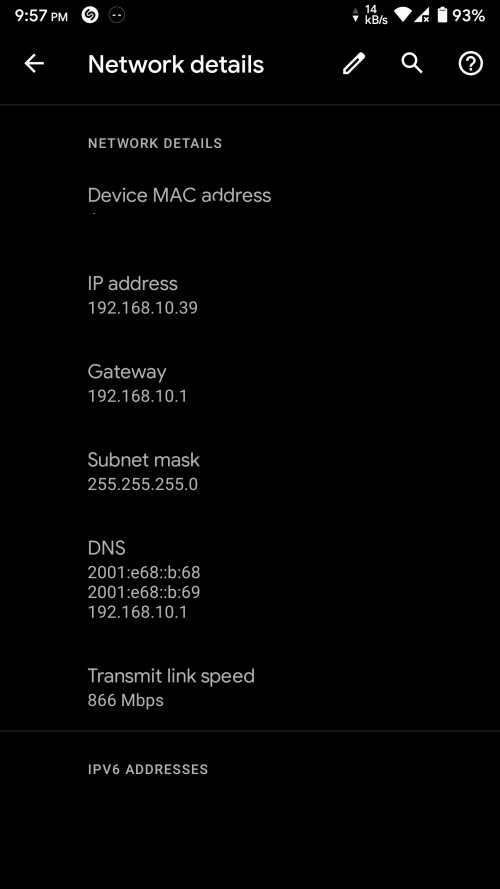
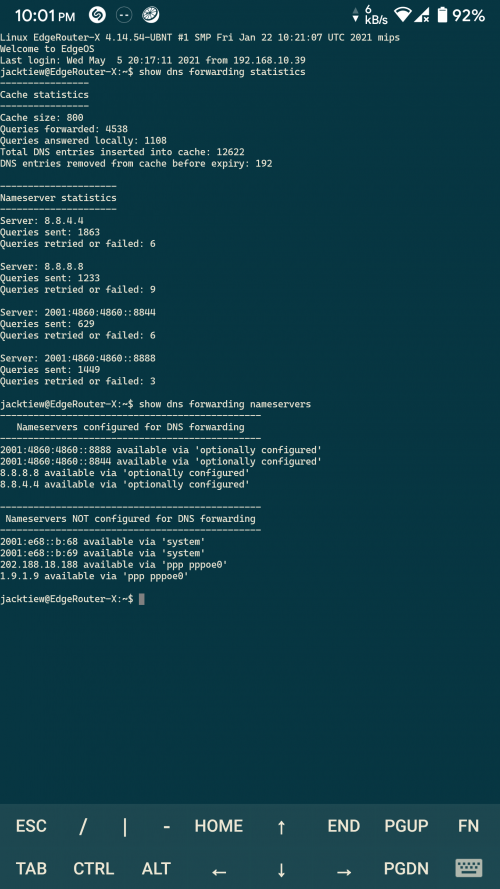
I got a doubt that's need to clear. After adding the DNS to the nameserver, I still see TM IPv6 DNS on my device. Is it normal?

Edit: I already reboot my router, AP and phone.

user posted image
user posted image

This post has been edited by jacktiew: May 5 2021, 10:06 PM
jacktiew
post May 8 2021, 02:45 PM

Getting Started
**
Junior Member
289 posts

Joined: Sep 2012
QUOTE(jacktiew @ May 5 2021, 10:06 PM)
I got a doubt that's need to clear. After adding the DNS to the nameserver, I still see TM IPv6 DNS on my device. Is it normal?

Edit: I already reboot my router, AP and phone.

user posted image
user posted image
*
So previously I was able to use IPV6 DNS on LAN device but not the WI-FI devices. Turns out it needs to use the router advertisement for the devices to know the edgerouter is distributing IPV6 DNS instead of TM. (Not sure I explained it in the correct way or not. Sifus please correct me if I'm wrong)

Here's the code I used to enable the router advertisements.

CODE
set interfaces switch switch0 ipv6 router-advert prefix ::/64


CODE
set interfaces switch switch0 ipv6 router-advert managed-flag true


Apply the MSS Clamping on both IPv4 & IPv6

CODE
set firewall options mss-clamp6 mss 1432
set firewall options mss-clamp6 interface-type all


CODE
set firewall options mss-clamp mss 1452
set firewall options mss-clamp interface-type all


Hope this helps.

This post has been edited by jacktiew: Sep 4 2021, 01:40 PM
thankyou
post May 25 2021, 10:17 PM

Regular
******
Senior Member
1,941 posts

Joined: Jan 2003
I'm still having some issue with my ER-12 with IPv6.


The configuration seems to have half working.

Android/Apple devices, no issue getting IPv6 while the Windows 10 laptop I'm having fail to get IPv6.

other than that, it seems to be working fine.
jacktiew
post May 26 2021, 12:09 AM

Getting Started
**
Junior Member
289 posts

Joined: Sep 2012
QUOTE(thankyou @ May 25 2021, 10:17 PM)
I'm still having some issue with my ER-12 with IPv6.
The configuration seems to have half working.

Android/Apple devices, no issue getting IPv6 while the Windows 10 laptop I'm having fail to get IPv6.

other than that, it seems to be working fine.
*
I have a ER-X. This is what I do. (Just to give you an idea, not sure if it works for your case.

I assume your router is in fresh factory state
1. Upgrade the firmware to the latest.
2. Go through basic wizard. Insert your all your data required. Do not check any IPv6 related such as delegation / firewall setting.
3. Follow the TS's instruction. Make sure you change according to your own usage. (Interface etc.)
4. Insert the commands in my previous post in terminal. (Change according to your usage as well. For the switch0 part, change to your LAN interface)
5. Done.

This post has been edited by jacktiew: May 26 2021, 12:11 AM
stress_043
post Aug 3 2021, 03:40 PM

New Member
*
Junior Member
8 posts

Joined: Dec 2008
QUOTE(wanttotree @ Sep 26 2018, 07:49 PM)
Hi guys, its me, im back for a tutorial!
I read that someone is interested for a tutorial. so i assume maybe at least half of the edgerouters owner wanna use ipv6.
ipv6 is all cli based setup.

1)first step is to enable ssh. Go to login page and click system then enable and save.

2)use putty to ssh on windows, or terminal on mac.

3)copy and paste these commands

configure

edit firewall ipv6-name WAN6_IN

set default-action drop

set rule 10 action accept
set rule 10 description "allow established"
set rule 10 protocol all
set rule 10 state established enable
set rule 10 state related enable

set rule 20 action drop
set rule 20 description "drop invalid packets"
set rule 20 protocol all
set rule 20 state invalid enable

set rule 30 action accept
set rule 30 description "allow ICMPv6"
set rule 30 protocol icmpv6
top

edit firewall ipv6-name WAN6_LOCAL
set default-action drop

set rule 10 action accept
set rule 10 description "allow established"
set rule 10 protocol all
set rule 10 state established enable
set rule 10 state related enable

set rule 20 action drop
set rule 20 description "drop invalid packets"
set rule 20 protocol all
set rule 20 state invalid enable

set rule 30 action accept
set rule 30 description "allow ICMPv6"
set rule 30 protocol icmpv6

set rule 40 action accept
set rule 40 description "allow DHCPv6 client/server"
set rule 40 destination port 546
set rule 40 source port 547
set rule 40 protocol udp
top

set interfaces ethernet eth0 vif 500 pppoe 0 firewall in ipv6-name WAN6_IN
set interfaces ethernet eth0 vif 500 pppoe 0 firewall local ipv6-name WAN6_LOCAL

set interfaces ethernet eth0 vif 500  pppoe 0 dhcpv6-pd pd 0 interface eth1 service slaac
set interfaces ethernet eth0 vif 500 pppoe 0 dhcpv6-pd pd 0 prefix-length 64
set interfaces ethernet eth0 vif 500 pppoe 0 dhcpv6-pd prefix-only
set interfaces ethernet eth0 vif 500 pppoe 0 dhcpv6-pd rapid-commit enable
set interfaces ethernet eth0 vif 500 pppoe 0 ipv6 address autoconf
set interfaces ethernet eth0 vif 500 pppoe 0 ipv6 dup-addr-detect-transmits 1
set interfaces ethernet eth0 vif 500 pppoe 0 ipv6 enable

commit

save

exit
these settings are assuming your(please check and adjust accordingly):
-eth0- is your wan port(the one connects no your fiber/vdsl2/adsl modem) [etc - eth0 / eth1 / eth2 ]
-eth1- is your lan port(the one connects to your computer or switch or access points) [etc - eth0 / eth1 / eth2 / or br0 if you have bridge interface]
-pppoe0- is your pppoe interface [etc - pppoe0 / pppoe1]

-vif 500- is your vlan tag (your vlan based connection according to you isp) [etc - vif 500 for unifi / vif 621 for maxis fibre / remove vif 500 entirely for anything else like time fibre]

dont forget to setup your ipv6 dns server at name server
you can use cloudfare google or opendns.
go to login page, system and fill up system name server

cloudfare
2606:4700:4700::1111
2606:4700:4700::1001

google
2001:4860:4860::8888
2001:4860:4860::8844

opendns
2620:0:ccc::2
2620:0:ccd::2
*
Thank you very very much for this guide. I am now able to connect to Internet with both IPv4 and IPv6 with my EdgeRouter 10X. ISP TM Unifi.
My router is running firmware 2.0.0.

Only changes that I had made is not including vif 500 because my TP-Link smart switch is doing the job. So my eth1 is replace with switch0.

notworthy.gif notworthy.gif
mamatkhalid8481 P
post Mar 27 2022, 05:17 PM

New Member
*
Probation
2 posts

Joined: Mar 2022
QUOTE(wanttotree @ Feb 18 2021, 01:19 PM)
Hi guys, need to ask about whoever successfully setup ipv6 on their edgerouters. I understand that some firmware is buggy still. May i know which firmware is working so far?
*
Hi, are having problem? I never have any issue in connecting to TM IPV6 through my EdgeRouter 4 at all. My firmware is the latest v2.0.9-hotfix.2. After every reboot, the router never failed to get an IPV6 address. Thanks to the guides posted here before.

mamatkhalid8481 P
post Mar 27 2022, 05:23 PM

New Member
*
Probation
2 posts

Joined: Mar 2022
QUOTE(thankyou @ May 25 2021, 10:17 PM)
I'm still having some issue with my ER-12 with IPv6.
The configuration seems to have half working.

Android/Apple devices, no issue getting IPv6 while the Windows 10 laptop I'm having fail to get IPv6.

other than that, it seems to be working fine.
*
Sometimes, this has happened to me on my Windows 10 machines. I simply disable the network adapter (WiFi/ethernet) and enable it back. Then, boom! I can get a local IPV6 address from my EdgeRouter 4.
TSwanttotree
post Mar 27 2022, 10:05 PM

On my way
****
Junior Member
677 posts

Joined: Apr 2008
QUOTE(mamatkhalid8481 @ Mar 27 2022, 05:17 PM)
Hi, are having problem? I never have any issue in connecting to TM IPV6 through my EdgeRouter 4 at all. My firmware is the latest v2.0.9-hotfix.2. After every reboot, the router never failed to get an IPV6 address. Thanks to the guides posted here before.
*
Was just checking for another fellow forumer. One of the build was having a weird bug. He fixed it by downgrading temporarily until the new fw was released. Im glad you appreciate the guide. Was helped by @ahasenak on ubnt forum 6 years ago. Cheers.
System Error Message
post Mar 28 2022, 01:23 AM

Regular
******
Senior Member
1,781 posts

Joined: Jul 2010
meanwhile with mikrotik we have a nice GUI to do everything with. I have both mikrotik and edgerouter, and i find the edgerouter very lacking in GUI to configure. It tries to appear nice but it is very very lacking. What isn't lacking is that you can install MIPS debian packages but the limited onboard storage is another matter, though you can actually set up nginx proxy cache if you have limited bandwidth.
The one thing that i use this for is to provide CPU based LACP bonding because i do not want to spend another 40 watts using my 36 core CCR for it

Support at ubiquiti forums are non existant from experience, whereas with mikrotik, litespeed, blesta i can badger their dev teams all i want biggrin.gif

This post has been edited by System Error Message: Mar 28 2022, 01:24 AM
TSwanttotree
post Mar 28 2022, 04:20 PM

On my way
****
Junior Member
677 posts

Joined: Apr 2008
QUOTE(System Error Message @ Mar 28 2022, 01:23 AM)
meanwhile with mikrotik we have a nice GUI to do everything with. I have both mikrotik and edgerouter, and i find the edgerouter very lacking in GUI to configure. It tries to appear nice but it is very very lacking. What isn't lacking is that you can install MIPS debian packages but the limited onboard storage is another matter, though you can actually set up nginx proxy cache if you have limited bandwidth.
The one thing that i use this for is to provide CPU based LACP bonding because i do not want to spend another 40 watts using my 36 core CCR for it

Support at ubiquiti forums are non existant from experience, whereas with mikrotik, litespeed, blesta i can badger their dev teams all i want  biggrin.gif
*
Your opinion is legit. Though i think this thread is not for you. Please open another thread for your complain or a tutorial to help others. Heres an idea, make a tutorial for policy routing on mikrotik for example(that would be interesting to read). Whats your point to mention the ccr anyway? Care to share what interesting thing u need the 36 core for(maybe share 'how to' with us)? I have a 16 core ccr and i think its overkill for many things i do. I ended up just firing up a low power debian server with minimal iptables for my routing needs. Before u ask, yes i am planning to post a tutorial about that too(maybe you can enjoy that one).
System Error Message
post Mar 28 2022, 05:29 PM

Regular
******
Senior Member
1,781 posts

Joined: Jul 2010
QUOTE(wanttotree @ Mar 28 2022, 04:20 PM)
Your opinion is legit. Though i think this thread is not for you. Please open another thread for your complain or a tutorial to help others. Heres an idea, make a tutorial for policy routing on mikrotik for example(that would be interesting to read). Whats your point to mention the ccr anyway? Care to share what interesting thing u need the 36 core for(maybe share 'how to' with us)? I have a 16 core ccr and i think its overkill for many things i do. I ended up just firing up a low power debian server with minimal iptables for my routing needs. Before u ask, yes i am planning to post a tutorial about that too(maybe you can enjoy that one).
*
i have both since people thought i was a mikrotik fanboy. I'm just not happy with the way that ubiquiti does things and their focus, not to mention at one point they made unfair comparisons using my posts. I remember at one point they made an unfair comparison between what i said was equivalent in hardware, a dual core 800Mhz PPC mikrotik and an ERP3 which at that time was a dual core 800Mhz MIPS too, showing just how much faster the ERP3 was. The unfair comparison was that the ERP3 was not using QoS and was relying on hardware NAT while mikrotik at that time did not have acceleration for NAt, and the speed was someone elses bench on their non standard/non home consumer config.

I would'nt really call the edgerouter a low powered debian server though as 20W is still more than what the raspberry pi uses. The main thing lacking which isn't as easy to find is the block diagram for ubiquiti devices which tells you the internal architecture so that you can best set up the device.

As for the CCR i did actually load it up for fun with traffic generator. Theres a lot that mikrotik provides that actually makes it quite interesting, and its actually useful in hacking, but i did make a tutorial before on the net on silencing and replacing the fans and comparing the noise to the ERPRO including the PSU issues for mikrotik which they did fix in the 2nd generation of CCRs.

Still though a lot of what you can do with edgerouters are best done using SSH like a linux server, so the best tutorial for edgerouter would be how to add debian package repository and to use it like a debian server. You will need to understand the limits though like with the ERPRO the CPU can do 80Mb/s of squid per core as a proxy, so it may do 3x that if using nginx instead. The hardware limits for edgerouters are more that they do well for simpler logic instructions than calculations like ARM, so things like filters should run fast while things like non standard VPN servers or anything heavier including RTMP on nginx may run poorly.

Still, could be worse (cisco)

This post has been edited by System Error Message: Mar 28 2022, 05:30 PM
TSwanttotree
post Mar 28 2022, 10:42 PM

On my way
****
Junior Member
677 posts

Joined: Apr 2008
QUOTE(System Error Message @ Mar 28 2022, 05:29 PM)
i have both since people thought i was a mikrotik fanboy. I'm just not happy with the way that ubiquiti does things and their focus, not to mention at one point they made unfair comparisons using my posts. I remember at one point they made an unfair comparison between what i said was equivalent in hardware, a dual core 800Mhz PPC mikrotik and an ERP3 which at that time was a dual core 800Mhz MIPS too, showing just how much faster the ERP3 was. The unfair comparison was that the ERP3 was not using QoS and was relying on hardware NAT while mikrotik at that time did not have acceleration for NAt, and the speed was someone elses bench on their non standard/non home consumer config.

I would'nt really call the edgerouter a low powered debian server though as 20W is still more than what the raspberry pi uses.  The main thing lacking which isn't as easy to find is the block diagram for ubiquiti devices which tells you the internal architecture so that you can best set up the device.

As for the CCR i did actually load it up for fun with traffic generator. Theres a lot that mikrotik provides that actually makes it quite interesting, and its actually useful in hacking, but i did make a tutorial before on the net on silencing and replacing the fans and comparing the noise to the ERPRO including the PSU issues for mikrotik which they did fix in the 2nd generation of CCRs.

Still though a lot of what you can do with edgerouters are best done using SSH like a linux server, so the best tutorial for edgerouter would be how to add debian package repository and to use it like a debian server. You will need to understand the limits though like with the ERPRO the CPU can do 80Mb/s of squid per core as a proxy, so it may do 3x that if using nginx instead. The hardware limits for edgerouters are more that they do well for simpler logic instructions than calculations like ARM, so things like filters should run fast while things like non standard VPN servers or anything heavier including RTMP on nginx may run poorly.

Still, could be worse (cisco)
*
I dont really mind whether or not you are a fanboy, the whole point of these tutorials are helping out the community rather than proving a point from a singular point of view. I definitely not gonna side on any party who made a bias comparison.

Like i said earlier, you will be better off venting somewhere else, which is much more appropriate. Traffic generator in my opinion is useful for a somewhat narrow group of people who actually can make use of the data. In our case, it would be a normal user - enthusiasts level, the scope is rather simplistic and straight forward. All these ssh are mostly copy and paste for the majority user and i dont think i mind it at all.

Just a side note, i didnt refer any edgerouters as a debian server. I literally meant debian server on low power x86 and setup the rest so it would work as a router. Thats why i mentioned it would need its own tutorial to setup.

Anyway i hope u find your channel somewhere. Unless you are working on something interesting and needed some insight, i am more than happy to give me opinion.
System Error Message
post Mar 30 2022, 11:08 PM

Regular
******
Senior Member
1,781 posts

Joined: Jul 2010
QUOTE(wanttotree @ Mar 28 2022, 10:42 PM)
I dont really mind whether or not you are a fanboy, the whole point of these tutorials are helping out the community rather than proving a point from a singular point of view. I definitely not gonna side on any party who made a bias comparison.

Like i said earlier, you will be better off venting somewhere else, which is much more appropriate. Traffic generator in my opinion is useful for a somewhat narrow group of people who actually can make use of the data. In our case, it would be a normal user - enthusiasts level, the scope is rather simplistic and straight forward. All these ssh are mostly copy and paste for the majority user and i dont think i mind it at all.

Just a side note, i didnt refer any edgerouters as a debian server. I literally meant debian server on low power x86 and setup the rest so it would work as a router. Thats why i mentioned it would need its own tutorial to setup.

Anyway i hope u find your channel somewhere. Unless you are working on something interesting and needed some insight, i am more than happy to give me opinion.
*
nah i have a place to vent about ubiquiti. There are some good and bad things and they are not useful everywhere. The issue i have with ubiquiti are
- lacking in network configuration
- lack of community support
- lack of information and proper supplier support
- wrong customer target (they try to target the professional/enterprise user promoting themselves as a cisco alternative but from what i find they fail here too.
- vendor lock in for some of their products

That said they aren't a total loss. Their wifi is good if you want basic functionality and good signal. I do question the use of an edgerouter, i mean i do like having different interesting architectures to work with. The TILERA TILE isn't far from MIPS though it is more capable at running software, comparing from the MIPS that ubiquiti uses, but to me edgerouters have always been a jack of all trades, master of none. They are more useful as a combined router/debian server. For instance why not make a tutorial on setting up nginx proxy cache for web browsing on one that is also a router? Could be very useful for those that use mobile internet. Make sure to have usb storage for this as well.

The only problem is, the use cases i get asked, its extremely rare such use case would be better off with a ubiquiti device. For instance if you wanted a good firewall fortigate has some, but if poor the answer is a linux server, if you wanted the best internet load balancer peplink is the answer, with mikrotik second for the poorer users (not as perfect as peplink). I see mikrotik used a lot by ISPs and coreISPs in their datacenters (i did even work for a coreISP as well and it was fun having the same router as my ISP before (not in malaysia) as their edge router). To me ubiquiti naming is off because mikrotik CCRs make better edgerouters than ubiquiti edgerouters while for core routing CCRs are not used if bgp is needed but i believe for OSPF it is used. Feature level is the reason why cisco is still used for bgp rather than ubiquiti or mikrotik.

I'm just letting you know the details on what to cover for ubiquiti for your tutorials as to what their strengths are rather than their weaknesses.
bulkbiz
post Jul 17 2022, 01:10 AM

Be Wise
******
Senior Member
1,203 posts

Joined: Dec 2007
From: Bumi Kenyalang, Kuala Lumpur


Tutorial still working as of yesterday 16 July 2022. Uploaded latest firmware, with DHCP and IPV6 enabled with Maxis fiber 300MBPS. Thanks TS.

One question which is out of topic, where can i still get Cloud Key Gen2 Plus in KL/Selangor?

This post has been edited by bulkbiz: Jul 17 2022, 01:12 AM


Change to:
| Lo-Fi Version
0.0379sec    0.92    5 queries    GZIP Disabled
Time is now: 18th December 2025 - 09:40 PM