

Still working in 2021. Thanks TS for the guide. Please post more tutorial like this, I just got my ER-X hands on after years haha.
Tutorial Ubiquiti Edgerouter ipv6 unifi/maxis/time, ipv6 for malaysian isp(s)
Tutorial Ubiquiti Edgerouter ipv6 unifi/maxis/time, ipv6 for malaysian isp(s)
|
|
 May 5 2021, 04:54 PM May 5 2021, 04:54 PM
Return to original view | Post
#1
|
 
Junior Member
289 posts Joined: Sep 2012 
|
Still working in 2021. Thanks TS for the guide. Please post more tutorial like this, I just got my ER-X hands on after years haha.
|
|
|
|
|
|
May 5 2021, 10:06 PM
Return to original view | IPv6 | Post
#2
|
|
Junior Member
289 posts Joined: Sep 2012
|
QUOTE(wanttotree @ May 5 2021, 07:38 PM) Thanks for the appreciation. I rarely get it. 😂. Anyways stay tune for something fun in the future. Trying to get it as simple and easy to follow as i can. Cheers. I got a doubt that's need to clear. After adding the DNS to the nameserver, I still see TM IPv6 DNS on my device. Is it normal? Edit: I already reboot my router, AP and phone. 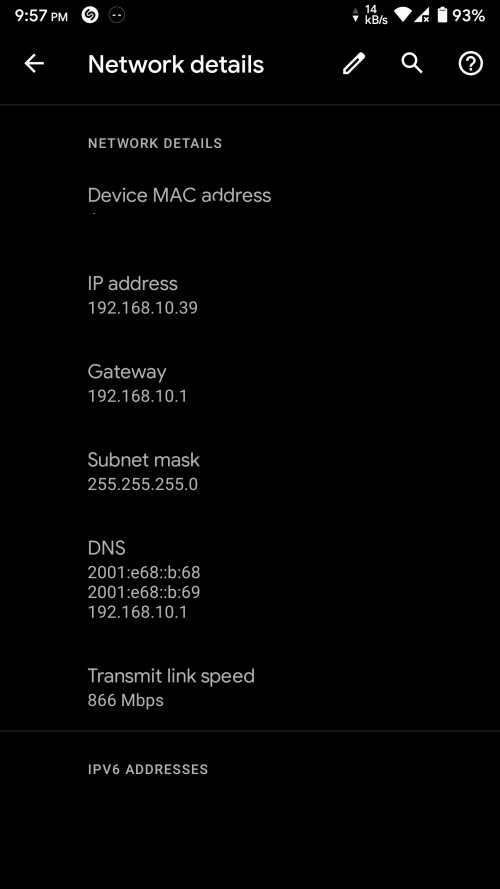 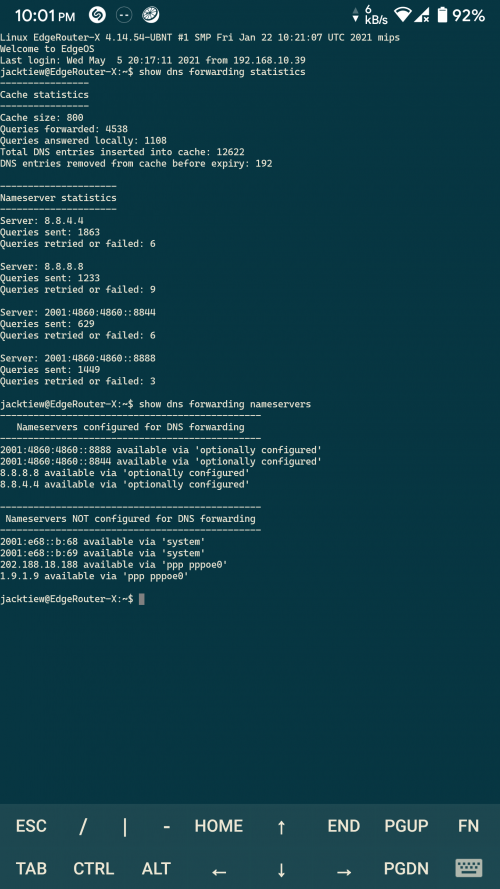 This post has been edited by jacktiew: May 5 2021, 10:06 PM |
|
|
May 8 2021, 02:45 PM
Return to original view | IPv6 | Post
#3
|
|
Junior Member
289 posts Joined: Sep 2012
|
QUOTE(jacktiew @ May 5 2021, 10:06 PM) I got a doubt that's need to clear. After adding the DNS to the nameserver, I still see TM IPv6 DNS on my device. Is it normal? So previously I was able to use IPV6 DNS on LAN device but not the WI-FI devices. Turns out it needs to use the router advertisement for the devices to know the edgerouter is distributing IPV6 DNS instead of TM. (Not sure I explained it in the correct way or not. Sifus please correct me if I'm wrong)Edit: I already reboot my router, AP and phone. Here's the code I used to enable the router advertisements. CODE set interfaces switch switch0 ipv6 router-advert prefix ::/64 CODE set interfaces switch switch0 ipv6 router-advert managed-flag true Apply the MSS Clamping on both IPv4 & IPv6 CODE set firewall options mss-clamp6 mss 1432 set firewall options mss-clamp6 interface-type all CODE set firewall options mss-clamp mss 1452 set firewall options mss-clamp interface-type all Hope this helps. This post has been edited by jacktiew: Sep 4 2021, 01:40 PM |
|
|
May 26 2021, 12:09 AM
Return to original view | IPv6 | Post
#4
|
|
Junior Member
289 posts Joined: Sep 2012
|
QUOTE(thankyou @ May 25 2021, 10:17 PM) I'm still having some issue with my ER-12 with IPv6. I have a ER-X. This is what I do. (Just to give you an idea, not sure if it works for your case.The configuration seems to have half working. Android/Apple devices, no issue getting IPv6 while the Windows 10 laptop I'm having fail to get IPv6. other than that, it seems to be working fine. I assume your router is in fresh factory state 1. Upgrade the firmware to the latest. 2. Go through basic wizard. Insert your all your data required. Do not check any IPv6 related such as delegation / firewall setting. 3. Follow the TS's instruction. Make sure you change according to your own usage. (Interface etc.) 4. Insert the commands in my previous post in terminal. (Change according to your usage as well. For the switch0 part, change to your LAN interface) 5. Done. This post has been edited by jacktiew: May 26 2021, 12:11 AM |
| Change to: |  0.0186sec 0.0186sec
 0.98 0.98
 6 queries 6 queries
 GZIP Disabled GZIP Disabled
Time is now: 19th December 2025 - 12:25 PM |
 Quote
Quote