

QUOTE(set @ Sep 19 2018, 05:34 PM)
just changed to 100mb rm129, router they changed to dlink 842

u mean u downgrade / upgrade the plan and TM change a new router for u?Unifi Official TM UniFi High Speed Broadband Thread V35, READ 1ST PAGE FOR TURBO SPEED INFO!
|
|
 Sep 19 2018, 06:11 PM Sep 19 2018, 06:11 PM
Return to original view | IPv6 | Post
#1
|
 
Senior Member
726 posts Joined: Jan 2003  
|
QUOTE(set @ Sep 19 2018, 05:34 PM) just changed to 100mb rm129, router they changed to dlink 842 u mean u downgrade / upgrade the plan and TM change a new router for u? |
|
|
|
|
|
Sep 25 2018, 11:21 PM
Return to original view | IPv6 | Post
#2
|
|
Senior Member
726 posts Joined: Jan 2003
|
need some help from experts here regarding router setting...
my setup : - BTU : Alcatel Lucent I240G - Router : Dlink DIR-842 (NEW) - Cable : CAT 6 - On Unifi 500Mbps i follow the setup wizard in the dlink router to setup my unifi for both 2.4Ghz and 5Ghz... i use my phone to connect to 5Ghz wifi and speedtest can reach around 200mbps, which is ok for me...then i use my laptop to connect to the 2.4Ghz wifi (my laptop does not support 802.11ac), the speedtest result is disappointing in which the result only give me 25mbps for both download and upload speed... sad.gif before this i only use my old router which is the TP Link TL-WR841HP Wireless N router, and my laptop (connect to 2.4Ghz wifi) can get constantly good speed at around 75 to 80mbps for both download and upload speed, upon change to the dlink dir-842, the speed drops a lot and never can exceed 30mbps... sad.gif have i done something wrong on the dlink 842 router setting? or i need to do extra setting for the 2.4Ghz wifi? really appreciate some help here...thx a lot... smile.gif |
|
|
Sep 25 2018, 11:45 PM
Return to original view | IPv6 | Post
#3
|
|
Senior Member
726 posts Joined: Jan 2003
|
QUOTE(StuartLee2015 @ Sep 25 2018, 11:38 PM) I got the same setup as yours, just with Cat5e between router and modem... i actually do have and TP Link AC adapter, but the adapter wont recognised by my windows 8.1 laptop so cannot use that adapter (i m sure the AC adapter is working fine as i tested it on my brother's laptop which is running on windows 8.1 too)...so i have no choice but to use my laptop's built in wifi... Get yourself an AC adapter.. i not sure why 2.4Ghz speeds drop that way . Previously on 50Mbps plan, i was using RT-N12HP_B1, and DWA131 N300 wifi adapter. I can constantly get 45 to 51 Mbps.. right after I got Turbo-ed , I was baffled on the 2.4Ghz speeds from 0.13 MBps to 20Mbps .... as for asking why here, all suggest to change the router, which i will eventually do anyway.. but i just want to know why only. So I then made a report to TM and they come and just changed the Router and my j7 Pro Samsung which have AC, can hit at least 200Mbps now.  i just do not understand why on wireless N router 2.4Ghz speed is constantly good, while on the DIR 842 the 2.4GHz speed is terrible...  |
|
|
Sep 26 2018, 12:02 AM
Return to original view | IPv6 | Post
#4
|
|
Senior Member
726 posts Joined: Jan 2003
|
QUOTE(StuartLee2015 @ Sep 25 2018, 11:48 PM) yea, maybe try another AC adapter? D-link installation method is really tricky... I not sure whether it's the same for ASUS, TP-link, etc... Fixing the my Wifi adapter infinity on/off took me a week , as asking here won't help much , so i just experiment it on my own. As of now i dun hv other AC adapter, but i try to plug in my old tplink wireless N adapter to my laptop just now, it is being recognised n wirks smoothly...just that AC adapter wont work on my laptop, but can be use on other laptop n pc without problem... |
|
|
Sep 26 2018, 12:04 AM
Return to original view | IPv6 | Post
#5
|
|
Senior Member
726 posts Joined: Jan 2003
|
QUOTE(JohnLai @ Sep 25 2018, 11:40 PM)  Ever wonder if your neighbours also got turbo-ed and using the same 2.4ghz too? |
|
|
Sep 26 2018, 12:09 AM
Return to original view | IPv6 | Post
#6
|
|
Senior Member
726 posts Joined: Jan 2003
|
QUOTE(SilentVampire @ Sep 25 2018, 11:57 PM) Probably your old router has better 2.4GHz coverage, with better antennae and high gain ones. Try using a WiFi analyzer and go on the least congested channels, and see if that improved things. Another thing you could do is to switch to a better router. I just bought that dlink router from someone (btw its the dlink router provided by TM), so wont be changing the router so soon...As for your AC adapter not working on your Windows 8.1 laptop, upgrade to Windows 10, or just go to TP-Link website to manually download the driver for the adapter. It will work then. As for the AC adapter, i already try manually download the driver n install it, but my laptop just wont recognised the adapter... |
|
|
|
|
|
Sep 26 2018, 12:14 AM
Return to original view | IPv6 | Post
#7
|
|
Senior Member
726 posts Joined: Jan 2003
|
QUOTE(JohnLai @ Sep 26 2018, 12:09 AM) TL-WR841HP = 9dbi antenna DIR-842 = 5dbi antenna 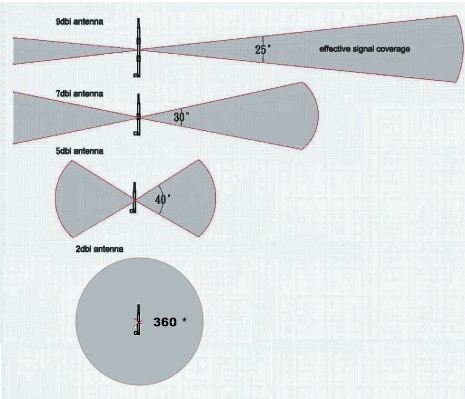 |
|
|
Sep 26 2018, 12:15 AM
Return to original view | IPv6 | Post
#8
|
|
Senior Member
726 posts Joined: Jan 2003
|
QUOTE(StuartLee2015 @ Sep 26 2018, 12:11 AM) Did you check ' Device Manager ' , it got show unknown devices or anything? Yes it appears under other device with an question mark on it...after install drivers still showing the same... |
|
|
Sep 26 2018, 12:24 AM
Return to original view | IPv6 | Post
#9
|
|
Senior Member
726 posts Joined: Jan 2003
|
QUOTE(StuartLee2015 @ Sep 26 2018, 12:19 AM) Did you try clicking it, and update driver through it? Yes hv done that but result is unable to update driver. |
|
|
Sep 26 2018, 12:26 AM
Return to original view | IPv6 | Post
#10
|
|
Senior Member
726 posts Joined: Jan 2003
|
QUOTE(cannavaro @ Sep 26 2018, 12:16 AM) Is the 2.4Ghz wifi on your DIR-842 set to 'N' only mode? Yes i did set it to N only and the speed do increase a bit to 35mbps, stil cant exceed 50mbps... |
|
|
Sep 26 2018, 12:32 AM
Return to original view | IPv6 | Post
#11
|
|
Senior Member
726 posts Joined: Jan 2003
|
QUOTE(JohnLai @ Sep 26 2018, 12:24 AM) Aside from the antenna 5 and 9 dbi .....there is another variable. The radio amplifier. Do I really need to find everything for you? Left side =TL-WR841HP Right side = DIR-842  Check the mW. Sorry i have very little knowledge on this, only know about the antenna... Anyway thx for the info...  |
|
|
Sep 26 2018, 12:34 AM
Return to original view | IPv6 | Post
#12
|
|
Senior Member
726 posts Joined: Jan 2003
|
QUOTE(StuartLee2015 @ Sep 26 2018, 12:28 AM) When you update it, what windows tell you? 'Could not find the driver to update', something like that... |
|
|
Sep 26 2018, 12:48 AM
Return to original view | IPv6 | Post
#13
|
|
Senior Member
726 posts Joined: Jan 2003
|
QUOTE(JohnLai @ Sep 26 2018, 12:35 AM) In a sense....if you really need to use 2.4ghz....why not plug a LAN cable from DIR842 to WR841HP? (Make sure DHCP Server is disabled at WR841HP and turn off DIR842 2.4ghz) can it be done like that? i never try this before...  |
|
|
|
|
|
Sep 26 2018, 12:48 AM
Return to original view | IPv6 | Post
#14
|
|
Senior Member
726 posts Joined: Jan 2003
|
QUOTE(StuartLee2015 @ Sep 26 2018, 12:39 AM) Strange indeed, maybe it's time to try another AC adapter... i guess so... |
|
|
Sep 26 2018, 12:56 AM
Return to original view | Post
#15
|
|
Senior Member
726 posts Joined: Jan 2003
|
QUOTE(JohnLai @ Sep 26 2018, 12:53 AM) Of course can. ok, will try that tomolo...thx again for the info... Second, plug a cable from your DIR842 port 2 to WR841HP port 1. Don't plug into the WR841HP WAN port. Just follow the guide here https://www.tp-link.com/ae/faq-1933.html |
|
|
Oct 13 2018, 04:11 PM
Return to original view | IPv6 | Post
#16
|
|
Senior Member
726 posts Joined: Jan 2003
|
Is there something wrong with my unifi connection?
I m on unifi turbo 500mbps package, using Dlink DIR -842 router by tm... I tested the wifi speed on both my Huawei Honor 10 and Asus Zenfone 5 smartphone, max can only reach around 180mbps... I test it with my laptop using tplink t4u wifi adapter, max speed also around 190mbps... I thought its normal for this speed since wifi on the DIR-842 can reach max around 300mbps... But today when i tested it with my newly bought Xiaomi Mi Pad 4, i m surprise to see that the speedtest can reach 470mbps on wifi...  Something wrong with my mi pad 4 or the Dlink router? and i always thought Huawei device network connection is always better than xiaomi device... FYI, i tested the speed on both Ookla Speedtest app and the Unifi speedtest site, both show almost the same result... Attached thumbnail(s) 
|
|
|
Oct 13 2018, 04:36 PM
Return to original view | IPv6 | Post
#17
|
|
Senior Member
726 posts Joined: Jan 2003
|
QUOTE(SilentVampire @ Oct 13 2018, 04:13 PM) Read 1st page, 1st post, green text, as well as pinned post by soonwai on this sub forum. thx for the reply...in fact i did follow everything according to the 1st page, i change to CAT6 lan cable, connect all my device to 5ghz, but only the mi pad 4 can get almost full speed on wifi connection... |
|
|
Oct 13 2018, 04:53 PM
Return to original view | IPv6 | Post
#18
|
|
Senior Member
726 posts Joined: Jan 2003
|
QUOTE(afroboy @ Oct 13 2018, 04:47 PM) My honor 10 can't get more than 250 mbps on 5ghz My honor 10 max can get around 190mbps only...but my mi pad 4 can go up to 470mbps... |
|
|
Oct 13 2018, 05:59 PM
Return to original view | IPv6 | Post
#19
|
|
Senior Member
726 posts Joined: Jan 2003
|
QUOTE(Savor_Savvy @ Oct 13 2018, 05:48 PM) It is your wifi adapter on your other devices that needs changing. My laptop can change wifi adapter la, but smartphone how to change wifi adapter o? |
|
|
Oct 31 2018, 11:44 AM
Return to original view | IPv6 | Post
#20
|
|
Senior Member
726 posts Joined: Jan 2003
|
Not sure whether this has been posted b4 or not, but looks like its much more difficult and not convenient for unifi termination now...
Attached thumbnail(s) 
|
|
Topic ClosedOptions
|
| Change to: |  0.3275sec 0.3275sec
 0.63 0.63
 7 queries 7 queries
 GZIP Disabled GZIP Disabled
Time is now: 5th December 2025 - 10:13 AM |
 Quote
Quote