Outline ·
[ Standard ] ·
Linear+
Unifi Official TM UniFi High Speed Broadband Thread V35, READ 1ST PAGE FOR TURBO SPEED INFO!
|
kennychan12
|
 Oct 10 2018, 11:53 AM Oct 10 2018, 11:53 AM
|

|
QUOTE(cstkl1 @ Oct 10 2018, 11:36 AM) so far GTA V only can hit 800-840mbps... with occasional dips DOOM/FFXV all around 600 with occasional spikes... But rizvanrp.. he gets stable 880-900 Take Note Steam uses 4 threads ya. while Uplay one thread I try download rainbow 6 also same speed .. dont know whats the problem man  kinda wanna downgrade to 100mbps .. |
|
|
|
|
|
kennychan12
|
Oct 10 2018, 12:36 PM
|
|
|
QUOTE(cstkl1 @ Oct 10 2018, 12:16 PM) your router comp spec ( cpu/ssd?? hdd?? ) Router using dir850l ( have a new router asus ac86u but still havent setup yet ) Cpu : i5 8400 Ssd : samsung evo 850 |
|
|
|
|
|
kennychan12
|
Oct 10 2018, 01:12 PM
|
|
|
QUOTE(Jas2davir @ Oct 10 2018, 01:10 PM) my speedtest is around 750-800mbps but my steam dl speed is 40-50mbps :confused: Mbs or mbps ?... |
|
|
|
|
|
kennychan12
|
Oct 12 2018, 01:08 AM
|
|
|
wow finally fixed my download speed on idm , steam , uplay etc ... changed my dir850l to asus ac86u and the download speed when sky high lol .. is that the trashcan dir850l bottlenecking my download speed or what ?? This post has been edited by kennychan12: Oct 12 2018, 01:10 AM Attached thumbnail(s)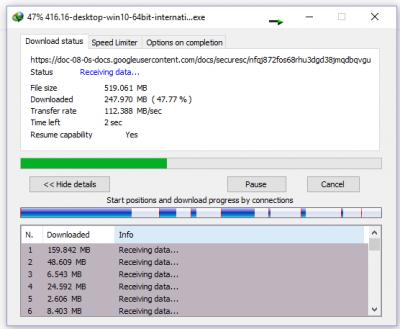
|
|
|
|
|
|
kennychan12
|
Oct 12 2018, 01:18 AM
|
|
|
QUOTE(JohnLai @ Oct 12 2018, 01:16 AM) Hmm....there are reports that 850L NAT acceleration is not engaged after one make use of QOS. Emptying the QOS boxes will not re-enable back NAT acceleration. The only way is to do a full reset (pressing reset button) and reconfigure 850L without touching the QOS.  i didnt turned on the qos on that router before lol , dont know whats the problem loll |
|
|
|
|
|
kennychan12
|
Oct 12 2018, 01:43 AM
|
|
|
QUOTE(JohnLai @ Oct 12 2018, 01:29 AM) Quick question, did you turn on "Enable Anti-Spoof Checking" (this should be disabled) [probably disable all ALG] and "Enable SPI IPv4" (please enable this)? Im sorry but i think i forgot already ... normally i dont touch any setting that im not familiar with ... but why i felt like that i didnt saw these setting before that you mentioned ... im blinded maybe  |
|
|
|
|
|
kennychan12
|
Oct 12 2018, 01:47 AM
|
|
|
QUOTE(JohnLai @ Oct 12 2018, 01:29 AM) Quick question, did you turn on "Enable Anti-Spoof Checking" (this should be disabled) [probably disable all ALG] and "Enable SPI IPv4" (please enable this)? I will try to check these settings that you mentioned when’s my offday 👍🏻👍🏻 |
|
|
|
|
|
kennychan12
|
Oct 12 2018, 08:44 PM
|
|
|
i would like to ask , currently paying rm 242.75 for 800 mbps .. if i go to tm point said that i wanted to downgrade to rm 129 100 mbps , will they offer a lower price for my current 800 mbps package ? lol
|
|
|
|
|



 Quote
Quote
 0.2451sec
 0.27
0.27
 7 queries
 GZIP Disabled