

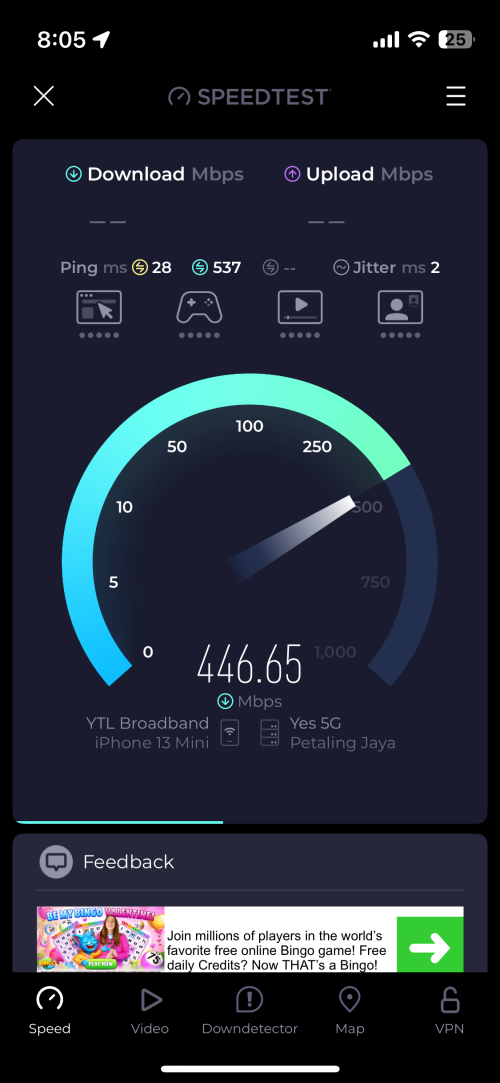
 Speedtest result using YES via wifi.
Now, one problem - I couldn’t get my adguard DNS to work. Rather, I don’t know how to set up custom DNS at router level. Kindly please advise, thank you.
Home Networking WiFi Router Discussion Thread, Updated for 2023
|
|
 Jun 6 2025, 08:13 PM Jun 6 2025, 08:13 PM
Return to original view | IPv6 | Post
#1
|
 
Newbie
7 posts Joined: Nov 2016 
|
Hiya folks. Recently, I went ahead and bought myself TP-Link NX200 5G Wifi router after I tested out YES 5G network at my place via free eSIM on my iPhone 13 mini. Truly a nice plug and play experience when I tried the router using my existing Maxis nano SIM then YES 5G nano SIM (the Broadband Flexi plan).
Speedtest result using YES via wifi.Now, one problem - I couldn’t get my adguard DNS to work. Rather, I don’t know how to set up custom DNS at router level. Kindly please advise, thank you. |
|
|
Jun 13 2025, 05:35 PM
Return to original view | IPv6 | Post
#2
|
|
Newbie
7 posts Joined: Nov 2016
|
QUOTE(jacktiew @ Jun 7 2025, 08:40 AM) I tried this but new DNS does not stick. Dnsleaktest also says that ytl is resolving my queries. For now, I’m relying on per device manual DNS. However, there are some devices that arent configurable like Sonos speakers. Anyone else have any idea? If not then I might try using my old Unifi router that is already flashed to openwrt firmware, disable DHCP server on NX200 and have that old router connect via ethernet to act as the DHCP/DNS server to hand out IP address and DNS to all devices in the network. |
| Change to: |  0.0207sec 0.0207sec
 0.31 0.31
 7 queries 7 queries
 GZIP Disabled GZIP Disabled
Time is now: 1st December 2025 - 07:01 PM |
 Quote
Quote
