Welcome Guest ( Log In | Register )

Outline · [ Standard ] · Linear+

Home Networking WiFi Router Discussion Thread, Updated for 2023

views
     
misspinky
post Aug 28 2019, 10:13 AM

Casual
***
Junior Member
309 posts

Joined: Jul 2012


QUOTE(geowills @ Aug 27 2019, 06:14 PM)
Look I already Bought Linksys ea7500 Router it was very good at early days, but from past few days a new problem occurred Linksys ea7500 Keeps Dropping Internet Connection on the random basis I think I select the wrong Router, If anybody faced such kind of issue please suggest me for fix it.
*
» Click to show Spoiler - click again to hide... «


to fix this issue, you need turn off ipv6 connection. you need to change wifi channel on 2.4GHz & 5GHz to fix/static channel. 2.4Ghz just go with 20MHz only and pick wireless mode Wireless-N only. For 5Ghz pick just go with 40MHz Change 5ghz network mode to 802.11 a/n Only. Most of linksys router users have this kind of problem, after someone find the issue, many user tried this method. Really works.

This post has been edited by misspinky: Aug 28 2019, 10:15 AM
misspinky
post Sep 3 2019, 11:36 AM

Casual
***
Junior Member
309 posts

Joined: Jul 2012


QUOTE(uhlaw @ Sep 1 2019, 05:41 PM)
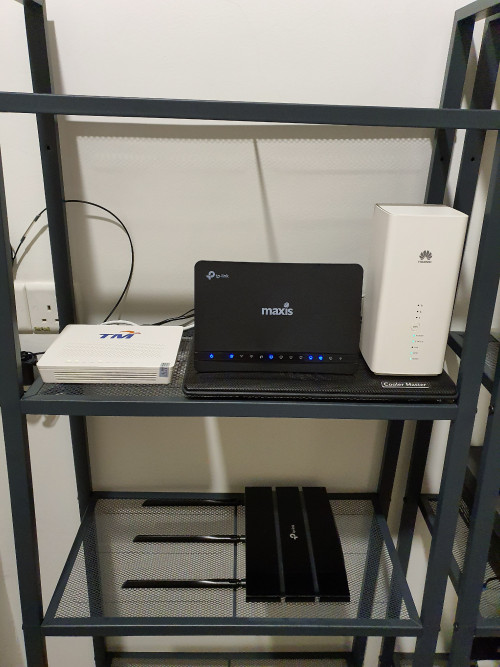
I test through my ac1750 repeater at ground floor.. it can detect 5ghz signal 1st floor from b618 (3 bar) easily, while a9 (0~1 bar). Usually ground floor i cnt detect 5ghz, that is why need that repeater.

My repeater hardly detect 5ghz signal from a9, thus fail to extend 5ghz network. But b618 no problem.
user posted image
*
Sometimes need to Diy and testing the outcome. From what i'm reading somewhere in website, your based station place for your wireless router should be less metal, not solid one and avoid put electronic device(wireless phone, microwave and television/monitor) things too nearby that thing. That will interrupt the frequency or coverage of your wireless router. Plus not to put too high or too low of your wireless router, all depend how big size of your house. If want to put high better changed to wireless access point device. Try playing around with the wireless antenna, 1 for straight, another one for down or up, one more for left or right side.

Last time, i'm just like you used this kind of metal, after changed to small one and place at wall and playing around with the antenna, my wireless coverage improved a bit than before.
misspinky
post Sep 9 2019, 11:15 AM

Casual
***
Junior Member
309 posts

Joined: Jul 2012


QUOTE(westlife @ Sep 6 2019, 01:13 PM)
is there any model of Linksys router works well with unifi and has native support to unifi? meaning it has the option to key in the unifi username password to create teh pppoe connection for WAN?
*
ea6900, ea7300, ea7500, ea8100, ea8300, ea9300, ea9500, wrt 1900, wrt3200, wrt32x, mesh velop
misspinky
post Sep 26 2019, 08:24 PM

Casual
***
Junior Member
309 posts

Joined: Jul 2012


QUOTE(wheelhot @ Sep 26 2019, 06:45 PM)
user posted image

These are the wireless settings for 5Ghz, it should be fine I think.

But still not getting even 400 🤔

Any other settings I should check?
*
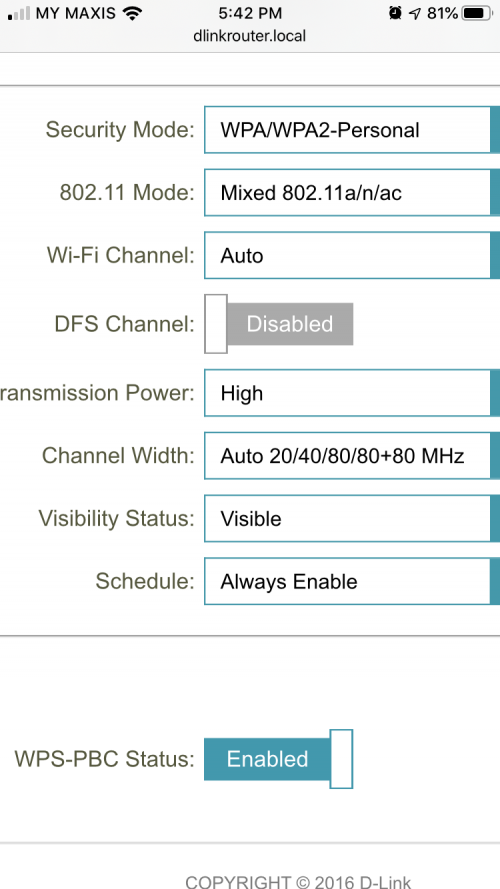
wow, your router support dfs channel, hope not trouble just like linksys router. Because most of linksys that support dfs channel, got trouble when using that setting. Channel width change to 80Mhz if can. wifi channel change to static channel, choose any channel as long not interference with your neighbourhood.
misspinky
post Sep 26 2019, 11:12 PM

Casual
***
Junior Member
309 posts

Joined: Jul 2012


QUOTE(wheelhot @ Sep 26 2019, 10:52 PM)
Haha, yeah, it's oversimplified I guess, and things not that clear, like there's a toggle that'll automatically choose 2.4 or 5ghz so you only have 1 SSID, but if that's turned on, your advance settings are even less. Turn that off and you can do as shown in the photo. What they did not tell you is, if you keep the same SSID, the router will still put you on the highest band automatically.
Haha, I did ask, but I smartass, now not so smart  bangwall.gif  hahahaha.
Yeah, but it's turned off and so the Linksys one even off still causes problems?

user posted image

This is the latest setting, you can't specifically select 40 or 80Mhz, but I guess the router will automatically choose the highest that your device accepts?

user posted image

So right now I'm using 5Ghz band at 80Mhz, still only getting measly <200mbps. I wonder if my router is broken? lol

user posted image

And the only reason why I got it cause I saw this review, so looks like something wrong with my unit?

The really odd thing is, my upload is the same as this photo which is at 100mbps, only my download is crap  hmm.gif
*
what i mean is, if you are using dfs channel for your dlink. For linksys router that support dfs a few of their router got unstable connection when using dfs channel, plus their firmware got bugs, some of users need to revert back old firmware, and some of them stick with current firmware, not for latest one. When they using non dfs channel then got stable back. If want using dfs channel, just using portal wifi router. It's hard using dfs channel that best for you because this is strict channel with weather radar & aeroplane channel. Hope your area don't have any planes visit your place. https://www.flightradar24.com/0.88,106.24/6

so, now you use 1 ssid or separate?your 2.4Ghz channel static or auto?cat6 wire?

This post has been edited by misspinky: Sep 26 2019, 11:13 PM
misspinky
post Sep 27 2019, 09:17 AM

Casual
***
Junior Member
309 posts

Joined: Jul 2012


QUOTE(wheelhot @ Sep 27 2019, 12:32 AM)
1 SSID, 2.4Ghz Channel Auto and yes, Cat6 wire.

Though I've checked on all the devices that run the speedtest, it was connected to the 5Ghz channel (The router firmware still have analysis to see which channel got activity and how fast. Haha)

And yes, I am considering restoring the router to factory default and connect to it without any firmware update to see if it's a firmware update causing the issue or not.
*
just make sure your wifi channel is not set for auto for both frequencies. There must be other settings you need to play around, i've used dlink 842 before this. for 5Ghz connection okay, but 2.4Ghz more worse than my old tplink ac router. Even my old tplink a bit more greater speed than dir 842 for 2.4Ghz. I know that limitation of 2.4Ghz connection. There must be 1 setting in your router messing around your speed. Have you tried disabled ipv6? just put Local Connectivity Only for ipv6 if want disabled it. Try reset your router first.

2.4Ghz
pick 802.11n only
pick 20MHz only
disable HT20/40 Coexistence
wifi channel set static

For 5Ghz
wifi channel set static

You may try dfs channel, no harm trying its.

For DCHP Server setting in advanced settings
WAN Port Speed pick 1000Mbps
Disabled IPv6 Multicast Streams

If don't use any usb sharing, just disabled it. usb still functioning if you plug in any usb device charging.
misspinky
post Oct 5 2019, 06:39 PM

Casual
***
Junior Member
309 posts

Joined: Jul 2012


QUOTE(filage @ Oct 5 2019, 08:39 AM)
Any idea why Unifi routers seeped so much battery power?
I had ADSL at my home and the battery drain is very minimal compared to Unifi battery drain at my relative place. Distance to router is about same for both.
However I did tried having a router turned into and Extender for that Unifi router, and connect to the Extender instead with the extenders beacon interval interval retarded around 800ms. seems to help a bit.
is beacon interval the big factor affecting battery drain on mobile devices to routers? For my own Adsl and that extender, i use very large beacon interval around 800-1000.
*
Beacon Interval

Beacon Interval, rst threshold


misspinky
post Nov 11 2019, 10:48 AM

Casual
***
Junior Member
309 posts

Joined: Jul 2012


QUOTE(LostAndFound @ Nov 9 2019, 10:55 PM)
Hi, I've been using Huawei WS880 but it finally burnt during the recent storms. As I'm on YEP I asked for TM to renew contract and give me new router (DIR-842), which is working but coverage like not enough in the corners of the house (1600 sqft terrace, fully renovated to the back, 2 and a half storeys with the router in the middle of the house just next to airwell).

Do I need mesh wifi (which I think is for much bigger houses)? If I prefer single router to cover all, what's my options (budget <1k if possible). What resources can I use to check wifi coverage/strength of router?
*
I usually used Wifi Analyzer and wifi heatmap. Mikrotik Audience(mesh wifi), that might can support your needs for coverage in your house but for setup might be tricky if not familiar with networking device. The price around RM7++ <> RM8++
misspinky
post Nov 12 2019, 09:14 AM

Casual
***
Junior Member
309 posts

Joined: Jul 2012


QUOTE(LostAndFound @ Nov 11 2019, 05:43 PM)
Thanks, I haven't done Mikrotik before, and am not afraid of configuration or command line, but nowadays so busy I just want something which works without much setup.
Thanks, I already read that while googling. Ended up purchasing 4 Deco M9 Plus units this morning (3+1 is cheaper than 2+2), 2 for my house and 2 for my parents house who have been having router-related issues as well.
*
yup, mikrotik setup need to setup properly and details. If want easy peasy setup and fast setup go for tplink, asus & other brand but avoid dlink one.
misspinky
post Nov 22 2019, 10:07 AM

Casual
***
Junior Member
309 posts

Joined: Jul 2012


QUOTE(falxon88 @ Nov 19 2019, 12:30 AM)
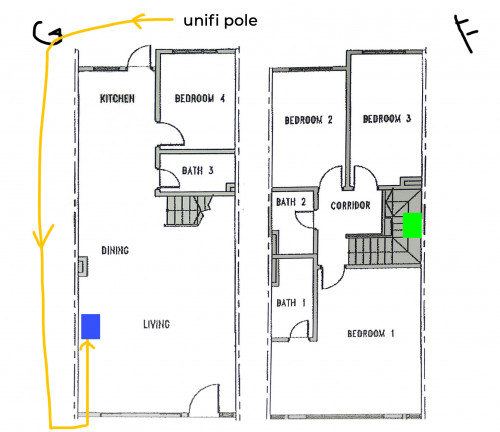
Hey guys! I'm planning to install unifi 100mbps fiber broadband in my new double storey house. My networking knowledge is very limited and have been racking my brain on whether I should get 2 access points on both ground and first floor, or simply use TP-Link Archer C2300 as recommended.

user posted image
Based on my neighbour's sharing, the unifi pole is at the back and the cable was pulled from the back to the front over the roof (yellow line). His modem (blue) is then stationed in the living room.

If I were to use C2300 and maximize the wifi coverage to first floor, is it suffice to place it in living room or better on the wall at the stairway (green)?

I hope the question is not too dumb and hopefully fellow sifu can shed some light  notworthy.gif
*
Need to place at center of your house for better coverage, either first floor near stairways or second floor at corridor. You should put another access point either first or second floor to cover that floor coverage.
misspinky
post Feb 5 2020, 12:36 PM

Casual
***
Junior Member
309 posts

Joined: Jul 2012


QUOTE(BayuDroidz @ Feb 5 2020, 10:40 AM)
Just got a wild idea. How about if I use a WiFi antenna cable extension and mount the antennas at different places. Will that extend my network coverage? Thanks.
*
https://forums.anandtech.com/threads/can-yo...ntenna.2379287/

better add another network access point or ceiling access point.


Change to:
| Lo-Fi Version
0.0232sec    0.69    7 queries    GZIP Disabled
Time is now: 5th December 2025 - 12:30 PM