For my case, I have use Amex with Foodpanda quite many times already and it's a bit tricky. It will always prompt Payment Failed error on first attempt. Spamming the place order button will always failed too.
But I learned to make it work with the steps as follows:
1) Go to your cart and tap the "Place your order" button
2) Payment Failed error will show after the first attempt (usually)
3) Choose to change payment method
4) Edit the entered Amex details but
only when the details on the form become incomplete like the photo below. (This is the most important part)
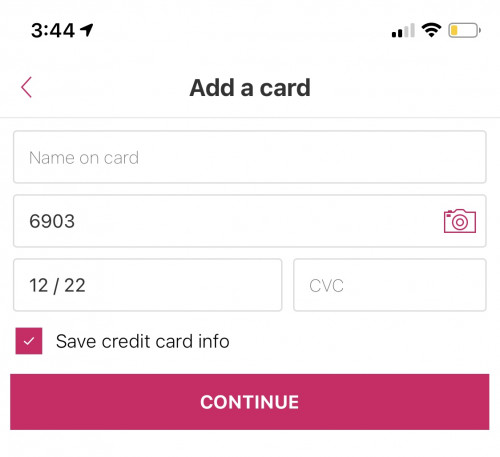
Notice the Name and CVC went missing and the card number only 4 digits. If it still showing your full card details, go back to step #1
5) After you reenter your card details, then tap the Continue button to return back to your cart
6) Try to place the order again. Usually it will work and if it not you may repeat the step above
But again this is for my case but you may give it a try and give some feedback

Too much work for Rm1.50.


 Sep 26 2018, 09:42 AM


 Quote
Quote


 Rm0.50 also call maybank.


 0.0511sec
 0.48
0.48
 7 queries
 GZIP Disabled