

QUOTE(soonwai @ Sep 11 2018, 02:48 AM)
Can you see the link speed in your J7 Pro? I think Android can see but I'm not sure how.

Go to previous results and tap one of the testing...is show wifi 2.4 or 5GUnifi Official TM UniFi High Speed Broadband Thread V34, READ 1ST PAGE FOR TURBO SPEED INFO!
|
|
 Sep 11 2018, 02:51 AM Sep 11 2018, 02:51 AM
Return to original view | Post
#61
|
 
All Stars
18,503 posts Joined: Oct 2007 From: P.Jaya 
|
QUOTE(soonwai @ Sep 11 2018, 02:48 AM) Can you see the link speed in your J7 Pro? I think Android can see but I'm not sure how. Go to previous results and tap one of the testing...is show wifi 2.4 or 5G |
|
|
|
|
|
Sep 11 2018, 03:25 AM
Return to original view | Post
#62
|
|
All Stars
18,503 posts Joined: Oct 2007 From: P.Jaya
|
QUOTE(StuartLee2015 @ Sep 11 2018, 03:10 AM) Can you test on PC with TM speed test:http://speedtest.tm.com.my/tmspeedtest.html This post has been edited by stasio: Sep 11 2018, 03:27 AM |
|
|
Sep 11 2018, 03:46 AM
Return to original view | Post
#63
|
|
All Stars
18,503 posts Joined: Oct 2007 From: P.Jaya
|
QUOTE(StuartLee2015 @ Sep 11 2018, 03:38 AM) hahaha, i know, i am saving up to get USB AC55 ... should be good right? Better buy Cat6 cable to connect router directly with you PC. |
|
|
Sep 11 2018, 03:56 AM
Return to original view | Post
#64
|
|
All Stars
18,503 posts Joined: Oct 2007 From: P.Jaya
|
QUOTE(StuartLee2015 @ Sep 11 2018, 03:48 AM) Hate the wires, but i'll see when time comes... USB or CAt6 Wired network is king 100% ...this all USB (wifi)...hmmmm.  ..you will never get proper speed. ..you will never get proper speed.Btw, DIR-867 is arround RM600 (+) Maybe Tenda AC18 (~RM280) or TP-Link C7 V.5 (~RM350). |
|
|
Sep 11 2018, 04:10 AM
Return to original view | Post
#65
|
|
All Stars
18,503 posts Joined: Oct 2007 From: P.Jaya
|
QUOTE(StuartLee2015 @ Sep 11 2018, 04:04 AM) This price at lelong, this seller quite trustworthy...  QUOTE(StuartLee2015 @ Sep 11 2018, 03:44 AM) AC66U is expensive, maybe switch to DIR-867, around 500 can get, 200RM cheaper.... Now you show DIR-878......  https://www.lazada.com.my/products/d-link-a...WlOFPn&search=1 This post has been edited by stasio: Sep 11 2018, 04:18 AM |
|
|
Sep 12 2018, 08:15 PM
Return to original view | Post
#66
|
|
All Stars
18,503 posts Joined: Oct 2007 From: P.Jaya
|
QUOTE(taqu @ Sep 12 2018, 08:05 PM) Try Extreme BroadBand Cyberjaya server. It's fast. Read a few pages back...then you will understand why....  QUOTE(StuartLee2015 @ Sep 12 2018, 08:13 PM) Tested with Telekom Malaysia Berhad , get 2.67 Mbps and 17.50 Mbps.... is this due to Pilot Phase? Still no enought what everybody try to advice you yesterday.  This post has been edited by stasio: Sep 12 2018, 08:17 PM |
|
|
|
|
|
Sep 12 2018, 08:19 PM
Return to original view | Post
#67
|
|
All Stars
18,503 posts Joined: Oct 2007 From: P.Jaya
|
QUOTE(dragna @ Sep 12 2018, 08:15 PM) Is that tested via LAN or WiFi? Read yesterday conversation...then you will know.If LAN could you try with another laptop/pc? |
|
|
Sep 12 2018, 08:25 PM
Return to original view | Post
#68
|
|
All Stars
18,503 posts Joined: Oct 2007 From: P.Jaya
|
QUOTE(JohnLai @ Sep 12 2018, 08:22 PM) .........strange indeed....... He dont have LAN connection...only Wifi 2.4......and questionable 5.... LAN also the same? LAN also the same?Otherwise, your area fiber contention ratio might be very high......  , but your ping value is fine, thus* there is no way it is contention issue. , but your ping value is fine, thus* there is no way it is contention issue.Read yesterday posts...so many people advice him.....  This post has been edited by stasio: Sep 12 2018, 08:25 PM |
|
|
Sep 12 2018, 08:27 PM
Return to original view | Post
#69
|
|
All Stars
18,503 posts Joined: Oct 2007 From: P.Jaya
|
QUOTE(StuartLee2015 @ Sep 12 2018, 08:23 PM) Yes, i tried everything available to me now , but still can't improve... Can you list your hardware NOW.....All left is to get TM Technician, Get new router, get new Cat5e or 6 cables, and get new USB adapter. |
|
|
Sep 12 2018, 11:29 PM
Return to original view | Post
#70
|
|
All Stars
18,503 posts Joined: Oct 2007 From: P.Jaya
|
QUOTE(StuartLee2015 @ Sep 12 2018, 11:19 PM) It uses random, I now use the Web version of TM. With Cat5 cable your speed is ok,as cable support up to 100Mbps.Update: Cat5 LAN, RGX4400 @ LAN1. 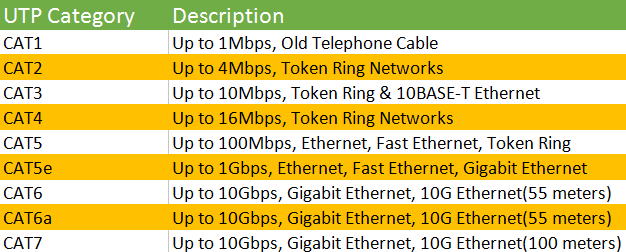 This post has been edited by stasio: Sep 12 2018, 11:40 PM |
|
|
Sep 12 2018, 11:46 PM
Return to original view | Post
#71
|
|
All Stars
18,503 posts Joined: Oct 2007 From: P.Jaya
|
QUOTE(StuartLee2015 @ Sep 12 2018, 11:40 PM) You mean connect from 1240G's LAN1 to my PC's Intel 1219-V? Cat 5e cable:I afraid that's impossible for now, since the longest cable is Cat5.. will need to go buy Cat5e tommorow or next monday. How much is it in range? Answer : There's label of ' Cat5 ' of my meters long... and the blue one is Cat5e.  Oh yea, i didn't feel insulted at all, my house is terrace house, 20x 80, which is decent .  https://www.lazada.com.my/catalog/?q=Cat5e+....a2cb64c1Hl7GDG Cat6 cable: https://www.lazada.com.my/catalog/?q=Cat6+c....272542dbBEMUO9 Price depend of lenght. I told you yesterday....only direct with at least Cat5e cable,from your router to PC. And check your speed with: http://speedtest.tm.com.my/tmspeedtest.html This post has been edited by stasio: Sep 12 2018, 11:50 PM |
|
|
Sep 13 2018, 12:16 AM
Return to original view | Post
#72
|
|
All Stars
18,503 posts Joined: Oct 2007 From: P.Jaya
|
QUOTE(RAMChYLD @ Sep 12 2018, 11:56 PM) So I just got the 500mbps upgrade from TM. I know I need a new router with a gigabit WAN-facing port, but does anyone know if I need to request TM to change the fiber ONT box as well? I'm still using the old Alcatel fiber box from 2011, but I don't know if that one has gigabit LAN ports to interface with the new router at full speed. Connect your PC direct with BTU WAN port (unplug from Router) by LAN cable (at least Cat 5e).At the moment I'm only pulling 100mbps, as expected from the old router. Check your speed..... 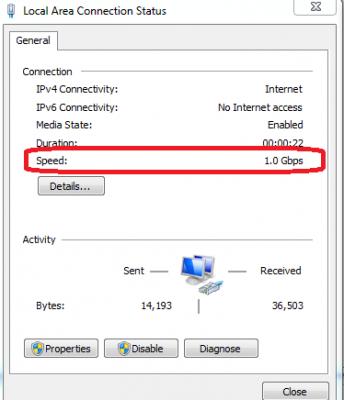
This post has been edited by stasio: Sep 13 2018, 12:19 AM |
|
|
Sep 13 2018, 10:36 PM
Return to original view | IPv6 | Post
#73
|
|
All Stars
18,503 posts Joined: Oct 2007 From: P.Jaya
|
10 years on VDSL line.....VIP20 => 30 => 50........@RM249...!!.......no more,enought is enought...
 Today shift to TIME 300/300Mbps.....RM80 cheaper !!....and fiber.. No more Unifi........ 
 This post has been edited by stasio: Sep 13 2018, 10:37 PM |
|
|
|
|
|
Sep 14 2018, 02:15 AM
Return to original view | Post
#74
|
|
All Stars
18,503 posts Joined: Oct 2007 From: P.Jaya
|
QUOTE(StuartLee2015 @ Sep 14 2018, 01:41 AM) So i use my Laptop which have 1000Mbps LAN port , connect to RGX4400 using Cat5e, and it won't go above 100Mbps on download and upload. From where you get laptop now?What's wrong again? |
|
|
Sep 14 2018, 07:52 PM
Return to original view | IPv6 | Post
#75
|
|
All Stars
18,503 posts Joined: Oct 2007 From: P.Jaya
|
Simple video......Why is my Internet so slow?! Is it the ISP, Modem, Router or WiFi?
|
|
|
Sep 14 2018, 08:55 PM
Return to original view | Post
#76
|
|
All Stars
18,503 posts Joined: Oct 2007 From: P.Jaya
|
QUOTE(chinkw1 @ Sep 14 2018, 08:42 PM) Original is 100, unifi gave me 800, Best to test your speed is:But they say to reach 800, will take time bciz ubifi is in process of full upgrading. Now download around average 35MB/s, so now is around 250mbps kah? http://speedtest.tm.com.my/tmspeedtest.html |
|
|
Sep 14 2018, 11:46 PM
Return to original view | IPv6 | Post
#77
|
|
All Stars
18,503 posts Joined: Oct 2007 From: P.Jaya
|
QUOTE(johnnywynne @ Sep 14 2018, 11:32 PM) Haven't been turbo'd yet but have been lurking this forum. Was interested to see about the BTU. Is this the terminating box inside the house that brings in fibre from outside and then had a lan cable to the modem? Look at the bottom of modem.If so, how to check the model? Mine is just a plain white box with TM logo in the corner. Doesn't seem to have any label or branding. Thanks |
|
|
Sep 15 2018, 09:27 AM
Return to original view | IPv6 | Post
#78
|
|
All Stars
18,503 posts Joined: Oct 2007 From: P.Jaya
|
QUOTE(ladiesman217 @ Sep 15 2018, 08:04 AM) Did the first page checks for 500mbps but only getting close to 100mbps.I suspect my btu max is only 100mbps. Can someone confirm? AN5506-04-BG :Model is AN5506-04-BG Router asus ac55uhp. Thanks. Four RJ-45 interfaces. Supports full duplex / half duplex mode, 10 / 100Mbps self-adaption. https://www.tm.com.my/Home/Broadband/unifi/...ide%20(ONU).pdf |
|
|
Sep 15 2018, 02:17 PM
Return to original view | IPv6 | Post
#79
|
|
All Stars
18,503 posts Joined: Oct 2007 From: P.Jaya
|
QUOTE(cyclone9 @ Sep 15 2018, 01:28 PM) just installed rm129 package 100mbps at my condo Are you on fibre or VDSL?[attachmentid=10021598] QUOTE(hz428 @ Sep 15 2018, 02:00 PM) just wondering is anyone from high rise building got their upgrades? This post has been edited by stasio: Sep 15 2018, 02:18 PM |
|
|
Sep 15 2018, 03:22 PM
Return to original view | Post
#80
|
|
All Stars
18,503 posts Joined: Oct 2007 From: P.Jaya
|
QUOTE(Eithanius @ Sep 15 2018, 03:17 PM) I'm curious... Now TM webbie only listing 2 unifi plans - the 30mbps and 100mbps... Faster then 100Mbps = TIME What if a NEW subscriber wants to subscribe to something faster than 100mbps... what then...?  |
|
Topic ClosedOptions
|
| Change to: |  0.0323sec 0.0323sec
 0.24 0.24
 7 queries 7 queries
 GZIP Disabled GZIP Disabled
Time is now: 7th December 2025 - 05:31 AM |
 Quote
Quote