

QUOTE(Cha3m @ Sep 9 2018, 06:41 AM)
Huh? There’s a 50Mbps plan?

Yup......coming officially in a few days.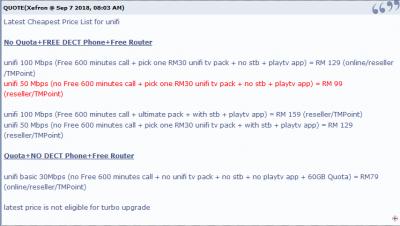
https://forum.lowyat.net/index.php?showtopi...post&p=90191140
This post has been edited by stasio: Sep 9 2018, 08:37 AM
Unifi Official TM UniFi High Speed Broadband Thread V34, READ 1ST PAGE FOR TURBO SPEED INFO!
|
|
 Sep 9 2018, 08:31 AM Sep 9 2018, 08:31 AM
Return to original view | Post
#41
|
 
All Stars
18,503 posts Joined: Oct 2007 From: P.Jaya 
|
QUOTE(Cha3m @ Sep 9 2018, 06:41 AM) Huh? There’s a 50Mbps plan? Yup......coming officially in a few days.
https://forum.lowyat.net/index.php?showtopi...post&p=90191140 This post has been edited by stasio: Sep 9 2018, 08:37 AM |
|
|
|
|
|
Sep 9 2018, 04:03 PM
Return to original view | Post
#42
|
|
All Stars
18,503 posts Joined: Oct 2007 From: P.Jaya
|
QUOTE(nikrizal @ Sep 9 2018, 03:09 PM) Should have been 100, try turn off & on both router & BTU, if needed, repeat several times Posted by your friend......100Mbps/50Mbps 300Mbps/50Mbps 500Mbps/100Mbps 800Mbps/200Mbps https://forum.lowyat.net/index.php?showtopi...&#entry89783446 and lower speed will be as: 50Mbps/20Mbps 30Mbps/10Mbps QUOTE(SilentVampire @ Sep 9 2018, 02:41 PM) Should be 100Mbps for both. QUOTE(CAL V @ Sep 9 2018, 02:19 PM) I'm also wondering what's the actual upload speed after turbo also. 800/200, 500/100, 300/100?  QUOTE(cucubud @ Sep 9 2018, 02:59 PM) By right it should be 300/100 but by left they gave us 300/50. This post has been edited by stasio: Sep 9 2018, 04:11 PM |
|
|
Sep 9 2018, 08:11 PM
Return to original view | Post
#43
|
|
All Stars
18,503 posts Joined: Oct 2007 From: P.Jaya
|
QUOTE(SilentVampire @ Sep 9 2018, 06:51 PM) You definitely won't regret the C3150 v2 though. It is only RM692 now, compared to RM725 when I got it. It is definitely worth the money I spent on it, and I even bought it for my in-laws house. ~ RM655 with RM20 discount.....https://www.lazada.com.my/products/tp-link-...5JyVqG&search=1 or RM679 https://shopee.com.my/TP-Link-Archer-C3150-...4247.1352494808 This post has been edited by stasio: Sep 9 2018, 08:16 PM |
|
|
Sep 9 2018, 08:43 PM
Return to original view | Post
#44
|
|
All Stars
18,503 posts Joined: Oct 2007 From: P.Jaya
|
QUOTE(kennychan12 @ Sep 9 2018, 08:29 PM) expired already wor ... And 1 piece..only...  Notice that Mono Digital is slightly cheaper then Ookas. This post has been edited by stasio: Sep 9 2018, 08:46 PM |
|
|
Sep 10 2018, 12:01 AM
Return to original view | Post
#45
|
|
All Stars
18,503 posts Joined: Oct 2007 From: P.Jaya
|
QUOTE(ace4828 @ Sep 9 2018, 11:43 PM) Dear All Sifu, Wtf you need higher WIFI speed...300++?I am facing some problem with my wifi connection. I have split it into 2 channel 2.5 gHZ and 5.0 gHZ. 5.0 GHZ has delivered download speed at 300++ and upload speed around 120. However, for 2.5 GHZ, download speed is stuck at 30++ but upload speed is around 90++ Is this speed rational or is there some hiccup happening here? Router : TP Link C1200 Unifi Turbo 500 MBPS Change router...to get better WIFI speed....?  Then it's time to change your handphone.......TV boxes....AndroidTV...wifi cards...etc..etc....haha..... This post has been edited by stasio: Sep 10 2018, 12:02 AM |
|
|
Sep 10 2018, 11:54 AM
Return to original view | Post
#46
|
|
All Stars
18,503 posts Joined: Oct 2007 From: P.Jaya
|
QUOTE(nevland @ Sep 10 2018, 11:48 AM) i can't get anywhere near 800mb using newly bought cat7 ugreen cable. Try TM speedtest:BTU to TP Link AC1200 to gigabit laptop both using cat7 cable what could be the reason? http://speedtest.tm.com.my/tmspeedtest.html |
|
|
|
|
|
Sep 10 2018, 12:04 PM
Return to original view | Post
#47
|
|
All Stars
18,503 posts Joined: Oct 2007 From: P.Jaya
|
QUOTE(nevland @ Sep 10 2018, 11:57 AM) it seems the TM's speed test give faster speed.  Edit: Don't expose your IP address...you have "copy link" This post has been edited by stasio: Sep 10 2018, 12:07 PM |
|
|
Sep 10 2018, 01:27 PM
Return to original view | Post
#48
|
|
All Stars
18,503 posts Joined: Oct 2007 From: P.Jaya
|
QUOTE(chocobo7779 @ Sep 10 2018, 01:25 PM) Check whether NAT Boost is turned on and QoS (Quality of Service) is turned off in your router Look above......TM speedtest...OK. |
|
|
Sep 10 2018, 03:00 PM
Return to original view | Post
#49
|
|
All Stars
18,503 posts Joined: Oct 2007 From: P.Jaya
|
QUOTE(cyclone9 @ Sep 10 2018, 01:51 PM) which means? Max 30mbps? TM VSDL is up to 50Mbps,depend on TM and building infra. |
|
|
Sep 10 2018, 03:08 PM
Return to original view | Post
#50
|
|
All Stars
18,503 posts Joined: Oct 2007 From: P.Jaya
|
QUOTE(wilson1stop @ Sep 10 2018, 03:02 PM) 100Mbps also can, but must be very close to DSLAM eg within 100m according to wikipedia.....up to 300Mbps...... 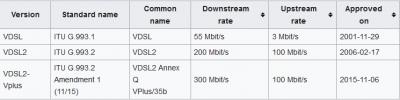
https://en.wikipedia.org/wiki/VDSL So far,I didn't heard anybody 100Mbps on VDSL here in Malaysia. Btw, I am on 50Mbps VDSL. This post has been edited by stasio: Sep 10 2018, 03:09 PM |
|
|
Sep 10 2018, 03:13 PM
Return to original view | Post
#51
|
|
All Stars
18,503 posts Joined: Oct 2007 From: P.Jaya
|
QUOTE(wilson1stop @ Sep 10 2018, 03:09 PM) That's is VDSL2+ But still on copper...right.How about G.Fast....?......(up to 1Gbps) QUOTE(danielSinclair @ Sep 10 2018, 03:13 PM) how much you paid every month boss? RM249.........  Already terminate....this week TIME 300Mbps@RM169.....  This post has been edited by stasio: Sep 10 2018, 03:21 PM |
|
|
Sep 10 2018, 03:30 PM
Return to original view | Post
#52
|
|
All Stars
18,503 posts Joined: Oct 2007 From: P.Jaya
|
QUOTE(cwk0713 @ Sep 10 2018, 03:26 PM) No one to borrow from... at least not from the people I know in this area.. TP-LINK AC1200 ™....RM100https://shopee.com.my/TP-LINK-AC1200-i.1926086.1003948107 This post has been edited by stasio: Sep 10 2018, 03:30 PM |
|
|
Sep 10 2018, 03:36 PM
Return to original view | Post
#53
|
|
All Stars
18,503 posts Joined: Oct 2007 From: P.Jaya
|
QUOTE(cwk0713 @ Sep 10 2018, 03:34 PM) Price is tempting, but well known issue, already stated in the first page. Then go for Tenda AC18 (~RM280) or TP-Link C7 V.5 (~RM350).This post has been edited by stasio: Sep 10 2018, 03:46 PM |
|
|
|
|
|
Sep 10 2018, 04:05 PM
Return to original view | Post
#54
|
|
All Stars
18,503 posts Joined: Oct 2007 From: P.Jaya
|
QUOTE(SilentVampire @ Sep 10 2018, 03:58 PM) Wired is no problems as it has gigabit, but in terms of wireless, it is crap. Did you check your system log to see if the router is constantly rebooting? It might seem fine, but if it is constantly rebooting, it is not meant to be like that. Version 3 (and 2)is not for Malaysia market,only V.1.I am referring to v1, so if you have v3, then it should be okay. I meam TIME,Unifi,..... This post has been edited by stasio: Sep 10 2018, 04:06 PM |
|
|
Sep 10 2018, 05:54 PM
Return to original view | Post
#55
|
|
All Stars
18,503 posts Joined: Oct 2007 From: P.Jaya
|
QUOTE(cucubud @ Sep 10 2018, 05:11 PM) TIME 300Mbps@RM169 is pure internet or with voice etc? Voice HomeBasic - Pay as you use (default) Lite - RM2.50/month for 30 mins/month Max - RM10/month for 300 mins/month Download 300Mbps Upload 300Mbps This post has been edited by stasio: Sep 10 2018, 05:58 PM |
|
|
Sep 10 2018, 06:06 PM
Return to original view | Post
#56
|
|
All Stars
18,503 posts Joined: Oct 2007 From: P.Jaya
|
QUOTE(StuartLee2015 @ Sep 10 2018, 06:04 PM) Got turbo today 500mbps, router is rtn12hpb1 , Wi-Fi can go how high? https://www.asus.com/Networking/RTN12HP_B1/specifications/802.11n : up to 300 Mbps This post has been edited by stasio: Sep 10 2018, 06:07 PM |
|
|
Sep 10 2018, 06:21 PM
Return to original view | Post
#57
|
|
All Stars
18,503 posts Joined: Oct 2007 From: P.Jaya
|
QUOTE(StuartLee2015 @ Sep 10 2018, 06:16 PM) I see... if want to get higher and close to 500Mbps , which router to look for? Budget 300 to 400, and Wi-Fi dongle usb or pcie... ? Look at first page...btw,maybe Tenda AC18 (~RM280) or TP-Link C7 V.5 (~RM350). QUOTE(yagami05 @ Sep 10 2018, 06:08 PM) im from 50mbps plan with ultimate pack. do i need to return the hypptv decoder if i apply rm129 plan? No....only BTU.This post has been edited by stasio: Sep 10 2018, 06:25 PM |
|
|
Sep 10 2018, 06:57 PM
Return to original view | Post
#58
|
|
All Stars
18,503 posts Joined: Oct 2007 From: P.Jaya
|
QUOTE(2pig @ Sep 10 2018, 06:38 PM) nothing i can do now only waiting tm contact me... Did you check in windows.....setting Speed & Duplex set to Auto Negotiation (1Gbps)..?got other forumer here facing same problem like mine? sample: 
This post has been edited by stasio: Sep 10 2018, 07:34 PM |
|
|
Sep 11 2018, 02:30 AM
Return to original view | Post
#59
|
|
All Stars
18,503 posts Joined: Oct 2007 From: P.Jaya
|
@soonwai...but both routers he got is only 100M WAN/LAN ports and probably BTU to router is Cat5 cable.
So now he deal with 100Mbps speed. This post has been edited by stasio: Sep 11 2018, 02:31 AM |
|
|
Sep 11 2018, 02:34 AM
Return to original view | Post
#60
|
|
All Stars
18,503 posts Joined: Oct 2007 From: P.Jaya
|
QUOTE(soonwai @ Sep 11 2018, 02:33 AM) The RGX4400 is gigabit. I know, the manual says it's 10/100. Yea, I just read manual.......http://2msia.com/wp-content/uploads/2016/0...User_Manual.pdf http://2msia.com/2016/07/09/tm-unifi-innac...0-router-login/ He got samsung J7 Pro phone. Edit: So maybe is cable problem now BTU=>RGX4400.....Cat5..? This post has been edited by stasio: Sep 11 2018, 02:40 AM |
|
Topic ClosedOptions
|
| Change to: |  0.0268sec 0.0268sec
 0.27 0.27
 7 queries 7 queries
 GZIP Disabled GZIP Disabled
Time is now: 6th December 2025 - 06:29 PM |
 Quote
Quote