

was on 30mbps -> 50mbps (last year campaign)
now 50mbps -> close to 500mbps?
Sekian.
Attached thumbnail(s)

 TM Turbo Upgraded, TM upgraded my Speed to Turbo
|
|
 Aug 7 2018, 04:58 PM, updated 8y ago Aug 7 2018, 04:58 PM, updated 8y ago
Show posts by this member only | Post
#1
|
 
Newbie
2 posts Joined: Nov 2013 
|
Salam everyone, this morning received an sms saying order completed. Was thinking, I didn't place any order. So next logical thing is Turbo Upgrade I guess. The result is as below. btw staying in SS2, PJ, Selangor, Malaysia.
was on 30mbps -> 50mbps (last year campaign) now 50mbps -> close to 500mbps? Sekian. Attached thumbnail(s)
|
|
|
Aug 7 2018, 04:59 PM
Show posts by this member only | Post
#2
|
|
Junior Member
65 posts Joined: Jun 2018
|
You got receive prior email about this?
Or you found it out by accident. Also,did you upgrade your router? Sorry for so many questions lol. |
|
|
Aug 7 2018, 05:01 PM
Show posts by this member only | Post
#3
|

Senior Member
1,420 posts Joined: Nov 2013 
|
QUOTE(legendswt @ Aug 7 2018, 04:58 PM) Salam everyone, this morning received an sms saying order completed. Was thinking, I didn't place any order. So next logical thing is Turbo Upgrade I guess. The result is as below. btw staying in SS2, PJ, Selangor, Malaysia. Please check whether they block some websites or decrease the speed for downloading/streaming movies.. was on 30mbps -> 50mbps (last year campaign) now 50mbps -> close to 500mbps? Sekian.   |
|
|
Aug 7 2018, 05:01 PM
Show posts by this member only | Post
#4
|

Junior Member
976 posts Joined: Nov 2014 From: Sandakan, Sabah
|
Mine dun got leh
|
|
|
Aug 7 2018, 05:01 PM
Show posts by this member only | Post
#5
|
|
Newbie
2 posts Joined: Nov 2013
|
hello aeonbig, I received email prior.
Didn't manage to check on their website, was busy working. No router upgrade. Using the TP-Link AC1200 which was given during installation. I just got the sms in the morning, actually around 4am i realized my whatsapp wasn't backing up on wifi, I think that time upgrading already. then around maybe 5am+ got SMS saying complete order from TM. I know I didn't place any order, so my instinct was got upgrade, cause similar incident with 30mbps-> 50mbps upgrade. |
|
|
Aug 7 2018, 05:03 PM
Show posts by this member only | IPv6 | Post
#6
|

Junior Member
170 posts Joined: Dec 2015
|
Wow cukurlah, 4K udang from now on
 My 800mbps tak tau sampai bila baru upgrade |
|
|
Aug 7 2018, 05:05 PM
Show posts by this member only | Post
#7
|
|
Newbie
2 posts Joined: Nov 2013
|
I didn't get any throttling on any website, btw I don't stream illegal stuff so I can't confirm on that front.
But I guess cheers everyone, TM upgraded as promised. Sometimes have to syukur, and this time I really think TM deserve some praise. They said upgrade start 15 Aug, I believe they are doing their best to upgrade stage by stage. To everyone, I can only say bersabarlah. The upgrade will come. I guess I'm just lucky cause SS2 memang hot area for anything, be it utilies, shopping, durian, murni. Just a good place to live. |
|
|
Aug 7 2018, 05:05 PM
Show posts by this member only | Post
#8
|

Senior Member
1,644 posts Joined: Jan 2007
|
Hopefully get 800
But get 500 I don't mind either |
|
|
Aug 7 2018, 05:10 PM
Show posts by this member only | Post
#9
|
|
Senior Member
3,076 posts Joined: Jan 2008
|
QUOTE(legendswt @ Aug 7 2018, 05:01 PM) hello aeonbig, I received email prior. Good that you got upgraded so early. Didn't manage to check on their website, was busy working. No router upgrade. Using the TP-Link AC1200 which was given during installation. I just got the sms in the morning, actually around 4am i realized my whatsapp wasn't backing up on wifi, I think that time upgrading already. then around maybe 5am+ got SMS saying complete order from TM. I know I didn't place any order, so my instinct was got upgrade, cause similar incident with 30mbps-> 50mbps upgrade.  From now on, once wake up, check phone for SMS first.  |
|
|
Aug 7 2018, 05:14 PM
|
|
Junior Member
234 posts Joined: Mar 2012
|
Actually if just play FB, Youtube and maybe Netflix, is 100mbps enough or should I top up another RM10 and go for 300mbps?
Moving to a new place in December, dunno which package to subscribe. This post has been edited by blackie19: Aug 7 2018, 05:18 PM |
|
|
Aug 7 2018, 05:17 PM
|

Senior Member
1,340 posts Joined: Sep 2006 From: Selangor
|
I stay almost next to SS2 also no get email about any upgrade. The last free upgrade supposedly in 2017, this year baru upgraded.
|
|
|
Aug 7 2018, 05:22 PM
Show posts by this member only | IPv6 | Post
#12
|

Junior Member
405 posts Joined: Sep 2004
|
QUOTE(legendswt @ Aug 7 2018, 05:01 PM) hello aeonbig, I received email prior. The email u received... Does it stte when they gonna upgrade...? Myself got the email saying gonna be upgraded starting 15 august...Didn't manage to check on their website, was busy working. No router upgrade. Using the TP-Link AC1200 which was given during installation. I just got the sms in the morning, actually around 4am i realized my whatsapp wasn't backing up on wifi, I think that time upgrading already. then around maybe 5am+ got SMS saying complete order from TM. I know I didn't place any order, so my instinct was got upgrade, cause similar incident with 30mbps-> 50mbps upgrade. |
|
|
Aug 7 2018, 05:25 PM
|
|
Newbie
2 posts Joined: Nov 2013
|
QUOTE(blackie19 @ Aug 7 2018, 05:14 PM) Actually if just play FB, Youtube and maybe Netflix, is 100mbps enough or should I top up another RM10 and go for 300mbps? Can't help you there buddy, maybe can ask TM reseller in the forum. But I think if got unifi infra, if register in 2018, possible to get the turbo upgrade next year i guess. Don't quote me on this though, i really dont know.Moving to a new place in December, dunno which package to subscribe. |
|
|
Aug 7 2018, 05:27 PM
|
|
Newbie
2 posts Joined: Nov 2013
|
QUOTE(Spootid @ Aug 7 2018, 05:22 PM) The email u received... Does it stte when they gonna upgrade...? Myself got the email saying gonna be upgraded starting 15 august... My Email also said 15August to December. That's why I also shocked. Maybe TM set that date early to play safe and surprise some customers. Maybe can check with other people living in SS2 if they have the upgrade. I see my neighbour wifi a lot Maxis Home Fibre though haha. RIP Unifi. |
|
|
Aug 7 2018, 05:28 PM
|

Senior Member
2,528 posts Joined: Dec 2007
|
browsing rumah mudah now... looking for rumah kosong in ss2 pj...
|
|
|
Aug 7 2018, 05:29 PM
Show posts by this member only | IPv6 | Post
#16
|
|
Junior Member
405 posts Joined: Sep 2004
|
QUOTE(legendswt @ Aug 7 2018, 05:27 PM) My Email also said 15August to December. That's why I also shocked. Maybe TM set that date early to play safe and surprise some customers. Maybe can check with other people living in SS2 if they have the upgrade. I see my neighbour wifi a lot Maxis Home Fibre though haha. RIP Unifi. Lucky you bro... Do update on ur experience using 500mbps speed... |
|
|
Aug 7 2018, 05:32 PM
|

Junior Member
478 posts Joined: May 2007
|
QUOTE(legendswt @ Aug 7 2018, 04:58 PM) Salam everyone, this morning received an sms saying order completed. Was thinking, I didn't place any order. So next logical thing is Turbo Upgrade I guess. The result is as below. btw staying in SS2, PJ, Selangor, Malaysia. Do we need better router for this? I received such msg few weeks back but nth happenedwas on 30mbps -> 50mbps (last year campaign) now 50mbps -> close to 500mbps? Sekian. |
|
|
Aug 7 2018, 05:32 PM
|

Senior Member
1,941 posts Joined: Jan 2003
|
I'm still on HG850a which having 100Base port. Don't think i'll get upgrade so soon as hardware replacement for ONU is needed.
|
|
|
Aug 7 2018, 05:32 PM
|

Senior Member
3,081 posts Joined: May 2011 From: ▁ ▂ ▃ ▄ ▅ ▆ █ 100 % 
|
Eh got upgraded liao ma? Tot 15 aug.... oklah janji dicapati
|
|
|
Aug 7 2018, 05:42 PM
|

Junior Member
248 posts Joined: Aug 2011
|
4k infinity war?
|
|
|
Aug 7 2018, 05:52 PM
|

Junior Member
440 posts Joined: Oct 2007
|
if najib still rulling, definitely wont get this turbo speed...owai~
|
|
|
Aug 7 2018, 05:55 PM
|
|
Newbie
2 posts Joined: Nov 2013
|
QUOTE(Spootid @ Aug 7 2018, 05:29 PM) Lucky you bro... Do update on ur experience using 500mbps speed... To be honest, 50mbps already overkill for me. I think wasted on me because I tak kuat like otai-otai /k. I just youtube, netflix, game sikit je. But I hope everyone in /k get upgrade soon too. Hopefully Malaysia won't be selow internet country after this. |
|
|
Aug 7 2018, 05:57 PM
|

Senior Member
4,880 posts Joined: Jan 2003 From: Petaling Jaya
|
when i got upgraded form 10 to 30 i didn't feel much difference with surfing. for some reason, lazada and lelong loads horribly slow on unifi. only torrent is way faster.
unifibiz still has better surfing experience. |
|
|
Aug 7 2018, 06:08 PM
|

Senior Member
1,682 posts Joined: Oct 2004 From: let there be rain
|
my concern is they upgrade line, but forget about equipment...
|
|
|
Aug 7 2018, 08:23 PM
Show posts by this member only | IPv6 | Post
#25
|
|
Junior Member
405 posts Joined: Sep 2004
|
QUOTE(ticke @ Aug 7 2018, 06:08 PM) my concern is they upgrade line, but forget about equipment... Which equipment r u talking about...? If not mistaken, the new tplink router should be able to handle 5ghz at 450mbps rite...? |
|
|
Aug 7 2018, 09:24 PM
|

Senior Member
959 posts Joined: Jan 2016
|
do u restart the router or btu after received the sms?
This post has been edited by Ebony & Ivory: Aug 7 2018, 09:24 PM |
|
|
Aug 7 2018, 09:37 PM
|
|
Junior Member
464 posts Joined: Aug 2008
|
QUOTE(blackie19 @ Aug 7 2018, 05:14 PM) Actually if just play FB, Youtube and maybe Netflix, is 100mbps enough or should I top up another RM10 and go for 300mbps? Solo? NpMoving to a new place in December, dunno which package to subscribe. The lag starts when u have like 6,7 people all streaming 4k at the same time Also depends on ur device capability |
|
|
Aug 7 2018, 09:43 PM
|

Junior Member
305 posts Joined: Jan 2003
|
When I sign up for 30 Mbps unifi speed test consistently show 28-29 Mbps. After get free upgrade to 50, speed test only get max 39 Mbps. Dafuk. After this they said 500 Mbps I will not be surprised if I only get below 100.
|
|
|
Aug 7 2018, 09:45 PM
|

Junior Member
429 posts Joined: Jan 2003
|
Uploading speed still like sheet though kompare to time 500mbps.
True storeyz |
|
|
Aug 7 2018, 09:52 PM
|
|
Junior Member
45 posts Joined: Dec 2009
|
Meanwhile.. i dont even get a mail or notice regarding the turbo upgrade.. asked tm they said pls wait for mail.. still in the dark.. 😫
|
|
|
Aug 7 2018, 10:03 PM
|
|
Newbie
2 posts Joined: Nov 2013
|
QUOTE(Ebony & Ivory @ Aug 7 2018, 09:24 PM) do u restart the router or btu after received the sms? Yeap, have to reset. I just reset both BTU and router because I don't know which is affected. You won't be connected to internet till you reset. |
|
|
Aug 7 2018, 10:05 PM
|
|
Newbie
2 posts Joined: Nov 2013
|
QUOTE(tupai @ Aug 7 2018, 09:43 PM) When I sign up for 30 Mbps unifi speed test consistently show 28-29 Mbps. After get free upgrade to 50, speed test only get max 39 Mbps. Dafuk. After this they said 500 Mbps I will not be surprised if I only get below 100. I think depend on area, I never felt it was slow even when updating games on steam. To be fair, I'm the only one using moderately. Parents just youtube all the way, so maybe I'm not a good example. |
|
|
Aug 7 2018, 10:05 PM
Show posts by this member only | IPv6 | Post
#33
|

Senior Member
4,403 posts Joined: Jan 2007 From: Johor Bahru
|
1000000000000MPS....bukaK YOUTUBE pun keluar SD potato video..TM SCAMMER!!
|
|
|
Aug 7 2018, 10:06 PM
|
|
Newbie
2 posts Joined: Nov 2013
|
QUOTE(red4900 @ Aug 7 2018, 09:37 PM) Solo? Np Yea, that's why I think I'm not a good example. I think I'm only getting close to full because I'm the only moderate user, don't even have heavy user at home. 50mbps was already overkill for my household.The lag starts when u have like 6,7 people all streaming 4k at the same time Also depends on ur device capability |
|
|
Aug 7 2018, 10:09 PM
|
|
Newbie
2 posts Joined: Nov 2013
|
QUOTE(beetch @ Aug 7 2018, 09:45 PM) Uploading speed still like sheet though kompare to time 500mbps. Yea, it's unfortunate for people that actually fully utilize upload speed. Personally I don't stream on twitch, upload youtube videos or anything for that matter. give 10mbps or 100mbps upload also I don't know the difference haha.True storeyz |
|
|
Aug 7 2018, 10:09 PM
|

Junior Member
544 posts Joined: Mar 2013
|
Cant wait to dl torrent with 800mbps
|
|
|
Aug 7 2018, 10:17 PM
|

Senior Member
852 posts Joined: Apr 2012
|
Only ts got upgrade? Other k?
|
|
|
Aug 7 2018, 10:25 PM
|

Senior Member
972 posts Joined: Aug 2007 From: Lokap Polis
|
QUOTE(legendswt @ Aug 7 2018, 04:58 PM) Salam everyone, this morning received an sms saying order completed. Was thinking, I didn't place any order. So next logical thing is Turbo Upgrade I guess. The result is as below. btw staying in SS2, PJ, Selangor, Malaysia. nais, wifi test via c1200 how?was on 30mbps -> 50mbps (last year campaign) now 50mbps -> close to 500mbps? Sekian. that losses of 31mbps is insignificant to be honest. This post has been edited by zerorating: Aug 7 2018, 10:25 PM |
|
|
Aug 7 2018, 10:32 PM
|

Junior Member
256 posts Joined: May 2014
|
QUOTE(beetch @ Aug 7 2018, 09:45 PM) Uploading speed still like sheet though kompare to time 500mbps. time bila lagi?True storeyz |
|
|
Aug 7 2018, 11:18 PM
|
|
Junior Member
305 posts Joined: Jan 2003
|
QUOTE(legendswt @ Aug 7 2018, 10:09 PM) Yea, it's unfortunate for people that actually fully utilize upload speed. Personally I don't stream on twitch, upload youtube videos or anything for that matter. give 10mbps or 100mbps upload also I don't know the difference haha. Same la.my most frequent upload would be the link click and address typing. Lel |
|
|
Aug 8 2018, 12:46 AM
|
|
Junior Member
420 posts Joined: Feb 2007
|
you may have the internet speed of 500 Mbps but your transmission via WIFI still limited by device wireless chip.... if your laptop running on 802.11 a/b/g/n then the max u can go only 300Mbps unless u have 802.11ac like in highend smart phone or latest laptop
|
|
|
Aug 8 2018, 12:51 AM
|

Senior Member
5,363 posts Joined: Apr 2005 From: กรุงเทพมหานคร BKK
|
Wtf.. Got email? I got nuthin...
|
|
|
Aug 8 2018, 08:12 AM
|
|
Junior Member
429 posts Joined: Jan 2003
|
QUOTE(nasiputih @ Aug 7 2018, 10:32 PM) time bila lagi? Tak tau la.U tanya masa lo |
|
|
Aug 8 2018, 08:34 AM
Show posts by this member only | IPv6 | Post
#44
|
|
Newbie
2 posts Joined: Nov 2013
|
QUOTE(zerorating @ Aug 7 2018, 10:25 PM) nais, wifi test via c1200 how? I haven't tested on wifi, biasa balik rumah guna desktop(wired) je. Nanti I update sini. TV also wired, so youtube sana memang takde problem.that losses of 31mbps is insignificant to be honest. |
|
|
Aug 8 2018, 08:35 AM
Show posts by this member only | IPv6 | Post
#45
|
|
Newbie
2 posts Joined: Nov 2013
|
QUOTE(sukhoi35mk @ Aug 8 2018, 12:46 AM) you may have the internet speed of 500 Mbps but your transmission via WIFI still limited by device wireless chip.... if your laptop running on 802.11 a/b/g/n then the max u can go only 300Mbps unless u have 802.11ac like in highend smart phone or latest laptop The AC1200 supplied has AC standard, but I haven't tested on my phone/laptop (both have AC standard). I'll update when I get the time. |
|
|
Aug 8 2018, 09:08 AM
|

Junior Member
586 posts Joined: Oct 2004
|
i just go the sms yesterday, techinician coming tomorrow.. anybody know what modem/router are they upgrading to?
|
|
|
Aug 8 2018, 09:11 AM
|
|
Junior Member
232 posts Joined: Oct 2010
|
bro are you still using the same old router/modem that given by tm earlier? or u have changed it?
|
|
|
Aug 8 2018, 09:13 AM
Show posts by this member only | IPv6 | Post
#48
|

Junior Member
72 posts Joined: Jul 2012 From: Eastern Kingdom
|
I also recipt message Order ID : ..... has been completed"" from Unifi. I checked my speed still sama jer.. Maybe tonight i go check again. Or is it because my router cannot run 500mbps?? Hmmmm..
|
|
|
Aug 8 2018, 09:14 AM
|

Junior Member
268 posts Joined: Apr 2014 From: dont harash me
|
QUOTE(legendswt @ Aug 7 2018, 05:05 PM) I didn't get any throttling on any website, btw I don't stream illegal stuff so I can't confirm on that front. how cum?But I guess cheers everyone, TM upgraded as promised. Sometimes have to syukur, and this time I really think TM deserve some praise. They said upgrade start 15 Aug, I believe they are doing their best to upgrade stage by stage. To everyone, I can only say bersabarlah. The upgrade will come. I guess I'm just lucky cause SS2 memang hot area for anything, be it utilies, shopping, durian, murni. Just a good place to live. ac1200 can support 800 mbps ar? so tokong ar? then I oso plan to get 1 new modem lo. u should wait till night time 8pm - 12am, where tm love to troll ppl around at this peak hours |
|
|
Aug 8 2018, 09:14 AM
|

Senior Member
3,848 posts Joined: Dec 2009 From: Ampang
|
QUOTE(Aparaa @ Aug 8 2018, 09:13 AM) I also recipt message Order ID : ..... has been completed"" from Unifi. I checked my speed still sama jer.. Maybe tonight i go check again. Or is it because my router cannot run 500mbps?? Hmmmm.. Got restart everything or not? |
|
|
Aug 8 2018, 09:21 AM
|

All Stars
14,242 posts Joined: Jul 2007 From: JAVABUS
|
QUOTE(kennykong85 @ Aug 8 2018, 09:14 AM) how cum? 5GHz: Up to 867Mbpsac1200 can support 800 mbps ar? so tokong ar? then I oso plan to get 1 new modem lo. u should wait till night time 8pm - 12am, where tm love to troll ppl around at this peak hours 2.4GHz: Up to 300Mbps |
|
|
Aug 8 2018, 09:25 AM
Show posts by this member only | IPv6 | Post
#52
|
|
Junior Member
72 posts Joined: Jul 2012 From: Eastern Kingdom
|
QUOTE(Boy96 @ Aug 8 2018, 09:14 AM) Got restart everything or not? Oh ya. Missed that step. I will do and check again later. Thank you |
|
|
Aug 8 2018, 09:25 AM
|
|
Junior Member
268 posts Joined: Apr 2014 From: dont harash me
|
QUOTE(0168257061 @ Aug 8 2018, 09:21 AM) 5GHz: Up to 867Mbps u use cable ar?2.4GHz: Up to 300Mbps memang tokong ni, I so jelly~ ok I re read again, its wifi I bodo, sorry~ This post has been edited by kennykong85: Aug 8 2018, 09:25 AM |
|
|
Aug 8 2018, 09:30 AM
Show posts by this member only | IPv6 | Post
#54
|
|
Newbie
2 posts Joined: Nov 2013
|
QUOTE(PlayMaker` @ Aug 8 2018, 09:11 AM) bro are you still using the same old router/modem that given by tm earlier? or u have changed it? Hey bro, all my equipment is original TM supplied. Never touched since installed. I didn't even get notice from TM about upgrading (other than email), just suddenly realized my wifi is working, but no internet + got sms say order done. This is usually symptom of upgrading work. Based on experience, I just off modem/router/phone/etc and just let it rest for 10 mins and turn back on. At first see internet light on BTU/router not lighted, but after like 2 mins? internet got back on, buka speed test, realized got upgraded. |
|
|
Aug 8 2018, 09:31 AM
|
|
Junior Member
232 posts Joined: Oct 2010
|
QUOTE(legendswt @ Aug 8 2018, 09:30 AM) Hey bro, all my equipment is original TM supplied. Never touched since installed. I didn't even get notice from TM about upgrading (other than email), just suddenly realized my wifi is working, but no internet + got sms say order done. This is usually symptom of upgrading work. thanks for your feedback bro Based on experience, I just off modem/router/phone/etc and just let it rest for 10 mins and turn back on. At first see internet light on BTU/router not lighted, but after like 2 mins? internet got back on, buka speed test, realized got upgraded.  |
|
|
Aug 8 2018, 09:31 AM
|

Senior Member
967 posts Joined: Apr 2009
|
QUOTE(tupai @ Aug 7 2018, 09:43 PM) When I sign up for 30 Mbps unifi speed test consistently show 28-29 Mbps. After get free upgrade to 50, speed test only get max 39 Mbps. Dafuk. After this they said 500 Mbps I will not be surprised if I only get below 100. Mine 50 Mbps can get 45~55 Mbps easily. These 2~3 years TM improving a lot (for me). Now got turbo'ed, TIME user kenot show off d. |
|
|
Aug 8 2018, 09:34 AM
|
|
Senior Member
967 posts Joined: Apr 2009
|
QUOTE(Weretiger1 @ Aug 8 2018, 09:32 AM) upgrade or no upgrade keciannn my speed suppose to be 50mb now still around 10-25mb jer... apalanjau cibaifi  |
|
|
Aug 8 2018, 09:35 AM
Show posts by this member only | IPv6 | Post
#58
|
|
Newbie
2 posts Joined: Nov 2013
|
QUOTE(kennykong85 @ Aug 8 2018, 09:14 AM) how cum? If not mistaken, 802.11ac standard can theoretically support up to 1.3gbps (lab conditions). My guess, if you're using relatively new router, should be okay kot. My guess, if your router not compatible(based on their system show what router they supplied you), I think they will call to come and change your router to give the 800mbps upgrade. <--- Just my guess, don't quote me on that.ac1200 can support 800 mbps ar? so tokong ar? then I oso plan to get 1 new modem lo. u should wait till night time 8pm - 12am, where tm love to troll ppl around at this peak hours I usually game around 8pm - 930pm, honestly never had problems since day 1. Not sure because SS 2 memang power area or got datuk staying around here make the line power. Never dialed TM 100 before since streamyx days. Had jaring also last time, never had problem. |
|
|
Aug 8 2018, 09:38 AM
|

Junior Member
5 posts Joined: Feb 2007
|
QUOTE(tupai @ Aug 7 2018, 09:43 PM) When I sign up for 30 Mbps unifi speed test consistently show 28-29 Mbps. After get free upgrade to 50, speed test only get max 39 Mbps. Dafuk. After this they said 500 Mbps I will not be surprised if I only get below 100. Did they changed your modem and router? Last time same case. TM came changed router and modem and I get 50-60 on wifi. |
|
|
Aug 8 2018, 10:00 AM
|
|
Junior Member
586 posts Joined: Oct 2004
|
funny i just got an automated call reminding me of the appointment tomorrow but it was from Time??
|
|
|
Aug 8 2018, 10:03 AM
|

Senior Member
7,936 posts Joined: Mar 2014
|
QUOTE(Weretiger1 @ Aug 8 2018, 09:32 AM) upgrade or no upgrade Maybe repair interruption. TM usually do quiet work. Last time mine dropped also but now okmy speed suppose to be 50mb now still around 10-25mb jer... apalanjau cibaifi Anyway, was it 50Mbps before or since day 1 like that? This post has been edited by Zot: Aug 8 2018, 10:05 AM |
|
|
Aug 8 2018, 10:57 AM
|

Senior Member
1,542 posts Joined: Jul 2008
|
How to check?
|
|
|
Aug 8 2018, 11:12 AM
|

Junior Member
323 posts Joined: May 2010
|
Last time while I was on TM, the service rep told me it's probably not a good idea to upgrade to 50Mbps cause i use copper wiring in condo building. Offer me a reduced price on 20Mbps instead. I change straight to TIME that offers fibre to home.
How will this turbo upgrade affect those using copper wires? This is in central PJ area mind you |
|
|
Aug 8 2018, 11:19 AM
|
|
Senior Member
1,141 posts Joined: Apr 2010 From: USJ
|
QUOTE(0168257061 @ Aug 8 2018, 09:21 AM) 5GHz: Up to 867Mbps theoretical speed only mah. if got half already good enough 2.4GHz: Up to 300Mbps  |
|
|
Aug 8 2018, 11:29 AM
|
|
Senior Member
7,936 posts Joined: Mar 2014
|
QUOTE(Weretiger1 @ Aug 8 2018, 10:55 AM) i do speedtest fro time to time.. That is why called best effortsometime 20 30ish.. sometime 40 50... then down to 20ish... Now they offer is turbo boost All not guarantee speed. Commercial one pay expensive because guarantee speed. Unfortunately your place too many sharing backbone. So, if all heavy traffic at particular time, then speed drop.  |
|
|
Aug 8 2018, 11:35 AM
|
|
All Stars
14,242 posts Joined: Jul 2007 From: JAVABUS
|
QUOTE(iguana_dude_619 @ Aug 8 2018, 11:19 AM) theoretical speed only mah. if got half already good enough That speed is quite easy to achieve provided you got no walls in between.If got like 3-4 walls... susah lah |
|
|
Aug 8 2018, 11:35 AM
|

Junior Member
433 posts Joined: Jan 2003
|
QUOTE(Invalid Username @ Aug 8 2018, 11:12 AM) Last time while I was on TM, the service rep told me it's probably not a good idea to upgrade to 50Mbps cause i use copper wiring in condo building. Offer me a reduced price on 20Mbps instead. I change straight to TIME that offers fibre to home. I don't think they will get any significant speed jump if your house is still on copper wires. Its the same thing the Unifi technicians told me. Copper wires he say max 30mbps but in reality its around 15mbps only. He told me if I can get consistently 10mbps is already considered very good. He said for copper lines, stability is more important than speed.How will this turbo upgrade affect those using copper wires? This is in central PJ area mind you |
|
|
Aug 8 2018, 11:37 AM
|
|
Junior Member
323 posts Joined: May 2010
|
QUOTE(oucheev @ Aug 8 2018, 11:35 AM) I don't think they will get any significant speed jump if your house is still on copper wires. Its the same thing the Unifi technicians told me. Copper wires he say max 30mbps but in reality its around 15mbps only. He told me if I can get consistently 10mbps is already considered very good. He said for copper lines, stability is more important than speed. So those on copper wires not entitled to turbo upgrade? syukur didn't continue with TM on contract |
|
|
Aug 8 2018, 11:41 AM
|

All Stars
21,962 posts Joined: Dec 2004 From: KL 
|
QUOTE(Invalid Username @ Aug 8 2018, 11:12 AM) Last time while I was on TM, the service rep told me it's probably not a good idea to upgrade to 50Mbps cause i use copper wiring in condo building. Offer me a reduced price on 20Mbps instead. I change straight to TIME that offers fibre to home. How will this turbo upgrade affect those using copper wires? This is in central PJ area mind you QUOTE(oucheev @ Aug 8 2018, 11:35 AM) I don't think they will get any significant speed jump if your house is still on copper wires. Its the same thing the Unifi technicians told me. Copper wires he say max 30mbps but in reality its around 15mbps only. He told me if I can get consistently 10mbps is already considered very good. He said for copper lines, stability is more important than speed. last i heard copper able to support up to 100mbps |
|
|
Aug 8 2018, 11:41 AM
|
|
Junior Member
433 posts Joined: Jan 2003
|
QUOTE(Invalid Username @ Aug 8 2018, 11:37 AM) So those on copper wires not entitled to turbo upgrade? The chat I had with the Unifi technician was 3 years ago. Maybe there are some new tech which can boost the speed on copper wires.syukur didn't continue with TM on contract |
|
|
Aug 8 2018, 11:42 AM
Show posts by this member only | IPv6 | Post
#71
|
|
Junior Member
420 posts Joined: Feb 2007
|
I using unifi 30Mbps but speedtest always give me +- 40Mbps using white and orange Dlink router.... Kekeke... I think if they going to turbo charger my unifi; I guess they have replace my router
|
|
|
Aug 8 2018, 11:51 AM
|

Junior Member
382 posts Joined: Sep 2006
|
Kesian my house wall only CAT5.... max 100mbps... WiFi too far away
|
|
|
Aug 8 2018, 11:56 AM
|

Senior Member
1,218 posts Joined: Jul 2007 From: Sibu, Cheras Selangor 
|
TS, what router are u using now?
|
|
|
Aug 8 2018, 12:01 PM
|

Senior Member
619 posts Joined: Sep 2009 From: Behind you, Fapping.
|
My place only 4mbps max. Stupid TM says my area cabinet cannot support higher.
|
|
|
Aug 8 2018, 01:58 PM
|
|
Senior Member
2,329 posts Joined: Jun 2015
|
QUOTE(Invalid Username @ Aug 8 2018, 11:37 AM) So those on copper wires not entitled to turbo upgrade? cukur you have TIME coverage...syukur didn't continue with TM on contract majority don’t have |
|
|
Aug 8 2018, 02:09 PM
|
|
Newbie
16 posts Joined: Dec 2017
|
can start download 4k quality JAV liao
|
|
|
Aug 8 2018, 02:19 PM
|
|
Newbie
2 posts Joined: Nov 2013
|
QUOTE(yeelong @ Aug 8 2018, 11:56 AM) TS, what router are u using now? I heard TS using TP-Link AC1200 supplied by TM. |
|
|
Aug 8 2018, 02:25 PM
|
|
Senior Member
852 posts Joined: Apr 2012
|
How to know our line use copper wire or not?
|
|
|
Aug 8 2018, 02:26 PM
Show posts by this member only | IPv6 | Post
#79
|

Junior Member
6 posts Joined: Oct 2005
|
Received the sms on 30th july.till now still same speed 😅
Attached thumbnail(s) 
|
|
|
Aug 8 2018, 02:39 PM
Show posts by this member only | IPv6 | Post
#80
|
|
Newbie
2 posts Joined: Nov 2013
|
QUOTE(siconsole @ Aug 8 2018, 02:26 PM) Received the sms on 30th july.till now still same speed 😅 Did you reset modem/router/BTU/etc? I think it needs to do firmware update, I just off 10min on back can get turbo speed. If not maybe can call 100 to check with TM. |
|
|
Aug 8 2018, 02:40 PM
Show posts by this member only | IPv6 | Post
#81
|
|
Junior Member
6 posts Joined: Oct 2005
|
Ok ill try that once i got home.thanks
|
|
|
Aug 8 2018, 02:48 PM
Show posts by this member only | IPv6 | Post
#82
|

Junior Member
579 posts Joined: Jun 2007 From: Subang Jaya, KL
|
QUOTE(legendswt @ Aug 7 2018, 05:01 PM) hello aeonbig, I received email prior. Maybe your ONU is newer model. Cause if no hardware upgrade, conlanfirm my internet cannot more than 100Mbps No router upgrade. Using the TP-Link AC1200 which was given during installation. (cause the LAN for the ONU is only 10/100mbps, NOT gigabit LAN =D) |
|
|
Aug 8 2018, 02:52 PM
|

Senior Member
7,740 posts Joined: Jun 2006 From: Some Yih
|
QUOTE(siconsole @ Aug 8 2018, 02:26 PM) Received the sms on 30th july.till now still same speed 😅 speedtest screenshot ada? |
|
|
Aug 8 2018, 02:53 PM
Show posts by this member only | IPv6 | Post
#84
|

Junior Member
82 posts Joined: Feb 2008 From: Vladivostok
|
how bt tor?
still works perfectly? |
|
|
Aug 8 2018, 03:10 PM
|

Junior Member
354 posts Joined: Feb 2015
|
so jealous. mine is still the snail slow 50mbps
 |
|
|
Aug 8 2018, 03:12 PM
|
|
Junior Member
354 posts Joined: Feb 2015
|
QUOTE(HuorEarfalas @ Aug 8 2018, 11:51 AM) Kesian my house wall only CAT5.... max 100mbps... WiFi too far away homeplug can help? ie data via powerline |
|
|
Aug 8 2018, 03:17 PM
|

Junior Member
327 posts Joined: Nov 2008
|
Haiz...no receive sms yet
Yesterday nite keep on testing speedtest, the speed still 100mbps. Inb4 udang collection already reach 2tb. Last week bought 4tb hdd to harvest more udang. |
|
|
Aug 8 2018, 03:18 PM
Show posts by this member only | IPv6 | Post
#88
|
|
Newbie
2 posts Joined: Nov 2013
|
QUOTE(BelaCHAN @ Aug 8 2018, 02:48 PM) Maybe your ONU is newer model. Cause if no hardware upgrade, conlanfirm my internet cannot more than 100Mbps I got my onu maybe 2 years ago? So I guess relatively new. But I think if TM offer to upgrade you, they will help change your equipment. I think I saw another person in this thread said technician going to his house. Most likely upgrade equipment, so got hope for everyone as long in Unifi area haha.(cause the LAN for the ONU is only 10/100mbps, NOT gigabit LAN =D) |
|
|
Aug 8 2018, 03:21 PM
|
|
Junior Member
382 posts Joined: Sep 2006
|
QUOTE(happyking4ever @ Aug 8 2018, 04:12 PM) homeplug can help? ie data via powerline Also cannot... red status and speed limited down to 40mbps on a 100mbps connection |
|
|
Aug 8 2018, 03:41 PM
|

Junior Member
24 posts Joined: Mar 2009
|
QUOTE(legendswt @ Aug 7 2018, 06:05 PM) I didn't get any throttling on any website, btw I don't stream illegal stuff so I can't confirm on that front. YOU DONT STREAM PORN AT ALL? THATS WHAT I CALLED BULLSHITBut I guess cheers everyone, TM upgraded as promised. Sometimes have to syukur, and this time I really think TM deserve some praise. They said upgrade start 15 Aug, I believe they are doing their best to upgrade stage by stage. To everyone, I can only say bersabarlah. The upgrade will come. I guess I'm just lucky cause SS2 memang hot area for anything, be it utilies, shopping, durian, murni. Just a good place to live. |
|
|
Aug 8 2018, 03:42 PM
|
|
All Stars
14,242 posts Joined: Jul 2007 From: JAVABUS
|
QUOTE(mistralmudd @ Aug 8 2018, 03:41 PM) YOU DONT STREAM PORN AT ALL? THATS WHAT I CALLED BULLSHIT Kid, what is he is a grown up adult. Got family, got wife. Only kid like you will get so triggered about it. |
|
|
Aug 8 2018, 03:57 PM
|
|
Junior Member
24 posts Joined: Mar 2009
|
QUOTE(0168257061 @ Aug 8 2018, 04:42 PM) Kid, what is he is a grown up adult. another holier than thou people. Got family, got wife. Only kid like you will get so triggered about it.  so much for so called adult cant even face other people perception if people know you are streaming naughty stuff  |
|
|
Aug 8 2018, 03:59 PM
|
|
Junior Member
571 posts Joined: Mar 2012
|
QUOTE(Ichibanichi @ Aug 8 2018, 03:17 PM) Haiz...no receive sms yet worth more than bitcoin if apocalypse or skynet took over.Yesterday nite keep on testing speedtest, the speed still 100mbps. Inb4 udang collection already reach 2tb. Last week bought 4tb hdd to harvest more udang. |
|
|
Aug 8 2018, 04:03 PM
|

Junior Member
469 posts Joined: Jan 2003 From: UM, KL, PJ, 14
|
nice
now downloading game from steam or playstation store would be much much more faster |
|
|
Aug 8 2018, 04:09 PM
|
|
Newbie
2 posts Joined: Nov 2013
|
QUOTE(darosha @ Aug 8 2018, 04:03 PM) nice you just gave me a good idea, maybe I can download something off steam and post results here. Maybe we can get a real world idea on this turbo speed. Hopefully steam side can keep up with 500mbps.now downloading game from steam or playstation store would be much much more faster I used to get around 6MBps download on steam, let's see if can get 60MBps. |
|
|
Aug 8 2018, 05:02 PM
|
|
Junior Member
354 posts Joined: Feb 2015
|
QUOTE(legendswt @ Aug 8 2018, 04:09 PM) you just gave me a good idea, maybe I can download something off steam and post results here. Maybe we can get a real world idea on this turbo speed. Hopefully steam side can keep up with 500mbps. can hard disk reaches write speed of 60Mbps or not?I used to get around 6MBps download on steam, let's see if can get 60MBps. steam download might be a bad choice, as not sure if they are doing sequential write or random write if torrent is involved. i normally test download speed by downloading a big nvidia driver. This post has been edited by happyking4ever: Aug 8 2018, 05:05 PM |
|
|
Aug 8 2018, 05:07 PM
Show posts by this member only | IPv6 | Post
#97
|

Junior Member
193 posts Joined: Oct 2008 From: Suq Madiq
|
after this can do cloud gaming, no need to buy gaming rig
|
|
|
Aug 8 2018, 05:08 PM
Show posts by this member only | IPv6 | Post
#98
|
|
Senior Member
2,223 posts Joined: Aug 2008 From: Port Klang, Selangor
|
Ping berapa?
|
|
|
Aug 8 2018, 05:08 PM
|
 
VIP
9,692 posts Joined: Jan 2003 From: Mongrel Isle
|
Well done TM.
Well done Gobind. |
|
|
Aug 8 2018, 05:10 PM
Show posts by this member only | IPv6 | Post
#100
|
|
Newbie
2 posts Joined: Nov 2013
|
QUOTE(happyking4ever @ Aug 8 2018, 05:02 PM) can hard disk reaches write speed of 60Mbps or not? Good point, there's a lot of possible bottlenecks, HDD, Steam Servers, Unifi Infra. I'm not able to afford large SSD caps, so I'll just show my standard WD Blue HDD capabilities. At least that should establish a base line for people to get an idea what can potentially be achieved. steam download might be a bad choice, as not sure if they are doing sequential write or random write if torrent is involved. i normally test download speed by downloading a big nvidia driver. If anyone else have Turbo and bangsawan PC, maybe can share their results here also. |
|
|
Aug 8 2018, 05:12 PM
Show posts by this member only | IPv6 | Post
#101
|
|
Newbie
2 posts Joined: Nov 2013
|
QUOTE(zedyll @ Aug 8 2018, 05:07 PM) after this can do cloud gaming, no need to buy gaming rig I hope TM or someone brings cloud gaming service to Malaysia since we have the Internet speed to support now. But maybe long shot kot, market too small and might not be huge profit considering our earning power. If priced too high, maybe can't get enough ppl on board. |
|
|
Aug 8 2018, 05:14 PM
|

Newbie
19 posts Joined: Jan 2017
|
Any idea when Penang will start getting apgreded?
|
|
|
Aug 8 2018, 05:14 PM
Show posts by this member only | IPv6 | Post
#103
|
|
Newbie
2 posts Joined: Nov 2013
|
QUOTE(tsg_7 @ Aug 8 2018, 05:08 PM) Ping berapa? Hey bang, post saya paling pertama sekali tunjuk 3ms ping. Paling best I pernah nampak pre-turbo 1ms pon ada. average 3-5ms ping, worse maybe 20+ms? |
|
|
Aug 8 2018, 05:34 PM
|
|
Junior Member
469 posts Joined: Jan 2003 From: UM, KL, PJ, 14
|
QUOTE(legendswt @ Aug 8 2018, 05:14 PM) Hey bang, post saya paling pertama sekali tunjuk 3ms ping. Paling best I pernah nampak pre-turbo 1ms pon ada. average 3-5ms ping, worse maybe 20+ms? niceno more lag especially fighting games now i can really train for tournament lol |
|
|
Aug 8 2018, 05:40 PM
Show posts by this member only | IPv6 | Post
#105
|

Junior Member
555 posts Joined: Aug 2013 From: Bolehland
|
fark my place kenot sapot hundreds of Mbps speed. brb moving out
|
|
|
Aug 8 2018, 05:48 PM
Show posts by this member only | IPv6 | Post
#106
|

Junior Member
36 posts Joined: Dec 2011
|
QUOTE(legendswt @ Aug 8 2018, 05:10 PM) Good point, there's a lot of possible bottlenecks, HDD, Steam Servers, Unifi Infra. I'm not able to afford large SSD caps, so I'll just show my standard WD Blue HDD capabilities. At least that should establish a base line for people to get an idea what can potentially be achieved. I also ss2 area but no upgrade yet. Sad.If anyone else have Turbo and bangsawan PC, maybe can share their results here also. Btw now ssd 480gb rm300+ only. |
|
|
Aug 8 2018, 05:50 PM
Show posts by this member only | IPv6 | Post
#107
|
|
Senior Member
2,223 posts Joined: Aug 2008 From: Port Klang, Selangor
|
QUOTE(legendswt @ Aug 8 2018, 05:14 PM) Hey bang, post saya paling pertama sekali tunjuk 3ms ping. Paling best I pernah nampak pre-turbo 1ms pon ada. average 3-5ms ping, worse maybe 20+ms? Gooding....i drool liao. |
|
|
Aug 8 2018, 06:21 PM
Show posts by this member only | IPv6 | Post
#108
|
|
Junior Member
6 posts Joined: Oct 2005
|
QUOTE(legendswt @ Aug 8 2018, 02:39 PM) Did you reset modem/router/BTU/etc? I think it needs to do firmware update, I just off 10min on back can get turbo speed. If not maybe can call 100 to check with TM. Still getting old speed after modem/ router reset.i guess i should just wait until 15th aug and then try again.Attached thumbnail(s) 
|
|
|
Aug 8 2018, 06:32 PM
|
|
Newbie
2 posts Joined: Nov 2013
|
QUOTE(nicholasloke @ Aug 8 2018, 05:48 PM) I also ss2 area but no upgrade yet. Sad. wah serious? can consider upgrade Btw now ssd 480gb rm300+ only.  |
|
|
Aug 8 2018, 06:34 PM
|
|
Newbie
2 posts Joined: Nov 2013
|
QUOTE(siconsole @ Aug 8 2018, 06:21 PM) Still getting old speed after modem/ router reset.i guess i should just wait until 15th aug and then try again. Well, maybe you can call 100 check with them why did you have order completed sms? just to clarify.Kinda weird if you have that sms but nothing happened. takut fraud case. |
|
|
Aug 8 2018, 06:44 PM
|
|
Newbie
2 posts Joined: Nov 2013
|
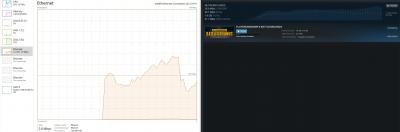
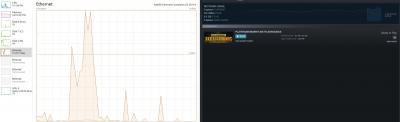
Did a pre-test, got around 441.14 mbps. (to check what is the starting baseline to compare with)
Then so happened got 9.5GB pubg update, getting around 28.7MBps peak. Windows task manager average around 200mbps. Disk usage was almost 100% haha, possible bottleneck? Got to say 9.5GB in approx 12mins is pretty good. If anyone got SSD with unifi turbo, maybe can verify? maybe my WD Blue is bottlenecking. Edited: Added result, after completed download. 38.3 MBps peak on steam, windows captured too late. This post has been edited by legendswt: Aug 8 2018, 06:53 PM Attached thumbnail(s) 
|
|
|
Aug 8 2018, 08:05 PM
|

Senior Member
1,102 posts Joined: Jul 2008 From: Kuala Lumpur
|
Inb4 can it run crysis?
Inb4 wrong thread |
|
|
Aug 8 2018, 08:06 PM
|
|
Senior Member
1,102 posts Joined: Jul 2008 From: Kuala Lumpur
|
QUOTE(legendswt @ Aug 8 2018, 06:44 PM) Did a pre-test, got around 441.14 mbps. (to check what is the starting baseline to compare with) Test it with nvmeThen so happened got 9.5GB pubg update, getting around 28.7MBps peak. Windows task manager average around 200mbps. Disk usage was almost 100% haha, possible bottleneck? Got to say 9.5GB in approx 12mins is pretty good. If anyone got SSD with unifi turbo, maybe can verify? maybe my WD Blue is bottlenecking. Edited: Added result, after completed download. 38.3 MBps peak on steam, windows captured too late. |
|
|
Aug 8 2018, 08:18 PM
|

Senior Member
1,393 posts Joined: Feb 2006
|
Main question is ... how much are u paying monthly
|
|
|
Aug 8 2018, 08:30 PM
|
|
Newbie
2 posts Joined: Nov 2013
|
QUOTE(Weretiger1 @ Aug 8 2018, 07:41 PM) I just checked based on tp link website, the router TM supplied to me is advertised to go up to 867Mbps on 5Ghz and 300Mbps on 2.4GHz. Your router is a different model?My 2.4ghz having 20-25m download My 5ghz having 47m downloX How???? Macam mana??? TP Link AC1200 Product page |
|
|
Aug 8 2018, 08:30 PM
|
|
Newbie
2 posts Joined: Nov 2013
|
QUOTE(aral3005 @ Aug 8 2018, 08:05 PM) Inb4 can it run crysis? My com can run crysis hahaInb4 wrong thread |
|
|
Aug 8 2018, 08:31 PM
|
|
Newbie
2 posts Joined: Nov 2013
|
QUOTE(aral3005 @ Aug 8 2018, 08:06 PM) Test it with nvme Don't want to spend so much on SSD, but if you supply I would love to test it for you haha. |
|
|
Aug 8 2018, 08:33 PM
|
|
Newbie
2 posts Joined: Nov 2013
|
QUOTE(GymBoi @ Aug 8 2018, 08:18 PM) Main question is ... how much are u paying monthly I got Unifi at the worst of times, 199MYR. Didn't have promo that time I signed up. Now I see all the 129MYR, sakit hati :'(I think I'm still under contract, and since I got this free upgrade I think I'll stick to it. |
|
|
Aug 8 2018, 08:35 PM
|
|
Senior Member
1,243 posts Joined: Sep 2005
|
Only my hpptv gets upgraded (can watch all channels now). I'm on 50Mbps plan now.
|
|
|
Aug 8 2018, 08:36 PM
|
|
Senior Member
1,243 posts Joined: Sep 2005
|
QUOTE(legendswt @ Aug 8 2018, 06:44 PM) Did a pre-test, got around 441.14 mbps. (to check what is the starting baseline to compare with) Can you help to check in your selfcare unifi.com.my, what is your plan now?Then so happened got 9.5GB pubg update, getting around 28.7MBps peak. Windows task manager average around 200mbps. Disk usage was almost 100% haha, possible bottleneck? Got to say 9.5GB in approx 12mins is pretty good. If anyone got SSD with unifi turbo, maybe can verify? maybe my WD Blue is bottlenecking. Edited: Added result, after completed download. 38.3 MBps peak on steam, windows captured too late. |
|
|
Aug 8 2018, 09:03 PM
Show posts by this member only | IPv6 | Post
#121
|
|
Junior Member
36 posts Joined: Dec 2011
|
QUOTE(legendswt @ Aug 8 2018, 06:32 PM) wah serious? can consider upgrade Ya now below 400bucks.Hopefully my part of ss2 turbo upgrade kambing soon. |
|
|
Aug 8 2018, 09:21 PM
|
|
Newbie
2 posts Joined: Nov 2013
|
QUOTE(blahbleh @ Aug 8 2018, 08:36 PM) Can you help to check in your selfcare unifi.com.my, what is your plan now? Hi just checked, this is what they show.Attached thumbnail(s) 
|
|
|
Aug 8 2018, 09:22 PM
|
|
Junior Member
174 posts Joined: Apr 2018
|
Wow. Hopefully kampung pandan area can get soon
|
|
|
Aug 8 2018, 09:27 PM
|
|
Newbie
2 posts Joined: Nov 2013
|
Bad news for wifi users, this is my result.
218Mbps Down and 102 Mbps Up Using 5GHz Wifi on Samsung S7. Attached thumbnail(s) 
|
|
|
Aug 8 2018, 09:27 PM
|
|
Senior Member
972 posts Joined: Aug 2007 From: Lokap Polis
|
QUOTE(Weretiger1 @ Aug 8 2018, 07:41 PM) I just checked nampak sangat stupid equipment. mine both 2.4ghz and 5ghz band no issue to get 50mbps (out of 50mbps unifi package)My 2.4ghz having 20-25m download My 5ghz having 47m downloX How???? Macam mana??? |
|
|
Aug 8 2018, 09:28 PM
|
|
Senior Member
972 posts Joined: Aug 2007 From: Lokap Polis
|
QUOTE(legendswt @ Aug 8 2018, 09:27 PM) Bad news for wifi users, this is my result. thanks, my cheap router should expect the similar result. 218Mbps Down and 102 Mbps Up Using 5GHz Wifi on Samsung S7. time to shopping for 3x3 mimo router |
|
|
Aug 8 2018, 09:29 PM
|
|
Junior Member
256 posts Joined: May 2014
|
QUOTE(legendswt @ Aug 8 2018, 06:44 PM) Did a pre-test, got around 441.14 mbps. (to check what is the starting baseline to compare with) 3msThen so happened got 9.5GB pubg update, getting around 28.7MBps peak. Windows task manager average around 200mbps. Disk usage was almost 100% haha, possible bottleneck? Got to say 9.5GB in approx 12mins is pretty good. If anyone got SSD with unifi turbo, maybe can verify? maybe my WD Blue is bottlenecking. Edited: Added result, after completed download. 38.3 MBps peak on steam, windows captured too late. hnnnnnghhhhh |
|
|
Aug 8 2018, 09:30 PM
|
|
Senior Member
972 posts Joined: Aug 2007 From: Lokap Polis
|
QUOTE(siconsole @ Aug 8 2018, 06:21 PM) Still getting old speed after modem/ router reset.i guess i should just wait until 15th aug and then try again. are you sure that order not for something else? |
|
|
Aug 8 2018, 09:43 PM
|
|
Senior Member
4,296 posts Joined: Dec 2009 From: Malaysia
|
Jelly NYA
|
|
|
Aug 8 2018, 09:55 PM
Show posts by this member only | IPv6 | Post
#130
|
|
Senior Member
1,588 posts Joined: Sep 2011
|
Since many people has gotten the upgrade, but I am downgrading. Last time I get 100mbps, but now I get 40-50mbps.
|
|
|
Aug 8 2018, 10:03 PM
|
|
Senior Member
972 posts Joined: Aug 2007 From: Lokap Polis
|
QUOTE(Weretiger1 @ Aug 8 2018, 09:59 PM) Setting maybe please dont blame much fault on tm la, get a better router please, dont expect good thing from free stuff.Mine beside changed to googledns All default settings Funny laaaa |
|
|
Aug 8 2018, 10:05 PM
|

Junior Member
107 posts Joined: Nov 2011 From: Sabah
|
QUOTE(replayzxc @ Aug 7 2018, 05:03 PM) Wow cukurlah, 4K udang from now on i bet my fortune, with 500mbps from unifi, u aint enjoying smooth streamingMy 800mbps tak tau sampai bila baru upgrade byebye to prawn |
|
|
Aug 8 2018, 10:13 PM
|
|
Senior Member
1,393 posts Joined: Feb 2006
|
QUOTE(legendswt @ Aug 8 2018, 08:33 PM) I got Unifi at the worst of times, 199MYR. Didn't have promo that time I signed up. Now I see all the 129MYR, sakit hati :'( You're definitely not the worse .. I'm paying 249 for 50mbps now .... and worse is i'm in a contract ... wtf? They upgraded me from 30 to 50 without letting me know ... i use tmnet since 56k dial up days and now they tell me i'm still in contract .... fking tmnetI think I'm still under contract, and since I got this free upgrade I think I'll stick to it. |
|
|
Aug 8 2018, 10:26 PM
Show posts by this member only | IPv6 | Post
#134
|
|
Junior Member
170 posts Joined: Dec 2015
|
QUOTE(XxSupaNovaxX @ Aug 8 2018, 10:05 PM) i bet my fortune, with 500mbps from unifi, u aint enjoying smooth streaming Mohon pencerahan? byebye to prawn  |
|
|
Aug 8 2018, 10:30 PM
|

Junior Member
27 posts Joined: Sep 2008
|
u guys need to check in selfcare unifi.com.my, if the package already changed to turbo speed package mean that your home internet already turbo-ed...
|
|
|
Aug 8 2018, 10:38 PM
|

Senior Member
1,304 posts Joined: Mar 2010
|
QUOTE(kelvinfixx @ Aug 8 2018, 09:55 PM) Since many people has gotten the upgrade, but I am downgrading. Last time I get 100mbps, but now I get 40-50mbps. that one not turbo-ed, but turbo-tched. |
|
|
Aug 8 2018, 10:39 PM
|

Senior Member
3,669 posts Joined: Apr 2006
|
QUOTE(legendswt @ Aug 8 2018, 09:27 PM) Bad news for wifi users, this is my result. Oh...that?218Mbps Down and 102 Mbps Up Using 5GHz Wifi on Samsung S7. Have you change your router 5ghz channel width to 80Mhz? |
|
|
Aug 8 2018, 10:40 PM
Show posts by this member only | IPv6 | Post
#138
|

Senior Member
3,833 posts Joined: Oct 2006 From: Shah Alam
|
please try stream youtube at 4k 60fps. and screenshot the stats for nerd for us
|
|
|
Aug 8 2018, 10:49 PM
|
|
Newbie
2 posts Joined: Nov 2013
|
QUOTE(JohnLai @ Aug 8 2018, 10:39 PM) Oh...that? Tried on 80, same results(actually worse, but i attribute that to margin of error). But I don't really use the wifi, I routed cable for my desktop and TVs. Only mobiles are on wifi, not too worried about getting full 500Mbps on them.Have you change your router 5ghz channel width to 80Mhz? But I can understand others who depend on wifi, maybe they might not get the full speed on it. |
|
|
Aug 8 2018, 10:52 PM
Show posts by this member only | IPv6 | Post
#140
|
|
Senior Member
3,669 posts Joined: Apr 2006
|
QUOTE(legendswt @ Aug 8 2018, 10:49 PM) Tried on 80, same results(actually worse, but i attribute that to margin of error). But I don't really use the wifi, I routed cable for my desktop and TVs. Only mobiles are on wifi, not too worried about getting full 500Mbps on them. Which server did you select on speedtest? Telekom Malaysia server? But I can understand others who depend on wifi, maybe they might not get the full speed on it. |
|
|
Aug 8 2018, 10:54 PM
|
|
Newbie
2 posts Joined: Nov 2013
|
QUOTE(JohnLai @ Aug 8 2018, 10:52 PM) Which server did you select on speedtest? Telekom Malaysia server? I didn't manually choose, auto selected some U-Mobile server. Don't know if switching to a Telekom Server would help.Edited: Okay switch to a webe server in PJ. Results as attached. 537Mbps Down & 103.02Mbps Up This post has been edited by legendswt: Aug 8 2018, 10:58 PM Attached thumbnail(s) 
|
|
|
Aug 8 2018, 10:58 PM
Show posts by this member only | IPv6 | Post
#142
|
|
Senior Member
1,873 posts Joined: Nov 2010
|
QUOTE(legendswt @ Aug 8 2018, 10:54 PM) I didn't manually choose, auto selected some U-Mobile server. Don't know if switching to a Telekom Server would help. Might helps.Did you enabled Hardware NAT? should affecting for this case. You can start by checking your phone's Wi-Fi speed, clicking into the advanced page of your Wi-Fi SSID, which showing your IP address and current Wi-Fi speed one. Something like this.   https://forums.androidcentral.com/showthrea...l=1#post4142569 |
|
|
Aug 8 2018, 10:59 PM
|
|
Senior Member
3,669 posts Joined: Apr 2006
|
QUOTE(legendswt @ Aug 8 2018, 10:54 PM) I didn't manually choose, auto selected some U-Mobile server. Don't know if switching to a Telekom Server would help. Edited: Okay switch to a webe server in PJ. Results as attached. 537Mbps Down & 103.02Mbps Up So....not router and smartphone issue......? |
|
|
Aug 8 2018, 11:05 PM
|
|
Newbie
2 posts Joined: Nov 2013
|
QUOTE(JohnLai @ Aug 8 2018, 10:59 PM) So....not router and smartphone issue......? As for wifi, tried manually choosing webe server, switched manually to 80MHz width, link speed at 433Mbps, still getting on average 200+mbps only. Possible that my phone is just old, I don't have any other newer gadget. Not sure what modem is in exynos chipset, could be the culprit. Hope that clears things up a bit. |
|
|
Aug 8 2018, 11:07 PM
Show posts by this member only | IPv6 | Post
#145
|
|
All Stars
14,673 posts Joined: Sep 2010
|
QUOTE(legendswt @ Aug 8 2018, 11:05 PM) My apologies, I miscommunicated. That result is for wired. Previously all my test on desktop was with some U-mobile server in KL (auto selected), wanted to see switching to a nearer server would affect result or not. Now seems like can get 500mbps as advertised. Phones tend to have 2x2 antenna or even smaller (due to size restrictions), which may lead to the bottleneck As for wifi, tried manually choosing webe server, switched manually to 80MHz width, link speed at 433Mbps, still getting on average 200+mbps only. Possible that my phone is just old, I don't have any other newer gadget. Not sure what modem is in exynos chipset, could be the culprit. Hope that clears things up a bit.  What phone is that? BTW, the original speed for 802.11ac is 433Mbps This post has been edited by chocobo7779: Aug 8 2018, 11:08 PM |
|
|
Aug 8 2018, 11:10 PM
|
|
Newbie
2 posts Joined: Nov 2013
|
QUOTE(chocobo7779 @ Aug 8 2018, 11:07 PM) Phones tend to have 2x2 antenna or even smaller (due to size restrictions), which may lead to the bottleneck Wah, going into enthusiast techies territory already haha. I'm not too good with technology.What phone is that? BTW, the original speed for 802.11ac is 433Mbps Using Samsung S7. I believe it's considered ancient by 2018 standards? haha |
|
|
Aug 8 2018, 11:12 PM
Show posts by this member only | IPv6 | Post
#147
|
|
All Stars
14,673 posts Joined: Sep 2010
|
QUOTE(legendswt @ Aug 8 2018, 11:10 PM) Wah, going into enthusiast techies territory already haha. I'm not too good with technology. What router is that? It's dependent on the WiFi hardware and the antenna itself Using Samsung S7. I believe it's considered ancient by 2018 standards? haha |
|
|
Aug 8 2018, 11:14 PM
Show posts by this member only | IPv6 | Post
#148
|
|
Senior Member
3,669 posts Joined: Apr 2006
|
QUOTE(legendswt @ Aug 8 2018, 11:05 PM) My apologies, I miscommunicated. That result is for wired. Previously all my test on desktop was with some U-mobile server in KL (auto selected), wanted to see switching to a nearer server would affect result or not. Now seems like can get 500mbps as advertised. S7 has 2x2:2 configuration.As for wifi, tried manually choosing webe server, switched manually to 80MHz width, link speed at 433Mbps, still getting on average 200+mbps only. Possible that my phone is just old, I don't have any other newer gadget. Not sure what modem is in exynos chipset, could be the culprit. Hope that clears things up a bit. What is your router model? Seem like your router only has 1 stream instead of 2? |
|
|
Aug 8 2018, 11:14 PM
|
|
Newbie
2 posts Joined: Nov 2013
|
QUOTE(chocobo7779 @ Aug 8 2018, 11:12 PM) What router is that? It's dependent on the WiFi hardware and the antenna itself If you mean my AP router, it's tp link ac1200. If you mean router and antennae in the phone, then it's out of my league. I really don't know. |
|
|
Aug 8 2018, 11:18 PM
Show posts by this member only | IPv6 | Post
#150
|
|
Senior Member
3,669 posts Joined: Apr 2006
|
QUOTE(legendswt @ Aug 8 2018, 11:14 PM) If you mean my AP router, it's tp link ac1200. If you mean router and antennae in the phone, then it's out of my league. I really don't know. Eh? This is weird.....by right, your S7 wifi should sync at 867Mbps.Your S7 can handle up to 400Mbps upload and downstream when wifi is linked at 867Mbps. Strange...any setting at S7 that you need to change? |
|
|
Aug 8 2018, 11:18 PM
|
|
Newbie
2 posts Joined: Nov 2013
|
QUOTE(JohnLai @ Aug 8 2018, 11:14 PM) S7 has 2x2:2 configuration. TP Link AC1200, original supplied by TM. Maybe this is an entry level router. There's only 2 antennas, I guess one 2.4 the other 5? So I guess cannot have 2 5GHz to maximize the speed? I still need the 2.4GHz to cover other parts of the home. What is your router model? Seem like your router only has 1 stream instead of 2? But again, WiFi is not an issue for me, don't really need 500mbps for my phone haha. Janji tv stream YouTube and Netflix cantik with cable. |
|
|
Aug 8 2018, 11:21 PM
Show posts by this member only | IPv6 | Post
#152
|
|
Senior Member
1,873 posts Joined: Nov 2010
|
QUOTE(legendswt @ Aug 8 2018, 11:18 PM) TP Link AC1200, original supplied by TM. Maybe this is an entry level router. There's only 2 antennas, I guess one 2.4 the other 5? So I guess cannot have 2 5GHz to maximize the speed? I still need the 2.4GHz to cover other parts of the home. Then I guess the 2x2 is disabled, as 433Mbps is 1:1 only, it should be 866Mbps.But again, WiFi is not an issue for me, don't really need 500mbps for my phone haha. Janji tv stream YouTube and Netflix cantik with cable. https://en.wikipedia.org/wiki/IEEE_802.11ac...rates_and_speed Maybe they only support until 40MHz? I think the 80MHz range is too big for 2 antenna. So far I has tested Samsung S7 Edge, it did support 2:2, but it is year ago, and it is 2.4Ghz 150Mbps only. --- And nope, it is 2.4 for 1, 5 for 1, center antenna shared for 2.4/5, if my memory don't failed me. But yup, it is enough, I think if going too fast, you will back to the future.  |
|
|
Aug 8 2018, 11:27 PM
Show posts by this member only | IPv6 | Post
#153
|
|
Senior Member
3,669 posts Joined: Apr 2006
|
QUOTE(legendswt @ Aug 8 2018, 11:18 PM) TP Link AC1200, original supplied by TM. Maybe this is an entry level router. There's only 2 antennas, I guess one 2.4 the other 5? So I guess cannot have 2 5GHz to maximize the speed? I still need the 2.4GHz to cover other parts of the home. Nope, as far as I know, S7 has issue with dropping to 433Mbps when connected to MU-MIMO capable router. Disabling MU-MIMO at the router will let S7 to be connected at 867MbpsBut again, WiFi is not an issue for me, don't really need 500mbps for my phone haha. Janji tv stream YouTube and Netflix cantik with cable. According to tplink, if beamforming is enabled, SU-MIMO will be disabled and vice versa. (it is 2x2:2, so single-user mimo) However, supposely there is no MU-MIMO function for TP-Link C1200. On the other hand, C1200 has 5ghz Beamforming. Did you enable 5Ghz beamforming? |
|
|
Aug 8 2018, 11:35 PM
Show posts by this member only | IPv6 | Post
#154
|
|
Senior Member
1,873 posts Joined: Nov 2010
|
QUOTE(JohnLai @ Aug 8 2018, 11:27 PM) Nope, as far as I know, S7 has issue with dropping to 433Mbps when connected to MU-MIMO capable router. Disabling MU-MIMO at the router will let S7 to be connected at 867Mbps Just add more information, beamforming are only available on EU firmware, if you are not messing around the firmware, then it should still be TM one. According to tplink, if beamforming is enabled, SU-MIMO will be disabled and vice versa. (it is 2x2:2, so single-user mimo) However, supposely there is no MU-MIMO function for TP-Link C1200. On the other hand, C1200 has 5ghz Beamforming. Did you enable 5Ghz beamforming?  |
|
|
Aug 8 2018, 11:41 PM
|
|
Newbie
2 posts Joined: Nov 2013
|
QUOTE(JohnLai @ Aug 8 2018, 11:27 PM) Nope, as far as I know, S7 has issue with dropping to 433Mbps when connected to MU-MIMO capable router. Disabling MU-MIMO at the router will let S7 to be connected at 867Mbps Okay this is getting a bit deep for me. I'll check on how to enable beam forming tmr. I'll post the results if I get any significant result. According to tplink, if beamforming is enabled, SU-MIMO will be disabled and vice versa. (it is 2x2:2, so single-user mimo) However, supposely there is no MU-MIMO function for TP-Link C1200. On the other hand, C1200 has 5ghz Beamforming. Did you enable 5Ghz beamforming? Thanks though! Without you guys, I wouldn't even know about all these. Haha |
|
|
Aug 8 2018, 11:44 PM
Show posts by this member only | IPv6 | Post
#156
|
|
Senior Member
3,669 posts Joined: Apr 2006
|
QUOTE(BenYeeHua @ Aug 8 2018, 11:35 PM) Just add more information, beamforming are only available on EU firmware, if you are not messing around the firmware, then it should still be TM one. Oh wait....is it spatial multiplexing or mimo that got disabled when beamforming is enabled?  |
|
|
Aug 8 2018, 11:55 PM
Show posts by this member only | IPv6 | Post
#157
|
|
Senior Member
1,873 posts Joined: Nov 2010
|
QUOTE(JohnLai @ Aug 8 2018, 11:44 PM) Oh wait....is it spatial multiplexing or mimo that got disabled when beamforming is enabled? Time to call the expert. soonwai Hope you don't mind, and thank for the help first. |
|
|
Aug 9 2018, 12:39 AM
Show posts by this member only | IPv6 | Post
#158
|
|
All Stars
14,673 posts Joined: Sep 2010
|
QUOTE(BenYeeHua @ Aug 8 2018, 11:55 PM) Time to call the expert. Also our networking guru blacktubi may be able to assist you soonwai Hope you don't mind, and thank for the help first. |
|
|
Aug 9 2018, 01:42 AM
Show posts by this member only | IPv6 | Post
#159
|

Senior Member
3,176 posts Joined: May 2013 From: Petaling Jaya
|
SS1 here, 30mbps upgrade campaign last year. Tak dapat pun :/
|
|
|
Aug 9 2018, 07:54 AM
|
|
Senior Member
3,076 posts Joined: Jan 2008
|
QUOTE(legendswt @ Aug 8 2018, 09:27 PM) Bad news for wifi users, this is my result. Samsung S7 don't have MIMO. That's why such low speed on WiFi.218Mbps Down and 102 Mbps Up Using 5GHz Wifi on Samsung S7. |
|
|
Aug 9 2018, 09:40 AM
|
|
Senior Member
1,243 posts Joined: Sep 2005
|
QUOTE(legendswt @ Aug 8 2018, 09:21 PM) Hi just checked, this is what they show. Thanks for sharing!! |
|
|
Aug 9 2018, 09:43 AM
|

Senior Member
4,706 posts Joined: May 2008
|
still waiting
|
|
|
Aug 9 2018, 09:52 AM
|
|
Senior Member
4,706 posts Joined: May 2008
|
QUOTE(cucubud @ Aug 9 2018, 07:54 AM) Samsung S7 don't have MIMO. That's why such low speed on WiFi. just asking..if my wifi hotspot only single device connected. SU-MIMO should be fine right? |
|
|
Aug 9 2018, 09:56 AM
|
|
Junior Member
420 posts Joined: Feb 2007
|
i want to know if TM FTTH BTU LAN port is 10/100 or 10/100/1000 ? if only 10/100 then no point turbo the package but the speed is limited by RJ-45 port.
|
|
|
Aug 9 2018, 10:00 AM
|
|
Senior Member
3,076 posts Joined: Jan 2008
|
QUOTE(fantasy1989 @ Aug 9 2018, 09:52 AM) just asking..if my wifi hotspot only single device connected. SU-MIMO should be fine right? Depend on how demanding you are. One device should be fine. |
|
|
Aug 9 2018, 10:13 AM
|
|
Senior Member
4,706 posts Joined: May 2008
|
QUOTE(cucubud @ Aug 9 2018, 10:00 AM) Depend on how demanding you are. One device should be fine.  in the end i use ethernet cable ..lol in the end i use ethernet cable ..lol |
|
|
Aug 9 2018, 12:14 PM
|
|
Junior Member
6 posts Joined: Oct 2005
|
QUOTE(legendswt @ Aug 8 2018, 06:34 PM) Well, maybe you can call 100 check with them why did you have order completed sms? just to clarify. False alarm Kinda weird if you have that sms but nothing happened. takut fraud case. the sms is for the unifi tv free upgrade.They said i will only get the turbo upgrade starting from 15th of august. and on the unifi website my unifi plan is still 50Mbps plan.  This post has been edited by siconsole: Aug 9 2018, 12:32 PM |
|
|
Aug 9 2018, 12:32 PM
|

Senior Member
9,333 posts Joined: May 2009
|
QUOTE(legendswt @ Aug 7 2018, 05:05 PM) I didn't get any throttling on any website, btw I don't stream illegal stuff so I can't confirm on that front. Praise?But I guess cheers everyone, TM upgraded as promised. Sometimes have to syukur, and this time I really think TM deserve some praise. They said upgrade start 15 Aug, I believe they are doing their best to upgrade stage by stage. To everyone, I can only say bersabarlah. The upgrade will come. I guess I'm just lucky cause SS2 memang hot area for anything, be it utilies, shopping, durian, murni. Just a good place to live. They can give us x100 speed without blinking... Meaning they have this capability (and within their budget) to do so for quite some time... but they never did... So they been shortchanging us for so long.... should F them instead |
|
|
Aug 9 2018, 01:07 PM
|
|
Newbie
2 posts Joined: Nov 2013
|
QUOTE(MeToo @ Aug 9 2018, 12:32 PM) Praise? Well, TM is a for-profit business. It makes sense to maximize profit margins from a business perspective, I don't condone ridiculous profit margins (aka Apple products, Luxury cars). They can give us x100 speed without blinking... Meaning they have this capability (and within their budget) to do so for quite some time... but they never did... So they been shortchanging us for so long.... should F them instead If the government were to take back all the infra from TM, I think the burden to maintain, operate, deal with cable thefts, etc would be a huge burden on taxpayers money. Time is smart to target only profitable places, but this leaves out many many people who Time doesn't see as "profitable". Got good and bad I guess? However I don't think "F-ing" them would do anyone any good, right now I'm just glad they increase the internet speed without additional charges. I just want to be grateful for once. |
|
|
Aug 9 2018, 02:53 PM
|

Junior Member
79 posts Joined: Feb 2010 From: Autocity, Penang
|
QUOTE(iAmPotat0 @ Aug 9 2018, 02:51 PM) Maxis called me yesterday to ask regarding the unifi upgrade + any service issues when i was with maxis previously or not , then i told them im eligible for turbo upgrade. they quickly told me even if i was eligible, i wouldnt get the full speed due to the limitation of the router which was given by unifi. Once i told them i just bought a TP link archer c5400 , they kept quiet. Then i asked them , where's your speed upgrade? They said dont have. LEL . me too... |
|
|
Aug 9 2018, 05:18 PM
|
|
Newbie
2 posts Joined: Nov 2013
|
QUOTE(iAmPotat0 @ Aug 9 2018, 02:51 PM) Maxis called me yesterday to ask regarding the unifi upgrade + any service issues when i was with maxis previously or not , then i told them im eligible for turbo upgrade. they quickly told me even if i was eligible, i wouldnt get the full speed due to the limitation of the router which was given by unifi. Once i told them i just bought a TP link archer c5400 , they kept quiet. Then i asked them , where's your speed upgrade? They said dont have. LEL . Wow, Maxis feeling the heat. Calling up customers already haha. I think Maxis and Time will retaliate. If not 2018, confirm 2019 will retaliate.Actually to me Maxis or TM also feels the same. I was on Maxis for a while, but switch back to TM because Maxis only offered me 5Mbps back then. |
|
|
Aug 9 2018, 05:25 PM
|

Senior Member
1,863 posts Joined: Aug 2014 From: Soviet Sarawak - Dum Spiro Spero
|
lol maxis so funny meh. just say the router cant support. change router only ma lul
|
|
|
Aug 9 2018, 05:26 PM
|
|
Senior Member
1,304 posts Joined: Mar 2010
|
QUOTE(MeToo @ Aug 9 2018, 12:32 PM) They can give us x100 speed without blinking... just curious, but.. do you know that based on hard facts? |
|
|
Aug 9 2018, 05:57 PM
|
|
Junior Member
535 posts Joined: Mar 2009
|
QUOTE(pokchik @ Aug 9 2018, 05:26 PM) just curious, but.. do you know that based on hard facts? Anyone in gombak area already got turbo? |
|
|
Aug 9 2018, 07:56 PM
Show posts by this member only | IPv6 | Post
#175
|

Senior Member
1,258 posts Joined: Jan 2003
|
QUOTE(pokchik @ Aug 9 2018, 05:26 PM) just curious, but.. do you know that based on hard facts? Well, they can probably increase the port speed just by changing the configuration. But the backhaul would be an entirely different matter! |
|
|
Aug 9 2018, 08:00 PM
|

Senior Member
2,209 posts Joined: Nov 2010
|
QUOTE(legendswt @ Aug 9 2018, 01:07 PM) Well, TM is a for-profit business. It makes sense to maximize profit margins from a business perspective, I don't condone ridiculous profit margins (aka Apple products, Luxury cars). I find that their profit driven is literally stupid by giving us 10x speed lolIf the government were to take back all the infra from TM, I think the burden to maintain, operate, deal with cable thefts, etc would be a huge burden on taxpayers money. Time is smart to target only profitable places, but this leaves out many many people who Time doesn't see as "profitable". Got good and bad I guess? However I don't think "F-ing" them would do anyone any good, right now I'm just glad they increase the internet speed without additional charges. I just want to be grateful for once. |
|
|
Aug 9 2018, 08:11 PM
|
|
Junior Member
64 posts Joined: Sep 2010
|
Anyone else experiencing slower speeds recently?
I received free upgrade to 100mpbs in 2017 and can confirm was 100mbps download speeds before, but today tried multiple times to speedtest only 50mbps eventhough unifi.com.my shows my package as "UniFi Pro 100Mbps (Thank You Campaign 2017)" |
|
|
Aug 9 2018, 08:15 PM
Show posts by this member only | IPv6 | Post
#178
|
|
Senior Member
1,588 posts Joined: Sep 2011
|
QUOTE(yoongjun @ Aug 9 2018, 08:11 PM) Anyone else experiencing slower speeds recently? Yes I xperience the same, mine 100 became <50 recently. Called to restart the so call port, it is getting worse. wtf.I received free upgrade to 100mpbs in 2017 and can confirm was 100mbps download speeds before, but today tried multiple times to speedtest only 50mbps eventhough unifi.com.my shows my package as "UniFi Pro 100Mbps (Thank You Campaign 2017)" This post has been edited by kelvinfixx: Aug 9 2018, 08:16 PM |
|
|
Aug 10 2018, 11:06 AM
Show posts by this member only | IPv6 | Post
#179
|

Senior Member
1,573 posts Joined: Jan 2003 From: Nilai, Negeri Sembilan
|
QUOTE(yoongjun @ Aug 9 2018, 08:11 PM) Anyone else experiencing slower speeds recently? I received free upgrade to 100mpbs in 2017 and can confirm was 100mbps download speeds before, but today tried multiple times to speedtest only 50mbps eventhough unifi.com.my shows my package as "UniFi Pro 100Mbps (Thank You Campaign 2017)" QUOTE(kelvinfixx @ Aug 9 2018, 08:15 PM) Yes I xperience the same, mine 100 became <50 recently. Called to restart the so call port, it is getting worse. wtf. How did you do the speedtest? WiFi? If yes, how far are you from the router? Does your device support wifi speed more than 50Mbps? |
|
|
Aug 10 2018, 11:27 AM
|

Senior Member
3,580 posts Joined: Oct 2007 From: everywhere in sabah
|
QUOTE(legendswt @ Aug 9 2018, 01:07 PM) Well, TM is a for-profit business. It makes sense to maximize profit margins from a business perspective, I don't condone ridiculous profit margins (aka Apple products, Luxury cars). not grateful at allIf the government were to take back all the infra from TM, I think the burden to maintain, operate, deal with cable thefts, etc would be a huge burden on taxpayers money. Time is smart to target only profitable places, but this leaves out many many people who Time doesn't see as "profitable". Got good and bad I guess? However I don't think "F-ing" them would do anyone any good, right now I'm just glad they increase the internet speed without additional charges. I just want to be grateful for once. u do know malaysia has 1 of the most expensive and 1 of the slowest internet in the world because of TM the speed upgrade is the speed that every user DESERVED so nothing to be grateful abt, customer is only getting something they deserved all along QUOTE(legendswt @ Aug 9 2018, 05:18 PM) Wow, Maxis feeling the heat. Calling up customers already haha. I think Maxis and Time will retaliate. If not 2018, confirm 2019 will retaliate. TIME won't retaliateActually to me Maxis or TM also feels the same. I was on Maxis for a while, but switch back to TM because Maxis only offered me 5Mbps back then. they might not be faster than TM but their speed is comparable to TM as compared to maxis pricing wise cheaper too and line quality better than TM |
|
|
Aug 10 2018, 11:28 AM
|

Junior Member
99 posts Joined: Jul 2013
|
QUOTE(kelvinfixx @ Aug 9 2018, 08:15 PM) Yes I xperience the same, mine 100 became <50 recently. Called to restart the so call port, it is getting worse. wtf. router did u change or still using the one that tm gave? |
|
|
Aug 10 2018, 06:38 PM
|
|
Junior Member
64 posts Joined: Sep 2010
|
QUOTE(boxsystem @ Aug 10 2018, 11:06 AM) How did you do the speedtest? WiFi? If yes, how far are you from the router? Does your device support wifi speed more than 50Mbps? Lan cable direct from Router. Did not change my setup since they installed it was 100mbps only this week when downloading noticed cannot unable to reach 100mbps only 50mbps (max). |
|
|
Aug 11 2018, 03:34 AM
Show posts by this member only | IPv6 | Post
#183
|

Senior Member
1,725 posts Joined: Jan 2003
|
QUOTE(iAmPotat0 @ Aug 9 2018, 10:01 AM) according to unifi livechat , btu doesnt carry the speed, its only on the RG side. So i assume its gigabit then. bullshit |
|
|
Aug 11 2018, 12:53 PM
|
 
Elite
8,400 posts Joined: Jul 2008 
|
QUOTE(iAmPotat0 @ Aug 9 2018, 10:01 AM) according to unifi livechat , btu doesnt carry the speed, its only on the RG side. So i assume its gigabit then. Older BTU only come with 10/100 LAN.The Huawei HG8240w support Gigabit. They still have a few more BTU. |
|
|
Aug 11 2018, 12:54 PM
|

Senior Member
5,697 posts Joined: Nov 2007 From: A Place Where God And Master Of TroubleMaker Exist
|
QUOTE(blacktubi @ Aug 11 2018, 12:53 PM) Older BTU only come with 10/100 LAN. I wonder does the first batch of unifi user that has the black BTU support gigabit anot The Huawei HG8240w support Gigabit. They still have a few more BTU. |
|
|
Aug 11 2018, 01:02 PM
|
|
Junior Member
420 posts Joined: Feb 2007
|
I am wondering White colour TM Alcatel Lucent I 240G-P is 10/100 or 10/100/1000
|
|
|
Aug 11 2018, 01:40 PM
|

Junior Member
449 posts Joined: Dec 2009
|
Guise, tm turbo upgrade need to change router anot? Am still using the old model silver router
|
|
|
Aug 11 2018, 02:06 PM
|
|
Junior Member
966 posts Joined: Nov 2009
|
Do I need to contact them to get the upgrade or will they contact me?
|
|
|
Aug 14 2018, 11:45 AM
|

Junior Member
469 posts Joined: Jan 2003
|
QUOTE(Current Events guy @ Aug 11 2018, 02:06 PM) Do I need to contact them to get the upgrade or will they contact me? You will receive sms |
| Bump Topic Add ReplyOptions New Topic |
| Change to: |  0.0574sec 0.0574sec
 0.29 0.29
 6 queries 6 queries
 GZIP Disabled GZIP Disabled
Time is now: 1st December 2025 - 10:00 PM |
 Quote
Quote