

QUOTE(tsg_7 @ Aug 8 2018, 05:08 PM)
Ping berapa?

Hey bang, post saya paling pertama sekali tunjuk 3ms ping. Paling best I pernah nampak pre-turbo 1ms pon ada. average 3-5ms ping, worse maybe 20+ms? TM Turbo Upgraded, TM upgraded my Speed to Turbo
|
|
 Aug 8 2018, 05:14 PM Aug 8 2018, 05:14 PM
Return to original view | IPv6 | Post
#21
|
 
Newbie
2 posts Joined: Nov 2013 
|
QUOTE(tsg_7 @ Aug 8 2018, 05:08 PM) Ping berapa? Hey bang, post saya paling pertama sekali tunjuk 3ms ping. Paling best I pernah nampak pre-turbo 1ms pon ada. average 3-5ms ping, worse maybe 20+ms? |
|
|
Aug 8 2018, 06:32 PM
Return to original view | Post
#22
|
|
Newbie
2 posts Joined: Nov 2013
|
QUOTE(nicholasloke @ Aug 8 2018, 05:48 PM) I also ss2 area but no upgrade yet. Sad. wah serious? can consider upgrade Btw now ssd 480gb rm300+ only.  |
|
|
Aug 8 2018, 06:34 PM
Return to original view | Post
#23
|
|
Newbie
2 posts Joined: Nov 2013
|
QUOTE(siconsole @ Aug 8 2018, 06:21 PM) Still getting old speed after modem/ router reset.i guess i should just wait until 15th aug and then try again. Well, maybe you can call 100 check with them why did you have order completed sms? just to clarify.Kinda weird if you have that sms but nothing happened. takut fraud case. |
|
|
Aug 8 2018, 06:44 PM
Return to original view | Post
#24
|
|
Newbie
2 posts Joined: Nov 2013
|
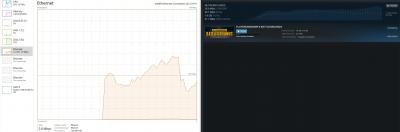
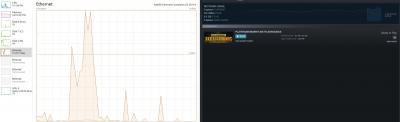
Did a pre-test, got around 441.14 mbps. (to check what is the starting baseline to compare with)
Then so happened got 9.5GB pubg update, getting around 28.7MBps peak. Windows task manager average around 200mbps. Disk usage was almost 100% haha, possible bottleneck? Got to say 9.5GB in approx 12mins is pretty good. If anyone got SSD with unifi turbo, maybe can verify? maybe my WD Blue is bottlenecking. Edited: Added result, after completed download. 38.3 MBps peak on steam, windows captured too late. This post has been edited by legendswt: Aug 8 2018, 06:53 PM Attached thumbnail(s) 
|
|
|
Aug 8 2018, 08:30 PM
Return to original view | Post
#25
|
|
Newbie
2 posts Joined: Nov 2013
|
QUOTE(Weretiger1 @ Aug 8 2018, 07:41 PM) I just checked based on tp link website, the router TM supplied to me is advertised to go up to 867Mbps on 5Ghz and 300Mbps on 2.4GHz. Your router is a different model?My 2.4ghz having 20-25m download My 5ghz having 47m downloX How???? Macam mana??? TP Link AC1200 Product page |
|
|
Aug 8 2018, 08:30 PM
Return to original view | Post
#26
|
|
Newbie
2 posts Joined: Nov 2013
|
QUOTE(aral3005 @ Aug 8 2018, 08:05 PM) Inb4 can it run crysis? My com can run crysis hahaInb4 wrong thread |
|
|
Aug 8 2018, 08:31 PM
Return to original view | Post
#27
|
|
Newbie
2 posts Joined: Nov 2013
|
QUOTE(aral3005 @ Aug 8 2018, 08:06 PM) Test it with nvme Don't want to spend so much on SSD, but if you supply I would love to test it for you haha. |
|
|
Aug 8 2018, 08:33 PM
Return to original view | Post
#28
|
|
Newbie
2 posts Joined: Nov 2013
|
QUOTE(GymBoi @ Aug 8 2018, 08:18 PM) Main question is ... how much are u paying monthly I got Unifi at the worst of times, 199MYR. Didn't have promo that time I signed up. Now I see all the 129MYR, sakit hati :'(I think I'm still under contract, and since I got this free upgrade I think I'll stick to it. |
|
|
Aug 8 2018, 09:21 PM
Return to original view | Post
#29
|
|
Newbie
2 posts Joined: Nov 2013
|
QUOTE(blahbleh @ Aug 8 2018, 08:36 PM) Can you help to check in your selfcare unifi.com.my, what is your plan now? Hi just checked, this is what they show.Attached thumbnail(s) 
|
|
|
Aug 8 2018, 09:27 PM
Return to original view | Post
#30
|
|
Newbie
2 posts Joined: Nov 2013
|
Bad news for wifi users, this is my result.
218Mbps Down and 102 Mbps Up Using 5GHz Wifi on Samsung S7. Attached thumbnail(s) 
|
|
|
Aug 8 2018, 10:49 PM
Return to original view | Post
#31
|
|
Newbie
2 posts Joined: Nov 2013
|
QUOTE(JohnLai @ Aug 8 2018, 10:39 PM) Oh...that? Tried on 80, same results(actually worse, but i attribute that to margin of error). But I don't really use the wifi, I routed cable for my desktop and TVs. Only mobiles are on wifi, not too worried about getting full 500Mbps on them.Have you change your router 5ghz channel width to 80Mhz? But I can understand others who depend on wifi, maybe they might not get the full speed on it. |
|
|
Aug 8 2018, 10:54 PM
Return to original view | Post
#32
|
|
Newbie
2 posts Joined: Nov 2013
|
QUOTE(JohnLai @ Aug 8 2018, 10:52 PM) Which server did you select on speedtest? Telekom Malaysia server? I didn't manually choose, auto selected some U-Mobile server. Don't know if switching to a Telekom Server would help.Edited: Okay switch to a webe server in PJ. Results as attached. 537Mbps Down & 103.02Mbps Up This post has been edited by legendswt: Aug 8 2018, 10:58 PM Attached thumbnail(s) 
|
|
|
Aug 8 2018, 11:05 PM
Return to original view | Post
#33
|
|
Newbie
2 posts Joined: Nov 2013
|
QUOTE(JohnLai @ Aug 8 2018, 10:59 PM)  So....not router and smartphone issue......? As for wifi, tried manually choosing webe server, switched manually to 80MHz width, link speed at 433Mbps, still getting on average 200+mbps only. Possible that my phone is just old, I don't have any other newer gadget. Not sure what modem is in exynos chipset, could be the culprit. Hope that clears things up a bit. |
|
|
Aug 8 2018, 11:10 PM
Return to original view | Post
#34
|
|
Newbie
2 posts Joined: Nov 2013
|
QUOTE(chocobo7779 @ Aug 8 2018, 11:07 PM) Phones tend to have 2x2 antenna or even smaller (due to size restrictions), which may lead to the bottleneck Wah, going into enthusiast techies territory already haha. I'm not too good with technology. What phone is that? BTW, the original speed for 802.11ac is 433Mbps Using Samsung S7. I believe it's considered ancient by 2018 standards? haha |
|
|
Aug 8 2018, 11:14 PM
Return to original view | Post
#35
|
|
Newbie
2 posts Joined: Nov 2013
|
QUOTE(chocobo7779 @ Aug 8 2018, 11:12 PM) What router is that? It's dependent on the WiFi hardware and the antenna itself If you mean my AP router, it's tp link ac1200. If you mean router and antennae in the phone, then it's out of my league. I really don't know. |
|
|
Aug 8 2018, 11:18 PM
Return to original view | Post
#36
|
|
Newbie
2 posts Joined: Nov 2013
|
QUOTE(JohnLai @ Aug 8 2018, 11:14 PM) S7 has 2x2:2 configuration. TP Link AC1200, original supplied by TM. Maybe this is an entry level router. There's only 2 antennas, I guess one 2.4 the other 5? So I guess cannot have 2 5GHz to maximize the speed? I still need the 2.4GHz to cover other parts of the home. What is your router model? Seem like your router only has 1 stream instead of 2? But again, WiFi is not an issue for me, don't really need 500mbps for my phone haha. Janji tv stream YouTube and Netflix cantik with cable. |
|
|
Aug 8 2018, 11:41 PM
Return to original view | Post
#37
|
|
Newbie
2 posts Joined: Nov 2013
|
QUOTE(JohnLai @ Aug 8 2018, 11:27 PM) Nope, as far as I know, S7 has issue with dropping to 433Mbps when connected to MU-MIMO capable router. Disabling MU-MIMO at the router will let S7 to be connected at 867Mbps Okay this is getting a bit deep for me. I'll check on how to enable beam forming tmr. I'll post the results if I get any significant result. According to tplink, if beamforming is enabled, SU-MIMO will be disabled and vice versa. (it is 2x2:2, so single-user mimo) However, supposely there is no MU-MIMO function for TP-Link C1200. On the other hand, C1200 has 5ghz Beamforming. Did you enable 5Ghz beamforming? Thanks though! Without you guys, I wouldn't even know about all these. Haha |
|
|
Aug 9 2018, 01:07 PM
Return to original view | Post
#38
|
|
Newbie
2 posts Joined: Nov 2013
|
QUOTE(MeToo @ Aug 9 2018, 12:32 PM) Praise? Well, TM is a for-profit business. It makes sense to maximize profit margins from a business perspective, I don't condone ridiculous profit margins (aka Apple products, Luxury cars). They can give us x100 speed without blinking... Meaning they have this capability (and within their budget) to do so for quite some time... but they never did... So they been shortchanging us for so long.... should F them instead If the government were to take back all the infra from TM, I think the burden to maintain, operate, deal with cable thefts, etc would be a huge burden on taxpayers money. Time is smart to target only profitable places, but this leaves out many many people who Time doesn't see as "profitable". Got good and bad I guess? However I don't think "F-ing" them would do anyone any good, right now I'm just glad they increase the internet speed without additional charges. I just want to be grateful for once. |
|
|
Aug 9 2018, 05:18 PM
Return to original view | Post
#39
|
|
Newbie
2 posts Joined: Nov 2013
|
QUOTE(iAmPotat0 @ Aug 9 2018, 02:51 PM) Maxis called me yesterday to ask regarding the unifi upgrade + any service issues when i was with maxis previously or not , then i told them im eligible for turbo upgrade. they quickly told me even if i was eligible, i wouldnt get the full speed due to the limitation of the router which was given by unifi. Once i told them i just bought a TP link archer c5400 , they kept quiet. Then i asked them , where's your speed upgrade? They said dont have. LEL . Wow, Maxis feeling the heat. Calling up customers already haha. I think Maxis and Time will retaliate. If not 2018, confirm 2019 will retaliate.Actually to me Maxis or TM also feels the same. I was on Maxis for a while, but switch back to TM because Maxis only offered me 5Mbps back then. |
| Bump Topic Add ReplyOptions New Topic |
| Change to: |  0.0202sec 0.0202sec
 1.07 1.07
 7 queries 7 queries
 GZIP Disabled GZIP Disabled
Time is now: 1st December 2025 - 01:32 PM |
 Quote
Quote