Welcome Guest ( Log In | Register )

3 Pages  1 2 3 >Bottom

Outline · [ Standard ] · Linear+

 HiMedia Media Player, All about HiMedia V2, New upgrade is out

views
     
TSOPT
post Jul 31 2018, 08:23 PM, updated 6y ago

Wee wang wang
*******
Senior Member
2,064 posts

Joined: Feb 2011
Aiseh...since no one open new thread.

Firstly I must say I'm kinda noob on this...

But today tangan gatal search for this thread and found got new firmware upgrade (since 30 Jul 2018)

Link below:

Q10pro :http://www.futeko.com/newforum/index.php?topic=3592.0
Q5pro :http://www.futeko.com/newforum/index.php?topic=3593.0

Changelog:
1. 4K UHD Bluray files playback optimized
2. Happycast for ios 11.4 supported
3. Netflix playback optimized
4. When online video playback, screen size switch not working issue fixed
5. When local video playback, screen size switch not working issue fixed
6. DLNA APP wrongly stop running issue fixed
7. HDCP2.2 Switch value not keeping after rebooting issue fixed
8. Russian and French language supported

I know bro AVFAN is taiko, don't ask siudai innocent.gif

Kalau salah mohon maafkan icon_rolleyes.gif
TSOPT
post Jul 31 2018, 08:30 PM

Wee wang wang
*******
Senior Member
2,064 posts

Joined: Feb 2011
...and yes, noob don't know how to add web links in here biggrin.gif
TSOPT
post Jul 31 2018, 11:12 PM

Wee wang wang
*******
Senior Member
2,064 posts

Joined: Feb 2011
QUOTE(AVFAN @ Jul 31 2018, 11:02 PM)
firmware 2.0.9 for q10pro and q5pro has been available for a week or 2 now.

but i am not rushing into it since i find 2.0.8 very good, no urgent need for new firmware.

will wait a bit, see if there is anything more from the reviews.
below is what i use my Q10pro for:

.. Q10pro->AVR->4k hdr TV+5.1 home theater.
.. sata drive inside box; 100gb spare for torrenting direct/temp and kodi quasar (watch n delete).
.. apps: astrogo, cloudtv, globaltv, redbox, livenettv, freeflix, terrarium, icdrama rss player, acestream media, kodi.
.. utilities: brave browser, dolphin browser, es file explorer pro, asus file manager, mx pro, vlc, xplayer, yes player.
.. playback: mkv, bdmv; 1080p, 2160p, hdr; dd, dd+, ddtruehd, dts, dtshdma.

will be happy to help if i can, on issues regarding above.  wink.gif
*
Really pro...haha

I download and watch 720p saje. Heh heh innocent.gif
TSOPT
post Aug 3 2018, 08:55 PM

Wee wang wang
*******
Senior Member
2,064 posts

Joined: Feb 2011
QUOTE(AVFAN @ Aug 3 2018, 08:52 PM)
i hv a couple of BDMV 1080p or 4k HDR that did not play full BD menu right.

with 209, one became good but the other still no good... but could be the rip was poor.
overall, i think the BDMV/BD iso 1080p/2160p HDR full menu feature is good enough, mature now.

it is this feature that i really appreciate Q10pro - i love to watch "the making", "deleted scenes"!

i think only EGreat can do this as well, no other box.

and with auto frame + auto resolution switch now, excellent.
*
Egreat price much much higher
TSOPT
post Aug 4 2018, 09:57 PM

Wee wang wang
*******
Senior Member
2,064 posts

Joined: Feb 2011
QUOTE(Ngto @ Aug 4 2018, 03:38 PM)
Talking about Eagles DVD, I transferred some of the my old DVD concerts to my thumb drive to do some testing on the Zidoo Home Theatre 2.0 poster etc.

It automatically scanned from the internet and got the following covers and info very accurately , although they are very old titles. For now the DVDs are mistakenly tagged as BD though lol ๐Ÿ˜„

I already got the HD DVD eagles farewell tour concert, so the Hell Freezes Over DVD is relegated  ๐Ÿ˜Š

Poster wall with Large icons and Medium icons .

Ok, sorry this is my last Zidoo post in Himedia thread ๐Ÿ™
*
I would very very very love to have this kind of menu....

Can Q10pro do this?

If yes, any links on how to do this? Noob here console.gif
TSOPT
post Aug 5 2018, 12:29 AM

Wee wang wang
*******
Senior Member
2,064 posts

Joined: Feb 2011
All I get is a โ€œNo File!โ€ Written...


Update: ok, now I get something...it seems first need to go to setting to click on some setting...

This post has been edited by OPT: Aug 5 2018, 12:31 AM
TSOPT
post Aug 5 2018, 01:25 AM

Wee wang wang
*******
Senior Member
2,064 posts

Joined: Feb 2011
Could a NAS-like unit be plugged in direct into Q10pro? Or do we need a pc for that?
TSOPT
post Aug 6 2018, 01:24 AM

Wee wang wang
*******
Senior Member
2,064 posts

Joined: Feb 2011
QUOTE(AVFAN @ Aug 5 2018, 08:25 PM)
if i read correctly, u mean a docking station where u fit in a couple of HDD, connect via LAN to router...?

i hv seen such a device, supposedly will work like a nas.

i think it should work via q10pro media center, just like nas or samba to pc or other connected device used as a server.
such a device, can also plug in direct to player via usb which will obviously work.[I]
*
Can anyone confirm can direct via usb?
TSOPT
post Aug 6 2018, 11:31 PM

Wee wang wang
*******
Senior Member
2,064 posts

Joined: Feb 2011
QUOTE(AVFAN @ Aug 6 2018, 01:57 AM)
I am not entirely sure what device u meant.

Post a picture... then others can comment.

I think it can becos i have a simple docking station, just usb, works fine, rm120.

That device i saw, and i think it is what u meant, costs rm500 or so.
*
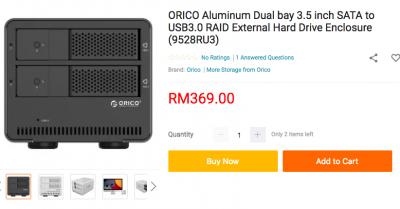
Something like this...

can we use the usb even though there could be more than 1 hdd inside?

Or do we need to go through samba or LAN...(Never tried before)


Attached thumbnail(s)
Attached Image
TSOPT
post Aug 7 2018, 12:39 AM

Wee wang wang
*******
Senior Member
2,064 posts

Joined: Feb 2011
QUOTE(AVFAN @ Aug 7 2018, 12:24 AM)
that is a device more for doing fast backups but will work as an ordinary sata HDD enclosure or docking station.

u can go to IT stores, pick one of a dozen models, rm100-rm300.

those than can take 2.5" sata is very useful - if your portable HDD dies, remove the casing and slot it in.

becos it's usually the sata bridge card that kaputs, not the drive itself.

I wrote about this a few months ago, see post #3367.
https://forum.lowyat.net/topic/1849024/+336...20bridge%20card
*
Yes, I saw and read your earlier posts and was about to buy those RM100-300 until i chance upon these...

I'm not into RAIDs though...just multiple HDD and kept in a fan ventilated and more nice arrangement setup.

Back to my original question, would these be recognized by Himedia Q10pro (without the need of a PC or LAN)?
TSOPT
post Aug 23 2018, 08:54 PM

Wee wang wang
*******
Senior Member
2,064 posts

Joined: Feb 2011
QUOTE(gkl83 @ Aug 23 2018, 08:34 PM)
Sound bad for me now.

I bought Q5 Pro but doesn't resolve the problem and worse. Seem Q5 player could read the 3D iso as the LCD screen showing the play time but no video, audio and subtitle at all. sweat.gif

Any opinion?
*
Q5pro should be good...

Strange indeed. It seems from your statements, each time there is sound but no picture. Could it be an issue with your TV/TV setting/mediabox setting?

If I understood you correctly, you used H8 and Q5pro and both produced no picture?
TSOPT
post Aug 24 2018, 09:53 AM

Wee wang wang
*******
Senior Member
2,064 posts

Joined: Feb 2011
QUOTE(gkl83 @ Aug 24 2018, 02:58 AM)
Seem my pioneer receiver bottleneck 3D contents cannot go thru it.

I do cable direct from Q5 to TV and tested 2 hdmi cable provided by seller, it is working fine. Later, I use both tested hdmi cables to connect with pioneer receiver and TV doesn't appear any contents at all (no video, audio and subtitle).
Here my findings
1. Any settings to be done on Q5 to suit with Pioneer? At least H8 have audio and subtitle.
2. Any possible good HDMI cables can resolve this?
3. Can I connect HDMI and optical (audio) on Q5? Video thru Hdmi to TV and audio thru optical to Pioneer?
*
Maybe TV 3D got problem? I didn't realize it was 3D in the first place rolleyes.gif

Shouldnt be HDMI cable issue as you have tested it
TSOPT
post Sep 2 2018, 08:30 AM

Wee wang wang
*******
Senior Member
2,064 posts

Joined: Feb 2011
The subtitle skipping is really annoying...

When was the last firmware version without this issue? Anyone knows?

I think this has been the case since the last 2-3 updates
TSOPT
post Sep 7 2018, 09:43 PM

Wee wang wang
*******
Senior Member
2,064 posts

Joined: Feb 2011
QUOTE(Ngto @ Sep 2 2018, 10:08 AM)
Yes, I mentioned the problem before. The futeko forum also got people complain. Don't know they will fix or not.
*
Bcos of this, I've decided and already just sold off my Q10pro.

Looking into other models in the near future sweat.gif
TSOPT
post Sep 10 2018, 04:21 PM

Wee wang wang
*******
Senior Member
2,064 posts

Joined: Feb 2011
QUOTE(Ngto @ Sep 10 2018, 10:51 AM)
You should have waited for future FW, see if they fixed or not. I think the problem is with only certain subtitles where the dialogue text timing  is too close to one another, so the bug in the FW skip certain lines.

Sometimes I switch to a diff subtitles source (external/Internal), it solve the problem.
*
Mine are usually external subs, same issue that Iโ€™m experiencing.

Anyway, while I like himedia (still have my olโ€™ q3ii that Iโ€™m using temporarily), Iโ€™m exploring other brands ๐Ÿ˜Š
TSOPT
post Sep 10 2018, 10:57 PM

Wee wang wang
*******
Senior Member
2,064 posts

Joined: Feb 2011
QUOTE(AVFAN @ Sep 10 2018, 08:22 PM)
i think this is a subs provider problem.

becos i see the same skipping when using kodi player.

anyway, yes, do try another box, let us now how this and other issues come out.

*
I don't think so because this past 1 week with my ol' q3ii....subs are 100% good hmm.gif

Suddenly like my q3ii much much better too wink.gif

This post has been edited by OPT: Sep 10 2018, 10:57 PM
TSOPT
post Sep 11 2018, 09:51 AM

Wee wang wang
*******
Senior Member
2,064 posts

Joined: Feb 2011
QUOTE(AVFAN @ Sep 10 2018, 08:22 PM)
anyway, yes, do try another box, let us now how this and other issues come out.
*
Was gonna get a Zappiti, but apparently itโ€™s currently sold out in Malaysia. Next batch of shipment is coming soon though, but no date fixed yet.

Was looking at other alternatives when I chance upon this Zidoo that carries similar chipset as Zappiti. Online reviews were good. Also, somehow because Zappiti website responded a bit โ€˜lateโ€™...I decided to get this Zidoo.

Somehow my q3ii...still very good if youโ€™re not in 4K

This post has been edited by OPT: Sep 11 2018, 09:53 AM
TSOPT
post Sep 11 2018, 10:35 AM

Wee wang wang
*******
Senior Member
2,064 posts

Joined: Feb 2011
QUOTE(AVFAN @ Sep 11 2018, 10:28 AM)
ya, zidoo and zappiti uses realtek chipset.

egreat is said to be good too, uses same hisilicon chipset as q10pro.

not sure if there is a zidoo thread, but do post something for us to read when u have used it enough, tq.
*
Zidoo thread closed d...

Why Zidoo X9S? It costs about half of Zappiti with both using same chipset.

Also read online Zidoo seems pretty good and fast support. Many preferring this over Zappiti.

Plus...I have Lazada big voucher thus I have close to RM100 off this Zidoo unit ๐Ÿ˜ฌ

This post has been edited by OPT: Sep 11 2018, 10:37 AM
TSOPT
post Sep 13 2018, 03:50 PM

Wee wang wang
*******
Senior Member
2,064 posts

Joined: Feb 2011
QUOTE(Ngto @ Sep 11 2018, 11:25 AM)
You should update to latest FW for the x9s to get the better UI and HT 2.0 wall posters interface, that you said you liked before.

There are lots of hidden options in the x9s which uses Android 6.0. Even the android adjustments settings is buried deep in the 'Quick Settings-Other-About-Advanced Settings' page. However If your unit comes with the 'Settings' app installed , then you could access that option quickly.

You should also auto sync your resolution and frame rate in the display settings options  if your tv support 24p for smooth playback.

Also there is no separate file manager to copy, delete etc. It's all Incorporated in the Media Center itself. Try not to install third party file manager, they can bring some problems.

I installed ES File explorer once, and during some operations it corrupted my thumb drive. Had to reformat.

One more thing I forgot to mention earlier, the remote has 2 unused buttons (red and green) which can be programmed with some limited functions of your choice. The option is found in the quick settings. I chose to use them as subtitles and audio change buttons.
*
You have Zidoo X9S? How is it compared to Q10pro?
TSOPT
post Sep 13 2018, 06:21 PM

Wee wang wang
*******
Senior Member
2,064 posts

Joined: Feb 2011
QUOTE(Ngto @ Sep 13 2018, 05:17 PM)
Currently I have not used  extensively yet, as it is connected to my Samsung KS7000 4k tv, which is in the Living room. Refer to my post #22, 26 etc. , if you have forgotten.

My Q10 pro I bought earlier is connected to my AVR  and Sharp 3D tv (full HD)in my bedroom turned into HT room (sort of).

The Zidoo can also do 3d of course, but unfortunately the Samsung is not a 3d tv.
*
thumbsup.gif

Me old man with bad memories biggrin.gif

Ok, since you have it...can I ask a question:-
- How do you use the Home Theatre and get the wallpapers? Do we need to put it into a folder [Movies] and the movie file (.mp4,.mkv, etc) into it?
Example
d:\movies\Autaman.mp4

Currently, all mine are into individual folders according to alphabets (for easy manual searching of course plus the release year (just for quick info) and ws (with subtitle smile.gif ) , e.g

d:\movies\A\Autaman (1900) ws\Autaman.1080p.1900.mp4

Could mine above show the respective wallpapers?

3 Pages  1 2 3 >Top
 

Change to:
| Lo-Fi Version
0.0491sec    0.37    7 queries    GZIP Disabled
Time is now: 1st December 2025 - 07:43 PM