Outline ·
[ Standard ] ·
Linear+
How to buy cheap ASUS RT-AC68U router, come have a look
|
ulala2
|
 Dec 3 2018, 02:11 PM Dec 3 2018, 02:11 PM
|
Getting Started


|
QUOTE(sHawTY @ Nov 30 2018, 07:29 PM) Here's a screenshot of me downloading the latest AMD Radeon Driver from AMD website 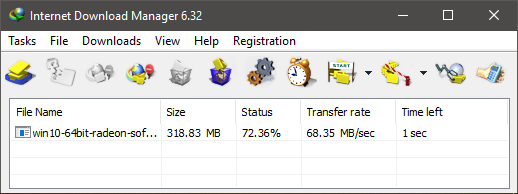 As you can see, I can get more than 500Mb/s Here: 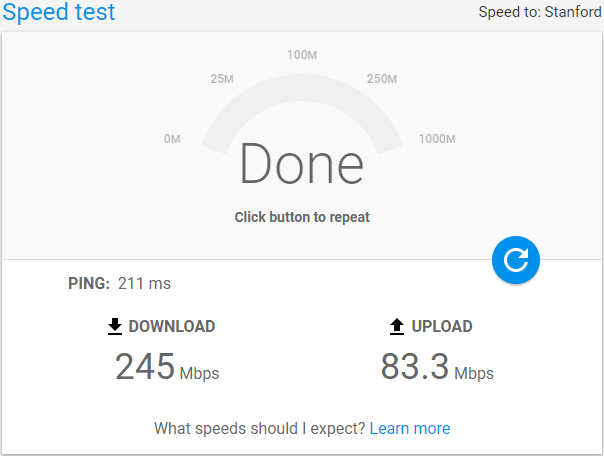 I still unable to enjoy 800mbps, TM will send technician tomorrow to my house and check the condition...hope tomorrow everything can settle. |
|
|
|
|
|
ulala2
|
Dec 4 2018, 04:54 PM
|
Getting Started
|
QUOTE(lyc1982 @ Dec 3 2018, 02:13 PM) if the tm technician found nothing faulty...will they charge you rm53 ? They turn out today and after 30 min finding, nothing wrong from their side, is my antivirus software caused the speed drop. Without antivirus software on PC, get 825mbps, with antivirus on only get around 500mbps. Just for info, if any of yours using China 360 Antivirus, please take note this will affect the internet speed. |
|
|
|
|
|
ulala2
|
Dec 4 2018, 05:51 PM
|
Getting Started
|
QUOTE(lyc1982 @ Dec 4 2018, 05:34 PM) i tested with and without enabling Kapersky Internet Security...the speedtest result is the same...lol This may due to the 360 antivirus take a lot of ram or bandwidth or internal setting caused the speed drop. Now need search for other antivirus software.... |
|
|
|
|
|
ulala2
|
Dec 6 2018, 12:58 PM
|
Getting Started
|
just saw a post from FB mentioned TNB also will become new internet service provider.
Currently tested in 1 POS Office mange to get 9xx mbps download speed and 7xx mbps upload speed..lolz
|
|
|
|
|
|
ulala2
|
Dec 10 2018, 09:00 AM
|
Getting Started
|
Any 1 here facing problem with LAn 4 Hypptv ??
Keep pop up mentioned unable to detect internet, lan cable problem.
Replace with new workable lan cable still problem.
Replace my RT-AC86U with 55U also the same.
Lan 4 cannot detect internet.
|
|
|
|
|
|
ulala2
|
Dec 10 2018, 11:37 AM
|
Getting Started
|
QUOTE(sHawTY @ Dec 10 2018, 10:19 AM) Are you trying to use the port 4 for internet or to watch HyppTV? For hypptv. However, Hypptv unable to detect internet connection at Port 4. Setting in router IPTV already using Unifi-Home, Lan 4. |
|
|
|
|
|
ulala2
|
Dec 10 2018, 02:30 PM
|
Getting Started
|
QUOTE(sHawTY @ Dec 10 2018, 02:23 PM) Turn off the HyppTV for 1 minute by disconnecting the AC adaptor but leave the ethernet cable plugged in Reconnect the AC adaptor but let it run at the home screen for a few minutes before you actually open the HyppTV channels Will try this tonight Just for info, after using AC86U, Lan cable i able to achieved 750-800mbps while my iphone 8 plus reached 500mbps. This post has been edited by ulala2: Dec 10 2018, 02:31 PM |
|
|
|
|
|
ulala2
|
Dec 13 2018, 12:18 PM
|
Getting Started
|
QUOTE(sHawTY @ Dec 10 2018, 02:23 PM) Turn off the HyppTV for 1 minute by disconnecting the AC adaptor but leave the ethernet cable plugged in Reconnect the AC adaptor but let it run at the home screen for a few minutes before you actually open the HyppTV channels After TM technician come and check, the hypptv equipment is faulty and replaced with a new one, while my Lan 4 still cannot detect. So search around, i reset my Lan 3 to IPTV and it works. Solved the issue. |
|
|
|
|



 Quote
Quote
 0.0373sec
 0.42
0.42
 7 queries
 GZIP Disabled