Hi guys. Just installed viofo129 duo with hardwire kit. Parking mode is important for me so I put auto event detection mode ON. I have some questions sometimes when I open the door I can hear beep sound and rec light flashing. It will turn off when I press the button. Is that normal? Another thing when I check back the recordings got some parking videos only not until I drive the car next morning. Is that bcz it auto off after battery colt reach 12.4? I tried to test parking mode g sensor by shaking the car from outside free times. But it didn’t record any videos... pls enlighten me
Um... If parking mode is important to you, should have went straight with Thinkware dashcam instead of A129.
Viofo's buffered parking mode is not 100% prefect like Thinkware dashcam. But it is the 1st China dashcam manufacturer to get buffered parking mode to work almost like Thinkware's.
Another thing, check what firmware are you using? Heard new firmware has some fixes for parking mode.
Um... If parking mode is important to you, should have went straight with Thinkware dashcam instead of A129.
Viofo's buffered parking mode is not 100% prefect like Thinkware dashcam. But it is the 1st China dashcam manufacturer to get buffered parking mode to work almost like Thinkware's.
Another thing, check what firmware are you using? Heard new firmware has some fixes for parking mode.
Don’t have budget to buy thinkware bro. I’m using latest 2.1 firmware. Yesterday I format the memory card and reset settings of the camera. Want to test today
Wed, 5 Aug, 2020 at 2:28 AM Latest A129 firmware is released, the version number is V2.1, please check the attachment:
Change log: Added the WiFi station mode(Press the MIC button to enable, and WiFi button to disable.) Live video source display will keep after the restart Optimize looping recording in parking mode for slow card Menu language translation update
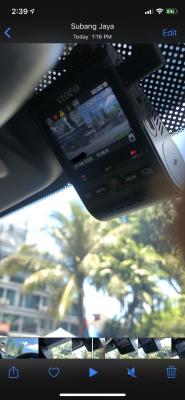
I am worried about removing the camera from windscreen as it might be hard to attach it back. As per instruction said ‘ Insert the card in the camera and connect it to the computer using a USB cable.’
I am worried about removing the camera from windscreen as it might be hard to attach it back. As per instruction said ‘ Insert the card in the camera and connect it to the computer using a USB cable.’
Or can i just take out the memory card?
Err the camera can be unattached from the base. its the base that is sticked on the windscreen.
I am worried about removing the camera from windscreen as it might be hard to attach it back. As per instruction said ‘ Insert the card in the camera and connect it to the computer using a USB cable.’
Or can i just take out the memory card?
You can take out the micro SD card and copy the firmware into it using a PC. Then insert it back into the A129 then power on and wait for it to update.
You'll need to setup again the A129 as after firmware update will reset the A129 back to factory defaults.
This post has been edited by blurjoey: Aug 24 2020, 09:41 AM
Don’t have budget to buy thinkware bro. I’m using latest 2.1 firmware. Yesterday I format the memory card and reset settings of the camera. Want to test today
Alright.
Just confirm if the HK3 is using the correct ACC and BATT fuse only.
You can take out the micro SD card and copy the firmware into it using a PC. Then insert it back into the A129 then power on and wait for it to update.
You'll need to setup again the A129 as after firmware update will reset the A129 back to factory defaults.
Just see if you want to remove the A129 plug to PC and update or just take out the micro SD card and use micro SD card reader to PC only to copy the firmware into it.
Where did you get it installed? If at an authorized installer then should be ok. If accessories shops then need to check if correct or not.
It’s not at Sizurez so definitely not authorised I think. But I get good deal (I think so) rm840 plus high endurance sandisk 128gb and installation. Btw today I found this notification when want to start my car after parking. The exclamation sign like the photo attached. It goes off after a while.
This post has been edited by rusty27: Aug 24 2020, 02:43 PM
It’s not at Sizurez so definitely not authorised I think. But I get good deal (I think so) rm840 plus high endurance sandisk 128gb and installation. Btw today I found this notification when want to start my car after parking. The exclamation sign like the photo attached. It goes off after a while.
The warning is impact detected or manual recording.
The warning is impact detected or manual recording.
I doubted so. I checked back the videos n no video saved in locked files. Btw I go thru viofo website n found that parking mode with hardwire kit will only works if the cable connected directly to the camera not thru gps mount. So I just changed and see hw it goes
I doubted so. I checked back the videos n no video saved in locked files. Btw I go thru viofo website n found that parking mode with hardwire kit will only works if the cable connected directly to the camera not thru gps mount. So I just changed and see hw it goes
Think you better ask the seller as I didn't test the parking mode extensively as it failed the low voltage for me during review.
want to ask, rear camera get power from the connector, or it saperately? how long the cable? extra or just enough?
from video share, i could see there was gps, date time stamp. was this on recorded video, got setting option / enable / disable, or post process with apps?
without that wiring to car box, this camera not have any battery? ie car full engine stop, i want keep recording run.. cannot?
want to ask, rear camera get power from the connector, or it saperately? how long the cable? extra or just enough?
from video share, i could see there was gps, date time stamp. was this on recorded video, got setting option / enable / disable, or post process with apps?
without that wiring to car box, this camera not have any battery? ie car full engine stop, i want keep recording run.. cannot?
The rear cam is controlled by the front cam. The rear camera cable is 6m long.
The GPS info can be turned off in the settings.
If you haven't read the 1st post, Viofo dashcams all is using supercapacitors and not battery. So there is no power after you off the engine.
Only way to continue recording aka parking mode is to use with the HK3 hardwire kit.
Just see if you want to remove the A129 plug to PC and update or just take out the micro SD card and use micro SD card reader to PC only to copy the firmware into it.
tried to remove the dashcam yesterday and it works fine. by the way i will update it once my card reader arrived.
one more thing, how can i remove our own plate number from recording? i have this one video of a Jazz + 2 Axia is speed of recklessly until almost hit my car. i wanted to share it online but then again there is my car plate number there. tried to make the plate number section empty in the apps but it still wont change.
tried to remove the dashcam yesterday and it works fine. by the way i will update it once my card reader arrived.
one more thing, how can i remove our own plate number from recording? i have this one video of a Jazz + 2 Axia is speed of recklessly until almost hit my car. i wanted to share it online but then again there is my car plate number there. tried to make the plate number section empty in the apps but it still wont change.
Try changing it on the A129 settings and see. There is 2 options - Custom text stamp and car license number.


 Aug 23 2020, 10:37 PM


 Quote
Quote






 0.0292sec
 0.73
0.73
 6 queries
 GZIP Disabled