Welcome Guest ( Log In | Register )

3 Pages  1 2 3 >Bottom

Outline · [ Standard ] · Linear+

 Astro Version 13A, All about Astro Malaysia offerings

views
     
xxxgkssixxx
post Aug 6 2019, 11:04 PM

Getting Started
**
Junior Member
187 posts

Joined: Jun 2019
QUOTE(opjust @ Aug 6 2019, 08:32 PM)
Guys - anyone using Astro go on LG smart TV? All of the sudden Astro go apps no longer available from LG store?

Anyone know that happened? Call Astro they told me it’s LG issue.
*
I just checked with Astro customer service via Facebook, they replied me with 2 messages:

"We are sorry to inform you that Astro will be decommissioning the Astro Go Smart TV app. We have since removed the app from LG store from downloads."

"We are updating the Smart TV app which shall include disabling the service from the LG Smart TV until further notice"


QUOTE(yongtjunkit @ Aug 6 2019, 08:55 PM)
I saw on their Facebook page this morning while I was contacting support that the app got discontinued
*
Do you have a link or screenshot of that post? I couldn't find it on Astro Facebook page.


xxxgkssixxx
post Aug 8 2019, 10:43 PM

Getting Started
**
Junior Member
187 posts

Joined: Jun 2019
QUOTE(yongtjunkit @ Aug 7 2019, 06:56 AM)
Thanks!
xxxgkssixxx
post Aug 22 2019, 12:38 AM

Getting Started
**
Junior Member
187 posts

Joined: Jun 2019
QUOTE(Qash-M @ Aug 21 2019, 05:46 PM)
user posted image

Ahem.
*
QUOTE(nexona88 @ Aug 21 2019, 09:44 PM)
Meaning No free preview for selected channel's during merdeka period huh...
*
These "blockbusters" replay dono how many times on Astro already ... doh.gif
xxxgkssixxx
post Jan 14 2020, 10:00 PM

Getting Started
**
Junior Member
187 posts

Joined: Jun 2019
QUOTE(yongtjunkit @ Jan 14 2020, 10:54 AM)
https://www.youtube.com/watch?v=eOHGUJ-vgw8

I think he means this "new Astro experience "  thumbup.gif
On a serious note, you'll regret if your house has a poor internet connection
*
I thought the new Ultra box is a satelite + internet hybrid, means we can still watch Astro without the internet? Correct me if I'm wrong.
xxxgkssixxx
post Feb 11 2020, 11:02 PM

Getting Started
**
Junior Member
187 posts

Joined: Jun 2019
QUOTE(mohamad134 @ Feb 11 2020, 09:29 PM)
NOOOOOOO~ i did the same last month.. kena marah kaw2 dengan mak they really hates the new interface and start to complaint a lot to you when something goes wrong. so don't do anything stupid.. now ayam very regret ada 23 months left with no way to downgrade back to PVR.
*
Very big difference? I planned to upgrade to ultra box after my existing contract ends next month...but I'm having the same concern. For Astro, my parents only know how to use the number pad on the remote to switch channels, that's it. If ultra box also can use the same way then maybe still ok for them.


xxxgkssixxx
post Feb 12 2020, 10:29 PM

Getting Started
**
Junior Member
187 posts

Joined: Jun 2019
QUOTE(joshhd @ Feb 12 2020, 12:35 AM)
Oh wait wait wait...
Before you even think of upgrading to Ultra Box, do you use PVR recording and its functions often (like pause live TV, rewind live TV,...)? If yes, maybe put a hold on that first for now.
Ultra Box do comes with lots of new internet-based features and also one free 4K UHD channel (ch780), some features were removed compared to the PVR box.

Unless if you really die hard fan of wanting to experience 4K UHD content like football, sports, documentaries in 4K UHD quality, and often stream shows from Video on Demand, then Ultra Box may be suitable for you to upgrade. Ways of using it, is pretty much the same. Same as just pressing channel numbers, but it comes with other new features. If you interested to try out new stuff, go ahead.

If just watch TV by pressing channel numbers and literally nothing much than that, then I suggest you stick with your PVR box, at least for now. Not forever la of cos. For now only.
*
I'm currently using the old HD box that cannot do anything besides switching channels sweat.gif

I do stream / record shows on Astro Go sometimes. Since ways of using it is similar with PVR, I guess it would be ok if I just directly upgrade to Ultra Box (?) hmm.gif


xxxgkssixxx
post Feb 13 2020, 11:46 PM

Getting Started
**
Junior Member
187 posts

Joined: Jun 2019
QUOTE(joshhd @ Feb 13 2020, 01:53 AM)
Ohh if that's the case, you shall be fine upgrading to Ultra Box. If your monthly fee is above RM100 per month, then upgrading to Ultra Box is free.
If below RM100/month, a one time RM199 will be charged.
Either way, you'll get 24 months contract, or penalty of up to prorated RM1600 if terminate within contract period.

If you're living in building (condo/apartment) using centralised dish, it must be able to support the newer dCSS technology, or else your Ultra Box won't be able to receive UHD channels due to technical factors. If your current Astro box is connected to an individual dish (own Astro dish outside your home, like in landed houses or certain flats/apartments), then you're fine.

If you're using 4K UHD TV (make sure it is HDCP 2.2 compliant), you should be able to watch the one and only UHD channel allowed to be viewed to all Ultra Box users, which is on CH 780.
If you're not using a 4K UHD TV, tuning to CH780 or any UHD channels will appear the HDCP error message. You can still watch SD and HD channels as per usual.
*
wow...very detailed explanation rclxms.gif

thanks a lot!
xxxgkssixxx
post Feb 23 2020, 11:29 PM

Getting Started
**
Junior Member
187 posts

Joined: Jun 2019
[Advice needed]

I am working on my new house wiring, but I'm wondering whether the same Astro satellite dish can connect to two different wall port (eg. one in ground floor, one in upper floor) ?

The reason I'm asking is : there's only 1 satellite wall port at ground floor living room. I'm thinking to add an additional wall port at upper floor and just move Astro/Njoi box to upper floor, in case when anyone want to watch Astro/Njoi there.

I rarely watch Astro, but I just want to prepare for it in case my parents come over to my house (they only watch Astro)


xxxgkssixxx
post Feb 25 2020, 12:53 AM

Getting Started
**
Junior Member
187 posts

Joined: Jun 2019
QUOTE(joshhd @ Feb 24 2020, 01:13 AM)
Can. You may wire 2 cables to both ground floor living room and upper floor respectively.
Are you planning to use Ultra Box in the future to watch UHD channels? Or you'll just use Njoi box all the way?
*
For the near future only Njoi box I guess. Why ask so?


xxxgkssixxx
post Mar 1 2020, 11:52 PM

Getting Started
**
Junior Member
187 posts

Joined: Jun 2019
QUOTE(joshhd @ Feb 25 2020, 02:24 AM)

If that's the case, then you can just use a cable splitter to split into 2 cables for downstairs and upstairs respectively to get things done.
If possible, try make the cable connection as short as possible by not placing your satellite dish too far away from your Astro/Njoi box.
The shorter the overall cable length, the lesser the signal loss caused by cable attenuation. Better is less than 15 metres.

» Click to show Spoiler - click again to hide... «

*
Cable splitter means 1 cable from satelite then split to two floors? With that, i can just bring astro / njoi box to any floor then plug and play?
xxxgkssixxx
post Mar 3 2020, 12:43 AM

Getting Started
**
Junior Member
187 posts

Joined: Jun 2019
QUOTE(joshhd @ Mar 2 2020, 06:46 AM)
Yes, that's correct.
*
OK noted. Thank you smile.gif
xxxgkssixxx
post May 17 2020, 07:32 PM

Getting Started
**
Junior Member
187 posts

Joined: Jun 2019
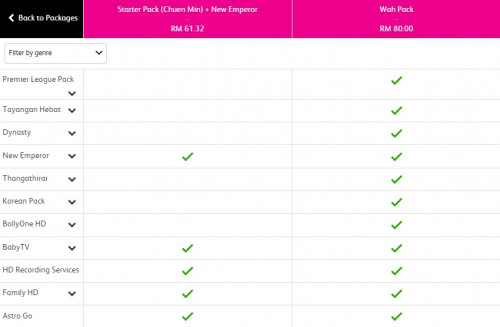
Dynasty Pack seems to be offered under Wah pack now? Previously my Wah Pack doesn't have WLT and AOD channels but now I can watch these channels already...

user posted image
xxxgkssixxx
post May 17 2020, 10:29 PM

Getting Started
**
Junior Member
187 posts

Joined: Jun 2019
QUOTE(joshhd @ May 17 2020, 08:43 PM)
Yeah...
As for Astro Awani in HD, nobody knows...

Yes. Read this post to know more: https://forum.lowyat.net/index.php?showtopi...&#entry96647553

Btw how did you get to see this screen? Send link...  biggrin.gif
*
Erm... which post? Didn't see any related post in that link

To get to that screen u have to go HERE then compare Starter Pack & Wah Pack

By the way, I have a few questions regarding Astro, not sure if you can help:

1. I'm currently subscribing Wah Pack with ancient HD Box (No PVR), if I want to upgrade to Ultra Box, can I just take the Ultra Box home then plug and play, or still need technician come into my house for installation or pull additional cables? (Parents want to avoid any strangers to come in during this COVID period)

2. What is the duration of renewed contract if I upgrade to Ultra Box with existing package?

3. Can Astro Go play on TV via HDMI cable? (i.e. play Astro Go on phone/tablet, connect to TV via USB-C to HDMI cable)

Thanks.


xxxgkssixxx
post May 18 2020, 09:29 PM

Getting Started
**
Junior Member
187 posts

Joined: Jun 2019
QUOTE(joshhd @ May 18 2020, 01:56 AM)
1. Astro technician have to come to your house and install it and activate it. No additional cables.
Just contact and ask Astro if you need further clarification on whether they make sure all of its technicians are tested and free from COVID-19 or not.
Practice social distancing. It should be good enough.

2. 24 months, or penalty of up to RM1000 prorated if early account termination (It means penalty applies if you downgrade to whatever Astro boxes without valid reasons, or terminate Astro account altogether).

3. Yes. You may login Astro Go on your laptop, connect HDMI cable from laptop to TV and watch it from there.
As of now, Astro Go doesn't support any form of wireless "Cast to Device". Maybe would be available in the future.
*
I see. Thanks a lot


xxxgkssixxx
post Jun 27 2021, 12:00 AM

Getting Started
**
Junior Member
187 posts

Joined: Jun 2019
QUOTE(rajlesta00 @ Jun 26 2021, 06:42 PM)
Astro called me and offered New decoder (iptv box) as 2nd decoder for RM50/month. Without dish and just need an internet connection. The list of channels follow my main package. I didn't accept.
*
Since it doesn't require satelite dish, can we use it at another location? (for example my main package & decoder at my parents house and the second one i use it at my own house)
xxxgkssixxx
post Nov 9 2021, 07:57 PM

Getting Started
**
Junior Member
187 posts

Joined: Jun 2019
QUOTE(leetan33 @ Nov 9 2021, 06:18 PM)
It seems like none of the new Astro package covers Dynasty package?
*
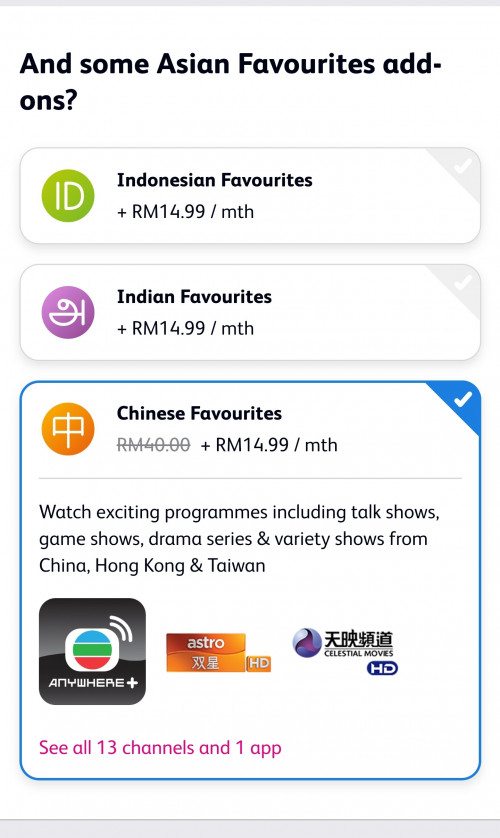
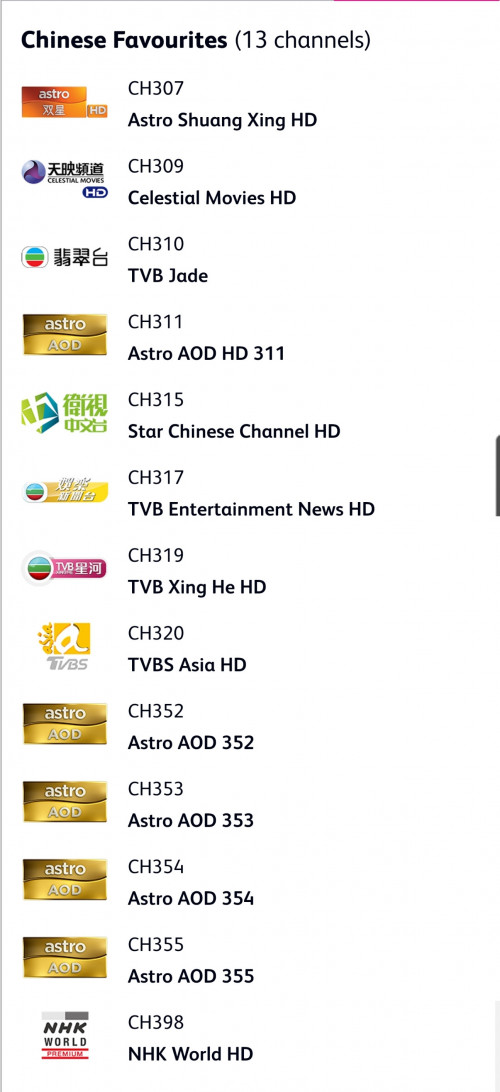
Dynasty being grouped under "Asian Favourites", it is included in most of the new packs except for Primary pack.

For Primary pack, the add-on option for Asian Favourites (RM14.99) will only appear after you have selected Primary + Movies + Sports

user posted image
user posted image

I think I will keep my Wah Pack for the time being.
xxxgkssixxx
post Nov 9 2021, 10:56 PM

Getting Started
**
Junior Member
187 posts

Joined: Jun 2019
QUOTE(joshhd @ Nov 9 2021, 10:16 PM)
Whatever packages you subscribed (before 9 Nov?) will remain as it is.
However you won't be able to make any changes to your current subscription anymore (including adding or removing packs and, even Multiroom).
You must choose the new bundle packs in order to make changes.
*
If I want to subscribe multiroom (eg. taking ulti box) now, do I have to change to new package too? Or I can maintain the same old package that Im having now?


xxxgkssixxx
post Nov 15 2021, 11:26 PM

Getting Started
**
Junior Member
187 posts

Joined: Jun 2019
QUOTE(lowyat101 @ Nov 15 2021, 10:22 AM)
Currently I'm subscribing to a package for my parents. Now need 1 more for my in-law.

Just want to find out from the sifus here, if I subscribe it under the same account, will there be any benefits or promos? Chat with the CS but seems that they are not offering anything on this. Keep on asking if I want to add the broadband package instead

Thanks
*
QUOTE(joshhd @ Nov 15 2021, 12:23 PM)
Let me summarise, just make sure I get your points right.
Currently you've already subscribed to Astro for your parents. And now you want to also subscribe Astro meant for your in-law, is that correct?

The thing is, if it's a different address, then it has to be a different separate account already.
Official, you can't use the same Astro account and install Astro boxes at different addresses.

*
What if we sign up for multiroom, then take the Ultibox / Ultra Plug & Play Box and use it another location? Since these boxes doesn't require satelite dish, I guess this method would work without signing up for a new account?


xxxgkssixxx
post Apr 6 2022, 10:13 AM

Getting Started
**
Junior Member
187 posts

Joined: Jun 2019
user posted image

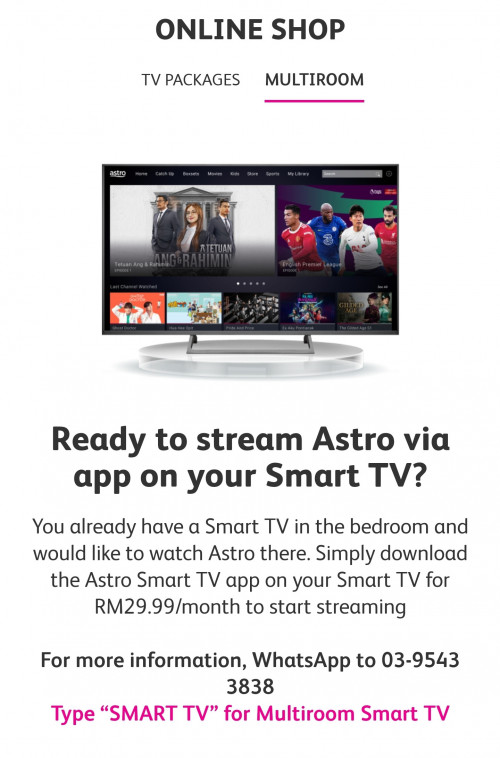
I just found out that Astro offering Multiroom with SMART TV this morning. Does it mean we can officially use multiroom at different address (via SMART TV) now?


xxxgkssixxx
post Apr 26 2022, 08:39 PM

Getting Started
**
Junior Member
187 posts

Joined: Jun 2019
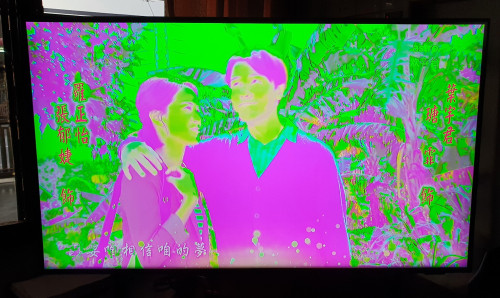
Hi all, I just changed a new SMART TV few weeks ago and sometimes Astro shown in pink + green screen when I switched on the TV. I have to switch off the power of the Astro decoder (Beyond HD non-PVR version) and turn it on back then the colour will back to normal.

The discolouration only happened to Astro screen. The TV UI and Mi Stick (HDMI 2 port) are not affected.

Did anyone encountered this problem before and does anyone know how to fix this? Thanks.

user posted image


3 Pages  1 2 3 >Top
 

Change to:
| Lo-Fi Version
0.0558sec    0.40    7 queries    GZIP Disabled
Time is now: 11th December 2025 - 02:10 PM