

Is it normal?
Thx
This post has been edited by chuah_ph: Oct 14 2020, 12:26 AM
Astro Version 13A, All about Astro Malaysia offerings
|
|
 Oct 14 2020, 12:14 AM Oct 14 2020, 12:14 AM
Return to original view | IPv6 | Post
#1
|
 
Senior Member
951 posts Joined: Sep 2004 From: Penang  
|
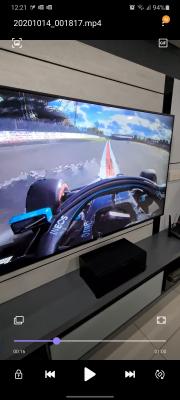
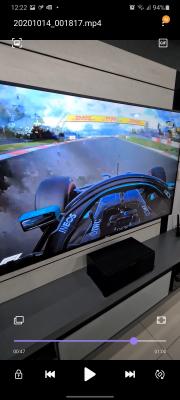
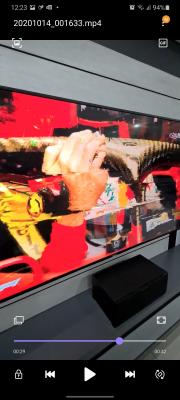
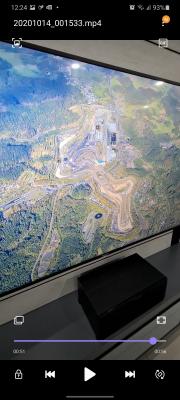
Hi, I just got my Astro-Maxis Fiber broadband installed today with 300Mbps speed but observe video picture tends to be glitch on 2160P and worst on 780 channel but no issue with 4K UHD on demand streaming.
Is it normal? Thx This post has been edited by chuah_ph: Oct 14 2020, 12:26 AM |
|
|
|
|
|
Oct 14 2020, 12:37 AM
Return to original view | IPv6 | Post
#2
|
|
Senior Member
951 posts Joined: Sep 2004 From: Penang
|
QUOTE(joshhd @ Oct 14 2020, 12:29 AM) What do you mean "video picture tends to be glitch on 2160P"? Ya pixelation but I am on full IPTV without connect satellite. It seem to be happening on 2160P resolution and if reduce to 1080i then look like going away. ThxYou mean, you see pixelation only when you're watching Astro UHD channel 780, am I right? Now you try go to channel 780, then press home>Settings>Satellite Settings>Diagnostics Then, now press right arrow button on your remote control, which it'll scrolls right to Tuner 2. Here, take a photo of it and show the signal reading page here.  This post has been edited by chuah_ph: Oct 14 2020, 12:48 AM |
|
|
Oct 14 2020, 09:26 AM
Return to original view | Post
#3
|
|
Senior Member
951 posts Joined: Sep 2004 From: Penang
|
QUOTE(joshhd @ Oct 14 2020, 06:42 AM) Hmmm... Yes, that is my 1st debug step to reset to factory default but seem like issue remain and mainly happen for 2160P resolutions but if 1080i then kind of clean.Try Restore Factory Settings on your Ultra Box, and try use other HDMI cable if you have. If issue persists, then the technician might have to come over and check to find out what happen... Contact Astro Customer service for further assistance. Initially Astro IPTV installer mention normally use 1080i instead of 2160P. Worst on 780 while for others HD channel just once a while only..... Try 2 different cables and either direct to AVR or HDMI splitter but both also happen too. Pixelization issue more on data packet drop or loss from backbone instead of HDMI cable signal rite? Thx This post has been edited by chuah_ph: Oct 14 2020, 09:30 AM |
|
|
Oct 14 2020, 09:27 AM
Return to original view | Post
#4
|
|
Senior Member
951 posts Joined: Sep 2004 From: Penang
|
QUOTE(Zot @ Oct 14 2020, 07:53 AM) Have you done speed test when this happened? 250-300mbps per Ookla speed test...  Basically no issue when I stream 4K UHD content on Netflix and Astro Ultrabox On Demand with similar network except occur worst on channel broadcast for CH780 while minor on others HD channels. I google around and seem like pixelization which quite similar to my case kind of common for Astro IPTV, is it true? Thx This post has been edited by chuah_ph: Oct 14 2020, 09:44 AM |
|
|
Oct 14 2020, 09:53 AM
Return to original view | Post
#5
|
|
Senior Member
951 posts Joined: Sep 2004 From: Penang
|
QUOTE(Zot @ Oct 14 2020, 09:49 AM) The speed is not the problem. Thanks for the details sharing, is there any IPTV users with 300mbps having same issue as mine especially CH780?Wait. The low speed will not pixelate the picture but stuttering it  Whether pixelation is common or not has nothing to do with satellite or IPTV. Service providers operate on available bandwidth they paid for. They will try to maximize the available bandwidth. In order to put more channel they have to reduce aux (just term I created for necessary but not absolute must) bandwidth. Each data frame consisted of error correction code (ECC). The receiving device will made correction to corrupt data based on ECC. Transmission implement FEC (Forward Error Correction) where data is encoded to create data redundancy. In order to get more bandwidth, the ECC is reduced, thus the transmitted data will be more prone to error. So, corrupted data in transmission due to noise in transmission will less likely be able to be corrected. So, picture pixelated. I think Astro is squeezing as much as possible from bandwidth right now since they need to introduce more HD channels.  If yes then most probably Astro related issue per your description. Thx |
|
|
Oct 14 2020, 02:08 PM
Return to original view | Post
#6
|
|
Senior Member
951 posts Joined: Sep 2004 From: Penang
|
QUOTE(smileguy @ Oct 14 2020, 10:18 AM) oops are u sure 300mbps u get 250-300? Unifi hardly passes 200mbps man! Ya at time >300mbps haha!! Most of the time within 250-300mbps range with Ookla!! Thx |
|
|
|
|
|
Oct 14 2020, 02:19 PM
Return to original view | Post
#7
|
|
Senior Member
951 posts Joined: Sep 2004 From: Penang
|
QUOTE(yongtjunkit @ Oct 14 2020, 11:03 AM) Used to be using Astro IPTV (PVR box),, pixelation issue did happen since few months ago(while I was using Astro IPTV)... even Microsoft Teams video call is pixelated for some reason... downgraded back to DTH and switched to another ISP,, problem disappears(and adds a new feature: the rain detector service) Ya, it call something like ecast if view in router status and is this explain this pixelation only happen on broadcast channel but no issue for on demand movie since it used fiber 300mbps speed? ThxAstro IPTV uses a dedicated bandwidth(for live TV), not the same as your internet speed This post has been edited by chuah_ph: Oct 14 2020, 02:19 PM |
|
|
Oct 14 2020, 02:40 PM
Return to original view | Post
#8
|
|
Senior Member
951 posts Joined: Sep 2004 From: Penang
|
QUOTE(yongtjunkit @ Oct 14 2020, 02:23 PM) Sounds like an issue with astro side,, didn't bother calling astro IPTV CS when I had this issue since was planing to switch ISP at that time already Too bad for me as I just switch to Astro-Maxis IPTV  I believe something weird on 4k UHD 2160P broadcast as if I set to 1080i then seem to be no issue while for 1080P slightly impacted haha!! I did submit I am not happy complain to Astro wecare and waiting for their technical team response but as usual no high hope on the solutions.  Thx This post has been edited by chuah_ph: Oct 14 2020, 02:45 PM yongtjunkit liked this post
|
|
|
Oct 14 2020, 11:54 PM
Return to original view | IPv6 | Post
#9
|
|
Senior Member
951 posts Joined: Sep 2004 From: Penang
|
QUOTE(joshhd @ Oct 14 2020, 08:50 PM) Yup almost same range of 250‐300mbps with 5Ghz WiFi...sometime will drop to 200 to 250mbps range. Thx |
|
|
Oct 14 2020, 11:55 PM
Return to original view | IPv6 | Post
#10
|
|
Senior Member
951 posts Joined: Sep 2004 From: Penang
|
QUOTE(joshhd @ Oct 14 2020, 08:50 PM) chuah_phYeah, since you sent the email to wecare, give them about few days time to let the technicians do the checking, especially in the network part. Haha...make sense...thxBut no matter what, you have to follow up with them ya. Don't just leave it "unattended". If worse to worse, if they don't take your matter seriously, just threaten them politely to terminate their service (either via call or email, or whatsoever). Yes, there is 24 months contract, but the thing is, they are providing you an unsatisfactory service and they seems like they don't want to solve it as soon as possible. Or, ask for some sort of compensation, such as prorated bill rebate during the number of days/weeks that you face the same issue. Or, you may exercise your rights as a consumer by filing a complaint to MCMC here: https://aduan.skmm.gov.my/ Sometimes, a company would only take customer's complaints seriously when the customer threaten to terminate its service, cuz matters like this, will alert their customer retention team. Do that only when things turn ugly la... As simple as that.  joshhd liked this post
|
|
|
Oct 15 2020, 03:23 PM
Return to original view | Post
#11
|
|
Senior Member
951 posts Joined: Sep 2004 From: Penang
|
Today Astro Fiber Tech come but some how pixelation gone... OMG as last nite still quite bad and not sure any amendment or upgrade done from Astro site.....
The only change I know is Maxis change Fiber IP from home to public per my request to support CCTV. Today pre-check by Astro tech show everything normal but did happened suddenly 2x broadcast disconnect with error check your router then resume back by itself which never happen previously. Current still under monitoring.....seem like pixelation really from Astro side instead of my "hardware" haha since I never change any of them but recover automatically!!!! Thx This post has been edited by chuah_ph: Oct 15 2020, 03:27 PM |
|
|
Oct 15 2020, 04:34 PM
Return to original view | IPv6 | Post
#12
|
|
Senior Member
951 posts Joined: Sep 2004 From: Penang
|
QUOTE(Zot @ Oct 15 2020, 03:37 PM) I personally believe it is not on your hardware side. Technician came during day time but pixelation is at night, right? Yup, exactly..last nite pretty bad but today afternoon "clean"....tonite will observed for any pixelation again.....susah.....thx |
|
|
Oct 15 2020, 04:49 PM
Return to original view | Post
#13
|
|
Senior Member
951 posts Joined: Sep 2004 From: Penang
|
QUOTE(Zot @ Oct 15 2020, 04:37 PM) Probably network congestion in your area at night. IPTV channel broadcast should use multicast up instead of Fiber streaming rite? When pixelation happen last nite, I can stream on demand 4K UHD though my 300Mbps without any issue so i assume not my network but could be the broadcast congestion ahhaha!! Thx |
|
|
|
|
|
Oct 15 2020, 05:32 PM
Return to original view | IPv6 | Post
#14
|
|
Senior Member
951 posts Joined: Sep 2004 From: Penang
|
QUOTE(Zot @ Oct 15 2020, 05:04 PM) Yes, public network I meant. Too many people creating too much traffic in your area hub probably If tonite never happen then should be Astro issue which they fix it from their broadcast barebone site. Thx |
|
|
Oct 16 2020, 09:59 AM
Return to original view | IPv6 | Post
#15
|
|
Senior Member
951 posts Joined: Sep 2004 From: Penang
|
As per my monitoring until 12am last nite, seem like CH780 pixelation done fix n reduce significantly until I hardly notice but others HD channels still intermittent minor pixelation like previously as in either within 5 mins or every 30-60mins.
Thx This post has been edited by chuah_ph: Oct 16 2020, 09:31 PM |
|
|
Oct 16 2020, 09:32 PM
Return to original view | IPv6 | Post
#16
|
|
Senior Member
951 posts Joined: Sep 2004 From: Penang
|
QUOTE(Zot @ Oct 16 2020, 10:13 AM) I just tried briefly the 780 and it looks fine. Tried the 4k movie collection in Movie and I can forward and rewind smoothly last night .. Ya, actually I mean my initial ch780 pixelation issue fix n hardly notice since last nite but others HD channel still intermittent induce minor pixelation even not so severe..thxThis post has been edited by chuah_ph: Oct 16 2020, 09:39 PM |
|
|
Oct 18 2020, 08:52 PM
Return to original view | IPv6 | Post
#17
|
|
Senior Member
951 posts Joined: Sep 2004 From: Penang
|
So far is it true none of the 3rd party router able replace default TPLink C5V for IPTV? Anyone try swap with own routers with working n stable Astro IPTV?
Thx |
|
|
Oct 18 2020, 09:54 PM
Return to original view | IPv6 | Post
#18
|
|
Senior Member
951 posts Joined: Sep 2004 From: Penang
|
QUOTE(joshhd @ Oct 18 2020, 09:11 PM) Pretty much any routers (doesn't matter from TP-Link, D-Link, Asus....) that supports VLAN Tagging will be able to support IPTV function for Astro IPTV or even TM's Unifi TV. I mean auto pre-config or preset type will be zero rite?You might need to configure the router settings (especially VLAN Tagging settings) by yourself for it to work. Heard manual config kind of in-stable, might intermittent down and redo. Is it true Is there any special step Astro-Maxis VLAN tagging config for multicast? Current Astro IPTV VLAN ID is 823 and PPPoE ID is 621 rite? Thx This post has been edited by chuah_ph: Oct 18 2020, 10:06 PM |
|
|
Oct 18 2020, 10:55 PM
Return to original view | IPv6 | Post
#19
|
|
Senior Member
951 posts Joined: Sep 2004 From: Penang
|
QUOTE(joshhd @ Oct 18 2020, 10:51 PM) That one I'm not sure. Any Astro IPTV users here can share further? Google around and not easy to get 3rd party router works on Astro IPTV channels broadcast and VOD. Sign ...😭 ....TPlink C5V wireless signal and performance kind of bad, the easy way just get 3rd party router as AP saja....thxAnd yes, the VLAN ID: Maxis IPTV is 823, Maxis Internet is 621 This post has been edited by chuah_ph: Oct 18 2020, 10:58 PM |
|
|
Oct 19 2020, 07:55 PM
Return to original view | IPv6 | Post
#20
|
|
Senior Member
951 posts Joined: Sep 2004 From: Penang
|
QUOTE(joshhd @ Oct 19 2020, 12:06 AM) If your WiFi router is placed on your house's ground floor, try put it somewhere higher from ground, like on top of a cupboard or shelf or something. Otherwise, consider 3rd party router as AP, or use mesh WiFi. QUOTE(yongtjunkit @ Oct 19 2020, 12:40 PM) For maxis infra Yup, most likely turn on 3rd party router as AP. I sold my old Asus AC88U recently and thinking of getting new AX router, since none can work on Astro IPTV broadcast and OD then I just choose my own preference model d.Internet :11 IPTV :17 Do keep in mind that VOD will not work with 3rd party router since it’s somehow maxis merge both of the vlan on maxis router(not standard with 3rd party consumer router at least), this also mean that the Ultra box will operate as a “HD Decoder” on Astro IPTV with 3rd party router( assuming they didn’t change anything from astro PVR box) Unifi doesn’t merge both internet and IPTV vlan on their router,, their IPTV setup is the same as 3rd party router(dedicated lan port for IPTV) Yup,, only maxis router as far as I know can do both at the same time Recent ditched Astro IPTV few months ago since their service isn’t reliable at all during mco Thx This post has been edited by chuah_ph: Oct 19 2020, 07:56 PM joshhd liked this post
|
| Change to: |  0.0508sec 0.0508sec
 0.93 0.93
 7 queries 7 queries
 GZIP Disabled GZIP Disabled
Time is now: 12th December 2025 - 08:13 PM |
 Quote
Quote