

Hi guys, wonder what's the setting in ultra box "block rating"? Which one i should select for no block at all. The description is not meaningful.
Astro Version 13A, All about Astro Malaysia offerings
Astro Version 13A, All about Astro Malaysia offerings
|
|
 Nov 16 2020, 11:29 PM Nov 16 2020, 11:29 PM
Return to original view | Post
#1
|
 
Junior Member
108 posts Joined: Aug 2008 
|
Hi guys, wonder what's the setting in ultra box "block rating"? Which one i should select for no block at all. The description is not meaningful.
|
|
|
|
|
|
Nov 18 2020, 12:44 PM
Return to original view | Post
#2
|
|
Junior Member
108 posts Joined: Aug 2008
|
QUOTE(joshhd @ Nov 16 2020, 11:44 PM) You mean Parental Control? Thanks for the great explanation, very very helpful. And now i know no block is not possible 😂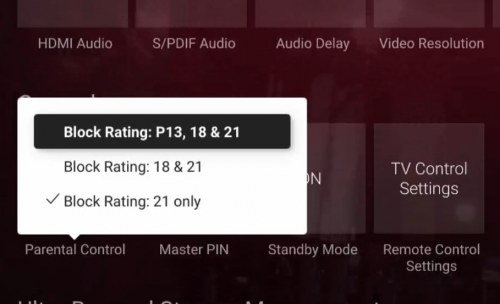 Parental Control / Block Rating is like you set PIN code when trying to access VOD shows is rated P13, 18 or 21, depends on which Block Rating you chose. This is useful if you don't want kids/young audiences to "accidentally" watches rated P13/18/21 shows easily. "Block Rating: 21 only" is the default setting. When "21 only" option is selected, it means you are required to enter 4 digit PIN to access to VOD shows that is rated 21. The best examples would be HBO shows like Game of Thrones, Westworld,... There's no option for "no block at all". Astro made it compulsory to enter 4 digit PIN to watch rated 21 shows on both VOD and Astro Go. Do note that this only works when watching VOD or Astro Go content, and it does not apply to TV channel. Alternatively, you can use Parental Control functions to lock TV channels instead. If you never change the PIN before, the default PIN is 0000. 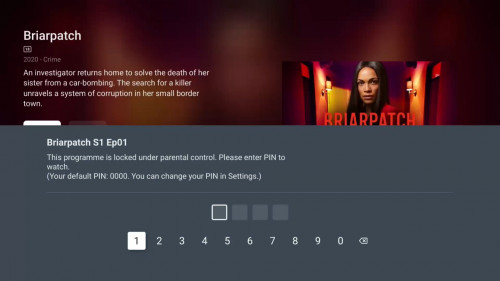 This is an example of how it looks like when you set "Block Rating: 18 & 21" and you try to access VOD content that is rated 18. Parents be like: "Yay, now I no need to worry that my kids would watch those super violent shows on VOD."   joshhd liked this post
|
|
|
Dec 8 2020, 12:49 AM
Return to original view | Post
#3
|
|
Junior Member
108 posts Joined: Aug 2008
|
Hi guys, want to consult with you all.
My house repair accidentally moved the satellite dish, the worker just manual adjust adjust until the signal came back as astro displayed no signal. Now i checked ultra box and it showed the following, could you help to confirm things are normal? Tuner1: Signal strength High at around 80 + abit Signal quality High at 100 CNR 15.8dB Tuner 2: Signal strength High at around 80+ abit Signal quality Low at around 10+ CNR 11.8dB I'm wondering the signal quality at Tuner 2 LOW will be matter? |
|
|
Dec 8 2020, 09:20 AM
Return to original view | Post
#4
|
|
Junior Member
108 posts Joined: Aug 2008
|
QUOTE(joshhd @ Dec 8 2020, 01:07 AM) This is the signal readings of a pretty much perfectly aligned dish would look like: Thanks for your sharing. 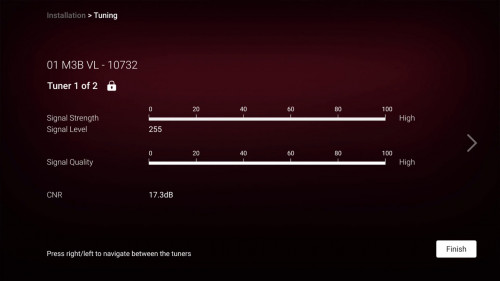 *especially during very clear weather, reaching 18dB also possible. The higher the SNR reading, the better (means more robust signal). The lower the SNR reading, the sooner you will lose signal during bad weather (heavy rain). As the reading gets closer to 10dB and lower, it means you are close to the borderline of experiencing pixelation, or intermittent signal blackout or no signal at all (Services currently not available). About the mysterious reason why Tuner 2 reading may appear lower than Tuner 1, you csn read this post: https://forum.lowyat.net/index.php?showtopi...post&p=98673427 So it's up to you, whether you want a more robust satellite signal by fine tune the dish little by little, or just leave it as it is because "as long got picture on TV then can already". Different people different needs.. Hahaha Let me try moving the dish if it helps... else it seems like nothing I can do better and have to ask astro guy come with meter reading... |
|
|
Dec 10 2020, 09:36 AM
Return to original view | Post
#5
|
|
Junior Member
108 posts Joined: Aug 2008
|
QUOTE(joshhd @ Dec 8 2020, 01:34 PM) For a more detailed guide on how to align Astro dish by yourself, refer this post: Thank you very very much... the instruction is very helpful. But i'm curious why need to go channel 702, should we use UHD channel or must use 702 as good reference to tune?https://forum.lowyat.net/index.php?showtopi...post&p=96465062 Since you at least have signal now, then just a slight fine tune on the dish alignment or rotate the LNB position (LNB skew) would be enough. Move little by little ya, and be patient. |
|
|
Dec 11 2020, 12:13 AM
Return to original view | Post
#6
|
|
Junior Member
108 posts Joined: Aug 2008
|
QUOTE(joshhd @ Dec 10 2020, 08:29 PM) I recommends CH 702 (Hello) because it is transmitted from one of the Measat 3b satellite transponders from Astro which has a strong signal (10772MHz), and that channel is accessible regardless whether you are Astro or Njoi user (means everyone will have access to that channel regardless of your package subscription). Bro, u r very knowledgeable. Hats off.And compare with other Astro channels out there, Hello channel offers a bit of everything, which targets mass audience. Now i know what to do next... joshhd liked this post
|
|
|
|
|
|
Nov 5 2022, 04:14 PM
Return to original view | Post
#7
|
|
Junior Member
108 posts Joined: Aug 2008
|
I'm on super pack 3a, it will be way more expensive to switch to the new pack, anyone has any idea if there is a way to get the answer tv access?
|
|
|
Feb 9 2023, 11:57 PM
Return to original view | Post
#8
|
|
Junior Member
108 posts Joined: Aug 2008
|
Need advice on Astro Smart TV App (legitimate paid astro package) -
I have it installed on Chromecast with GoogleTV but some (quite a lot) of movie on demand is just showing green screen but sounds and subtitle is showing ok, any ideas??? |
|
|
Feb 10 2023, 10:05 PM
Return to original view | Post
#9
|
|
Junior Member
108 posts Joined: Aug 2008
|
QUOTE(linkinstreet @ Feb 10 2023, 07:38 AM) weird. Sounds like your chromecast used the wrong codec or couldn't properly decrypt the VOD. Live channels are working fine? Yes, love channel working fine.Are you using chrome cast too? I couldn't see any options in setting for codec. Do you install codec separately? My settings are 4K 30Hz SDR COLOR YCbCr 4:2:2 12-bit March connect frame rate: seamless Game mode off Format auto enabled format list is empty, disabled format: Dolby vision, HDR10,HDR10+HLG any hints from the above? |
|
|
Feb 26 2023, 02:29 PM
Return to original view | Post
#10
|
|
Junior Member
108 posts Joined: Aug 2008
|
QUOTE(linkinstreet @ Feb 23 2023, 12:04 PM) I just noticed that Astro has officially added the Smart TV/Multiroom app to Google Play store, and not just limited to any specific TV model Anyone found it from Chromecast with Google TV? I can't, could you share the APK? Thanks jusbella liked this post
|
|
|
Mar 11 2023, 08:36 AM
Return to original view | Post
#11
|
|
Junior Member
108 posts Joined: Aug 2008
|
Hi will astro know if i bring the multiroom ultra plug and play box and use it in another location?
|
|
|
Mar 13 2023, 04:08 PM
Return to original view | Post
#12
|
|
Junior Member
108 posts Joined: Aug 2008
|
Could anyone share how to change ultra box from satellite mode to plug-and-play mode... and vice versa to change back?? Thanks ya
Some discussion before but only briefly mentioned like resetting to factory default then u will have the option. Have anyone tried this and it will just work ok even switching back to Satellite mode later? Will this anyhow trigger account issue at Astro? This post has been edited by casper1: Mar 13 2023, 04:53 PM |
|
|
Mar 13 2023, 07:19 PM
Return to original view | Post
#13
|
|
Junior Member
108 posts Joined: Aug 2008
|
QUOTE(Feliex @ Mar 13 2023, 06:22 PM) It just work without trigger any of your worry So just factory reset it?How about satellite tuning if i want to switch back to satellite later? just copy current parameters? |
|
|
Mar 13 2023, 08:12 PM
Return to original view | Post
#14
|
|
Junior Member
108 posts Joined: Aug 2008
|
QUOTE(joshhd @ Mar 13 2023, 07:34 PM) Yes, just Restore factory settings. Appreciate your reply, thank you very muchIf it's your first time doing Restore Factory Settings, at least go and remember what is the LNB Type you're using, either is it Universal, dCSS or SAT CR. 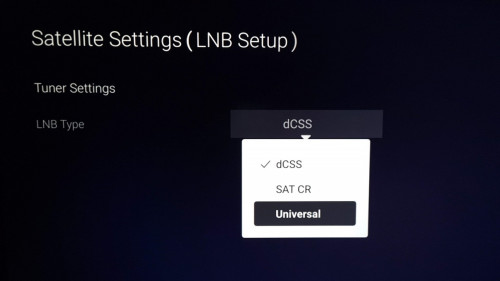 So later when you change back to Satellite, just select that same LNB Type, and then Next Next Next Finish. Don't worry. It won't trigger account issue on Astro side. |
| Change to: |  0.6461sec 0.6461sec
 0.55 0.55
 7 queries 7 queries
 GZIP Disabled GZIP Disabled
Time is now: 8th December 2025 - 10:14 AM |
 Quote
Quote