Welcome Guest ( Log In | Register )

Outline · [ Standard ] · Linear+

 Astro Version 13A, All about Astro Malaysia offerings

views
     
andreas
post Jan 16 2019, 06:34 PM

Getting Started
**
Junior Member
154 posts

Joined: Sep 2009


hi, i just set up astro byond super pack 1, normal hd decoder. im using samsung 4k tv ks7000 and soundbar samsung hwk551 which able to decode dolby 5.1. the soundbar has 1 hdmi in, 1 hdmi arc and optical cable.

if i want to enjoy dolby 5.1 from astro, how should i connect all my devices? tq.
andreas
post Jan 22 2019, 10:30 PM

Getting Started
**
Junior Member
154 posts

Joined: Sep 2009


QUOTE(joshhd @ Jan 21 2019, 05:15 PM)
Recommended method:

Connect HDMI cable from Astro HD box to your Samsung TV's HDMI port like normal.
Then, connect another HDMI cable from your TV's HDMI ARC port to your soundbar.

Alternative method:

If you prefer to use digital optical cable, you can also connect optical cable from your TV's digital optical output port (recommended alternative method) OR digital optical port on your Astro box to your soundbar's digital optical input directly.

And then on your Astro remote control, press "home", then Settings>Digital Audio

Change "Stereo (Analogue and Digital)" option to "Dolby Digital 5.1 (Digital only)" by pressing right arrow button on your remote.
Press "ok", and then "Yes, save changes"

You will be able to enjoy Dolby 5.1 audio on Astro now.
Do note that Dolby 5.1 is only available on HD channels, and not available on SD channels.
*
tq for your response. i tried recomended method but failed and optional method too..

currently connecting hdmi astro to tv. optical cable from tv to soundbar. it works with stereo audio only but when turned to dolby, no sound coming out.

andreas
post Jan 24 2019, 11:49 AM

Getting Started
**
Junior Member
154 posts

Joined: Sep 2009


QUOTE(joshhd @ Jan 23 2019, 12:47 AM)
Can you double check that you're not connecting RCA cable from Astro box to your soundbar.

If Digital Audio Settings on your Astro box is set as "Dolby Digital 5.1 (Digital only)", and you connect RCA cable (a.k.a analogue audio) from Astro box, the audio will be muted whenever you watch HD channels. Dolby 5.1 audio can only work on either HDMI or Optical/Coaxial output on Astro.

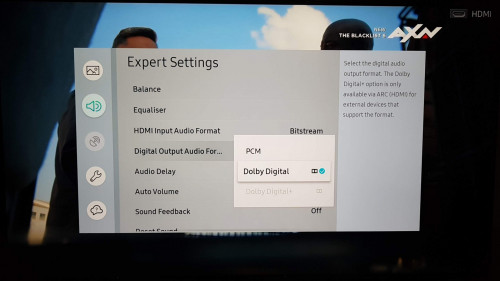
Alternatively, do make sure the Sound settings on Samsung TV are set as follows:
user posted image

I'm using Samsung TV too, and yeah, my TV are able to output Dolby 5.1 audio to my home theatre system via optical cable without issues.
*
yes, i double checked. but i think i didnt set audio format to dolby digital., instead dts neo. tq, will update soon, kindly working.
andreas
post Jan 24 2019, 06:10 PM

Getting Started
**
Junior Member
154 posts

Joined: Sep 2009


QUOTE(andreas @ Jan 24 2019, 11:49 AM)
yes, i double checked. but i think i didnt set audio format to dolby digital., instead dts neo. tq, will update soon, kindly working.
*
tq. u r the best. now i can enjoy surround sound from astro. thumbs up.


Change to:
| Lo-Fi Version
0.0437sec    0.72    7 queries    GZIP Disabled
Time is now: 8th December 2025 - 11:12 PM