Welcome Guest ( Log In | Register )

Outline · [ Standard ] · Linear+

 Astro Version 13A, All about Astro Malaysia offerings

views
     
PJng
post Mar 22 2023, 01:40 PM

10k Club
********
All Stars
12,041 posts

Joined: Oct 2017


What is the minimum TV needed for ulti/ultra box?
I got a 15 years old normal LED TV, 720P
Trying ask installer change to new box, he say maybe not support such old tv

Astro faq no mention

Think to change as now old astro box, fan very loud, like PC CPU USAGE overload, fan speed 100% all the time, and many normal channel no more

This post has been edited by PJng: Mar 22 2023, 01:42 PM
PJng
post Mar 22 2023, 02:47 PM

10k Club
********
All Stars
12,041 posts

Joined: Oct 2017


QUOTE(Oltromen Ripot @ Mar 22 2023, 02:27 PM)
HDCP 2.x-compliant
*
QUOTE(Zot @ Mar 22 2023, 02:42 PM)
The new box is HDCP 2.x compliance. So if connect to old TV which is normally non compliance just because the standard has not been established yet, then you will have problem. Read here

https://www.howtogeek.com/208917/htg-explai...-how-to-fix-it/
*
Just google search, no mention HDCP version
I think old tv no HDCP 2.0, tv that older that 2010

https://forum.lowyat.net/index.php?showtopi...post&p=47175533

Whatever i google searh anything, will come back to lyn

This post has been edited by PJng: Mar 22 2023, 03:04 PM
PJng
post Mar 22 2023, 11:44 PM

10k Club
********
All Stars
12,041 posts

Joined: Oct 2017


just checking some cheap full hd tv, no mention HDCP version
but check those smart tv got mention HDCP 2.2
temporary ignore util ultra box
PJng
post Mar 23 2023, 09:44 AM

10k Club
********
All Stars
12,041 posts

Joined: Oct 2017


QUOTE(joshhd @ Mar 23 2023, 12:50 AM)
Is it Sharp branded TV? What is the model number of your old TV?
*
Already post link model from lyn

Panasonic VIERA TH-L32C4K
QUOTE(linkinstreet @ Mar 23 2023, 09:34 AM)
If 720p tv for sure not compliant

But IIRC the box itself would only be in HDCP 2.2 mode if you set it to 4K. It will fall back to HDCP 1.X if you set it to 1080p. So a normal 1080p TV should be able to work with the box.
The people who have issues are the ones that has 4K TV's but HDCP lower than 2.2, which means they can't use the 4K capabilities of the box. If you are just using it for 1080p, then it should be fine
*
Installer say worry no image, did not proccess it
No need 4k content, just not sure 720p astro box got display or not
PJng
post Mar 24 2023, 07:54 PM

10k Club
********
All Stars
12,041 posts

Joined: Oct 2017


QUOTE(joshhd @ Mar 24 2023, 07:33 PM)
Besides Astro box, what other HDMI devices you would connect to that TV?
Unifi TV box? Gaming consoles? Blu-ray player?

If worse comes to worse, use HDMI splitter to bypass the HDCP, then it'll solve the problem.
*
No anything, i don have game console, now only that astro box using HDMI
Unifi tv on other CRT TV
PJng
post Mar 24 2023, 08:16 PM

10k Club
********
All Stars
12,041 posts

Joined: Oct 2017


QUOTE(joshhd @ Mar 24 2023, 08:14 PM)
If possible, try connect your Unifi TV box via HDMI port to your Panasonic TV.
If you're able to view the live TV channels without seeing any HDCP errors there, then using Astro box shouldn't be a problem.
*
Will try when free, but my unifi tv is very old one
Huawei silver box
PJng
post Jan 8 2024, 06:24 PM

10k Club
********
All Stars
12,041 posts

Joined: Oct 2017


Seem family no plan to switch to unifi tv
Is it any current smart tv is enough for astro ultra box?
Refer to my old post, i still using very old pamasonic a very basic tv, installer say HDCP too old, may not support new ultra box

Any i mean just pickup any brand like LG Sony Samsung also ok right, no related tizen on, google tv, android tv

This post has been edited by PJng: Jan 8 2024, 06:25 PM
PJng
post Jan 9 2024, 11:24 AM

10k Club
********
All Stars
12,041 posts

Joined: Oct 2017


QUOTE(cdspins @ Jan 9 2024, 12:40 AM)
If just to connect o ultra box via HDMI, then any of the newer TV will do regardless of brand or platform
Oh... but do stay away from SHARP, some installer  remind me that it may also have some issue.

If you plan to use multiroom app, then you may also want to check out from astro page on supported model. With Multiroom app, then you don't need the ultra box.
*
QUOTE(joshhd @ Jan 9 2024, 01:02 AM)
Time to shop for a new 4K TV. biggrin.gif
As long it is current model ones, then it should be good to go.
*
Any subs RM2k, as long as 4k also can right, i no need any special function on tv,
Saw like samsung 43inch 4k below RM2k, may go for that

I dunno ehat plan using, not i apply that astro, as still using old box, and current astro box exhaust fan very loud, like pc CPU full load, fan spin at 100%
PJng
post Jan 9 2024, 11:32 AM

10k Club
********
All Stars
12,041 posts

Joined: Oct 2017


QUOTE(pokemon @ Jan 9 2024, 11:29 AM)
Your current astro decoder must be clogged with dust and the fan needs to be on high mode to dissipate the heat.
Don't change the decoder if there is no issue and you don't need to invest money to buy TV.
Moreover, you are not watching 4k content/channels.
*
Parent keep bising raining cannot watch, and ultra box can use internet, so to change ultra, tv also need change

Btw we cannot do ownself to clean dust right
PJng
post Jan 9 2024, 01:22 PM

10k Club
********
All Stars
12,041 posts

Joined: Oct 2017


QUOTE(nexona88 @ Jan 9 2024, 01:06 PM)
what's the satellite signal strength?  hmm.gif
*
Normal day signal is about 55, 60, quality 100
PJng
post Jan 9 2024, 05:37 PM

10k Club
********
All Stars
12,041 posts

Joined: Oct 2017


QUOTE(joshhd @ Jan 9 2024, 05:31 PM)
Does your parents or yourself, do a lot of recordings on your Astro PVR box? Do note that you'll lose all recordings made on your PVR box as you change to new box.
Misalignment on the satellite dish or LNB could be the reason why the signal strength readings is at medium. In ideal scenario, Strength readings can go as high as 80-90%.

Which Astro pack you're currently on now? If not sure, check Astro bill, page number 3. Or you can check it at https://myastro.astro.com.my
*
As i not the onwer that apply astro, i dunno what plan using, as screenshot he send to me show premium pack 2
Yes aware all recording will gone if change box, as old box will take back
PJng
post Jan 9 2024, 06:38 PM

10k Club
********
All Stars
12,041 posts

Joined: Oct 2017


QUOTE(cdspins @ Jan 9 2024, 06:36 PM)
Haha... oklah for parent sake, just upgrade for them lo. But how come you are not the account owner but you are task to do the research... Haha... ask the owner lo...
Your parents current using 43 inch? Else the reduction in size will be very apparent and It is a bit small to view 4k content though. A 65' range from RM2.5k to 3.2k
Aiya, since they already request to upgrade, no need do all this la... waste time only.  laugh.gif
*
I just survey for tv, is someone family apply astro, not me
Now using over 15 years old panasonic 32 inch 720p tv, a basic LED tv without any function
PJng
post Jan 9 2024, 09:33 PM

10k Club
********
All Stars
12,041 posts

Joined: Oct 2017


QUOTE(joshhd @ Jan 9 2024, 09:29 PM)
If you are on Premium Pack 2, then you can't be using PVR box because Ultra Box is mandatory for Premium Pack 2 since day one.
I believe you've seen the screenshot wrongly. Check that screenshot again...

Can you confirm that you are connected to HDMI cable from your Astro box to your Panasonic 32 inch HDTV? Able to view HD channels without any error message?
Or you are using AV cable (red, white, yellow)?
*
Need ask owner again what pack, yes connect to HDMI, HD channel can view with old box

You posted this to me last year

https://forum.lowyat.net/index.php?showtopi...ost&p=102781471

This post has been edited by PJng: Jan 9 2024, 10:30 PM
PJng
post Jan 16 2024, 01:03 PM

10k Club
********
All Stars
12,041 posts

Joined: Oct 2017


QUOTE(Zot @ Jan 16 2024, 08:51 AM)
Interruption during rain is normal. Depends on how heavy the rain is. If you think before this you can still watch the program with that same amount of rain before but not now, then there must be some leakage at connection point outdoor.

I once get mine reconditioned the connection and the signal strength improved and it is now more resilient to rain. Well, that was quite long time ago  laugh.gif
*
Already upgarded tv (buy new 4k tv) only know owner no subs multi room, cannot log in smart tv
So seek owner contact astro change ultra box, or astro will decide ulti or ultra box? Since home still got satelite
You call astro to 'adjust' back to get better signal? Sometime rain not yet start, dark sky already SCNA

This post has been edited by PJng: Jan 16 2024, 01:03 PM
PJng
post Jan 23 2024, 12:24 PM

10k Club
********
All Stars
12,041 posts

Joined: Oct 2017


After asking owner request ultra box, got charge RM1xx and is out of contract, and yes this is second box, you know what mean

And yes i tell installer set satelite mode, and asking check signal, he cut cable and plug again, he say cable a bit old may cause signal week
And now signal is about 65 to 70

But after yesterday rain, it keep use internet play, even signal is back, it does not auto switch?
Feel annoying keep pop up continue viewing, and are tou sure what to switch channel?
My parent not understand the pop up
After few reboot finally use back satelite
PJng
post Jan 23 2024, 07:36 PM

10k Club
********
All Stars
12,041 posts

Joined: Oct 2017


QUOTE(pokemon @ Jan 23 2024, 07:29 PM)
Thought the switch to ultrabox is foc now.
If the ultrabox is mainly used by your parents and they are not using the VOD and streaming feature, just don't connect ultrabox to internet can help on the pop up message.
*
I try turn off wifi, SCNA is show even satelite signal still got
Is second box but not same home
PJng
post Jan 25 2024, 11:25 PM

10k Club
********
All Stars
12,041 posts

Joined: Oct 2017


QUOTE(joshhd @ Jan 24 2024, 12:08 AM)
And now signal is about 65 to 70
Now if you go to Settings>Satellite Settings>Diagnostics, what is the CNR reading? How many dB?

But after yesterday rain, it keep use internet play, even signal is back, it does not auto switch?
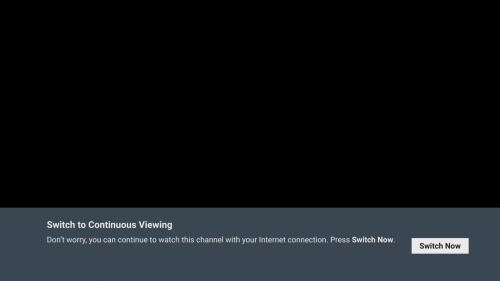
user posted image
When the Ultra/Ulti Box is under Satellite mode + connected to the Internet + no satellite signal = you will see this message (shown above) when tune to any channels except 4K UHD and radio channels.
As you press OK to 'Switch Now', from that moment onwards, the box will load the TV channel via Internet streaming, until you tune to other channel, which it will switches back to Satellite reception mode.
And nope, it does not auto switch. You have to do it manually everytime you tune to a different channel when the box detects no satellite signal.

Feel annoying keep pop up continue viewing, and are tou sure what to switch channel?
My parent not understand the pop up
After few reboot finally use back satelite

The "Would you like to stay on this programme? Select No to switch to Live TV channel." pop-up message is an expected behaviour since Astro PVR box era.
It is also to remind you that you are watching an already-rewinded TV channel (not watching a Live channel) before you decides to tune to other channel.
After you select "No", then it will start to receive the TV channel via satellite reception again as it tunes to the other channel.

You don't need to reboot for it to go back to satellite TV reception.
You can explain to your parents that whenever the "Switch to Continuous Viewing" message appears, it means no satellite signal (e.g. due to bad weather).
Just press OK on remote control, then they'll be able to watch their channel as usual again (because it temporary uses Internet streaming now).
And then, when the "Would you like to stay on this programme?...." pop-up message appears when tuning to other channel, just select "No". (press Right arrow button, and then press OK). 
Advise your parents not to do channel surfing when there's no satellite signal (e.g. during heavy rain), cuz otherwise the "Switch to Continuous Viewing" message will keep re-appear again and again as they keep surfing/tuning different channels, unless you don't mind lah (but now you already complain annoying, so... 🤷‍♂️)
SCNA  is show even satelite signal still got
What are the examples of channel numbers that you're getting the SCNA message even after when you disable the WiFi?
Switch to Ultra Box for FREE is subject to which Astro package tier you are currently on.
It is not always FREE to everyone, cuz Astro will always give priority to those high-paying customers one...
The pop up message that PJng refers to, is the "Switch to Continuous Viewing" feature. It is to allow you to continue watching TV channels when there's no satellite signal, and Internet connection is required for that feature to work.
*
signal level 170
CNR 14.3 to 14.5
currently look working fine, that SCNA is chinese channel 3xx, but nevermind cannot replicate again.

PJng
post Jan 26 2024, 12:34 AM

10k Club
********
All Stars
12,041 posts

Joined: Oct 2017


QUOTE(joshhd @ Jan 26 2024, 12:12 AM)
Which TV channel number that you tuned to, where the CNR reading is 14.3 to 14.5dB?

Are you getting either "Switch to Continuous Viewing" or SCNA message when tuning to these channels below: 
CH122, CH124, CH305, CH549, CH805
*
different channel value not same?
then need test when free, currently no more keep pop up continue viewing
PJng
post Jan 27 2024, 12:21 PM

10k Club
********
All Stars
12,041 posts

Joined: Oct 2017


QUOTE(joshhd @ Jan 26 2024, 12:49 AM)
You might get a slightly different signal readings if the particular TV channel transmits from a different satellite transponder frequency.

But no need to headache about that... For reference sake, tune to either channel 311, 393, 707 and then get the CNR readings.
*
Those channel level 176, 180.. CNR 15.2
2 4k SPORT channel level 183, CNR 14.9

But yes, seem this few day working fine, as notice if using internet, on home screen will stop playing at background, but using sattelite background still playing
PJng
post Mar 10 2024, 10:31 PM

10k Club
********
All Stars
12,041 posts

Joined: Oct 2017


QUOTE(RiriRuruRara @ Mar 10 2024, 03:36 PM)
Hi guys, sorry it's me again. WTA is there any way to know if the Ulti box is currently using the satellite as main source and not wifi?
Asking bcs my house many people using many devices, I dont want another device to be taking up the wifi unless necessary ...
*
i press home,
if background still play, it use satellite,
if background stop, it use internet

QUOTE(pokemon @ Mar 10 2024, 03:56 PM)
You can order the ulti box with satellite mode.
Once your order is created with plug n play, troublesome to change to sateliite and assthrow can say it is sop to arrange technicians (chargeable) to earn more money from you.
*
i think you answer wrongly

2 Pages  1 2 >Top
 

Change to:
| Lo-Fi Version
0.0469sec    0.67    7 queries    GZIP Disabled
Time is now: 11th December 2025 - 08:00 PM