They might and can do it someday, but not soon cuz there are HD box users out there that doesn't subscribe to HD yet.
Astro IPTV customers no longer able to access SD simulcast channels. It doesn't appear on their channel list anymore, and it's has been quite some time.
The satellite dish that you install at ur home now, what's the LNB type? Last time you used to have HD box or PVR box? 1 cable or 2 cables connects to the satellite dish?
Press home>Settings>Installation Settings>Satellite Settings>LNB Setup
Make sure the Input Type is selected correctly based on the LNB type that you've connected to your satellite dish.
If you're using Ultra Box and it's connected to the conventional Universal LNB or dCSS LNB, select "dCSS" option (If you're using the SatCR LNB, then select "SatCR" option). then keep press Next Next Next Finish. You should be able to get signals now on all SD and HD channels.
However, if you're using Universal LNB (doesn't matter single, dual or quad output types like previously used in PVR box) , you're unable to watch UHD channels as it won't be getting satellite signal (it shows Services currently not available), because you're using the legacy LNB. So in that case now, you must replace your LNB to the DCSS type.
Yes it's true. But if the Input Type setting is set to DCSS and you're using Universal LNB, it'll still be able to receive signal for SD and HD channels without issues, but except UHD channels. It is partially backward compatible with Universal LNB. I know cuz I tried before already.
Technically, it can't get signal from High range Ku band frequencies (12.2-12.75GHz) when Input Type setting is set to DCSS while you connect to a Universal LNB. But low range ones (10.7-11.7GHz) which is the frequencies for all SD and HD channels now, are able to receive without any compatibility issue, everything works like normal.
DCSS LNB are supposed to be provided for free by Astro upon installation. Maybe you can look at online shopping sites to see which seller got sell Astro dCSS LNB.
Yes.
Oh wait, you wanna connect HDMI Out from ultra box to your AVR, and then HDMI output from AVR (home theatre system) to your TV, is it? The HDMI ARC function?
Do note that your AVR must support HDCP 2.2, or else you will see the HDCP error when you tune to any UHD channels. Or basically means, if your AVR doesn't support UHD input via HDMI, you'll experience HDCP error when you tune to UHD channels. In that case, it's better if you connect the HDMI directly from Ultra Box to your TV's HDMI input.
Alternatively, just connect the digital optical cable from Ultra Box to your AVR. That way, you can still enjoy Dolby 5.1 surround sound without issues, especially when Dolby surround sound is available in the future on all UHD channels (currently it's still in Dolby Stereo only).
Yes, I install the dcss LNB, and no signal. My dad are using FHD TV only hence the astro guy did install the new dcss LNB.


 Aug 12 2019, 11:59 PM


 Quote
Quote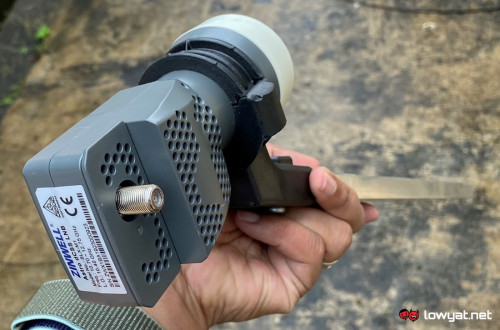



 0.5717sec
 0.39
0.39
 7 queries
 GZIP Disabled