

QUOTE(joshhd @ Nov 23 2021, 02:04 PM)
HDCP HDCP HDCP

seeing how vigorous and detailed @joshhd have been "teaching" about Astro's HDCP for the past 3 weeks, I am wondering how many TVs were flipped and how much hair is left along the way 😂Astro Version 13A, All about Astro Malaysia offerings
|
|
 Nov 23 2021, 02:37 PM Nov 23 2021, 02:37 PM
Return to original view | Post
#61
|
 
Senior Member
4,034 posts Joined: Dec 2019 
|
QUOTE(joshhd @ Nov 23 2021, 02:04 PM) HDCP HDCP HDCP seeing how vigorous and detailed @joshhd have been "teaching" about Astro's HDCP for the past 3 weeks, I am wondering how many TVs were flipped and how much hair is left along the way 😂 doubleM2, youngwolf2k, and 1 other liked this post
|
|
|
|
|
|
Nov 23 2021, 02:39 PM
Return to original view | Post
#62
|
|
Senior Member
4,034 posts Joined: Dec 2019
|
QUOTE(joshhd @ Nov 23 2021, 02:35 PM) Erm, guys... If you want to dispose your old Astro box, kindly throw it to your nearest e-waste bin or something. oi the hdisk inside can still use.... ohwait, that one don't have internal hdisk. 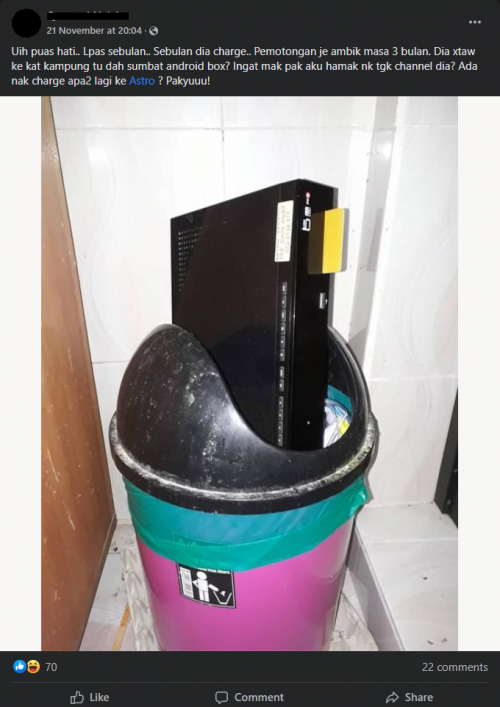 Or maybe jual besi buruk, can earn a few bucks from it  Or can sell it to those independent third party technicians... I believe some electricians out there that does Astro box repairing would love to keep some spare parts.  |
|
|
Nov 23 2021, 03:41 PM
Return to original view | IPv6 | Post
#63
|
|
Senior Member
4,034 posts Joined: Dec 2019
|
QUOTE(joshhd @ Nov 23 2021, 02:51 PM) That one is the first generation Astro PVR box (2010 model). This old model of PVR box does not have built in WiFi, but it does have internal hard disk of 500GB. this was my first decoder when i signed up. Considering the wear and tear of the hard disk after been using for more than 5 years, I don't think it is advisable to continue use that hard disk as if like new, as the failure rate of the hard disk will be high. hdisk supplied later and separately in another casing, put underneath this box. i still keep the hdisk in its original casing. I've formatted it though. just connect to laptop. i just recently threw away the USB wifi that came also later for this box. the USB stick is not usable with Windows, no driver, and i lazy to attempt on linux. This post has been edited by Oltromen Ripot: Nov 23 2021, 03:42 PM |
|
|
Nov 23 2021, 08:49 PM
Return to original view | Post
#64
|
|
Senior Member
4,034 posts Joined: Dec 2019
|
QUOTE(joshhd @ Nov 23 2021, 05:01 PM) Can take pic see? QUOTE(aniq8676 @ Nov 23 2021, 05:25 PM) PVR Easi ? 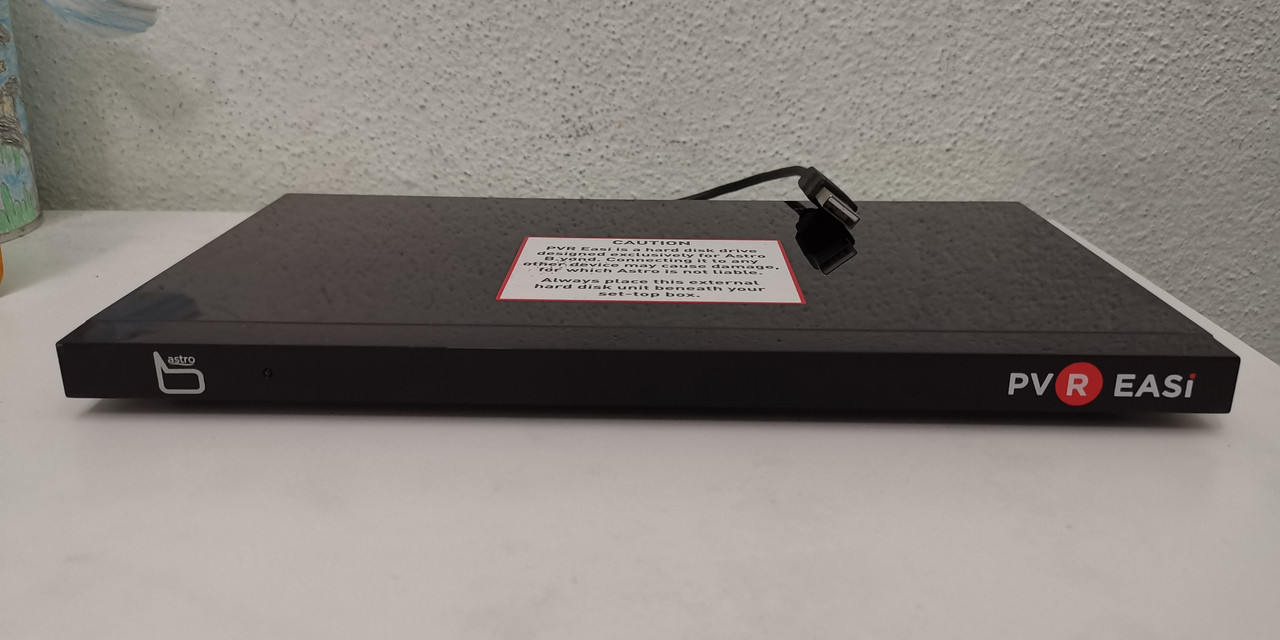 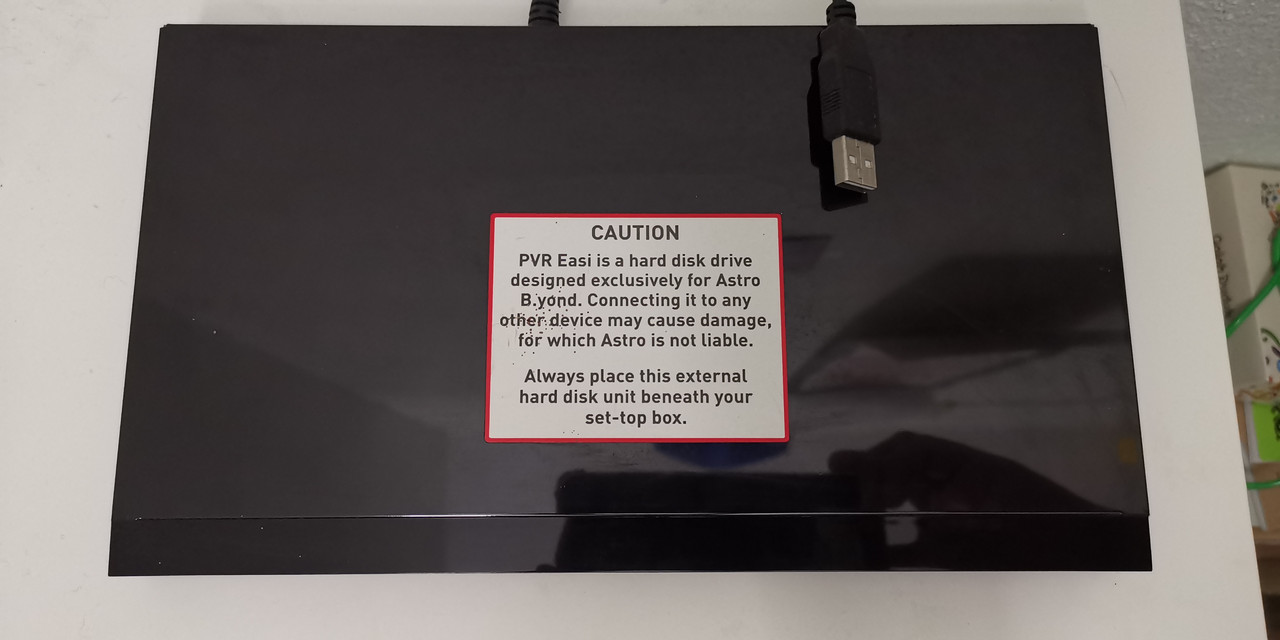 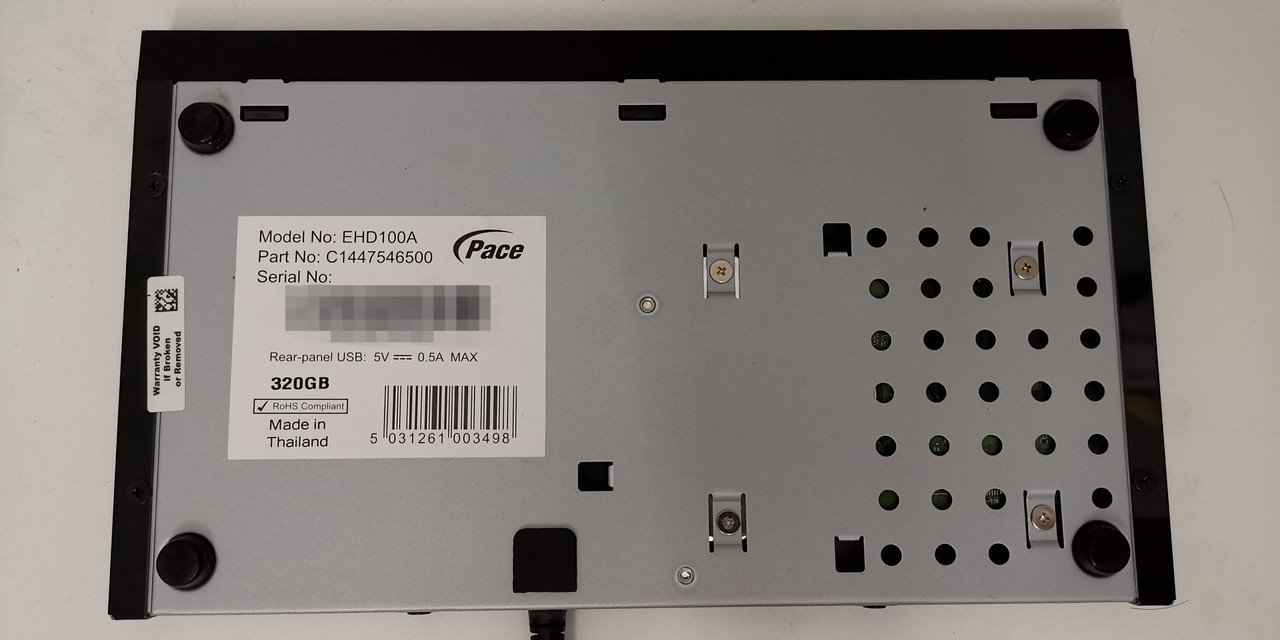 come to think of it, @joshhd might be right. I used this external PVR Easi with DMT4, then it was put aside when I moved to b.yond HD decoder. after that, I get the current DMT5 as replacement when b.yond HD hdisk was spoilt. the one thrown into the bin above is b.yond HD. https://astrobyondinfo.weebly.com/set-top-boxes.html This post has been edited by Oltromen Ripot: Nov 23 2021, 09:02 PM |
|
|
Nov 23 2021, 11:57 PM
Return to original view | IPv6 | Post
#65
|
|
Senior Member
4,034 posts Joined: Dec 2019
|
QUOTE(joshhd @ Nov 23 2021, 11:01 PM) Ah, so you were using the HD box (DMT4). I stumbled upon a promo booth after noon in Warta Bintang Giant BBBangi - snap sign up because wife was bored idling after giving birth few days earlier in March 2012 🤣 and I was too happy. The Sharp TV was also a snap purchase the night after 😂 bought in Carrefour Alamanda.I remember that PVR Easi was an alternative given to those Astro HD box users (back then is commonly known as "B.yond HD box") who wishes not to upgrade to the PVR box for various reasons. PVR Easi is basically an external hard disk, with the capacity of 320GB inside. And since Astro's DMT4 box is a single tuner satellite TV receiver equipment (unlike PVR box which is dual tuner), so it only allows you to watch and record 1 channel at a time only. (Means once you start recording a channel, you cannot change to any other channel until the recording is stopped). But eventually Astro secretly stops offering PVR Easi to customers... Not so sure the exact reason behind this, but I assume whenever I see see "Astro stops offering something", it usually means it's either an unpopular product, or a problematic product, or simply just not financially efficient in the long run. And if I'm not mistaken, PVR Easi was secretly offered around between 2011-2014 era? Could you share on how did you manage to get PVR Easi from Astro? How much you pay for it? Is there an additional monthly fee for using PVR Easi? How long you've been using that PVR Easi until the hard disk inside went spoilt? They came to install DMT4. I wasn't fussy choosy back then. DMT4 was considered new compared to the silver box I had seen everywhere. I don't remember Astro having online self service back then. Later I subscribed to recording option that the disk was given - or was it because I purchased the PVR Easi through call to CS that recording is automatically opted in. Purchase after Astro was Astro switched from DMT4 to the b.yond HD after some time. Need to pay if not mistaken, because I requested for the change. Not because Easi is broken. The installer only collected the decoder, told me to keep the Easi. I recall plugging Easi into computer and formatting it. The wifi dongle was separate. RM50. I think it was for use with the DMT4. The hdisk inside b.yond HD is the one that finally broken. It's came to a point where watching live Astro is like playing scratched DVD; stuttering, "buffering". add: Ah, now remembered, I asked to change to b.yond HD decoder because of "HD". That's why need to pay for the swap. This post has been edited by Oltromen Ripot: Nov 24 2021, 12:00 AM |
|
|
Nov 24 2021, 01:46 AM
Return to original view | IPv6 | Post
#66
|
|
Senior Member
4,034 posts Joined: Dec 2019
|
QUOTE(joshhd @ Nov 24 2021, 01:26 AM) I see... Thanks for sharing your story with us here. Really appreciate it 🙏🙏🙏 The Easi PVR (w/ DMT4) was never broken. Else I wouldn't be able to format it. Can't remember what was the original content or filesystem.I don't remember Astro having online self service back then They do have online self service back then. The wifi dongle was separate. RM50. I think it was for use with the DMT4. How come you'd pay RM50 for the WiFi dongle? That is after you upgraded to the PVR box model that doesn't have built in WiFi, is it? I recall plugging Easi into computer and formatting it. Before you format the PVR Easi on your computer, are you able to see what are the files and folders inside that drive (although I know that the recorded files can't be played). And do you still remember what is the file system used on that hard disk? Is it FAT32, exFAT or others? The hdisk inside b.yond HD is the one that finally broken. It's came to a point where watching live Astro is like playing scratched DVD; stuttering, "buffering". You mean the hard disk on the PVR Easi went broken? How many years you've been using that PVR Easi before it spoils? I believe I requested to replace the DMT4 to b.yond HD because I wanted better picture quality - "HD". 2 coaxial was a welcome surprise as I suddenly was able to record on one and live TV/record as well on another. It was the hdisk inside b.yond HD that was broken. Which was replaced with the DMT5 I am currently using. I have 2 decoders. I can't remember exactly, but I think the wifi dongle was for b.yond HD. b.yond HD was from a time where networking = cabling. The dongle was like an after-thought market trend. The first dongle was purchased, i vaguely remember RM50. The 2nd dongle was delivered free by Astro some time later, offered through a phone call from CS. QUOTE The Astro Wi-Fi dongle can be purchased from Astro’s Customer Service at RM110, or a special price of RM50 for Super Pack customers with B.yond PVR. This post has been edited by Oltromen Ripot: Nov 24 2021, 02:16 AMhttps://www.digitalnewsasia.com/enterprise-...catchup-service |
|
|
|
|
|
Nov 25 2021, 05:16 PM
Return to original view | IPv6 | Post
#67
|
|
Senior Member
4,034 posts Joined: Dec 2019
|
Here I am scratching my head why even after changing LAN cables, Ultrabox still does not get DHCP address. Switch indicator says it's connected.
Whatsapp "05 - Bantuan Teknikal" is all only about shoving "ultrabox-is-great.pdf". Itu bukanlah menghulurkan bantuan, tapi menghulurkan batu untuk hantuk kepala. Called in. Apparently, Ultrabox can operate either using Ethernet or using WiFi, cannot interchange after choosing during initial set up (factory reset). |
|
|
Nov 25 2021, 07:05 PM
Return to original view | IPv6 | Post
#68
|
|
Senior Member
4,034 posts Joined: Dec 2019
|
QUOTE(fruitie @ Nov 25 2021, 05:48 PM) You finally got your Ultrabox? yes, i bit the bullet.eventhough i downgraded the other box to basic (in lieu of going all the way to njoi) on 30th oct in accordance to mom's own wish, i followed up and found that mom now misses her korean show. so have to bite the bullet and upgraded back. end up from ~RM207 previous bill to ~RM140 in current bill now back to ~RM220 next bill (estimated figure, lazy to factcheck). QUOTE(joshhd @ Nov 25 2021, 06:00 PM) Here I am scratching my head why even after changing LAN cables, Ultrabox still does not get DHCP address. Switch indicator says it's connected. Software Version 21.2.5.47Have you tried reboot your Ultra Box to see if such connectivity issue persists? Or what other troubleshooting steps you've carried out? This particular software bug to me is quite common. The bug where your Ultra Box says Connected but still doesn't show those section on top corner of the home screen like Catch Up, Boxsets, Movies..... As well as cloud recording and Play from Start doesn't work too. Usually just reboot the box, then problem solved. EDIT: Btw what's your Ultra Box software version? You can see it at Settings page, and then look at the bottom right corner of the screen. What does it says there? Finally Oltromen Ripot got his Ultra Box 🤣🤣🤣 So which new packs you've chosen? 24 months contract, right? Release Date 23 Oct 2021 I initially thought that the box is broken. Wifi works as expected; but LAN, even when both port's indicator light and status says "connected", just cannot get DHCP address. cannot even set static IP. Cannot be that my CAT6e already faulty, but another CAT5e also failed. Reboot does not help. Hmmm..... Almost about to reset the box and start from scratch, but I backed down after remembering the installer did some satellite set up at start. I'm not ready to deal with self-inflicted "injury" to the set up. According to Phone Technical Support CS, cannot interchange between LAN and Wifi on-the-fly without doing factory reset. (To think the installer was very particular asking me if i want to use cable, which I already did with DMT5 to ensure quality of connection.) I declined to proceed with factory reset to use LAN; I just don't want to brick the satellite set up and a fool if i insists to anchor myself to a cable with inflexible networking set up. (and who knows it would insists to remain static enough when on LAN cable, to even refuse a different router MAC). I was initially bit disoriented because when it was on Wifi, all kind of category appears at top, but once i disconnected to work on the Ethernet, all the categories disappears. CS told me because those categories need network. Now writing of it, that makes sense; no point showing those categories only to rile up users who will call asking why the cannot watch (of course can't do so without network). But I agree with your previous statement; the LiveTv HD channels do appear less refined than when they appear on DMT5. And streaming will show jagged artifacts at start, took about 30s to a minute to start appearing better. Everything, except Sports, Sports Extra, Indo, and Indian Favourites pack. This post has been edited by Oltromen Ripot: Nov 25 2021, 07:26 PM |
|
|
Nov 26 2021, 12:44 AM
Return to original view | Post
#69
|
|
Senior Member
4,034 posts Joined: Dec 2019
|
QUOTE(joshhd @ Nov 25 2021, 11:15 PM) So how's the 4K UHD experience when watching CH780 or 4K VOD? Cuz finally after so long, now you're able to enjoy Ultra Box? 😅 nah.... if not for finally getting fibre-ed and wife mumbling about rain, i wouldn't have even bothered to move of my couch. it's problem solving rather than a want. never bothered about astro as long as it is viewable. 10 years old tv still okay whaaaaaat...And what are you "first impression review" or Day 1 review of the Ultra Box, compared over your previous PVR box? And streaming will show jagged artifacts at start, took about 30s to a minute to start appearing better. It took you 30 seconds to a minute, then only the video quality will look better? You sure ah? Like something wrong somewhere Which content/channel you experience like this though? The one that takes up to 30-60 seconds for the video quality to look HD and in 50 fps?  kinda iritated to see lower quality images on a technologically superior tv; even the previous DMT5 with satellite-only live tv gave better eye candy. and who decided to make such an inflexible networking set up. have to factory reset to switch between cable and wifi? and even if maxing out 4K does not require hundreds of Mbps, but 100Mbps Ethernet jack in this age? it's not funny that streaming HBO Go right on Sony's AndroidTV gave better resolution than streaming the same movie through Ultrabox. The jagged curve on HBO logo streaming is an eyesore. but all this is still better than unifi tv. that one the whole team responsible for it should just jump off the top of menara tm. force include RM60 subscription of worst than tv flintstones. baju petak abang askar gave more clarity and entertainment than unifi tv. the only consolation in exchange of that rm60, i get "free" viu sub (tbh it's overpriced RM60 than subscribing direct). This post has been edited by Oltromen Ripot: Nov 26 2021, 02:46 AM John42 liked this post
|
|
|
Nov 27 2021, 08:55 AM
Return to original view | IPv6 | Post
#70
|
|
Senior Member
4,034 posts Joined: Dec 2019
|
QUOTE(nexona88 @ Nov 27 2021, 08:32 AM) Astro oh Astro... what is pop-up channel?Keep having pop ups channels only... Seems like Malaysian.. Regardless of races... Love all this pop ups channels.... Also love by those ads companies too???? |
|
|
Nov 27 2021, 09:14 AM
Return to original view | Post
#71
|
|
Senior Member
4,034 posts Joined: Dec 2019
|
QUOTE(weareblahs @ Nov 27 2021, 09:10 AM) Channels that appear for a limited time. Mostly dedicated to a special event. Examples include: Ah, I see. Like the Jackie Chan-dedicated and recent Bond-dedicated channels.- Ch 400 / Ch 407 (Movies Pop-up, Examples: FAM Movies, 007, Jackie Chan) - Ch 338 (Most Taiwanese Awards, Example: Golden Melody Awards, Golden Horse Awards) - Ch 100 (Special Events Pop-up. Examples: Astro 25, Kollywood Queens) - Ch 702 (Once English Variety Pop-Up (?), Example: Stay Home Concert, now a permanent channel (PRIMEtime?)) Didn't pay attention to them anyway. Seems like just a method for Astro to distract from Disney's pulling out. |
|
|
Nov 27 2021, 11:21 AM
Return to original view | Post
#72
|
|
Senior Member
4,034 posts Joined: Dec 2019
|
QUOTE(joshhd @ Nov 27 2021, 10:48 AM) Distractions are necessary to prevent further PR disaster and also customer service crisis. The auto yearly renewal is big turnoff.Also, newly-installed fibre and AndroidTV have caused in shift in view pattern not even developed during the stuck-in-homes MCO. Before, wife spend some time watching random Korean on-air. Now spending more time binge watching finish whole series. Kids also switched from recording their OTA series to Youtube and OTT series. I found I'm the only one who still fill up harddisk on the DMT5 since fibre came. The only hesitating reason to keep going with Astro is to support older folks. There will be steep curve to learn switching between decoders and operating OTT. Turning to MyFreeView in the long run to replace OTA. I guess it is rain-proof. not going for nJoi if this works. Netflix and Disney+ standalone to replace Movies pack; full of re-runs anyway and without Fox channels, no longer have interest. Koreans have quite a number of alternatives. KiDoodle for kids. Or rather, grandkids. Maybe some alternative documentary streams. Or stick to rely on youtube - since everything on youtube is nothing but the truth, just like documentaries. Unifi Plus Box is not an option. Its HD has enough pixelated mess that makes abang askar's uniform to appear 8K standard in comparison. This post has been edited by Oltromen Ripot: Nov 27 2021, 11:28 AM |
|
|
Nov 30 2021, 06:02 PM
Return to original view | Post
#73
|
|
Senior Member
4,034 posts Joined: Dec 2019
|
QUOTE(smileguy @ Nov 30 2021, 02:03 PM) While I support the intent to weed out LGBT elements from corrupting our society, the charade is farce.in this link also mentioned blame online gambling for promoting social ill (which I agree btw). Just few weeks ago somebody from same side said we need law to govern online gambling in order to be able to tax it. Farcical exercise. Forked tongues. If you think its promotes social ill then curb it, not make profit out of it. This post has been edited by Oltromen Ripot: Nov 30 2021, 06:02 PM doubleM2 liked this post
|
|
|
|
|
|
Dec 1 2021, 01:51 PM
Return to original view | IPv6 | Post
#74
|
|
Senior Member
4,034 posts Joined: Dec 2019
|
QUOTE(kkm @ Dec 1 2021, 01:23 PM) Astro now message me to activate disney+ hotstar "free for 3 months" even though my plan isn't eligible. The catch is they quoted my correct account and smartcard numbers in the sms. hotstar comes with 1yr auto-renew contract. (or is it movies pack?)What's the catch? if you already subscribed to movies pack, hotstar is already bundled in. if you don't aubscribe to movies pack, is interested in hotstar, but don't want to be locked, just pay separately. |
|
|
Dec 1 2021, 01:54 PM
Return to original view | IPv6 | Post
#75
|
|
Senior Member
4,034 posts Joined: Dec 2019
|
QUOTE(Russkij @ Dec 1 2021, 08:49 AM) haha if really 31st december then that really shows ASTRO incompetency. 6mths after they forced everyone to pay more for movies pack, yet to issue native app for their own decoder platform, and you haven't called that incompetence?This post has been edited by Oltromen Ripot: Dec 1 2021, 01:55 PM juzmafia liked this post
|
|
|
Dec 1 2021, 08:33 PM
Return to original view | IPv6 | Post
#76
|
|
Senior Member
4,034 posts Joined: Dec 2019
|
QUOTE(kkm @ Dec 1 2021, 08:10 PM) Thanks for the explanation. Yeah, I tend to be forgetful, there's a high chance I'll end up paying rm54.90 in March. through ASTRO, it averaged over 3 month. will be RM17+.I'll probably hold out for a better offer. Rm5 per month maybe??  to get that RM5 special price, prerequisite to sub Movies pack |
|
|
Dec 2 2021, 01:36 AM
Return to original view | IPv6 | Post
#77
|
|
Senior Member
4,034 posts Joined: Dec 2019
|
QUOTE(joshhd @ Dec 1 2021, 11:22 PM) Very nice. So I assume that we all will be forced to watch unskippable advertisements when playing selected On Demand content on our Astro boxes, starting next year. Soon, Astro will become the next free version of YouTube. youtube didn't shove once i paid protection money to stop those 18+ advertisements.Thank you, Synamedia Iris, what an innovative revolutionary state-of-the-art invention you've brought to Astro   I'm very sure all the advertisers would love to hear this I'm very sure all the advertisers would love to hear this  astro on the other hand just keep on giving. on track to be liberated off astro's schemes. This post has been edited by Oltromen Ripot: Dec 2 2021, 01:45 AM |
|
|
Dec 2 2021, 04:24 PM
Return to original view | IPv6 | Post
#78
|
|
Senior Member
4,034 posts Joined: Dec 2019
|
QUOTE(Mr Loh A+ @ Dec 2 2021, 04:17 PM) Imagine Astro has both ad-free and ad-included feeds. How much bandwidth they need to pay for that and how much feeds/channels will stay on the platform? 🤣 It won't matter when my contract ends  |
|
|
Dec 2 2021, 04:25 PM
Return to original view | IPv6 | Post
#79
|
|
Senior Member
4,034 posts Joined: Dec 2019
|
QUOTE(joshhd @ Dec 2 2021, 03:06 PM) (Want to die, then die together. Don't die halfway). Macam skrip drama "Now everyone can die" aje |
|
|
Dec 2 2021, 10:53 PM
Return to original view | IPv6 | Post
#80
|
|
Senior Member
4,034 posts Joined: Dec 2019
|
QUOTE(smileguy @ Dec 2 2021, 06:24 PM) i notice that there is a serious audio issue on some astros channels, Many channels hv high audio and many are very low! HGTV cinemax,VJ tv have very high audio levels,while showtime,Suntv and Sun music have very low levels.These are the channels I watch and its very irritating to adjust my HTS!Can any of you check and update pls,thanks check the audio. don't use dolby 5.1.it's pita because netflix, hotstar app inside ultrabox and androidtv defaults to 5.1, and have to manually re-set for each movie/episode. |
| Change to: |  0.6672sec 0.6672sec
 0.13 0.13
 7 queries 7 queries
 GZIP Disabled GZIP Disabled
Time is now: 16th December 2025 - 06:49 AM |
 Quote
Quote