Is Xpenology not working well with AMD hardware? I have one AMD board with 6 Sata port which i would like to use..but from the reading only version 6.1 is compatible using the old loader. Any feature i will be missing out if using the old version?
nope. all of the major feature differences between 6.1 & 6.2 are mainly the splitting of some functions into separate apps, like replication. if 6.1 works well for you, I suggest you to wait until got confirmation that your hardware works.
since I have no idea on your hardware, a quick search reveals this:
- Outcome of the update: SUCCESSFUL - DSM version prior update: DSM 6.2.1-23824-1 - Loader version and model: JUN'S LOADER v1.04b - DS918+ - Using custom extra.lzma: NO - Installation type: BAREMETAL - Gigabyte B450 (AMD Ryzen 3600) - Additional comment: reboot required
I'd suggest you to get an additional usb, with a spare drive and try a fresh install. DSM 6.2-23739 works well for me, and I've got no time to try since the newest current update won't work with my DS3617xs.
Well if you really wanna try 6.2, install esxi, and passthrough your drives (or better yet, connect your drives to a LSI card and passthrough that). this would be the easiest https://mega.nz/#!eWokUSiS!6_vFRKsB...8sl58aF9otD0Gbc admin:synology2019$$$ mac1=0011322CA785
Once everything is set up, shutdown the VM, and save snapshot. you should be able to update at least to 6.2.2-24922 Update 2, but if it screws up, just restore the snapshot.
Save 2 cores for ESXi, or 1 core if it's low usage. at least you can get better VM performance than xpenology's VMM. Hell you can even install hackintosh using spare cores if your CPU has them. https://www.sysnettechsolutions.com/en/vmwa...mware-esxi-6-7/
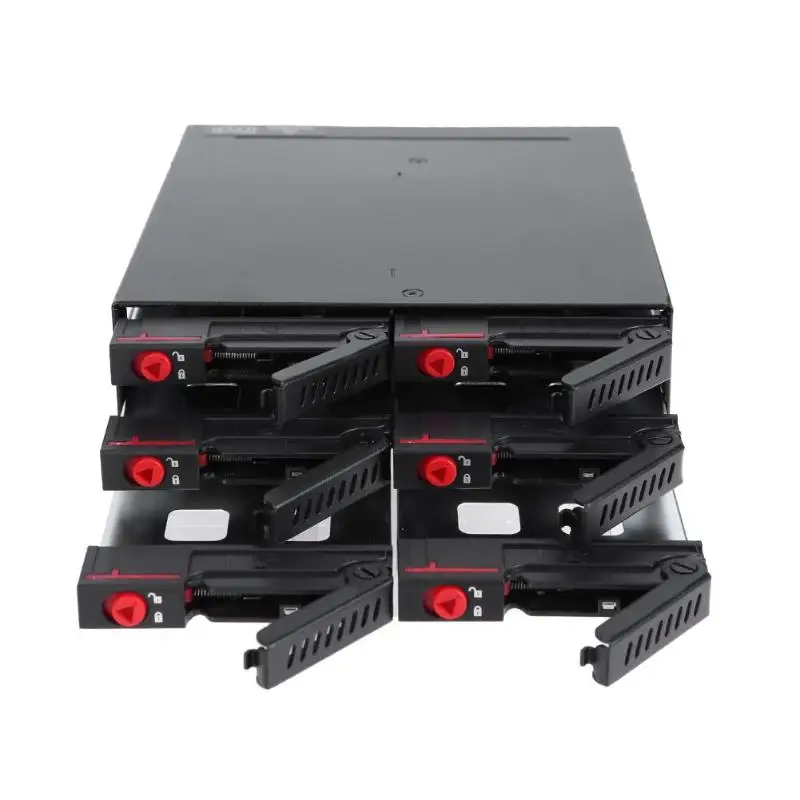
so far I'm able to boot up the v6.1..but since i missing some sata cable to test as it need hdd detected before can continue. I'm planning to use below enclosure to house all the 6 Hdd. hopefully the project is a success..i have a lot of data to park inside
uh no, you're not booting 6.1..... yet. the installer is just an installer, it'll work even in socket 775 cpu. once you put in the .pat file then it'll install the DSM 6.1. or 6.2.
try it on a test hdd first, if it works then you're set!
if you have only 2GB of RAM then I don't suggest you to use a lot of apps, maybe just the really essential ones like download station and SMB/Windows/NFS/WebDAV file share.
that enclosure is fine, but I've yet to see anybody test the heat performance anywhere so you'll be the first then as long as you understand that it's for 2.5" hdd
This post has been edited by C-Fu: Sep 29 2019, 12:23 PM
Question, question: If starting a DIY NAS, and start with only 2 4TB HDDs, want to start with RAID 1, then what is the migration plan to RAID 5 or 6 when want to add more HDD?
If you use Xpenology...
RAID type > Can be changed to… Basic > RAID 1 & 5 RAID 1 > RAID 5 RAID 5 > RAID 6 SHR-1 > SHR-2
I personally recommend SHR, simply because it maximises the use of space in all of your mixed-capacity drives.
In my case...
It's not an issue if all of your drives are the same capacities.
Also bear in mind that with SHR and BTRFS, should you have a catastrophic RAID failure (3 drives dead, etc), you can just use an usb disk with ubuntu live on it, boot it and mount the remaining drives and you can still recover whatever files that's left.
This post has been edited by C-Fu: Oct 8 2019, 05:59 PM
^ Hmmm. I thinking going OMV or FreeNAS route. More like OMV route becoz FreeNAS prefers-more-like-requires Intel.
Considering my main reason for NAS remains file-storage-reliability, so no need for superfluous transcoding, 24/7 Internet port forward NAS (yet), or running anything other than on-off file transfers/syncs.
EDIT: Also quick Googles say SHR is on the way to being deprecated? Xpenology already disabling it in DSM?
Not quite.
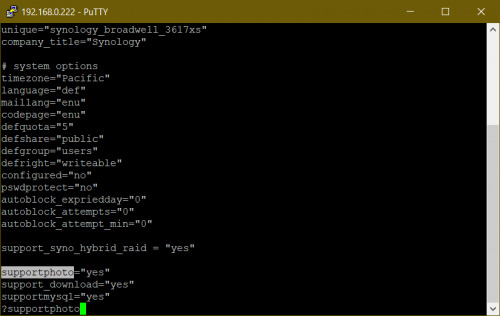
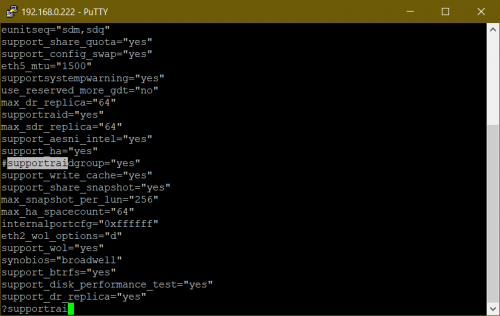
SHR is a feature enabled by default on selected models. It's not enabled on DS3615, 3617 and ds918. So you have to enable it yourself by editing 2 lines in a config file.
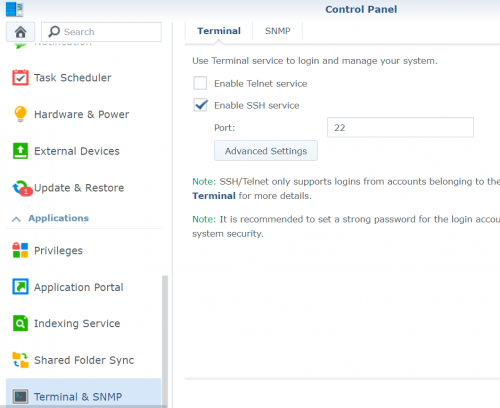
Steps: 1. install putty on your windows machine. 2. enable SSH in your DSM web ui.
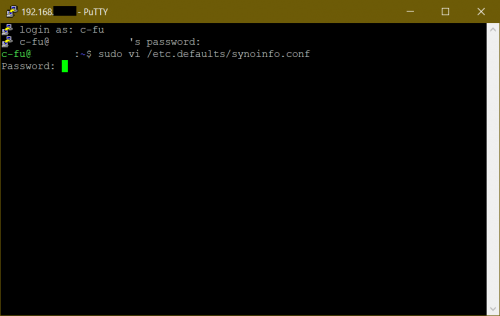
3. Use PuTTy to ssh into your machine - insert the IP and port number. login using your account. type this:
CODE
sudo vi /etc.defaults/synoinfo.conf
4. type ?supportphoto then press i. insert support_syno_hybrid_raid = "yes" above it, and press Esc to exit insert mode.
5. type ?supportraidgroup, press i and add # in front of it. press Esc.
6. type
CODE
:wq
to save and exit, reboot. and you're set.
SHR advantages: + sits on top of BTRFS, so in the event of a raid failure your data is still available as long as the drive is physically OK + maximises your disk space + parity is split in all drives, different than most other software raid where 1 or more disks are just for parity/protection. + snapshot in case file becomes corrupted + VERY fast + survives fresh DSM install where you can just migrate the disks to other xpenology/synology system
SHR to me has been very reliable and solid for years.
FreeNAS, XigmaNAS, uses ZFS. OMV supports ZFS with a plugin. ZFS too is reliable, but less flexible. In my case I have a lot of drives with mixed capacities so SHR is the only way to go. You can 100% use OMV if you want, nobody's stopping you but since OMV uses btrfs by default, might as well go with xpe and run omv as a VM in it if you really need some omv apps/plugins that's not available in Xpe (I found none, but I wasn't looking hard enough).
FreeNAS is a total beast, and while it used in enterprise setting, to me it's overkill for a NAS, not to mention the high(er) hardware requirements. But you don't need ECC ram for ZFS, no matter what people say It's a little scary, but your risk of losing everything in your ZFS pool is 1 in 115,792,089,237,316,195,423,570,985,008,687,907,853,269,984,665,640,564,039,457,584,007,913,129,639,936. it benefits greatly with ECC though.
If you just need fileserving function, Xpe fully works with a RM200 PC can't beat that yo
This post has been edited by C-Fu: Oct 8 2019, 07:15 PM
boss..is it a good idea to mix up the controller for the disk? I want to use the 6 bay disk enclosre but the original mobo i plan to use which has 6 SATA port just died after i stress it for a while ..now i have second board which only have 4 port, then i want to buy 2 or 4-port PCI-Express Expansion Card *link in shoppe*. Can i use 4 internal SATA port and then additional 2 port from the expansion card? Will Xpenology detect it correctly?
yes. but that's a port multiplier. it means it takes 1 sata port and splits the speed into four.
also it runs very very hot, even with just one port used.
you need a lsi card. some are 3G, some are 6G. the 3G kind supports a max of 2TB per drive, so get 6G version if possible.
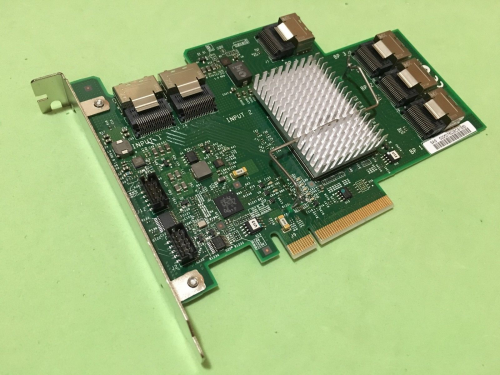
if you need more slots, get a LSI card, and an expander card. the (rebranded, so cheaper) LSI card:
the card must be flashed to IT mode so the software (unraid/freenas/xigmanas/xpenology) will handle the raid. flashing is as easy as flashing mobo bios. there are a billion models available, this is just the cheapest that I found on ebay using the search term "lsi 6G" but there are cheaper cards (I bought mine for RM60, can't remember the model name).
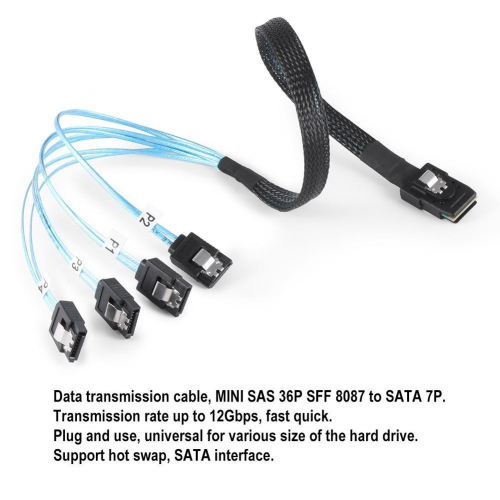
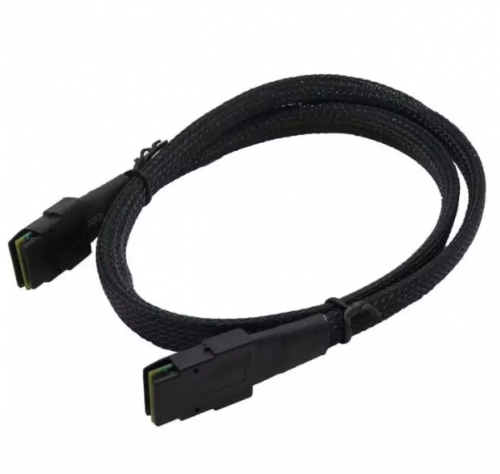
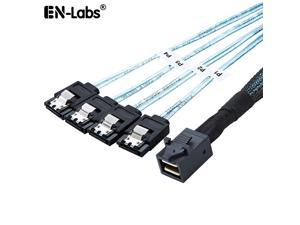
the card as 2 sas ports, so you can connect 2x4 sata ports using this SFF 8087 cable:
hmm, this is an interesting thread, now I think my old phenom II will have a new purpose
something I'm worried about which is power consumption, if I were to build my NAS with phenom II and running it 24/7, any idea will it cost a lot for my electricity bill?
I have no idea sorry. It's too vague. Phenom II I think is 125W at max, and need to calculate drives (15W per drive) and mobo+ram sticks (50? 100? Can't remember). Some enable hdd spindowns, but since you won't save that much with spindowns but introduce more wear and tears, I'd personally recommend AGAINST it.
Then it comes to your house tariff. 100kWh? 300kWh? 100kWh is 33.40 cents. so if your rig is at max load 24/7 and using 130W + 60W (4drives) + 100W = 300W, that would mean 0.3kWh x RM0.35 x 24h x 30 = RM75.60 per month, the absolute worst-case scenario. Hence a good efficient PSU will be your best first investment, second is a low-powered proc (like E5 2650L instead of E5 2650).
QUOTE(edministrator @ Dec 5 2019, 11:50 PM)
Hi bro, just wondering what is the difference between getting 2 SAS cards vs 1 SAS card + 1 Expander? Both would result in 16 HDDs config
Effectively no difference other than costs.
QUOTE(edministrator @ Dec 6 2019, 08:57 AM)
no, the biggest capacity usually used as redundancy
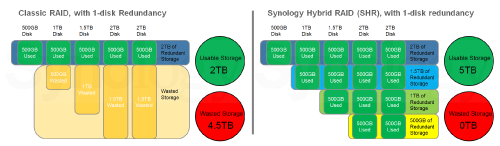
Not quite. Syno's RAID implementation is different than normal RAID. You don't use the biggest just for redundancy, but you use all/most drives for redundancy AND space to minimize wasted space.
Im using intel 4590 as esxi & xpenology ds918 image. Passthrough the onboard intel gpu & onboard sata for xpenology...boom ... U got esxi & nas all in 1. Why ds918?simple, gpu transcoding. Emby server is working, nas is working, bunch of vm is working, docker in xpenology is working. Only VMM inside xpenology not working since it needed nested hw in esxi
you can enable nested hw in esxi. but if you're already using esxi, might as well use esxi's VM implementation instead of VMM.
very detailed explanation there, really appreciate the breakdown and easier for me to do some planning. I guess if i were to carry on with Phenom II, might need to try to downclock + downvolt to achieve better power efficiency, but testing stability may be another hassle. Will see how to move on from there
I don't think you need to. a more accurate or average estimate would be to calculate using idle cpu wattage since it's not gonna be 100% all the time. even if you use things like plex that uses cpu transcoding for videos, it'll happen during the duration of the video only.
only way to be sure is to use a watt meter, set the cost according to your place, and leave it for a week and see for yourself.
This post has been edited by C-Fu: Dec 8 2019, 12:21 AM
Whatever people say, 2nd gen is MORE THAN CAPABLE for normal use. As you have noticed, pretty much everything still works.
For Xpenology on QEMU/KVM, a good guide is here.
few notes: Hypervisor=kvm=VMM For intel 2nd gen, max you can go is E3-12**v2. On top of my head, I can't remember if E3-1xxx series has a igpu built-in or not - I think it doesn't. iGPU is important if you want to use something like plex/emby/jellyfin for video transcoding purpose. if you want h264/mp4 video transcoding, I believe you need at minimum a 4th gen cpu. if you want a GPU to help with that, just get a minimum 1050 or 1050Ti for extra memory for more video transcoding at the same time. Some 1050Ti cards have no need for external power, so might be a very useful and cheap card for multiple clients.
jellyfin supports amd video transcoding, but performance wise isn't as good as nvidias. But if it works, it works.
C-Fu, Thanks for taking the time to write this beautiful post. Very inspiring for this "another" old uncle.
Inspired by you, I enthusiastically (which doesnt happen for a long while) pull out my i5-2400 from storage and did some refurbishing. Now it has 16GB ram (was 4GB), a new RM80 128GB SSD + 3TB HDD (was 500GB), a RX580 (was GT something-something) and a new bronze 500W PSU (was the gray box stuff) I picked up online for cheap, one at a time, mostly used items. None of the following fun would happen if I did any sort of budgeting... LOL
Still trying out most of the NAS softwares you listed by creating new VM,s to see what are the things I need. As I have no idea what I want ... All in the name of science LOL
After fiddling for about 2 months, what I have currently running is Ubuntu 20.04 LTS because I am kedekut and because I reckon the lighter Linux Os will benefit my old girl AND it just came out in April 2020. As for the Virtualization, I use the in-built virtual machine in the kernel KVM with VirtManager GUI don't know what to call it, a hypervisor? anyway, it works . I can not notice any difference in performance running SolidWorks and Autocad in VM from running in local machine. Ya, both are as slow as you can imagine with this Sandy-bridge i5. The important point is still can-use-la.... btw, the RX580 with 8Gb does give the rendering a huge boost.
Ubuntu 20.04LTS of course you can choose other distro such as PoP! Arch etc etc everyone is releasing their new LTS 5 year support version. https://releases.ubuntu.com/20.04/
SAMBA is my pick to serve files to my other devices, (which dont really happen very often...) and I really don't have much data to store for now... This may change since I now have the superpower to create a NAS when I want with a few click on the keyboard and buying a few HDD https://linuxconfig.org/how-to-configure-sa...cal-fossa-linux
I also fiddling with Jellyfin now and I am thinking of retiring my Pi music streamer... https://jellyfin.org/
As I continue to fiddle with stuff, I realized I am stuffing more work for the poor i5-2400 with just 4 core w/0 hyper-threading.... My current temptation is an XEON E3-1230V2 which is 4C/8T.... about RM200... a huge price cut from the i7-3770 with nearly same performance. which is about the biggest LGA1155 socket can take... no, wont change the mobo unless I get one for free... at least for now..
My old girl may accidentally rejuvenate into a Virtualization Server .... who would ever guess that 3 months ago.. LOL
It would be great to squeeze another 5 years of use from this old girl, which is looking promising at the moment.
Macam participant in Junkyard War...
5 years? People have been using 1st gen intel for NAS since 7 years ago till today
1st gen's advantage is it's the same slot as the xeon counterpart. it also supports ECC, and some boards can actually support up to 48GB ECC ram (3 channels x 3 sticks x 4GB per stick).
also protip: if you can get a really good deal with 1st gen and above, or lga2011 dual slot mobos (or chinese variants called "x79 motherboards), don't hesitate!
imagine, 4c/4t cpu for RM30. or a 8c/16t for RM100, and lga2011 board for RM300. in 2020 and in malaysia, currently the best bang for the buck, for our purpose, is this slot.
for transcoding via plex/jellyfin/emby, rule of thumb is MP4/h264 needs a min of 4th gen intel (any 4th gen non xeon will do, as all uses the same iGPU) MKV/h265/hevc file needs a min of 8th gen intel nvenc via a min of 1050 for h264+h265
no need a lot of porn, once you know a deep secret about RM40/month gsuite, you'll start going down the rabbit path of sonarr+radarr+bazarr+a billion more "companion" web apps
If you ever want to move, copy, or sync to Google Drive, or any other cloud service provider, I recommend using RClone. It requires work to set up, but once you do, just like building your own NAS, you'll thinking how you've ever live without it Best of all, it's free, portable, and works on most (if not all) systems out there. Ubuntu, general linux, xpe, proxmox, windows, raspberry pi, macos, and even (rooted) android!
Why google drive?
» Click to show Spoiler - click again to hide... «
pasal sekarang kalau bayar RM40/sebulan untuk gdrive, takde kuota. unlimited storage.
Learning time: About 1 hour
Basic idea. 1. Install/Download RClone. 2. Create a new remote (share) 3. Choose cloud provider. Here I'm showing you Google Drive integration, so pick Google Drive 4. Get a new id from google's console, so it allows external access to/from your google drive, and put it in #3 5. Open a generated link to link rclone to your GDrive. 6. Mount your google drive somewhere. 7. Repeat Step 1-3, but choose Encrypt/decrypt a folder. This way even if somebody hacks your google drive, they wouldn't know what are the files in there.
I'm going to use Xpenology for this guide. Enable ssh from control panel, and use something like putty to ssh into your NAS box.
1. download rclone temporarily into a folder, like /volume1/Downloads and run the install script. curl https://rclone.org/install.sh | sudo bash 2. run rclone config, new remote name (example: gdrive) choose google drive. from your google drive, enable the api access to drive. get a new client id and client secret and put it there. full access, everything else empty, and don't use autoconfig. copy paste the url into a browser, put the authorization code and you're set. 3. run rclone config again, this time choose encrypt/decrypt a remote (example name: crypt). for the folder, use something from #2, and the folder name you want encrypted files like movies to be. example: gdrive:crypt. encrypt filenames & dir names, choose a password. Step #3 is only needed if you are using gdrive for movies. 3a. run rclone lsd gdrive: or rclone lsd crypt: to see it working (lsd is like ls) 4. you then need to mount the crypt folder to a xpenology's shared folder or wherever you want (example: in /volume1/Gdrive/crypt). create a script called mountcrypt.sh somewhere (example: /volume1/mystuff/mountcrypt.sh). insert this. #!/bin/bash rclone mount --daemon --allow-other --dir-cache-time 48h --vfs-read-chunk-size 32M --vfs-read-chunk-size-limit 2G --buffer-size 512M --vfs-cache-mode writes --log-level INFO --stats 1m --allow-non-empty crypt: /volume1/Gdrive/crypt 5. from DSM's Control Panel, go to Task Scheduler. Create a new triggered task, event on boot-up. user: root. under Task Settings, script is: bash /volume1/mystuff/mountcrypt.sh >> /volume1/mystuff/mountcrypt.txt 2>&1 AND SAVE THE TASK. the ">> /volume1/mystuff/mountcrypt.txt 2>&1" part means it will generate a txt file for whatever that happens, like a log. Click OK, then right click on the task and run. open the text file to see any errors that might appear. 6. to copy/sync/move files, say from /volume1/Movies folder to your google drive (example: GoogleDrive/crypt/Movies), create a scheduled task with the script /volume1/mystuff/movemovies.sh >> /volume1/mystuff/movemovies.txt 2>&1 and save. the movemovies.sh contents are /bin/rclone move /volume1/Movies crypt:Movies -v --retries 1 --size-only --no-update-modtime and you're set. replace move with sync or copy if you want. It looks complicated, and depending on how far you want it to work, it can look complicated I guess. But at most, you only need an hour or two of your life understanding the process. the second time you wanna do it, it'll take 5 minutes. Rclone is good for the simple fact that it's portable, and works on almost every system out there - raspberry pi, ubuntu, windows, proxmox, (rooted) android you name it.
i use an old samsung laptop to build Synology NAS follow tutorial on Youtube for fun its working fine, photo will auto backup when i open the app
just that laptop temperature will increase to 42-46 Celsius degree during day time but i also can't put it into aircon room my electricity bill will cost me alot
for laptops it depends on your bios, see if you can increase the fan speed have you tried changing the fan speed setting in Control Panel?
changing fan speed in bios setting or the synology os setting? i even put the laptop upside down to reduce heat from bottom btw old laptop is samsung rv413, 4gb ram, amd e300 processor
syno OS. it's surprising that amd e300 works. which loader and dsm version?
If you want h265 transcoding, a minimum of 7TH GENERATION INTEL iGPU is needed.
4k, SD, HD, doesn't matter. J, i3, celeron, doesn't matter. Difference between J and i3 is big. Difference between i3 and i7 is not as much. In terms of amount of transcoding streams that is.
but if you want 10bit aka HDR transcoding, you need 8TH GEN INTEL.
quality wise, intel igpu's qsv is average to above average, while RTX 2xxx and 3xxx is very high quality.
hope this helps.
This post has been edited by C-Fu: Sep 19 2021, 07:27 PM
just wondering what's the best cost efficient setup for DIY NAS now?
trying to find one but still new to this..
hardware cost-wise, for any NAS OS out there you need
CPU - Intel 1st gen CPU - the one with i3/i5/i7 and three digit model name, like i7 750. You can go older with DSM, but only if you know what you're doing. Mobo + RAM - 1st gen can have 6 slots of DDR3 memory of up to 24GB of RAM (6x 4GB DDR3 RAM). very rare mobo models can go up to 48GB. Usually they have 6 or 8 SATA ports. PSU - Assume CPU +Fans + Mobo + RAM takes 250Watts. 20Watts per HDD. Add them all, plus another 20%, and get a PSU (preferably gold or bronze) rated for that. Turn on hdd spindown in BIOS, and it will sip power.
If you're new, go with intel 2nd gen and above just because 2nd gen has iGPU for display for first time configuration. makes it easier. or get 1st gen with a cheap small GPU.
For HDD/storage wise how many HDD I should start with? minimum of 2 right? Is SSD needed too?
Any suggestion is welcomed..
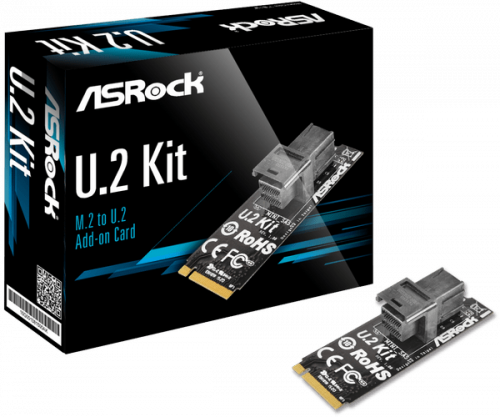
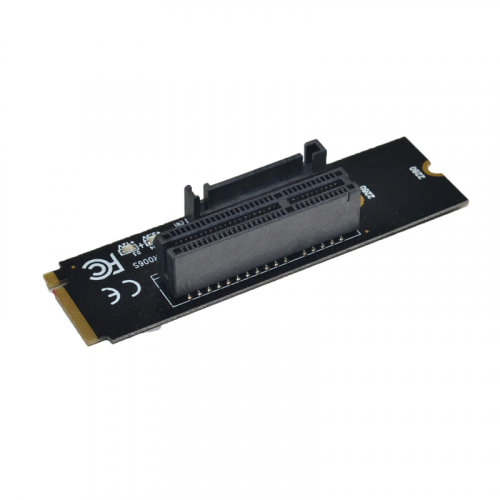
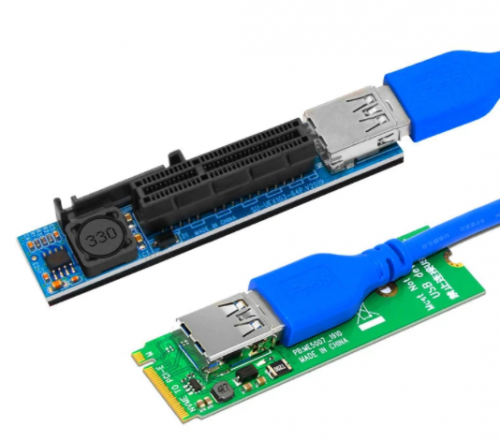
G6400 is a beast if you plan to use it for transcoding. You have 4 sata + M.2, so go with at least 4 drives. use it for your steam drive first. as for M.2, if you need nvme, use DS918 image. if not, you can get a cheap M.2 to pcie x4 adapter that you can then use for a sata card. or get the m.2 to u.2 kit.
giving you an extra 4 sata ports. if you use the pcie x4 m.2 adapter, you then need to get a pcie x4 to 4/5/6/8 sata adapter. used to be dirt cheap, but because of Chia mining, it's crazy expensive.
1 SSD is recommended, but not necessary. with Xpe, you can first create one big volume/pool with all of the HDDs (/volume1, 2 or more HDDs) then use 1 or 2 SSD for either cache (for the HDD data), to install all/most of the syno apps (at /volume2) so everything is super speedy, or both (1 SSD for cache, 1 SSD for apps). you really don't need to, but it's pretty useful. can always do it later.
8GB is very sufficient.
you can definitely go with just 2 HDDs, but 4 is nicer (eg. 4x 1TB > 2x2TB).
This post has been edited by C-Fu: Sep 19 2021, 09:21 PM
I have a question here, I wanted to setup the NAS to be able to stream medias to my TV too which are on the same network, how can I do that?
Can I do it via DLNA?
I am thinking something alone the line of having a software based program installed in the NAS drives, and when I wanted to watch medias from the NAS via TV, I just connect to the NAS and select what I wanted to watch..
Thanks again..
Xpe supports DLNA. just install MediaServer and you're set.
TV's internal media player is very very finicky. you need the media to use a very specific codec, specific bitrate, specific bitrate type to be supported. plus no subtitles. it will just fail most of the time, most of the tv.
Or install Plex/Jellyfin, and enable DLNA from it. DLNA is designed for internal network use, so all devices should be able to find it.
Plex can be used offline as well. Disable remote access if you wish, and enable DLNA server (as a fallback), and in Network, type 192.168.0.0/24 or 192.168.1.0/24 in LAN Networks.
This post has been edited by C-Fu: Sep 21 2021, 07:19 PM
I've been using Truenas for a couple of weeks now, and my initial intention was testing to set up a NAS myself and using it as a simple NAS. I got myself a couple of 5400 rpm hdd, and then now I am playing with the plugins and VMs, I wished I have gotten 7200 rpm hdd for better drive performance for those
(also regret selling off my old rig, first gen i7 cpu and cooler master haf case with lots of 3.5HDD bays)
truenas is like the endgame for NAS. if you have identical drives, and capable hardware to match, go for it. you won't be sorry. xpe/syno is more for people with mixed capacity drives who wants the best capacity+performance.
5400rpm vs 7200rpm doesn't really matter IMO. especially if you use gigabit ethernet.
but once you reach the top of the endgame, what's next?
that's another topic lah. but to get you guys started, google distributed storage, lizardfs, ipfs...
how do you find truenas? what hardware are you using?


 Sep 27 2019, 08:24 PM


 Quote
Quote
 as long as you understand that it's for 2.5" hdd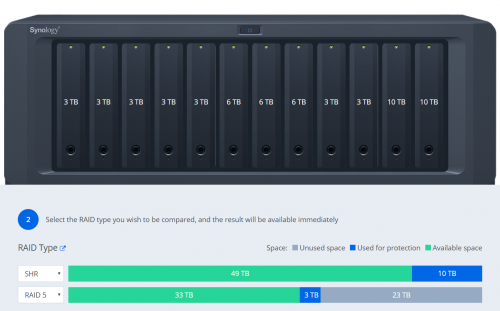
 can't beat that yo
 ..now i have second board which only have 4 port, then i want to buy 2 or 4-port PCI-Express Expansion Card *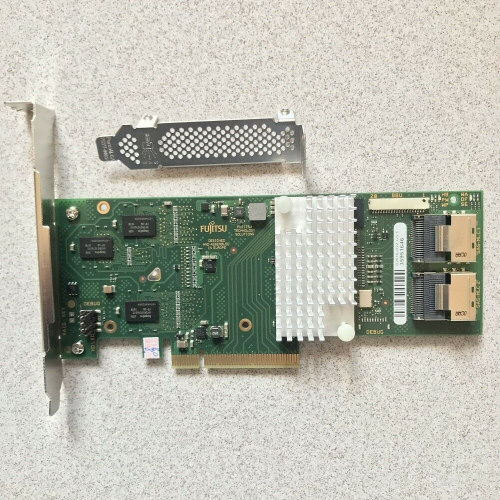



 to see what are the things I need. As I have no idea what I want
  ... All in the name of science LOL

 ,,,
,,,  don't need the attention...


 0.0314sec
 0.41
0.41
 6 queries
 GZIP Disabled