Welcome Guest ( Log In | Register )

Outline · [ Standard ] · Linear+

 Acer Predator XB252Q, gsync dilemma

views
     
TSmeyoe
post Mar 31 2018, 03:29 PM, updated 8y ago

New Member
*
Newbie
4 posts

Joined: Nov 2010
Im interested on getting monitor with gsync, and got my eyes on this monitor. Acer Predator xb252q.

user posted image

However i found that the Displayport Gsync Range is 60Hz-240Hz which get me worried if gsync wont help anything below 60fps and theres no point getting gsync at all sad.gif
My graphic card can hold 60fps with vsync on but sometimes dip to 50-55 in some intensive games and vsync of course get me to 30fps and cause stutter bangwall.gif
So i thought it will be nice to get gsync for this situation and play at 50+ fps with no stutter.
yeah i can upgrade the gpu to get better fps, but really interested in gsync tech in case most updated gpu cant hold even 60fps in latest AAA game for future proof


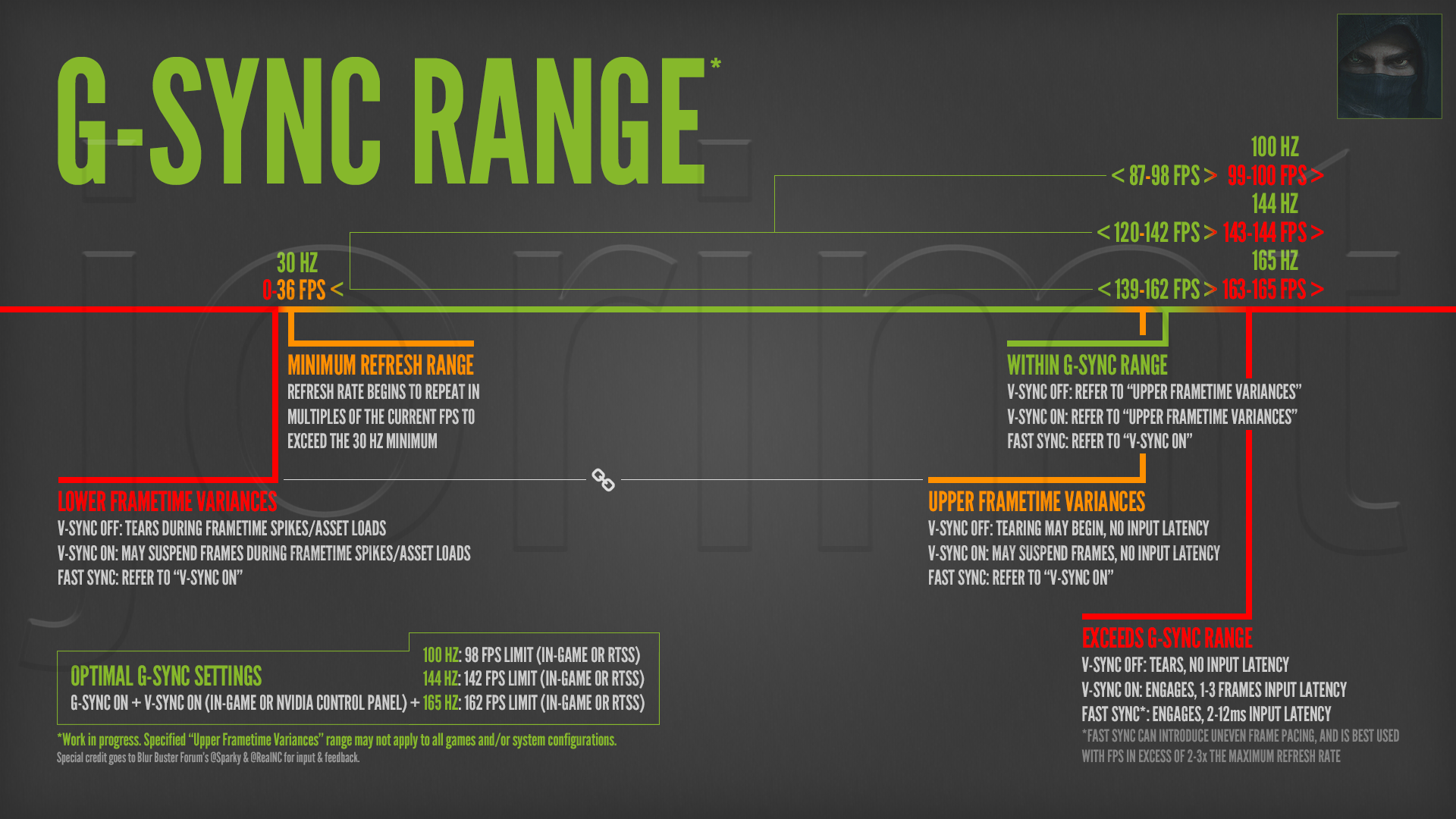
I've read that the g-sync module begins inserting duplicate refreshes per frame to maintain the panel’s minimum physical refresh rate (in this case below 60fps), keep the display active, and smooth motion perception.
But not so sure on this.
Is it better to get gsync monitor with supported range 30-144/240 instead?
kindly help me pls notworthy.gif
nexxim
post Mar 31 2018, 03:48 PM

New Member
*
Junior Member
38 posts

Joined: Aug 2007
Gsync is not limited to 60hz, it should work until 30+
Convael
post Mar 31 2018, 06:47 PM

Regular
******
Senior Member
1,109 posts

Joined: Sep 2007
From: Kuala Lumpur
May I know where you get the " Displayport Gsync Range is 60Hz-240Hz " ?


I have checked this monitor's official document several times and I don't see that statement .

You do however need a Display Port cable in order for Gsync to work up to 240hz refresh rate , but they did not state the minimum in this case.
G-sync usually works from 30 hz - 240hz , theres no reason it wouldn't work below 60 fps

This post has been edited by Convael: Mar 31 2018, 06:52 PM
TSmeyoe
post Mar 31 2018, 07:19 PM

New Member
*
Newbie
4 posts

Joined: Nov 2010
QUOTE(Convael @ Mar 31 2018, 06:47 PM)
May I know where you get the  " Displayport Gsync Range is 60Hz-240Hz " ?
I have checked this monitor's official document several times and I don't see that statement .

You do however need a Display Port cable in order for Gsync to work up to 240hz refresh rate , but they did not state the minimum in this case.
G-sync usually works from 30 hz - 240hz , theres no reason it wouldn't work below 60 fps
*
Hello, u can check it here

https://www.google.com/amp/amp.hothardware....-monitor-review

You tube review here

https://youtu.be/gQf-RoEhNFQ

User manual

Attached Image
TSmeyoe
post Mar 31 2018, 08:22 PM

New Member
*
Newbie
4 posts

Joined: Nov 2010
i got the answer btw

Minimum physical ranges don't affect G-Sync operation, it uses frame duplication to

maintain the effect below the physical limit. All G-Sync monitors work between 0 Hz and

the maximum range.

https://www.youtube.com/watch?v=VkrJU5d2RfA

Convael
post Mar 31 2018, 08:29 PM

Regular
******
Senior Member
1,109 posts

Joined: Sep 2007
From: Kuala Lumpur
QUOTE(meyoe @ Mar 31 2018, 07:19 PM)
Hello, u can check it here

https://www.google.com/amp/amp.hothardware....-monitor-review
You tube review here
User manual
*
The document did not state anything of sort , the only thing it clarifies are the cable refresher rate which has absolutely nothing to do with Gsync

And that review is wrong in a lot of aspects , look at the dowvotes .

When we said " working " , G sync is still functional at below 36hz , but going below 30 fps your monitor will switch to V sync instead .
» Click to show Spoiler - click again to hide... «


And back to frame duplication , mutiples of 0 fps is still 0 , so technically your G sync features will not work @ 0hz ( at that point your pictures will not be refreshed then )
It has to exceed 30 hz in order to for G-sync to have an effect .

And because of this frame duplication techniques , Gsync in the range of 30-60 refresh rate often look more like a motion blur than others

This post has been edited by Convael: Mar 31 2018, 08:44 PM
TSmeyoe
post Mar 31 2018, 10:20 PM

New Member
*
Newbie
4 posts

Joined: Nov 2010
QUOTE(Convael @ Mar 31 2018, 08:29 PM)
The document did not state anything of sort , the only thing it clarifies are the cable refresher rate which has absolutely nothing to do with Gsync

And that review is wrong in a lot of aspects  , look at the dowvotes .

When we said " working " ,  G sync is still functional at below 36hz , but going below 30 fps your monitor will switch to V sync instead .
» Click to show Spoiler - click again to hide... «


And back to frame duplication , mutiples of 0 fps is still 0 , so technically your G sync features will not work @ 0hz ( at that point your pictures will not be refreshed then )
It has to exceed 30 hz in order to for G-sync to have an effect .

And because of this frame duplication techniques , Gsync in the range of 30-60 refresh rate often look more like a motion blur than others
*
Tq for the explanation, basically what i understand from research and copy paste is all G-Sync monitors can maintain G-Sync mode from 0 Hz to their maximum refresh frequency. While the LCD panel does technically have a lower limit of operation (usually around 30-40 Hz) they use duplicate frames to maintain G-Sync at framerates down to zero, which is invisible to the external user.

Its just the xb252q have quite a higher lower limit which is 60hz and im not sure if duplicate frame is as good as gsync performance.

Guess i will buy and try it myself
cstkl1
post Apr 6 2018, 08:18 AM

Look at all my stars!!
Group Icon
Elite
6,799 posts

Joined: Jan 2003

QUOTE(meyoe @ Mar 31 2018, 03:29 PM)
Im interested on getting monitor with gsync, and got my eyes on this monitor. Acer Predator xb252q.

user posted image

However i found that the Displayport Gsync Range is 60Hz-240Hz which get me worried if gsync wont help anything below 60fps and theres no point getting gsync at all  sad.gif
My graphic card can hold 60fps with vsync on but sometimes dip to 50-55 in some intensive games and vsync of course get me to 30fps and cause stutter  bangwall.gif
So i thought it will be nice to get gsync for this situation and play at 50+ fps with no stutter.
yeah i can upgrade the gpu to get better fps, but really interested in gsync tech in case most updated gpu cant hold even 60fps in latest AAA game for future proof
I've read that  the g-sync module begins inserting duplicate refreshes per frame to maintain the panel’s minimum physical refresh rate (in this case below 60fps), keep the display active, and smooth motion perception.
But not so sure on this.
Is it better to get gsync monitor with supported range 30-144/240 instead?
kindly help me pls notworthy.gif
*
must be a confusion between gsync and freesync typo.
gsync has no lower limit however at 0.. theres stuttering issues.
the 30 thing. afaik it just doubles the refresh rate example at 20fps the refresh rate will be at 40.

monitors with gsync has no scalar.
whats the main issue with gsync??

its with vsync on above the monitor refresh rate.
advice to disable vsync.

This post has been edited by cstkl1: Apr 6 2018, 08:23 AM


Change to:
| Lo-Fi Version
0.0182sec    0.15    6 queries    GZIP Disabled
Time is now: 24th December 2025 - 03:58 AM