

 May 1 2019, 01:00 AM


QUOTE(KronenZerg @ Apr 25 2019, 11:58 AM)
I just registered 150GB plan 2days ago. Speed is averaging around 40 to 50MB.
Can someone clarify the following -
1- Is the speed normal or should it better pending on location? Can Celcom check the region speedrate within the area?
2- If i use booster, can it help to increase the speed?
3- I am using media box (Android) and ipad to surf Youtube (App). How do they or I know that it would deduct from Walla 1TB quota? Same with other apps as well.
Thank you.

1. speed is depend on your location n indoor coverage. is wireless ther eis no guarantee speed too and tower congestion condition. nope they cant just check like that from their system.Can someone clarify the following -
1- Is the speed normal or should it better pending on location? Can Celcom check the region speedrate within the area?
2- If i use booster, can it help to increase the speed?
3- I am using media box (Android) and ipad to surf Youtube (App). How do they or I know that it would deduct from Walla 1TB quota? Same with other apps as well.
Thank you.
2. what kind of booster? vpn?
3. if using youtube apps should consider as walla. if using others apps our of walla streaming it will eat your main quota.
QUOTE(alucard1983 @ Apr 30 2019, 11:49 PM)
Using it for a about 1 week + now at 2 different location , using the RM100 package. My findings
1. speed varies (1 house in bangsar south is consistent at 20mbps++, 2nd house at jalan pudu consistent at 80bmps++ minimum)
2. easy to use except today, it had red light at the MODE section. I believe by changing the DNS at admin section fixed this ( some say this drops the speed as the dns im using is public google dns) . That may be true at before this at the pudu house its at 100 mbps but after dns change is bout 80-90++ mbps. For me the speed is good enough.
3. Im using it to give internet to 2 laptops, 1 tv, 2 handphones. All no problems.
4. I checked the usage details thru celcom life app - tho the app seems buggy and I feel its not really updating the usage in real time.
5. about 2 hours of 4k youtube usage on my 55inch led tv, took out around 22GB from video walla.
current summary- its something i think ill keep since the portability is very useful when i travel as most times when im in hotel and in house internet sucks to even watch netflix. Im just evaluating now on should i upgrade to the rm150 with 1TB video walla. Needs to further abuse/stress test the service in the next 2 weeks to draw a conclusion
different location different tower.1. speed varies (1 house in bangsar south is consistent at 20mbps++, 2nd house at jalan pudu consistent at 80bmps++ minimum)
2. easy to use except today, it had red light at the MODE section. I believe by changing the DNS at admin section fixed this ( some say this drops the speed as the dns im using is public google dns) . That may be true at before this at the pudu house its at 100 mbps but after dns change is bout 80-90++ mbps. For me the speed is good enough.
3. Im using it to give internet to 2 laptops, 1 tv, 2 handphones. All no problems.
4. I checked the usage details thru celcom life app - tho the app seems buggy and I feel its not really updating the usage in real time.
5. about 2 hours of 4k youtube usage on my 55inch led tv, took out around 22GB from video walla.
current summary- its something i think ill keep since the portability is very useful when i travel as most times when im in hotel and in house internet sucks to even watch netflix. Im just evaluating now on should i upgrade to the rm150 with 1TB video walla. Needs to further abuse/stress test the service in the next 2 weeks to draw a conclusion
1. if u are 4G+ location your modem connection might be 4G+ mode, even thought sometimes it also wont be 4G+ it's not priority as 4G+ as default
2. i dont think set DNS will improve much speed.
3. Is a wireless modem indoor coverage is more important in order to get good speed vs stable connection.
the modem also might run single band mode somtimes, either b3, or b7 connection so speed also will be differents.
Find a good spot indoor to locate the modem is reading ald good, speed is bad mean is congested.
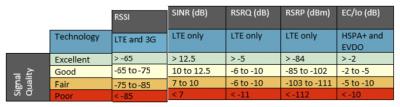
RSRP <90dbm (lower is better) directly effect speed , SINR >5dbm or higher is better
QUOTE(Marcion @ Apr 24 2019, 08:01 PM)
hi, I will be moving to new house soon, since the new resident there do not meet the demand of placing phone line pole so no telephone, streamyx and unifi service. is celcom home wireless better that maxis?
is it RM150 with data quata 150gb+1000gb worth?
wise vesa leh... wireless, every location or area got each telco blind spot. to confirm better buy a prepaid sim to test it first before try.is it RM150 with data quata 150gb+1000gb worth?
For some user main quota 150GB enough,
For me kampung area no unifi, 150GB not enough. daily min 10GB quota, if celcom remove walla, and put it as main quota like digi 150i would be great. least or not also an altenative to compete haha.
QUOTE(makasim @ Apr 22 2019, 12:45 PM)
1) Can someone confirm if I have used up my data plan, can I insert another celcom prepaid sim to purchase another data plan. Will it work?
The reason being I have just subscribed to the lowest data plan just to get the modem and there are only 2 persons using it at the moment but I am afraid once my kids are back for holidays the plan might not be sufficient.
2) I cannot check my usage thru OCR because no celcom line except the broadband line in my house. How do I go about this other than calling customer service.
3) Another thing Celcom start my billing on the 24th of April before my 30 days trial. ( I registered on April 4) Will I be billed?
Thanks for anyone who could enlighten me.
1. can put in others celcom sim as long as is celcom. tunetalk n etc also works.The reason being I have just subscribed to the lowest data plan just to get the modem and there are only 2 persons using it at the moment but I am afraid once my kids are back for holidays the plan might not be sufficient.
2) I cannot check my usage thru OCR because no celcom line except the broadband line in my house. How do I go about this other than calling customer service.
3) Another thing Celcom start my billing on the 24th of April before my 30 days trial. ( I registered on April 4) Will I be billed?
Thanks for anyone who could enlighten me.
2. modem can read stats, reset monthly. or set limit.
This post has been edited by alexchew_2020: May 1 2019, 01:40 AM
 Quote
Quote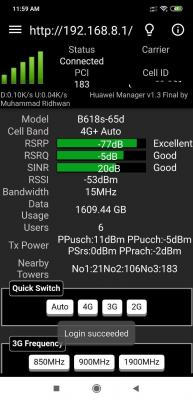

 0.0370sec
 0.87
0.87
 7 queries
 GZIP Disabled