Welcome Guest ( Log In | Register )

Outline · [ Standard ] · Linear+

 Migrate window to ssd, unable boot from ssd

views
     
TSeddie2020
post Mar 22 2018, 11:02 PM, updated 8y ago

Trusted
*******
Senior Member
3,125 posts

Joined: Jun 2008
From: Mars


Hi sifu, currently plan to get an ssd for my laptop which have m2 slot

I had clone twice using both easeus and macrium..
Both success however I couldn't boot up..

Is there wrong doing in cloning? I just use clone setting and choose drive c and clone it to ssd however I could boot up..

my hdd is 1tb but used space less than 200gb and ssd is 256gb

Your advise is highly appreciated.
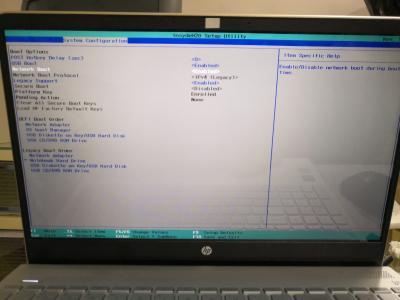
Below is some setting I tried in bios

EDIT : solve.. resize and shrink your drive in hdd less than 200gb, then other put as unallocated..
then copy all clone to ssd... then tada... working

This post has been edited by eddie2020: Mar 24 2018, 04:25 PM


Attached thumbnail(s)
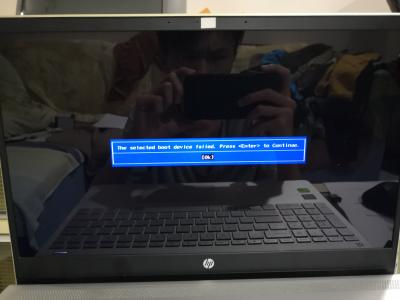
Attached Image Attached Image Attached Image Attached Image Attached Image
Limjiahao97
post Mar 23 2018, 04:47 PM

New Member
*
Junior Member
35 posts

Joined: Oct 2015
1: use https://www.macrium.com/reflectfree
2. your windows and everything u cloned will be exactly the same
3. Depending on the size of your new ssd , if its just 128gb ssd then i recommend deleting everything except windows before cloning from your HDD to new SSD. If ur ssd is big enough then u can just clone everything to it.
4. The best way to make sure nothing goes wrong is after cloning unplug your old HDD and go bios set new SSD as primary boot drive then start your pc. If it works then plug in your old HDD back then delete the windows files on it (recommend format the whole drive so there wont be any conflict , u may save your games etc to external HDD)

u can google how to clone with macrium reflect.
TSeddie2020
post Mar 23 2018, 06:58 PM

Trusted
*******
Senior Member
3,125 posts

Joined: Jun 2008
From: Mars


QUOTE(Limjiahao97 @ Mar 23 2018, 04:47 PM)
1: use https://www.macrium.com/reflectfree
2. your windows and everything u cloned will be exactly the same
3. Depending on the size of your new ssd , if its just 128gb ssd then i recommend deleting everything except windows before cloning from your HDD to new SSD. If ur ssd is big enough then u can just clone everything to it.
4. The best way to make sure nothing goes wrong is after cloning unplug your old HDD and go bios set new SSD as primary boot drive then start your pc. If it works then plug in your old HDD back then delete the windows files on it (recommend format the whole drive so there wont be any conflict , u may save your games etc to external HDD)

u can google how to clone with macrium reflect.
*
Hi there thanks.. For number 4,if my ssd dead I no backup.. Can't keep the windows file in hdd?
Limjiahao97
post Mar 23 2018, 07:07 PM

New Member
*
Junior Member
35 posts

Joined: Oct 2015
QUOTE(eddie2020 @ Mar 23 2018, 06:58 PM)
Hi there thanks.. For number 4,if my ssd dead I no backup.. Can't keep the windows  file in hdd?
*
u can keep windows file in your old hdd , the reason for formatting old hdd is to prevent any conflict between old and new windows files. Once your new ssd starts up windows normally there shouldnt be any problem and u can safely format your old hdd.
TSeddie2020
post Mar 23 2018, 07:23 PM

Trusted
*******
Senior Member
3,125 posts

Joined: Jun 2008
From: Mars


QUOTE(Limjiahao97 @ Mar 23 2018, 07:07 PM)
u can keep windows file in your old hdd , the reason for formatting old hdd is to prevent any conflict between old and new windows files. Once your new ssd starts up windows normally there shouldnt be any problem and u can safely format your old hdd.
*
oh, actually i just want keep in-case ssd died... so i can boot back with hdd


Change to:
| Lo-Fi Version
0.0147sec    0.49    6 queries    GZIP Disabled
Time is now: 13th December 2025 - 06:24 AM