Outline ·
[ Standard ] ·
Linear+
NVIDIA GeForce Community V19, RTX 5000 unveiled
|
h11g
|
 Dec 9 2020, 04:28 PM Dec 9 2020, 04:28 PM
|

|
QUOTE(thisisrazin @ Dec 9 2020, 02:53 PM) Exactly. All these low tier brands you see in garage sales always sell for cheap and even then not a lot of demand. No one wants to take this into account though. Rather continue the narrative that "Asus Bad". You will feel it 2 years from now. yeah i posted my gigabyte 5700xt for 1 week only sold, the asus card within 1 day sold~! |
|
|
|
|
|
h11g
|
Dec 9 2020, 04:44 PM
|
|
|
QUOTE(thisisrazin @ Dec 9 2020, 03:41 PM) A lot of buyers still care dude. I never had issues selling my Asus GPU. Always get buyers within one week or even less. Only ever bought Asus before. With Zotac, had to lower price a lot to even get an offer. Just the way it is. yes and zotac offer longer warranty and also they'd still honour the warranty even if you remove the heatsink~! |
|
|
|
|
|
h11g
|
Dec 11 2020, 12:55 PM
|
|
|
My neighbourhood pc shop selling Gigabyte 3080 Gaming OC @ $4099
Last unit
This post has been edited by h11g: Dec 11 2020, 01:02 PM
|
|
|
|
|
|
h11g
|
Dec 11 2020, 01:45 PM
|
|
|
QUOTE(wolf1991 @ Dec 11 2020, 12:39 PM) Wow see what nvidia doing. Don't understand why they so upset with honest feedback. Ray tracing was something nice to have but not essential for now as hardware still not powerful enough to get a significant ray tracing result. They are threatening the reviewer for not saying what they like. Their card actually was not bad just this was a bad way of marketing. Luckily they are not the only graphic card provider in the market. 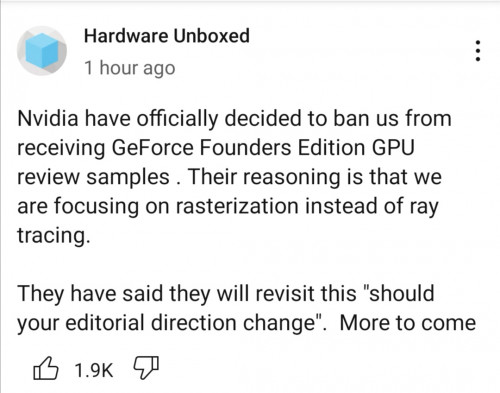 It’s common for these companies to do such thing, recently also big Hoo-hah with MSI what! Basically MSI is using their sister company to scalp themselves |
|
|
|
|
|
h11g
|
Dec 11 2020, 02:02 PM
|
|
|
QUOTE(FatalExe @ Dec 11 2020, 12:59 PM) "More to come" or, just reveal the full story before publishing lol. Did Gamers Nexus ever revealed the full story of the Colorful situation other than his initial tweet? What story ? |
|
|
|
|
|
h11g
|
Dec 12 2020, 10:44 AM
|
|
|
QUOTE(yimingwuzere @ Dec 12 2020, 01:48 AM) Capped power limit just to make sure it's not the GPU. Got the same result, although it took a lot longer to do so. AFAIK both HWInfo and GPU-Z uses the same sensors, just that GPU-Z refreshes more frequently. Pink indicates thermal throttling. https://pictr.com/images/2020/12/12/7oetyQ.pngdid you UV your card? voltage only 0.718V? |
|
|
|
|
|
h11g
|
Dec 12 2020, 12:12 PM
|
|
|
QUOTE(yimingwuzere @ Dec 12 2020, 01:48 AM) Capped power limit just to make sure it's not the GPU. Got the same result, although it took a lot longer to do so. AFAIK both HWInfo and GPU-Z uses the same sensors, just that GPU-Z refreshes more frequently. Pink indicates thermal throttling. https://pictr.com/images/2020/12/12/7oetyQ.pngthis is my amp holo stable @ 1995mhz while undervolting to 0.95v @ 70c and below, non ac room. 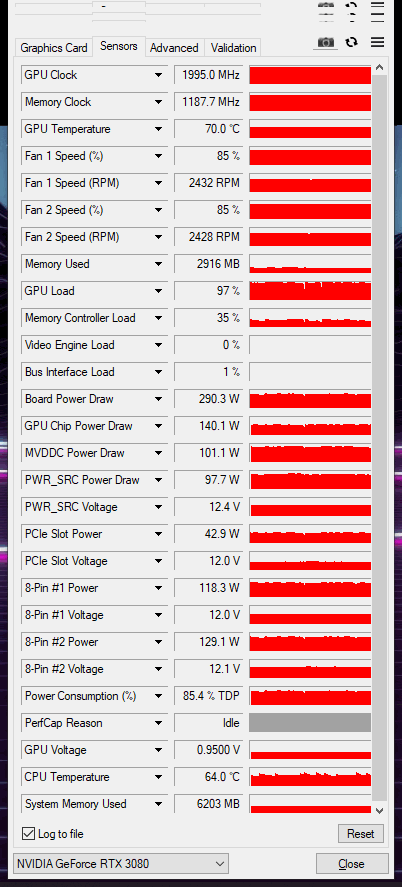 |
|
|
|
|
|
h11g
|
Dec 12 2020, 02:37 PM
|
|
|
QUOTE(yimingwuzere @ Dec 12 2020, 01:28 PM) Capped the power limit and undervolted the card so it's not running at its maximum boost clock, just to verify it isn't the GPU thermal throttling. The card will work. Note that faster PCIE3 cards may be bandwidth throttled, but the CPU bottleneck is most likely. Even newer titles are bottlenecked by Core i5 quadcores without hyperthreading at 1080p, let alone a Core 2 Quad (or Duo). Can share voltage curve and memory clock OC? Also, are you deshrouded like @Bonchi, and if not, what's your fan curve at? no my card is stock, not deshrouded. No memory oc as well. 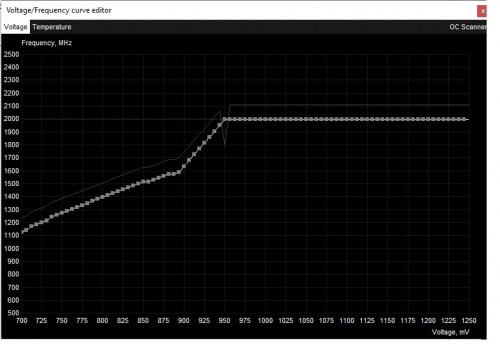 this is the curve, but i adjusted the fan curve to 85% to slightly ram up the cooling. This post has been edited by h11g: Dec 12 2020, 02:44 PM |
|
|
|
|
|
h11g
|
Dec 15 2020, 04:38 PM
|
|
|
guys any guides on ocing memory?
|
|
|
|
|
|
h11g
|
Dec 15 2020, 06:17 PM
|
|
|
QUOTE(nrw @ Dec 15 2020, 03:59 PM) 1) Confirm that you have sufficient (direct contact cooling) - if you have a 3090 be careful as the temps between front n backside of the pcb is day n night. 2) Keep adding 100 and bench every time until you stop gaining performance (or even lose as error correction kicks in) 3) Go back to the last 'stable' (without performance stagnation or loss) point and take off another 50-100 for safety as other applications might stress it differently. Don't overdo it in general... as I said ... if Nvidia wanted you to, you'd be able to see the temperature reporting of the 8/12/24 sensors. Curve OC is pretty safe but I wouldn't say the same thing about VRAM OC. It will clock down at a defined temp but I doubt it's good for long term if its running right below the max. Personally despite the chips actually being produced for 21GBit/s and the card being on water and +1300 being stable (+1250 on air) ... on my 3080 I just use +500 as a casual setting and even on my performance setting I 'just' went for +1000. it is also advisable to have a stable uv/oc first before messing with ram oc right? |
|
|
|
|
|
h11g
|
Dec 18 2020, 04:21 PM
|
|
|
yes i have to say everything in cyberpunk is so beautiful. It took longer for me to progress because i keep stopping and looking around, trying to explore the city.
|
|
|
|
|
|
h11g
|
Dec 22 2020, 01:21 PM
|
|
|
QUOTE(cstkl1 @ Dec 22 2020, 12:17 PM) already done that. same ram speed?? thats stupid. it should be same vdimm. but because noobs cant oc ram they dont understand yhe concept. funny how ppl nit pick. already produced. 5900x trades blows with 10900k. 10900k doesnt bsod. the crappiest silicion also none. can u guarantee 5900x doesnt. oh yeah forgot. its giga fauly, msi fault, asus fault. keep forgetting the zen defence line. any guide how to oc ram the proper way? |
|
|
|
|
|
h11g
|
Jan 27 2021, 02:20 PM
|
|
|
QUOTE(TristanX @ Jan 26 2021, 09:22 AM) the difference between 3600 and 5600x @ 2k gaming is only 3.1%, means the gain is very minimal right? and no point going 5900x for gaming too. |
|
|
|
|



 Quote
Quote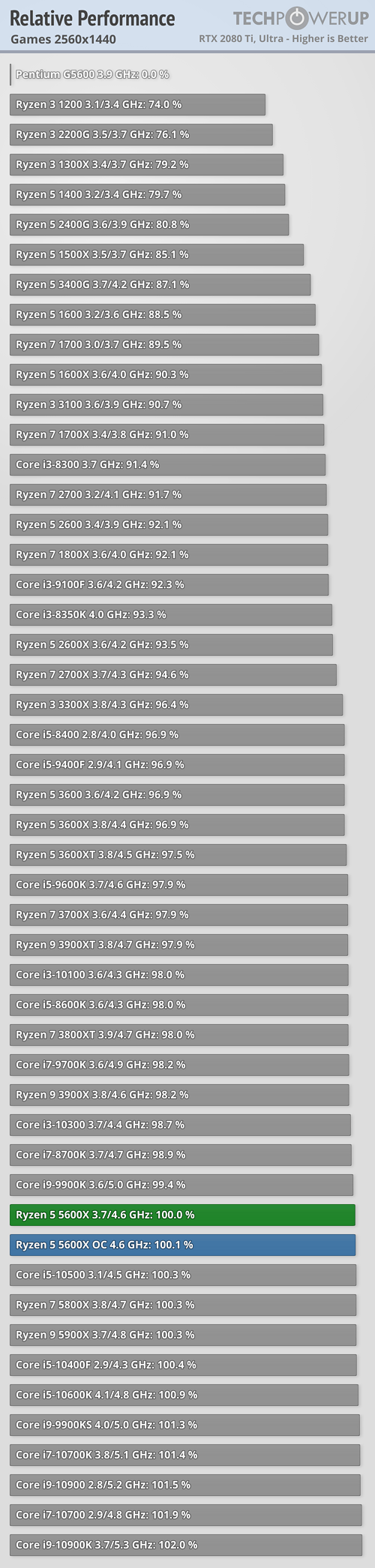

 0.5736sec
 1.28
1.28
 7 queries
 GZIP Disabled