

 Aug 5 2018, 11:15 PM


So this version is the FG7009GR(AC), one number up from the Aztech one (FG7008GR(AC)), and the differences are only:
- Casing has no trace of Aztech, all brands replaced by Singtel
- Firmware changes (USB port disabled, SSID set to Singtel one, additional routes)
- ‘Advanced’ mode by going to http://192.168.1.254/singtel, and login with
CODE
Username: admin
Password: H3ll0t3ch
Password: H3ll0t3ch
In this advanced mode you have access to more advanced settings compared to the normal settings page. Probably only for Singtel staff to configure the router. Btw, the current Singtel firmware version on mine is 339.6.2-011. I have tried using UniFi with the stock firmware doesn’t seem to work, but might have missed something out.
So now, how do we get UniFi compatible firmware on this router? Quite simple, but we have to flash two different versions of firmware, first one is to allow us to flash any version of the Aztech firmware replacing the Singtel one and second, the UniFi compatible one. In order, the first firmware can be either Version 322.6s.2-009 or Version 322.6s.2-011, but second firmware will be the last one working for UniFi, Version 322.6s.3-003.
If you choose to follow this guide, please note you’re doing this at your own risk, will void any warranty on the device, and I’m not accountable if your router becomes bricked or turns into a killer robot that has laser beams.
1) Connect computer to router via ethernet cable, do not use WiFi. Go to 192.168.1.254, login and under Device administration, select Firmware Upgrade
2) Select the first firmware to flash, Version 322.6s.2-009 or Version 322.6s.2-011, and press upload. Do not power down the router, laptop, or disconnect the ethernet cable until loading bar shows 100%
3) Flash second firmware, Version 322.6s.3-003
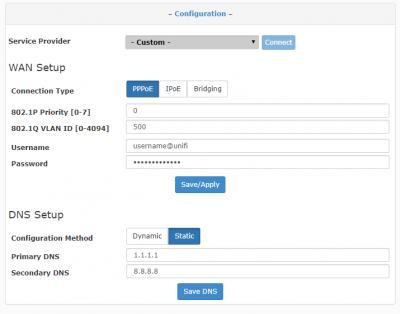
4) Enter in your PPPoE username and password, set 802.1P Priority to 0
5) Set 802.1Q VLAN ID to 500
6) Enable IGMP Multicast Proxy under Advanced>Advanced Setup>WAN>(for current interface)Edit> IGMP Multicast Proxy
Also attached some images if you need reference. For Internet setup:
For enabling IGMP Multicast Proxy


And you should be done! For some reason, I couldn’t find the strange routing problem that @soonwai encountered, but I created a static route to 1.0.0.0/8 just in case. Will still play around with this router and see if I discover anything new. So far, IPTV is untested yet but there is option for it, might have to create a new interface and everything. IPv6 needs more testing too.
As for my own setup, I repurposed my stock TP-Link router as a wired AP for my second floor. It works well enough to extend the range and cover the house in WiFi, ready for speed upgrade. Seller also gave me another older Singtel router DSL7002GRV(S) seems like this is only AC750 but still gigabit, might turn this into spare AP or switch. I'll try to get pics of both soon.
Helpful Links : https://forums.hardwarezone.com.sg/next-gen...-5275458-2.html
 Quote
Quote


 0.0189sec
 0.42
0.42
 7 queries
 GZIP Disabled