Welcome Guest ( Log In | Register )

Outline · [ Standard ] · Linear+

 migrate os from hdd to ssd problem

views
     
TSEterman
post Feb 23 2018, 01:08 PM, updated 8y ago

Casual
***
Junior Member
490 posts

Joined: Aug 2006


hello, i bought a m.2 sata ssd for my laptop for os migration. My laptop is originally preloaded with windows 10 on hdd. I have used a few cloning programs, amoei backupper, minitool partition wizard, macrium reflect, easeus todo backup.

For cloning, i cloned the recovery , efi, reserved, c: partitions over to ssd.

After that , i tried booting of ssd and it gives me error in boot\bcd,
-tried startup repair but failed
-tried bootrec /fixboot , access denied
-tried reformat efi partition, remake efi partition and boot folder, then re-run /fixboot , access denied too

Any other suggestions to the problem? or other viable os migration method?

Thanks.

this is my disk management after cloning :
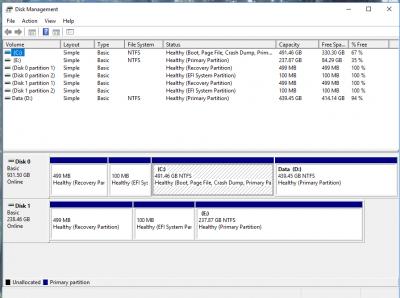
Attached Image

This post has been edited by Eterman: Feb 27 2018, 12:13 PM
foohoa
post Feb 23 2018, 01:16 PM

Enthusiast
*****
Senior Member
981 posts

Joined: Jan 2003
From: SABAH!!!


last time i brought samsung ssd, samsung have provide the software to clone over
not sure other brand
buraqdunia
post Feb 23 2018, 01:17 PM

On my way
****
Junior Member
617 posts

Joined: Jul 2006


yr win10 do not have it own migration software?
TSEterman
post Feb 23 2018, 01:26 PM

Casual
***
Junior Member
490 posts

Joined: Aug 2006


QUOTE(buraqdunia @ Feb 23 2018, 01:17 PM)
yr win10 do not have it own migration software?
*
don't quite understand your question. The ssd is plextor and apparently they don't have their own migration software.(i searched their website)
buraqdunia
post Feb 23 2018, 01:30 PM

On my way
****
Junior Member
617 posts

Joined: Jul 2006


QUOTE(Eterman @ Feb 23 2018, 01:26 PM)
don't quite understand your question. The ssd is plextor and apparently they don't have their own migration software.(i searched their website)
*
which mean yr system do not have OS. But to my understand ; i quote, "a m.2 sata ssd for this windows 10 os migration" ; obviously mean yrs are system with win10 OS on it. No?
TSEterman
post Feb 23 2018, 01:33 PM

Casual
***
Junior Member
490 posts

Joined: Aug 2006


QUOTE(buraqdunia @ Feb 23 2018, 01:30 PM)
which mean yr system do not have OS. But to my understand ; i quote,  "a m.2 sata ssd for this windows 10 os migration" ; obviously mean yrs are system with win10 OS on it. No?
*
oh, my laptop originally comes with windows 10 preloaded on hdd. i will try rephrase my initial sentence.
buraqdunia
post Feb 23 2018, 01:35 PM

On my way
****
Junior Member
617 posts

Joined: Jul 2006


QUOTE(Eterman @ Feb 23 2018, 01:33 PM)
oh, my laptop originally comes with windows 10 preloaded on hdd. i will try rephrase my initial sentence.
*
which is beg my previous question.
TSEterman
post Feb 23 2018, 01:40 PM

Casual
***
Junior Member
490 posts

Joined: Aug 2006


QUOTE(buraqdunia @ Feb 23 2018, 01:35 PM)
which is beg my previous question.
*
i don't think windows 10 has its own migration software.

----------------------------------------------------------------------

Added disk management screenshot, if it helps.
nuvi
post Feb 26 2018, 09:36 PM

20k VIP Club
*********
All Stars
27,961 posts

Joined: Aug 2009
Disk 0 is your HDD and disk 1 is SSD? I think some steps must have done wrong. Your cloned win partition should not be assigned with E drive letter. After cloned it you should immediately shut down, remove your HDD, boot to bios and change setting so that first boot attempt is to m.2

Try redo the cloning again
TSEterman
post Feb 26 2018, 10:50 PM

Casual
***
Junior Member
490 posts

Joined: Aug 2006


QUOTE(nuvi @ Feb 26 2018, 09:36 PM)
Disk 0 is your HDD and disk 1 is SSD? I think some steps must have done wrong. Your cloned win partition should not be assigned with E drive letter. After cloned it you should immediately shut down, remove your HDD, boot to bios and change setting so that first boot attempt is to m.2

Try redo the cloning again
*
yes, disk 0 is hdd and disk is ssd.

tried cloning few times , including the immediately shutdown method you mentioned, same bcd error.

i also tried fresh installation on ssd, same bcd error too bangwall.gif , so migration or fresh installation = same error. Can it be ssd problem?

written so many gigs on it already, thinking of just using it as storage for game files to preserve its life sad.gif
horns
post Feb 26 2018, 11:35 PM

\m/
*******
Senior Member
3,038 posts

Joined: Nov 2009
after cloning, you should take out the hdd, then go to bios and set up the ssd as os drive. make sure sata operations in bios is set to ahci, and make sure the boot order is pointed to the windows boot manager. assuming your laptop comes with w10, it should be running uefi bios.

by now your laptop should be able to boot up normally.

nuvi
post Feb 27 2018, 08:27 AM

20k VIP Club
*********
All Stars
27,961 posts

Joined: Aug 2009
QUOTE(Eterman @ Feb 26 2018, 10:50 PM)
yes, disk 0 is hdd and disk  is ssd.

tried cloning few times , including the immediately shutdown method you mentioned, same bcd error.

i also tried fresh installation on ssd, same bcd error too  bangwall.gif  , so migration or fresh installation = same error. Can it be ssd problem?

written so many gigs on it already, thinking of just using it as storage for game files to preserve its life  sad.gif
*
Maybe some settings in bios not changed?
TSEterman
post Feb 27 2018, 08:56 AM

Casual
***
Junior Member
490 posts

Joined: Aug 2006


QUOTE(horns @ Feb 26 2018, 11:35 PM)
after cloning, you should take out the hdd, then go to bios and set up the ssd as os drive. make sure sata operations in bios is set to ahci, and make sure the boot order is pointed to the windows boot manager. assuming your laptop comes with w10, it should be running uefi bios.

by now your laptop should be able to boot up normally.
*
tried that too, removed hdd, leaving only ssd. Sata default is ahci. Default uefi bios. Boot order changed between usb and windows boot manager. Still the same error.

QUOTE(nuvi @ Feb 27 2018, 08:27 AM)
Maybe some settings in bios not changed?
*
apart from some of the settings mentioned above, secure boot disabled , csm disabled (default).
nuvi
post Feb 27 2018, 09:35 AM

20k VIP Club
*********
All Stars
27,961 posts

Joined: Aug 2009
QUOTE(Eterman @ Feb 27 2018, 08:56 AM)
tried that too, removed hdd, leaving only ssd. Sata default is ahci. Default uefi bios. Boot order changed between usb and windows boot manager. Still the same error.
apart from some of the settings mentioned above, secure boot disabled , csm disabled (default).
*
When you tried doing fresh installation on SSD, you use installation files in USB drive?

Very strange issue. I suspect either it is not properly cloned or there's setting in bios that still not pointed to m.2 drive for boot.
TSEterman
post Feb 27 2018, 10:39 AM

Casual
***
Junior Member
490 posts

Joined: Aug 2006


QUOTE(nuvi @ Feb 27 2018, 09:35 AM)
When you tried doing fresh installation on SSD, you use installation files in USB drive?

Very strange issue. I suspect either it is not properly cloned or there's setting in bios that still not pointed to m.2 drive for boot.
*
yes, usb drive installation , made with media creation tool.

do you have any other parameters related to boot?
ALeUNe
post Feb 27 2018, 10:46 AM

I'm the purebred with aristocratic pedigree
Group Icon
VIP
9,692 posts

Joined: Jan 2003
From: Mongrel Isle
You didn't clone it properly.

Use easeus. Freeware.

P/S
Suggestion of doing fresh installation is beyond crazy.
You may not get your OS activation back.

This post has been edited by ALeUNe: Feb 27 2018, 10:48 AM
horns
post Feb 27 2018, 11:16 AM

\m/
*******
Senior Member
3,038 posts

Joined: Nov 2009
QUOTE(Eterman @ Feb 27 2018, 08:56 AM)
tried that too, removed hdd, leaving only ssd. Sata default is ahci. Default uefi bios. Boot order changed between usb and windows boot manager. Still the same error.
apart from some of the settings mentioned above, secure boot disabled , csm disabled (default).
*
this is a weird case. usually for cloning all i did was what i mentioned, i.e. clone the original os to ssd; shut the laptop down; take out hdd (so that the laptop has only ssd); boot into bios to ensure boot order is pointed to ssd (uefi bios; secureboot on; sata operations is ahci; csm disabled); save the settings and reboot. the laptops will boot normally.

i suspect something is wrong with the clone on your ssd. did you do diskpart > clean to clean up everything on your ssd before each attempt? if not, try do that, i.e. take out the hdd; boot into os installation screen with your usb bootable; press shift+f10 to bring up command prompt and do diskpart > clean; close the prompt and proceed with fresh installation. a fresh installation always works if the installer files are all good. since the hdd is taken out, it will not interfere with bcd related stuff, and everything will be installed on the ssd.

after making sure a fresh installation can be done and laptop can boot successfully with it, shut down the laptop, install the hdd, readjust boot settings, reboot with hdd, do a diskpart > clean on ssd again (be careful and select the right disk to do clean in diskpart), and try cloning again.

which plextor ssd are you using?

andrekua2
post Feb 27 2018, 11:18 AM

10k Club
********
All Stars
13,476 posts

Joined: Jan 2012


I do not have W10 but I tried Macrium with mixed result too. First I had success with it when I transfer my Autocad PC to a new SSD. It didnt have preloaded Windows, but one that I bought separately.

With the first success, I proceed to transfer my server to a new hdd since its showing warning bad sectors are showing up. It is on Win7 too but Macrium failed to complete. Tried multiple times also fail.

Finally I managed to transfer by using windows tool. I was surprised it works so well but I could not remember the steps that I did. If I guess correctly, it was in Backup and Restore. I created a system image and then restore it in the new hdd. Not sure how the whole process went but even the recovery partition was cloned successfully.
TSEterman
post Feb 27 2018, 12:12 PM

Casual
***
Junior Member
490 posts

Joined: Aug 2006


QUOTE(ALeUNe @ Feb 27 2018, 10:46 AM)
You didn't clone it properly.

Use easeus. Freeware.

P/S
Suggestion of doing fresh installation is beyond crazy.
You may not get your OS activation back.
*
i forgot to include that. I also tried using easeus todo backup. Same result.

QUOTE(horns @ Feb 27 2018, 11:16 AM)
this is a weird case. usually for cloning all i did was what i mentioned, i.e. clone the original os to ssd; shut the laptop down; take out hdd (so that the laptop has only ssd); boot into bios to ensure boot order is pointed to ssd (uefi bios; secureboot on; sata operations is ahci; csm disabled); save the settings and reboot. the laptops will boot normally.

i suspect something is wrong with the clone on your ssd. did you do diskpart > clean to clean up everything on your ssd before each attempt? if not, try do that, i.e. take out the hdd; boot into os installation screen with your usb bootable; press shift+f10 to bring up command prompt and do diskpart > clean; close the prompt and proceed with fresh installation. a fresh installation always works if the installer files are all good. since the hdd is taken out, it will not interfere with bcd related stuff, and everything will be installed on the ssd.

after making sure a fresh installation can be done and laptop can boot successfully with it, shut down the laptop, install the hdd, readjust boot settings, reboot with hdd, do a diskpart > clean on ssd again (be careful and select the right disk to do clean in diskpart), and try cloning again.

which plextor ssd are you using?
*
i didn't use diskpart clean. i usually delete the partitions, so it becomes unallocated before fresh installation or other methods of cloning.

i am using plextor s3g, latest firmware.
nuvi
post Feb 27 2018, 02:36 PM

20k VIP Club
*********
All Stars
27,961 posts

Joined: Aug 2009
QUOTE(ALeUNe @ Feb 27 2018, 10:46 AM)
You didn't clone it properly.

Use easeus. Freeware.

P/S
Suggestion of doing fresh installation is beyond crazy.
You may not get your OS activation back.
*
Don't connect to internet when it's for testing purposes

2 Pages  1 2 >Top
 

Change to:
| Lo-Fi Version
0.0192sec    0.71    6 queries    GZIP Disabled
Time is now: 12th December 2025 - 01:14 PM