

QUOTE(verine1012 @ Oct 6 2009, 12:19 AM)
how to put date & time like yours on the screen?
i'm a new beginner on mac

dude read back the past pages. everything is there. i'm a new beginner on mac

MacOS X Show Off Your Desktop - MacOS X only, Wallpaper , icons , themes , etc
|
|
 Oct 6 2009, 01:22 AM Oct 6 2009, 01:22 AM
|
 
Senior Member
2,197 posts Joined: Nov 2008   
|
QUOTE(verine1012 @ Oct 6 2009, 12:19 AM) how to put date & time like yours on the screen? dude read back the past pages. everything is there. i'm a new beginner on mac |
|
|
|
|
|
Oct 6 2009, 02:11 AM
|

Junior Member
66 posts Joined: Nov 2005
|
QUOTE(llsphinxll @ Oct 6 2009, 01:22 AM) dude read back the past pages. everything is there. i use the geektool but i dunno how to use it =.=or have other easier way? |
|
|
Oct 6 2009, 12:58 PM
|

Junior Member
268 posts Joined: Apr 2009
|
QUOTE(verine1012 @ Oct 6 2009, 02:11 AM) i use the geektool but i dunno how to use it =.= ive written it down somewhere in this post b4, search for it. or try google.or have other easier way? |
|
|
Oct 6 2009, 02:02 PM
|

Junior Member
261 posts Joined: Jun 2007 From: north malaya
|
QUOTE(verine1012 @ Oct 6 2009, 02:11 AM) i use the geektool but i dunno how to use it =.= try this...or have other easier way? CLIK HERE hope can help...  |
|
|
Oct 7 2009, 11:30 PM
|

All Stars
10,688 posts Joined: Jan 2005
|
My workstation
 |
|
|
Oct 8 2009, 09:17 AM
|
|
Junior Member
48 posts Joined: Jun 2009
|
 |
|
|
|
|
|
Oct 8 2009, 09:05 PM
|

Junior Member
36 posts Joined: Nov 2008 
|
hey guys, newbie here.
i changed the icon for my msn messenger but the icon did not appear (there's an empty space where it sits on the dock). so i reverted back to the original msn icon but it still wouldn't show. any ideas? also i'm looking for a free alternative to candybar. for some reason, when i download liteicon, there'a warning msg which says the dmg file is not recognised. help! |
|
|
Oct 9 2009, 01:21 AM
|
|
Junior Member
48 posts Joined: Jun 2009
|
@naughtyz
Hum, it looks to be working here  Can you check again? Probably deviantArt was down at the time you checked. |
|
|
Oct 11 2009, 01:14 AM
|
|
Senior Member
555 posts Joined: Mar 2007
|
ok guys, i tried to use geektool to show the date. went to the link, downloaded geektool, copied the code onto the shell section and still nothing is shown. I can only display "uptime".
 even something as simple as this -- Day of week - date +%A cannot be shown. pls help. mac idiot here also, how come Bowtie cannot run and says something like no Themes found? i cannot dl the theme from their site also. This post has been edited by daydreaming: Oct 11 2009, 01:21 AM |
|
|
Oct 11 2009, 02:05 PM
|
|
All Stars
10,688 posts Joined: Jan 2005
|
Change the wall
» Click to show Spoiler - click again to hide... « |
|
|
Oct 11 2009, 03:58 PM
|
|
Junior Member
261 posts Joined: Jun 2007 From: north malaya
|
QUOTE(daydreaming @ Oct 11 2009, 01:14 AM) ok guys, i tried to use geektool to show the date. went to the link, downloaded geektool, copied the code onto the shell section and still nothing is shown. I can only display "uptime". did u resize the text? even something as simple as this -- Day of week - date +%A cannot be shown. pls help. mac idiot here also, how come Bowtie cannot run and says something like no Themes found? i cannot dl the theme from their site also. if not, try to...40 should be ok...  |
|
|
Oct 11 2009, 04:13 PM
|
|
Senior Member
2,197 posts Joined: Nov 2008
|
QUOTE(gengstapo @ Oct 11 2009, 02:05 PM) Change the wall hahha dude you actually have a whole disk for 'porn only'? » Click to show Spoiler - click again to hide... «  |
|
|
Oct 11 2009, 04:51 PM
|
|
All Stars
10,688 posts Joined: Jan 2005
|
Dang, for got to unmount the secret disk
 |
|
|
|
|
|
Oct 11 2009, 05:15 PM
|
|
Senior Member
555 posts Joined: Mar 2007
|
QUOTE(almertfrenzy @ Oct 11 2009, 03:58 PM) did u resize the text? erm, how to change the size? by the way, i put "uptime", can see something. but i put the date, nothing returns. i followed the link given in the earlier post, copied pasted also cannot shown.if not, try to...40 should be ok... oh ya, how you all put the CD image in desktop? This post has been edited by daydreaming: Oct 11 2009, 05:15 PM |
|
|
Oct 11 2009, 05:40 PM
|
|
Junior Member
261 posts Joined: Jun 2007 From: north malaya
|
QUOTE(daydreaming @ Oct 11 2009, 05:15 PM) erm, how to change the size? by the way, i put "uptime", can see something. but i put the date, nothing returns. i followed the link given in the earlier post, copied pasted also cannot shown. click entry, colors n font, font:oh ya, how you all put the CD image in desktop? u should change the size here... if the command correct, it should appear... Date: date +%d Month: date +%B Day: date +%A Time: date +"%I:%M" Alternatives: Without the '0' infront of the hours 1-9, use: date +%l:%M 24 hour clock, with seconds: date '+%H:%M:%S' 24 hour clock, without seconds: date '+%H:%M' AM/PM: date +"%p" |
|
|
Oct 11 2009, 06:10 PM
|
|
Senior Member
555 posts Joined: Mar 2007
|
» Click to show Spoiler - click again to hide... « here's the screenshot of my geektool and the output screen. i did what has been told. aih. donno why cannot work. changed the font as well. sorry for troubling u guys man. i'm an IT guy and i totally sucks in this. LOL. This post has been edited by daydreaming: Oct 11 2009, 06:12 PM |
|
|
Oct 12 2009, 05:26 PM
|
|
Junior Member
261 posts Joined: Jun 2007 From: north malaya
|
QUOTE(daydreaming @ Oct 11 2009, 06:10 PM) » Click to show Spoiler - click again to hide... « here's the screenshot of my geektool and the output screen. i did what has been told. aih. donno why cannot work. changed the font as well. sorry for troubling u guys man. i'm an IT guy and i totally sucks in this. LOL. 1 entry 1 command...  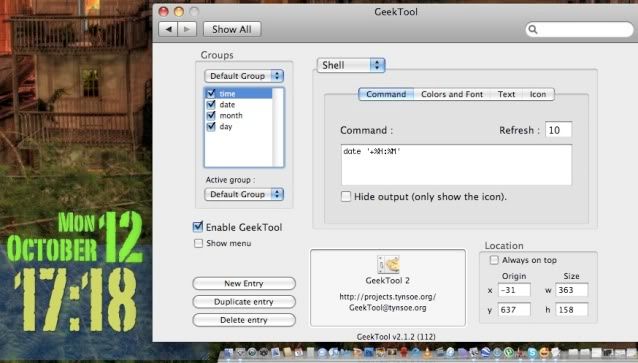 dont forget to change font style n size tooo...  |
|
|
Oct 12 2009, 05:31 PM
|
|
Senior Member
555 posts Joined: Mar 2007
|
ahh... sorry. =_= it's written there 'shell' =_= aih. unix noob here. anything shell = i sux wif it.
thanks for pointing it out. ------------- ok, changed but still no solution. arghhh. is it because i m using Snow Leopard? Here's the screen shot. I have no idea wat is wrong :| changed the font size to > 30 and color = black. » Click to show Spoiler - click again to hide... « --------------- ok, pretty stupid of me to include "month: ___" inside. =_= is working now. haha. sorry again guys. blur me. This post has been edited by daydreaming: Oct 14 2009, 08:51 PM |
|
|
Oct 13 2009, 07:48 PM
|

Senior Member
1,357 posts Joined: Jan 2003 From: Londinium, Albion
|
QUOTE(gengstapo @ Oct 11 2009, 04:51 PM) Dang, for got to unmount the secret disk oh lol. u got fetish for little Johnny? Anyways its already Oct  |
|
|
Oct 16 2009, 08:13 PM
|

Junior Member
112 posts Joined: Jul 2006
|
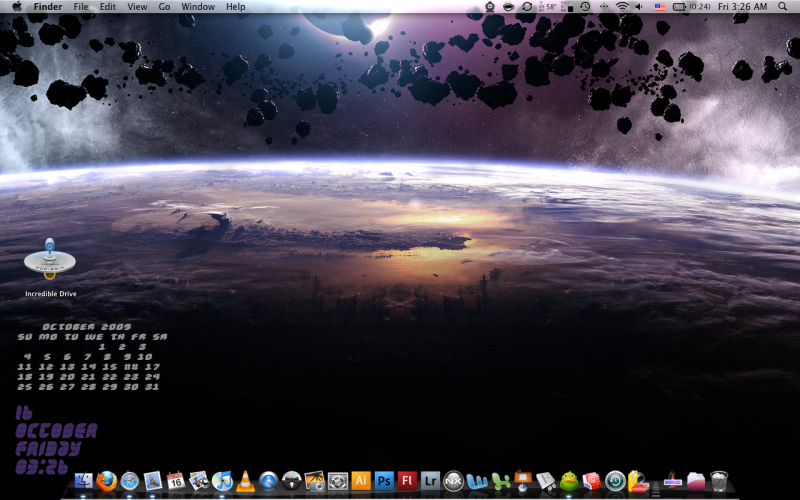
my OCT...not sure any1 has use it before!
 This post has been edited by kalvinhui: Oct 17 2009, 05:10 AM |
| Change to: |  0.0242sec 0.0242sec
 0.41 0.41
 6 queries 6 queries
 GZIP Disabled GZIP Disabled
Time is now: 5th December 2025 - 11:29 PM |
 Quote
Quote


