Outline ·
[ Standard ] ·
Linear+
MacOS X Show Off Your Desktop - MacOS X only, Wallpaper , icons , themes , etc
|
daydreaming
|
 Oct 11 2009, 01:14 AM Oct 11 2009, 01:14 AM
|

|
ok guys, i tried to use geektool to show the date. went to the link, downloaded geektool, copied the code onto the shell section and still nothing is shown. I can only display "uptime".  even something as simple as this -- Day of week - date +%A cannot be shown. pls help. mac idiot here also, how come Bowtie cannot run and says something like no Themes found? i cannot dl the theme from their site also. This post has been edited by daydreaming: Oct 11 2009, 01:21 AM |
|
|
|
|
|
daydreaming
|
Oct 11 2009, 05:15 PM
|
|
|
QUOTE(almertfrenzy @ Oct 11 2009, 03:58 PM) did u resize the text? if not, try to...40 should be ok...  erm, how to change the size? by the way, i put "uptime", can see something. but i put the date, nothing returns. i followed the link given in the earlier post, copied pasted also cannot shown. oh ya, how you all put the CD image in desktop? This post has been edited by daydreaming: Oct 11 2009, 05:15 PM |
|
|
|
|
|
daydreaming
|
Oct 11 2009, 06:10 PM
|
|
|
» Click to show Spoiler - click again to hide... « here's the screenshot of my geektool and the output screen. i did what has been told. aih. donno why cannot work. changed the font as well. sorry for troubling u guys man. i'm an IT guy and i totally sucks in this. LOL. This post has been edited by daydreaming: Oct 11 2009, 06:12 PM |
|
|
|
|
|
daydreaming
|
Oct 12 2009, 05:31 PM
|
|
|
ahh... sorry. =_= it's written there 'shell' =_= aih. unix noob here. anything shell = i sux wif it. thanks for pointing it out. ------------- ok, changed but still no solution. arghhh. is it because i m using Snow Leopard? Here's the screen shot. I have no idea wat is wrong :| changed the font size to > 30 and color = black. » Click to show Spoiler - click again to hide... « --------------- ok, pretty stupid of me to include "month: ___" inside. =_= is working now. haha. sorry again guys. blur me. This post has been edited by daydreaming: Oct 14 2009, 08:51 PM |
|
|
|
|
|
daydreaming
|
Oct 18 2009, 07:57 PM
|
|
|
QUOTE(kalvinhui @ Oct 16 2009, 08:13 PM) » Click to show Spoiler - click again to hide... « my OCT...not sure any1 has use it before! 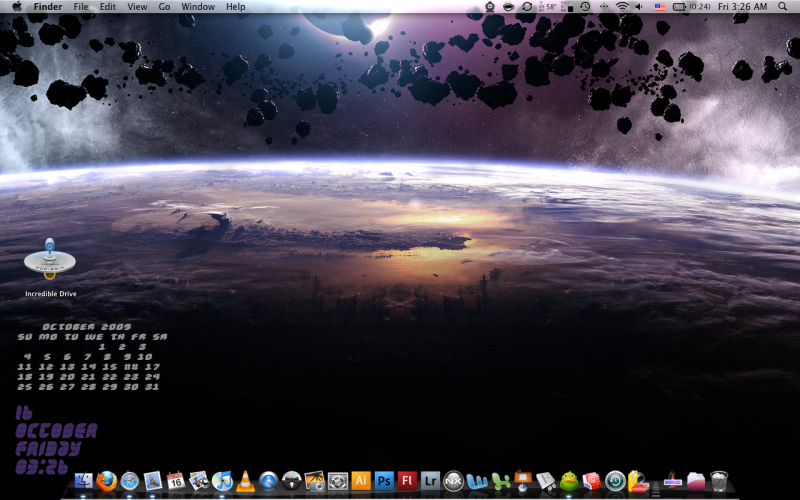 hmm how did u get ur bowtie to work? mine cant seem to work also, where did u get that wallpaper? looks nice leh. tried to dig around the links u all put in earlier posts , but nothing much lo |
|
|
|
|



 Quote
Quote


 0.0320sec
 0.49
0.49
 7 queries
 GZIP Disabled