Outline ·
[ Standard ] ·
Linear+
The SSD Thread V6, Solid State Drive, Continued.
|
ben3003
|
 Jan 9 2020, 10:45 AM Jan 9 2020, 10:45 AM
|

|
Planning to buy a 1tb ssd for my laptop to replace the puny 5400rpm drive. My OS is installed on pm961 128gb ssd. Is it okay to use bx500? It is around 100+ cheaper than mx500. The drive will use for torrenting but i not full time torrent
This post has been edited by ben3003: Jan 9 2020, 10:46 AM
|
|
|
|
|
|
ben3003
|
Jan 9 2020, 04:53 PM
|
|
|
QUOTE(sanderz @ Jan 9 2020, 02:16 PM) BX500 is pretty garbage. No DRAM cache, plastic shell. Basically lower performance and runs hotter, that extra RM100 is worth it for the long run if you choose the MX500. Okies.. it would be okay to torrent using mx500? |
|
|
|
|
|
ben3003
|
Jan 9 2020, 07:03 PM
|
|
|
QUOTE(EBBattlefield @ Jan 9 2020, 06:54 PM) why u wanna torrent off SSD?  not wrong, but why waste high speed storage on something limited by internet speed? unless you got gigabit broadband at home like worst korea la  No la.. using laptop only got 1 sata slot.. the OS drive is nvme pm961 128gb only.. i think cannot change if not will kacau the windows license. Now the sata slot is 1tb samsung 5400rpm drive.. so plan don kacau the os drive then have to change the sata drive lo.. or u guys got better recommendation? |
|
|
|
|
|
ben3003
|
Jan 10 2020, 09:27 AM
|
|
|
QUOTE(EBBattlefield @ Jan 10 2020, 08:13 AM) lel..... OS slot kacau only...... I've done it 2 million times now..... With Windows 10 and 8, just plug in new Drive, install OS, no need get license key etc.... if you are scared, can use softwares like showkeyplsu to save the cd key first prior to mass purge QUOTE(sHawTY @ Jan 10 2020, 08:59 AM) Windows 8 & Windows 10 license keys are not stored inside the disk It's stored within the BIOS chip Do a clean install on a new SSD & Windows setup will automatically extract the key from the BIOS chip ok thanks.. maybe i outdated already lol.. last time i change ssd they keep say my windows not licensed. Btw, can i do direct clone? I saw 1tb mx500 nvme price macam sama saja mx500 sata.. maybe straight upgrade the drive better.. is it okay to do clone? just use those clone software can already ka? This post has been edited by ben3003: Jan 10 2020, 09:27 AM |
|
|
|
|
|
ben3003
|
Jan 13 2020, 07:26 AM
|
|
|
Pulled trigger on crucial md500 1tb.. next time baru change nvme drive.. no time to change OS drive lol.. reinstall everything is pain in the ass
|
|
|
|
|
|
ben3003
|
Jan 13 2020, 12:15 PM
|
|
|
QUOTE(Benefon @ Jan 13 2020, 07:49 AM) Your desktop laptop fast enough just few hours maybe just 1 hour already settle many software installation from you. The rest like data can backup to Google drive or OneDrive else yea i know but pain in the ass to do all the setting back etc.. and driver all need install again also.. next time when i free i will do so. i think mx500 should be suffice, next upgrade nvme to 1tb  i see game loading speed nvme and sata ssd no big difference compare hdd to ssd, so should be okay la.. This post has been edited by ben3003: Jan 13 2020, 12:16 PM |
|
|
|
|
|
ben3003
|
Jan 16 2020, 01:15 PM
|
|
|
my current bios is preset with intel RST (RAID) instead of AHCI, should i change it to AHCI? my mx500 just receive, the result kinda off.. mx500 1tb 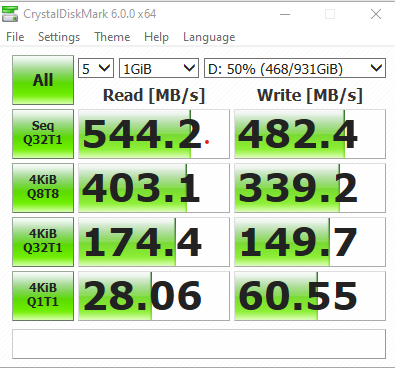 mx500 1tb 2nd try 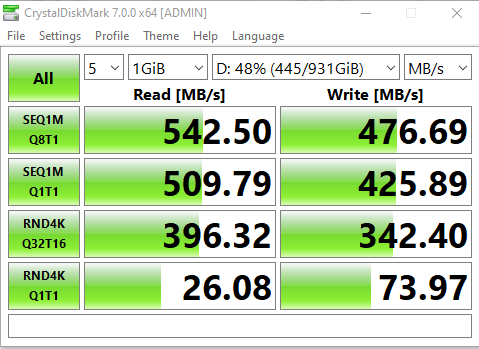 This post has been edited by ben3003: Jan 16 2020, 01:47 PM This post has been edited by ben3003: Jan 16 2020, 01:47 PM |
|
|
|
|
|
ben3003
|
Jan 16 2020, 09:09 PM
|
|
|
QUOTE(air_pull91 @ Jan 16 2020, 05:59 PM) is it due to capacity used? not sure.. mine is laptop tho.. and mine setting is intel RST, not AHCI.. this one will have impact? |
|
|
|
|
|
ben3003
|
Sep 18 2020, 09:53 AM
|
|
|
crucial mx500 no brainer for budget sata ssd. if nvme the xpg8200 pro
|
|
|
|
|



 Quote
Quote

 0.0954sec
 0.39
0.39
 7 queries
 GZIP Disabled