Outline ·
[ Standard ] ·
Linear+
Unifi Official TM UniFi High Speed Broadband Thread V32, Enjoy Your Speed Upgrade
|
sgmichael
|
 Dec 21 2017, 05:04 PM Dec 21 2017, 05:04 PM
|
Getting Started


|
QUOTE(SilentVampire @ Dec 19 2017, 05:31 PM) I would suggest WPA2 only, and disabling both WPS, and UPNP, and disabling remote management as well, and if possible, change the HTTP port to access your router from port 80 to a not well known port so not somewhere between port 1 - 1024, and set your firewall to not respond to WAN ping. You will be quite safe then. Hi, Any one can teach where to find the setting for "Disabling remote management" on ZTE (2 in 1) device given by TM? Thanks. |
|
|
|
|
|
sgmichael
|
Dec 21 2017, 05:37 PM
|
Getting Started
|
QUOTE(#Victor @ Dec 21 2017, 05:13 PM) I supposed u mean this. In TR-069 under Management & Diagnosis tab. 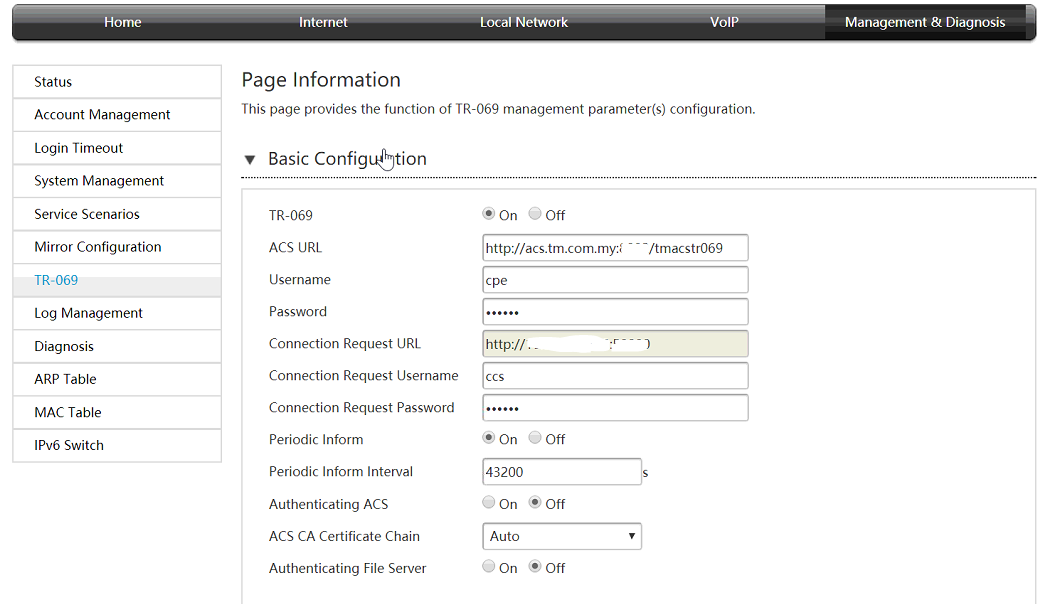 Hi, Mean just click "Off" at the first option that name as "TR-069" ? Thanks. |
|
|
|
|
|
sgmichael
|
Dec 21 2017, 07:11 PM
|
Getting Started
|
QUOTE(#Victor @ Dec 21 2017, 05:48 PM) Yes, should be but don't know any impact by turning off TR-069. Thanks for the advices. Any other sifu here can tell is there any impact? Thanks. |
|
|
|
|
|
sgmichael
|
Dec 22 2017, 10:11 AM
|
Getting Started
|
QUOTE(soonwai @ Dec 21 2017, 09:04 PM) No impact at all. TR-069 is used by TM to remotely configure your BTU & router. Turning it off on the router means they can no longer do that but it doesn’t matter on the router side. Which mean turn off this option is turn off so call "remote management" ? Due to security issue mentioned by some sifu here, it should be turn off? Thanks. |
|
|
|
|
|
sgmichael
|
Dec 22 2017, 11:40 AM
|
Getting Started
|
QUOTE(soonwai @ Dec 21 2017, 10:48 PM)  It's here. Change Mode to Discard. Thanks for all sifus trying to help but confusing ...... #6081 https://forum.lowyat.net/topic/4382989/+6080Sorry if offend anyone here, just simply want to know the correct setting, thank you thank you. |
|
|
|
|
|
sgmichael
|
Dec 22 2017, 03:43 PM
|
Getting Started
|
QUOTE(soonwai @ Dec 22 2017, 02:40 PM) TR-069 is remote management for TM's use only. It runs on a different VLAN so it's not publicly accessible from the internet. With this, TM can configure your router if the need arises. They also use this to control or configure the BTU. This only works with stock TM routers. You can leave this on, it should be safe. The other remote management that we talk about is the router's web configuration page. The same one that you're accessing from your LAN. If you don't need to access your router's config remotely then you should turn this off for remote access. Thanks soonwai. Which mean #6110 you posted yesterday is for disable router web configuration access? (Set to "Discard") Curious, if we disable this option, mean we blocked ourself as well to access router through web, if we need access in future, how to enable it back since we unable to access the page after disable? Or do hard reset on router for enable it back ? Thanks. |
|
|
|
|
|
sgmichael
|
Dec 22 2017, 09:01 PM
|
Getting Started
|
QUOTE(soonwai @ Dec 22 2017, 04:09 PM) If you look closely at the screenshot, the one to set to "Discard" is under WanControl. That's the one for remote access. You disable this one, you can still access via LAN. Don't kacau the LanControl one or else you won't be able to access it at all. Which mean after disable, still can be access using LAN cable connection. Thanks Soonwai. |
|
|
|
|
|
sgmichael
|
Dec 26 2017, 10:40 PM
|
Getting Started
|
Hi,
Any changes complain to MCMC to get my current Bonanza rm139 that only rupy not jumbo ? And only free standard STD without free 600mins call ? I'm upgraded from Rm129 lite 10mb to 30mb Bonzana now.
Thanks.
|
|
|
|
|



 Quote
Quote
 0.3604sec
 0.59
0.59
 7 queries
 GZIP Disabled