

My installation date 10m >> 30m will be tmr and hopefully everything will go well
Those from Lite to Adv did the installer also give you DECT phone?
Unifi Official TM UniFi High Speed Broadband Thread V32, Enjoy Your Speed Upgrade
Unifi Official TM UniFi High Speed Broadband Thread V32, Enjoy Your Speed Upgrade
|
|
 Dec 19 2017, 08:02 PM Dec 19 2017, 08:02 PM
Return to original view | Post
#1
|
 
Senior Member
4,537 posts Joined: Jan 2003 
|
My installation date 10m >> 30m will be tmr and hopefully everything will go well
Those from Lite to Adv did the installer also give you DECT phone? |
|
|
|
|
|
Dec 19 2017, 11:05 PM
Return to original view | Post
#2
|
|
Senior Member
4,537 posts Joined: Jan 2003
|
QUOTE(cho @ Dec 19 2017, 08:15 PM) no for me. as they said they already gave points to redeem the phone when subscribe to unifi lite. maybe you should just ask again. who knows you may get.. Hopefully installer dont ffk me as there is totally no news until now |
|
|
Dec 20 2017, 11:12 AM
Return to original view | Post
#3
|
|
Senior Member
4,537 posts Joined: Jan 2003
|
QUOTE(fruitie @ Dec 20 2017, 10:59 AM) I finally can view my bill and I must say mine is totally different from you guys. Earlier you mentioned the bill is too high so when the actual bill appears it comes with the right discount? My monthly Internet subscription is only RM 99. But I have to pay for Jumbo and Ruby which is RM 90. So in total is still RM 189 without GST.I called billing to confirm and this is also confirmed by her that my Internet is RM 99 + HyppTV RM 90. I asked if I can cancel Ruby a year later, she said it should be OK but I can only try a year later. My breakdown: 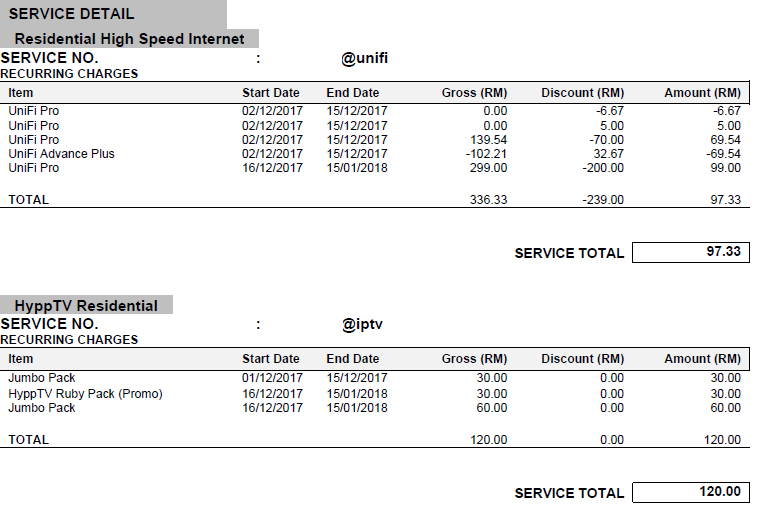 I am still waiting for mine and I see some higher amount too  |
|
|
Dec 22 2017, 10:43 AM
Return to original view | Post
#4
|
|
Senior Member
4,537 posts Joined: Jan 2003
|
       Upgraded! |
|
|
Dec 22 2017, 10:47 AM
Return to original view | Post
#5
|
|
Senior Member
4,537 posts Joined: Jan 2003
|
QUOTE(MGM @ Dec 22 2017, 10:46 AM) No STD20, paying rm139? Yes but hypptv jumbo + rubyGood enough |
|
|
Dec 26 2017, 12:23 AM
Return to original view | Post
#6
|
|
Senior Member
4,537 posts Joined: Jan 2003
|
QUOTE(Alpha_Tay @ Dec 25 2017, 11:51 PM) after further testing, it seem that now ONLY IPv6 be able to get the 2ms lowest 1st hop ping, while IPv4 now stuck at 6ms lowest 1st hop ping. TM unifi seem to now prioritize IPv6 Traffic. Correct me if I am wrongyou can test it yourself with PingPlotter version 5 https://www.pingplotter.com/download UPDATE 2: the unifi ipv6 1st hop ip is 2001:e68:5441:14e2:429b:cdff:febc:6900 the lowest ping reply i can get is 1ms, with PingPlotter 5.5.7.3827 personally i would say it's a bad move, since some services are still running on IPv4, especially gaming, it would take a long time to upgrade the gaming software to IPv6. AFAIK the service which has the biggest concern on ping is online gaming so it will best benefit online gaming but not all supporting ipv6 now as you mentioned |
|
|
|
|
|
Jan 1 2018, 10:33 PM
Return to original view | Post
#7
|
|
Senior Member
4,537 posts Joined: Jan 2003
|
The installer now plug the black wire directly to my modem. He saiid TM told them to do so and no moew socket and using white wire to connect to modem to reduce laser loss...
|
|
|
Jan 4 2018, 02:13 PM
Return to original view | Post
#8
|
|
Senior Member
4,537 posts Joined: Jan 2003
|
Is it better to enable NAT Boost? Am on 30M here
|
|
|
Jan 5 2018, 11:11 AM
Return to original view | Post
#9
|
|
Senior Member
4,537 posts Joined: Jan 2003
|
QUOTE(JohnLai @ Jan 5 2018, 10:46 AM) Still auto hang even with light usage with default firmware. Great and thanks for your review! Anyway.... C1200v1_eu-up-1.1.1 Build 20180101 rel.66049(Beta) http://support.tp-link.com/f/83ec721f22/?dl=1 C1200v2_eu-up-2.0.1 Build 20180101 rel.59123(Beta) http://support.tp-link.com/f/afccc09878/?dl=1 C1200v1_us-up-1.1.0 Build 20171230 rel.62364(Beta) http://support.tp-link.com/f/ff5667e274/?dl=1 Archer C1200(US)_V2_180103 (Official) http://www.tp-link.com/us/download/Archer-...2.html#Firmware Note: All router settings will reset after updating to new firmware, please backup the configuration at Advanced, Sytem Tools, Backup&Restore, update the the new correct firmware and restore the configuration later. Much less trouble. Bolded the region and revision number. Update: So far, beta firmware for c1200 EU v1 = been torrenting for 18 hours and still hasn't encounter random reboot.....  Did you enable / disable any settings? SPI Firewall, ALGs, NAT Boost etc etc... |
|
|
Jan 5 2018, 12:43 PM
Return to original view | IPv6 | Post
#10
|
|
Senior Member
4,537 posts Joined: Jan 2003
|
QUOTE(JohnLai @ Jan 5 2018, 11:23 AM) I only disable Print Server and WPS at System Parameter. Thanks! How about LED? he he heSPI Firewall activated. ALG all checked NAT Boost enabled Folder Share enabled, plugged 64Gb pendrive to the USB. UPNP active = manual portforwarding can be a hassle. IPV6 enabled OpenVPN server enabled = often use this functionality to vpn back home when I was at work (before getting layoff  ) )DDNS = got few D-Link adsl routers which have free DlinkDns services, used the account with C1200. Enabling TxBF for 5Ghz wifi. Will flash it when I got home oh and do you see high CPU? |
|
|
Jan 5 2018, 01:16 PM
Return to original view | Post
#11
|
|
Senior Member
4,537 posts Joined: Jan 2003
|
QUOTE(JohnLai @ Jan 5 2018, 01:00 PM) LED? The usual night mode or ON/OFF still there as usual. Yea I guess it doesn't matter as long as it doesn't reboot out of suddenCPU usage = same as the original firmware, high as usual. Not a big deal considering torrenting makes a lot of connection. |
|
|
Jan 6 2018, 08:27 PM
Return to original view | Post
#12
|
|
Senior Member
4,537 posts Joined: Jan 2003
|
I am tempted to change transmit power to high so the devices further will get full bar wifi signal instead of 3 to 4 bars
Advice? |
|
|
Jan 19 2018, 05:19 PM
Return to original view | Post
#13
|
|
Senior Member
4,537 posts Joined: Jan 2003
|
I got the shock of my life
 |
|
|
|
|
|
Jan 19 2018, 08:31 PM
Return to original view | Post
#14
|
|
Senior Member
4,537 posts Joined: Jan 2003
|
QUOTE(JohnLai @ Jan 19 2018, 05:25 PM) What is the bill breakdown? Post a screenshot after redacting personal details. And as usual CS told me to wait for bill |
|
|
Jan 30 2018, 02:54 PM
Return to original view | Post
#15
|
|
Senior Member
4,537 posts Joined: Jan 2003
|
QUOTE(Ebony & Ivory @ Jan 30 2018, 05:55 AM) 42.188.x.x new ip range for unifi? Mine this afternoon also got 42.xxx.xxx.xxx[attachmentid=9557033] usually i get 175, 115, 60  Location: PJ Actual: Melaka |
|
|
Jan 30 2018, 05:37 PM
Return to original view | Post
#16
|
|
Senior Member
4,537 posts Joined: Jan 2003
|
QUOTE(Azusa_San @ Jan 30 2018, 04:28 PM) not sure about other user/area, but this is the first time i seen mine unifi got this ip 42.x.x.x Yup first time for me as well and as usual 31mbps using fast.comlatency and speed also not bad. Usually are 175- and 118- and occasionally 60-, 115- and 219- |
|
Topic ClosedOptions
|
| Change to: |  0.0322sec 0.0322sec
 0.40 0.40
 7 queries 7 queries
 GZIP Disabled GZIP Disabled
Time is now: 1st December 2025 - 09:01 AM |
 Quote
Quote