

QUOTE(Ben Ling @ Nov 20 2017, 03:08 PM)
asked TM dealer they say early next year will have 500Mbps package coming. It's confirmed.

hopefully the early bird 100Mbps subscribers will get a free upgrade to this ;DUnifi Official TM UniFi High Speed Broadband Thread V32, Enjoy Your Speed Upgrade
|
|
 Nov 20 2017, 03:11 PM Nov 20 2017, 03:11 PM
Return to original view | Post
#1
|
 
Senior Member
3,008 posts Joined: Sep 2005 From: T.T.D.I, Bukit Damansara  
|
QUOTE(Ben Ling @ Nov 20 2017, 03:08 PM) asked TM dealer they say early next year will have 500Mbps package coming. It's confirmed. hopefully the early bird 100Mbps subscribers will get a free upgrade to this ;D |
|
|
|
|
|
Jan 24 2018, 06:03 PM
Return to original view | Post
#2
|
|
Senior Member
3,008 posts Joined: Sep 2005 From: T.T.D.I, Bukit Damansara
|
Guys, correct me if I'm wrong on this,
the fiber cable, along with the casing from the FDP (pole, ground, mdf room or whatever) is not chargeable as long as it is a standard installation right? Even if the nearest FDP is like 30m away from your house or something. Or is there a new condition like, "if the nearest FDP is 'x' meters away from the unifi installation location (house, apt, etc), it is chargeable." |
|
|
Jan 24 2018, 06:09 PM
Return to original view | Post
#3
|
|
Senior Member
3,008 posts Joined: Sep 2005 From: T.T.D.I, Bukit Damansara
|
QUOTE(winter01942 @ Jan 23 2018, 09:09 PM) Hi guys, if no longer under contract or contract almost over you can try and ask tm for new equipment.just a small question about billing, If I terminate my existing unifi subscription, is the payment for the last month calculated on a pro rata basis? I am planning to terminate and reapply to replace all the aging equipment. Thanks. my out of warranty hypptv box malfunctioned so I contacted them to inquire about a replacement. they said they can replace it for free if I renew the contract for 2 years.. if I don't want they will charge me RM400 (or thereabouts, can't remember the exact price) I should have asked for a new router as well even though I'm already using my own router  didn't think of it when making the call |
|
|
Feb 1 2018, 12:09 PM
Return to original view | Post
#4
|
|
Senior Member
3,008 posts Joined: Sep 2005 From: T.T.D.I, Bukit Damansara
|
bloody hell man. I am still paying RM299 - RM20 so called early bird discount = RM279 (not including iptv) for 100Mbps. Another two 100Mbps account got the upgrade from 50Mbps for free (RM219 internet, RM30 iptv).. .
in other words the early bird discount is bullshit, lol any other unfortunate members here? gonna try walk in to tm point and ask for a reduction |
|
|
Feb 15 2018, 02:25 AM
Return to original view | Post
#5
|
|
Senior Member
3,008 posts Joined: Sep 2005 From: T.T.D.I, Bukit Damansara
|
QUOTE(eehong @ Feb 13 2018, 08:21 AM) am using 100Mbps (RM189 RYE package), setup as follow: Ditch the range extender and weak receiver.ASUS AC1200G+ as my router on groundfloor TPLINK WA850RE as range extender on 1st floor desktop PC on 2nd floor connected to the range extender via TPLINK WN821N wifi receiver 3 users in my home, normal web browsing, no heavy youtuber & i'm the sole person who torrents via BitComet at times & game via PS4 which is connected via LAN on groundfloor my issue is whenever i'm torrenting & gaming, internet speed will slow down greatly, to the point that google mainpage take seconds to load, youtube mainpage take more than 10 seconds to load, and slow browsing speed to other sites as well. this issue is even more obvious when i'm torrenting. and i've tried torrenting with only 1 file running, not multiple torrent files. and the D/L speed is only around 1000-2000kb/s, not lighting fast speed. pls any sifu can enlighten me what's going wrong here  For starters, you can try getting a better wifi adapter like this: https://www.lazada.com.my/tp-link-ac1300-du....7f1c206fLys9VI If the connection with this adapter is not good enough, immediately utilize the 14 days easy return on lazada and we can try something else  the other 2 users in your home.. do they connect directly (wifi) to the ASUS AC1200G? |
|
|
Feb 25 2018, 12:41 AM
Return to original view | Post
#6
|
|
Senior Member
3,008 posts Joined: Sep 2005 From: T.T.D.I, Bukit Damansara
|
QUOTE(AFcf @ Feb 24 2018, 08:57 PM) My Unifi services (phone & internet) has been down for 13 days (as on 24Feb 2018) already. make sure to ask for a rebate in your next bill. case like this confirm can get Despite follow up via messaging & tweeter, there has been No details as to what is going on and when I will get back my services. My report no. is 1-19661307906 . Unifi's response has been ... 1- Upon checking your issue has still in the midst of progress. Our team will update to you accordingly. None received 2- Upon checking, you issue still under progress. Kindly wait for and update from our team. None received 3- As per checking, your report is still in progress. We have updated and urge our respective team for urgency regards in solving your issue. Our respective technical team will update you on the feedback. None received 4- We are doing our best to expedite your case. 5- Pleased be informed that our team still diagnose on your issue. We have urged our team to ensure the restoration can be completed soonest possible. Anything, our team will update you later. ... 6- ... Our team will update you for feedback. None received 7- You're report is still in progress. We have highlighted your issue to the team for faster action. 8- Upon checking your issue has still in the midst of progress. Our team will update to you accordingly. None received 9- We sincerely apologize for this issue. Fyi, your technical report status is still in progress. However, we have updated our Technical Department and urged for an urgency towards this issue. 10- [After 13 days down] Upon checking, your issue is still in progress. Anything, our team will update to you accordingly. None received With No light at the end of this tunnel .... is there any hope for the state of our broadband services or rather what broadband services?. Still Waiting  |
|
|
|
|
|
Mar 4 2018, 07:49 PM
Return to original view | Post
#7
|
|
Senior Member
3,008 posts Joined: Sep 2005 From: T.T.D.I, Bukit Damansara
|
QUOTE(darthbii @ Mar 4 2018, 12:34 PM) Not sure when it started happening, but it could have been after I upgraded to 30MBps. Did you test with another device? Another pc or phone perhapsJust the wifi. Had a Unifi technician come to check out. Ethernet connection can consistently output at least 24MBps. Have not done a speedtest on every single device but all devices that are tested show around the same dl speed. Could it be because of wear and tear? Have been using it for 5-6 years already. |
|
|
Mar 5 2018, 04:14 PM
Return to original view | Post
#8
|
|
Senior Member
3,008 posts Joined: Sep 2005 From: T.T.D.I, Bukit Damansara
|
is this ip range good?
1.xx.xx.xxx first time getting this address from unifi didn't notice anything different though for streaming and web surfing |
|
|
Mar 20 2018, 12:58 AM
Return to original view | Post
#9
|
|
Senior Member
3,008 posts Joined: Sep 2005 From: T.T.D.I, Bukit Damansara
|
QUOTE(mydurian @ Mar 19 2018, 07:55 PM) TM Router given: ZTE ZXHN H267A bro.. I am very familiar with the 172.x ip range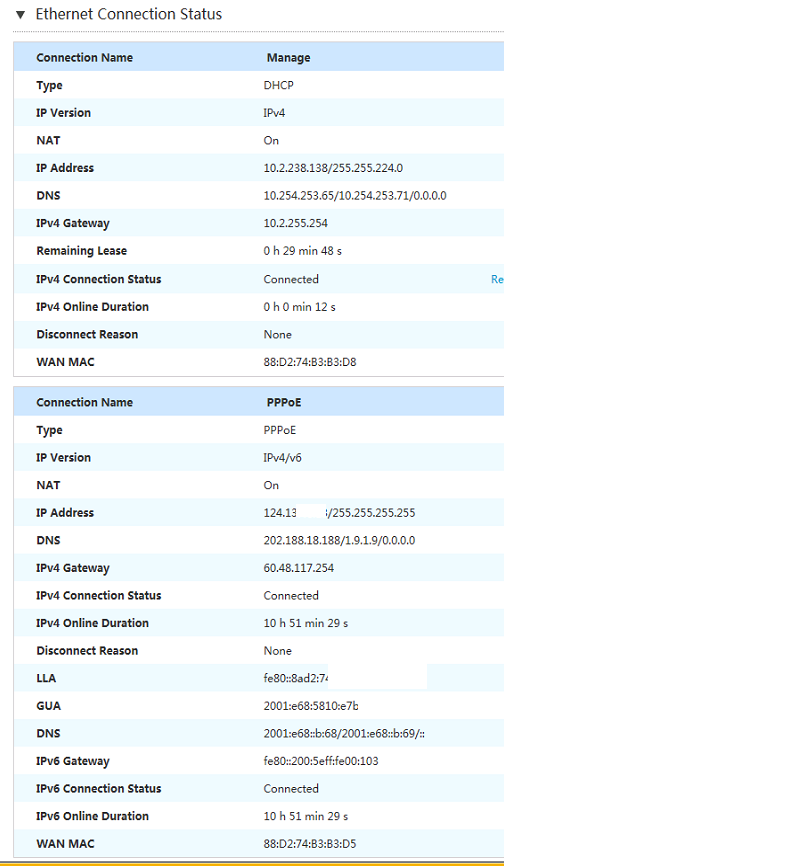 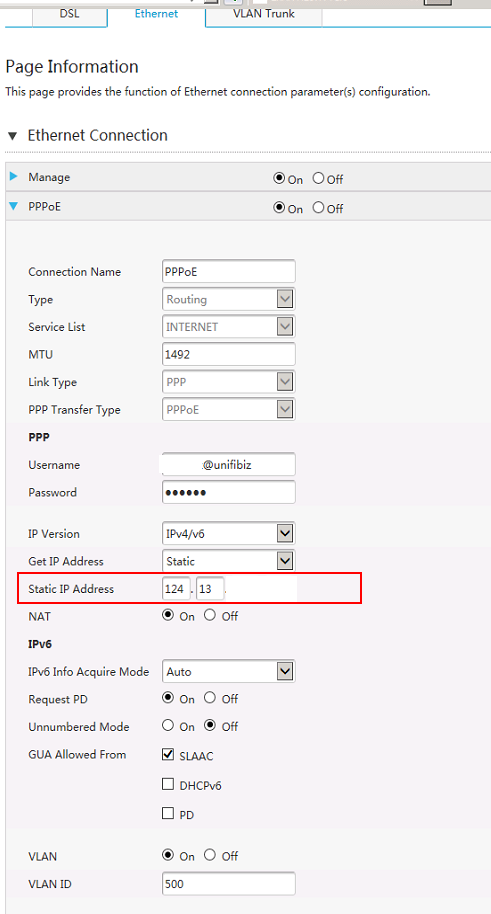 sharing the settings on the TM router. 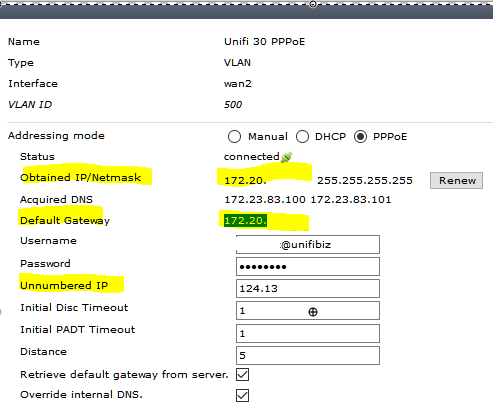 the 172.20.xx.xx is shown on my Fortigate unit. And yes, confirm the pw is correct. whenever I pay my unifi bill too late or didn't pay full despite numerous reminders from TM, they will reward me with this ip  in other words account suspended but still connected with this special ip. cannot even open hypptv lol |
|
Topic ClosedOptions
|
| Change to: |  0.2613sec 0.2613sec
 1.06 1.06
 7 queries 7 queries
 GZIP Disabled GZIP Disabled
Time is now: 1st December 2025 - 03:16 PM |
 Quote
Quote