Welcome Guest ( Log In | Register )

Outline · [ Standard ] · Linear+

 Illegear LAGUNA Review, A photographer/student's opinion

views
     
TSJeremy Schee
post Jul 20 2017, 10:57 AM, updated 9y ago

New Member
*
Junior Member
10 posts

Joined: May 2014


DISCLAIMER
Not a sponsored post. First time writing a review, do point out my mistakes as you read along, and I will be happy to answer your questions.


TLDR;
Pros: Great value(especially during promo period), great performance
Cons: Random fans noise, soft speaker, heavy


As a uni student and a freelance photographer, I need a laptop which is powerful enough to run photo editing and programming software, some casual gaming, a color-accurate IPS screen, generous choices of ports and small in size. LAGUNA checks all my needs. Compared to the aged Z5, LAGUNA is smaller, has better thermal management and has a sleeker look. (I have never owned a Z5, but on paper, it seems to be so)


Exterior
Ah, how I wish it comes in black, but the almost black, gunmetal anodized aluminum finish is low-key enough to me. The aluminum finish is cool to touch and conduct heat away easily too. The keyboard is good to type on which requires slightly more force to register a key, hence reduces typing mistake. The touchpad is huge and it is ALSO FREAKING RGB. The lighting mode of both keyboard and touchpad can be configured using the Control Center software that comes with the laptop. Sadly, the colour of 2 strips of light on the lid and at the front of the laptop is unchangeable(just light blue, can't be turned off too). Besides, the Illegear logo does not light up as the illustration in the website does.
It is not as thin as I thought it would be judging by the illustration from Illegear website and weighing at 2.75kg, LAGUNA is definitely not a lightweight laptop as well. However, do note that it packs an 86Wh battery, 4 heat-pipes, 3 vents and dual-fan cooling.


Specification
Display: 15.6" Full HD Antiglare Display featuring IPS / AHVA Wide Color & Wide View (1920 x 1080)
Tune Your Screen: Professional Color Calibration (FREE)
Processor: 7th Gen. Intel® Core™ i7-7700HQ (6MB Cache, 2.80GHz to 3.80GHz)
Graphics Card: Nvidia GeForce GTX 1060 6GB GDDR5 with Optimus (Pascal)
Thermal Compound: IC Diamond Thermal Compound - CPU & GPU (FREE)
RAM: Crucial 16GB Dual Channel DDR4 RAM 2400MHz - 2 X 8GB (FREE)
1st 2.5" SATA Drive: 1TB 7200rpm Hitachi Hard Drive
1st M.2 Solid State Drive: 256GB Western Digital Black M.2 PCIe NVMe Solid State Drive (upgraded from free 120GB option. A great steal since it is sold at USD110 on Amazon)
Wireless Network Card: Intel Dual Band Wireless-AC 8260 2x2 M.2 - WLAN & Bluetooth 4.2 Combo
Operating System: Windows 10 Home Single Language 64-Bit Edition
Warranty: ILLEGEAR Onsite Service/Pickup Warranty 2 Year Labor Parts & Lifetime Technical Support
Accessories: ILLEGEAR Backpack & Velvet Sleeve

Definitely a great deal during promotion period as you get free RAM upgrade, free colour calibration, free thermal compound upgrade, and free 120GB M.2 SSD and I am pretty sure there will be another wave of promotion for National Day so do not miss it!


Performance
Photoshop and Lightroom run well and responsive. The Witcher 3, Battlefield 1, Batman Arkham Knight and Doom all run steadily at 60fps on 1080p HIGH setting(max GPU temperature of 67°C). So there you go, who still cares about benchmarks.


Audio
Not an audiophile, but overall it is good enough to me. I wish the speaker is louder as it is firing upwards. Bass is good, maybe it is the subwoofer. Weak at mid and very high-pitched at high, some software tweak can easily solve these.


Some Issues...(and rants)
It could just be my unit, but here are some glitch/ issues on my laptop:
1. IPS glow. Yes I know, I know, IPS glow is common among all IPS panel. But for my case, it is slightly more "eye catching". At the top left corner of the screen, there was a very harsh transition of total black to yellowish white glow spot while displaying dark background. I believe this was because the bezel was clipped a bit too tight. I discovered this problem on the first day and quickly reflected this to Illegear's representative. Luckily, they are kind enough to replace my panel for free(took another 1 week of shipping to them, repairing, and shipping back, which is very quick).

2. Random fans noise. Random, but at an acceptable volume.

3. The laptop could never wake up properly from sleep, it just shuts down and restarts. Could be Windows 10 issue, perhaps someone can enlight me?

4. Battery life is not as good as promised. The 86Wh battery is definitely bigger than most other gaming laptops, but still, it only lasts for a maximum of 3 hours of casual web browsing. Turning on battery saver would help to extend the battery life. Again, I do not expect the laptop to tahan longer than that, besides how many gaming laptops on the market right now can do that anyway?

5. Breathing lighting mode of the keyboard is inconsistent. That is why I use "always on" mode.

6. Illegear, please upgrade the velvet sleeve as it is so thin and slippery.

7. Black color option for future laptops please.


Configure your LAGUNA here

Attached Image

Attached Image

Attached Image

Attached Image

Attached Image

Attached Image

Attached Image

Attached Image

This post has been edited by Jeremy Schee: Jul 20 2017, 10:10 PM
y888c
post Jul 20 2017, 11:11 AM

Getting Started
**
Junior Member
57 posts

Joined: Jun 2013
thunderbolt ada? this is the new z5 right?

This post has been edited by y888c: Jul 20 2017, 11:11 AM
TSJeremy Schee
post Jul 20 2017, 11:15 AM

New Member
*
Junior Member
10 posts

Joined: May 2014


QUOTE(y888c @ Jul 20 2017, 11:11 AM)
thunderbolt ada? this is the new z5 right?
*
Yes, this is the Z5 replacement. No thunderbolt as far as I know, but who still need an eGPU for this machine.
dinbk90
post Jul 20 2017, 11:29 AM

New Member
*
Junior Member
23 posts

Joined: Mar 2012


The only bummer thing about Laguna is that it doesn't have g-sync feature despite having the GPU option up to gtx 1070. Luckily, 120hz display option is available & still can compensate the high fps when playing games. Heck, even gtx 1060 can get more than 60 fps in high setting in many games. I'm still skeptical if 120hz display can totally eliminate the screen tearing issue when playing games with high ingame fps. AFAIK, only g-sync can totally eliminate screen tearing issue though...
Prince J
post Jul 20 2017, 11:42 AM

Regular
******
Senior Member
1,272 posts

Joined: May 2010
From: Team ILLEGEAR


Nice review Jeremy, glad you are comfortable with the replacement screen smile.gif

In Laguna, we have completely disabled the Nvidia Optimus and it is forced using the dedicated GPU all the time. We made this decision because we planned to integrate Gsync feature into it. We are still finalizing the agreement with Nvidia as there are too many T&C that we have to follow. The 86Wh might not last long because of the lack of integrated graphics switching feature.

However, we have had some users claim they can achieve 5 hours in normal surfing on Laguna, may I know what brightness and other settings are you using?

The ILLEGEAR logo is not a LED logo.
TSJeremy Schee
post Jul 20 2017, 11:42 AM

New Member
*
Junior Member
10 posts

Joined: May 2014


QUOTE(dinbk90 @ Jul 20 2017, 11:29 AM)
The only bummer thing about Laguna is that it doesn't have g-sync feature despite having the GPU option up to gtx 1070. Luckily, 120hz display option is available & still can compensate the high fps when playing games.  Heck, even gtx 1060 can get more than 60 fps in high setting in many games. I'm still skeptical if 120hz display can totally eliminate the screen tearing issue when playing games with high ingame fps. AFAIK, only g-sync can totally eliminate screen tearing issue though...
*
Yes G-Sync might be important for some users, but for someone who is only playing at max 60fps, I can live without G-Sync nod.gif
TSJeremy Schee
post Jul 20 2017, 11:46 AM

New Member
*
Junior Member
10 posts

Joined: May 2014


QUOTE(Prince J @ Jul 20 2017, 11:42 AM)
Nice review Jeremy, glad you are comfortable with the replacement screen smile.gif

In Laguna, we have completely disabled the Nvidia Optimus and it is forced using the dedicated GPU all the time. We made this decision because we planned to integrate Gsync feature into it. We are still finalizing the agreement with Nvidia as there are too many T&C that we have to follow. The 86Wh might not last long because of the lack of integrated graphics switching feature.

However, we have had some users claim they can achieve 5 hours in normal surfing on Laguna, may I know what brightness and other settings are you using?

The ILLEGEAR logo is not a LED logo.
*
5 hours should be possible if the display is dimmed to around 10% and with battery saver turned on. I was using mine at 75% brightness, which is how I usually use my laptop for net surfing.
Tachikoma
post Jul 24 2017, 11:18 AM

Dot
*******
Senior Member
2,864 posts

Joined: Jan 2005


So... no G-SYNC and no Optimus? Is there a way to reactivate Optimus? or at least switch to integrated graphics in bios when I need the battery life more than I need power?

The specs are attractive at the price, but the permanent "gaming look" lights and shit battery life are major issues.

Also, why bother with GSYNC and 1080p screens anyway? The 1060 will run most games at 60fps all the time.

This post has been edited by Tachikoma: Jul 24 2017, 11:25 AM
y888c
post Jul 24 2017, 03:49 PM

Getting Started
**
Junior Member
57 posts

Joined: Jun 2013
QUOTE(Prince J @ Jul 20 2017, 11:42 AM)
Nice review Jeremy, glad you are comfortable with the replacement screen smile.gif

In Laguna, we have completely disabled the Nvidia Optimus and it is forced using the dedicated GPU all the time. We made this decision because we planned to integrate Gsync feature into it. We are still finalizing the agreement with Nvidia as there are too many T&C that we have to follow. The 86Wh might not last long because of the lack of integrated graphics switching feature.

However, we have had some users claim they can achieve 5 hours in normal surfing on Laguna, may I know what brightness and other settings are you using?

The ILLEGEAR logo is not a LED logo.
*
Hi Prince J, how can we update the Control Center software? Do you mind to share here, I think I have problem with the automatic Fan setting. Think of updating the software.
dinbk90
post Jul 24 2017, 04:40 PM

New Member
*
Junior Member
23 posts

Joined: Mar 2012


QUOTE(Tachikoma @ Jul 24 2017, 11:18 AM)
So... no G-SYNC and no Optimus? Is there a way to reactivate Optimus? or at least switch to integrated graphics in bios when I need the battery life more than I need power?

The specs are attractive at the price, but the permanent "gaming look" lights and shit battery life are major issues.

Also, why bother with GSYNC and 1080p screens anyway? The 1060 will run most games at 60fps all the time.
*
You seems to be misinformed about how g-sync actually works. G-sync is meant to solve the screen tearing issue by limiting the fps to the monitor's refresh rate and at the same time help to fix or reduce stuttering ingame due invariable fps, resulting a smooth gameplay. G-sync actually will not benefit from high fps that can be achieved ingame (especially for high end gpu like gtx1060& above) becoz it limits the fps to function as intended. I do have g-sync capable laptop & I can say the gameplay experience is waay smoother from non-g-sync PC. If u really want to get the benefit of g-sync and at the same time wanna get the best high fps ingame, u have to get a laptop with 120hz panel with g-sync to get the both mentioned benefits. However there will be some sacrifices if u wanna both benefits at the same time in gaming laptop ( which I dont want to discuss yet here).

Regarding the battery life, it is indeed a commonly known issue that gaming laptops usually will have short battery life due to the high powered components inside draining the battery juice quickly & small battery capacity to compensate for the other internals. However, there are some gaming laptops out there albeit not that many, which have good battery life like gigabyte aero lineup & razer blade lineup. As u can see, these are slim premium gaming laptops which cost quite a lot than the mainstream gaming laptops. Usually, people using gaming laptops are well aware that they always need to plug in & will use the battery in some situations. Gaming laptops basically are designed to be as powerful and portable as possible at the same time with the sacrifice of the battery life.

Regarding the optimus & g-sync being absent on Laguna, prince J oredi mentioned that they are going to implement-sync feature, hence the reason why they disable optimus since g-sync & optimus can't exist at the same time. The only alternative to optimus for g-sync laptops is Mshybrid or Mux feature which AFAIK only available for clevo-based laptops like the illegear s-series.

Regarding the 'gaming look' that dis-tastes u, why not have a look at the illegear s-series? I think the s-series aka clevo p670/p650 series have the best low profile look that still can look professional without being too gaming oriented.. Heck, even the new S5x is very nice & sleek and not really that gaming-ish... Just my opinion though.. tongue.gif
Tachikoma
post Jul 25 2017, 02:06 AM

Dot
*******
Senior Member
2,864 posts

Joined: Jan 2005


QUOTE
G-sync actually will not benefit from high fps that can be achieved ingame (especially for high end gpu like gtx1060& above) ).


I'm sorry, but how is this different from how I understand g-sync again? My point was that the 1060 GPU was already enough to max out the 1080p screen all the time.

Just because a gaming laptop is not meant to have good battery life doesn't mean it has to go out of its way to cripple itself. An 87 WHr battery should have been enough to keep a laptop going for 6+ hours under normal usage.

Also, if you need to leave a computer on all night to do something (downloads, whatever), do you want a bright "gaming" LED that can't be turned off?

My annoyance at this laptop isn't because I dislike it. The specs are so promising, but it just has to have these annoying drawbacks.

This post has been edited by Tachikoma: Jul 25 2017, 02:17 AM
dinbk90
post Jul 25 2017, 04:47 AM

New Member
*
Junior Member
23 posts

Joined: Mar 2012


QUOTE(Tachikoma @ Jul 25 2017, 02:06 AM)
I'm sorry, but how is this different from how I understand g-sync again? My point was that the 1060 GPU was already enough to max out the 1080p screen all the time.

*
Hmm.. the way I see it, u seem not to know that if games can achieve high fps, like more than 60 fps (in case if your monitor is 60hz), u may get screen tearing issue which to some people, really ruin the gaming experience despite of the fluid high fps gameplay. To some people, screen tearing is no bummer since they oredi live with it. However, in some games like Doom 2016, the screen tearing is really bad though... it isn't the usual horizontal or vertical screen tear pattern, but some sort of triangle line screen tear.. which is really annoying to play with like that. So, G-sync feature is meant to counter this screen tear issue by making the game to run at fix fps similar to your monitor refresh rate. Not only that, g-sync also will help to reduce stuttering due to invariable fps that may occur from time to time, hence making the gameplay smoother. This is the reason why g-sync is really useful for high end gpu like gtx1060 & above.. Becoz of this as well, u will only see g-sync feature will be available for higher end gaming laptop with gtx1060 & above, not in mid range to low range gpu.. ( gtx1050 ti & below). This screen tearing issue while gaming only occur with high end gpu while low end gpu will rarely have this issue.. Thus, thats why I think g-sync should be a norm feature to all gtx1060 & above laptop but nvidia still wanna make it a premium feature to reap more $$$. bangwall.gif


QUOTE(Tachikoma @ Jul 25 2017, 02:06 AM)

Just because a gaming laptop is not meant to have good battery life doesn't mean it has to go out of its way to cripple itself. An 87 WHr battery should have been enough to keep a laptop going for 6+ hours under normal usage.

*
Again, as I mentioned before, Laguna lacks optimus feature. If Illegear can bring back optimus, I'm sure the battery life will be better in Laguna. The way I see it, gaming laptop with optimus & high battery capacity will have long battery life, given if users know how to tweak the settings to save more power. icon_idea.gif

QUOTE(Tachikoma @ Jul 25 2017, 02:06 AM)
Also, if you need to leave a computer on all night to do something (downloads, whatever), do you want a bright "gaming" LED that can't be turned off?

*
This one is something that many gaming laptops have like msi, alienware, acer & aourus have... Those flashy, shiny, bling-bling lighting on gaming laptops which are meant to show off others that u r 'bangsawan' gamers.. sweat.gif LOL.. Hahahaha... Nothing can be done with it. U have to live with it. If u cant, perhaps u can get the gigabyte aero lineup which has more professional look but it is a bit pricey for its specs. Or even razer blade.. which is even super expensive..

QUOTE(Tachikoma @ Jul 25 2017, 02:06 AM)
My annoyance at this laptop isn't because I dislike it. The specs are so promising, but it just has to have these annoying drawbacks.

*
Usually when u r looking for gaming laptops, u sometimes need to make sacrifice in some aspects becoz rarely there is a perfect option to cater every single preferences & needs. (if such perfect option exists, it usually will cost a fortune) I have been in gaming laptop market quite a while ( like since 2++ years ago until now ) & oredi own several laptops before; no laptop which I own actually is perfect & catered my every preference.. There always will be at least a drawback somewhere... ( shitty sound quality, cheap build material, difficult to disassemble for upgrade, mediocre thermal management, not so good track-pad.. etc.. & the list can go on & on) This situation is unavoidable though when buying stuff... Unless u r super rich and can afford to buy anything u like... Haha.. brows.gif


Tachikoma
post Jul 25 2017, 06:00 PM

Dot
*******
Senior Member
2,864 posts

Joined: Jan 2005


I definitely fall in the "already live with it and don't care" camp for high FPS screen tearing. To me, it falls in the category of things that "you didn't know you needed until a big company said so".

Low FPS g-sync for getting rid of screen stutter, that I can understand.

In any case, I hope the Illegear people are reading this thread for feedback. Having massive battery life can be a huge differentiator in the gaming laptop market, and only Alienware seems to have decent battery life in their gaming laptops.

This post has been edited by Tachikoma: Jul 25 2017, 06:02 PM
AZIM@ILLEGEAR
post Jul 25 2017, 06:29 PM

New Member
*
Junior Member
28 posts

Joined: Feb 2017
From: Team ILLEGEAR


QUOTE(Jeremy Schee @ Jul 20 2017, 11:46 AM)
5 hours should be possible if the display is dimmed to around 10% and with battery saver turned on. I was using mine at 75% brightness, which is how I usually use my laptop for net surfing.
*
Hi Jeremy, after performing a full charge on the LAGUNA, the battery lifetime can reach around 4.5 hours as per our testing, kindly refer to the screenshot below:

user posted image

This post has been edited by AZIM@ILLEGEAR: Jul 25 2017, 06:55 PM
TSJeremy Schee
post Jul 25 2017, 11:06 PM

New Member
*
Junior Member
10 posts

Joined: May 2014


QUOTE(AZIM@ILLEGEAR @ Jul 25 2017, 06:29 PM)
Hi Jeremy, after performing a full charge on the LAGUNA, the battery lifetime can reach around 4.5 hours as per our testing, kindly refer to the screenshot below:

user posted image
*
Hi Azim, appreciate the clarification, I believe the software cannot simulate real-life usage(eg: Chrome and music player) right? Would you mind to share with us is there a possible way to enable Optimus back?
Tachikoma
post Jul 26 2017, 12:13 AM

Dot
*******
Senior Member
2,864 posts

Joined: Jan 2005


Nevermind optimus, can we at least switch to integrated graphics in BIOS?
Prince J
post Jul 26 2017, 11:47 PM

Regular
******
Senior Member
1,272 posts

Joined: May 2010
From: Team ILLEGEAR


QUOTE(Tachikoma @ Jul 25 2017, 02:06 AM)
Just because a gaming laptop is not meant to have good battery life doesn't mean it has to go out of its way to cripple itself. An 87 WHr battery should have been enough to keep a laptop going for 6+ hours under normal usage.

Also, if you need to leave a computer on all night to do something (downloads, whatever), do you want a bright "gaming" LED that can't be turned off?
*
4.5 hours are considered very long battery life in a GTX1070 gaming laptop which doesn't utilize integrated graphics (graphcis switching technology) at all. The absence of Optimus also means better dedicated GPU compatibility in gaming.

The keyboard and touchpad LED can be turned off in Control Centre. For the two LED strips at the back cover, you can turn it off with a secret hotkey combination.

QUOTE(Tachikoma @ Jul 26 2017, 12:13 AM)
Nevermind optimus, can we at least switch to integrated graphics in BIOS?
*
It's not possible, the LAGUNA is designed to utilize dedicated GPU all the time.
TSJeremy Schee
post Jul 27 2017, 10:37 AM

New Member
*
Junior Member
10 posts

Joined: May 2014


QUOTE(Prince J @ Jul 26 2017, 11:47 PM)
4.5 hours are considered very long battery life in a GTX1070 gaming laptop which doesn't utilize integrated graphics (graphcis switching technology) at all. The absence of Optimus also means better dedicated GPU compatibility in gaming.

The keyboard and touchpad LED can be turned off in Control Centre. For the two LED strips at the back cover, you can turn it off with a secret hotkey combination.
It's not possible, the LAGUNA is designed to utilize dedicated GPU all the time.
*
Oooooohhhh so what's the secret hotkey combination? confused.gif
AZIM@ILLEGEAR
post Jul 28 2017, 07:38 PM

New Member
*
Junior Member
28 posts

Joined: Feb 2017
From: Team ILLEGEAR


QUOTE(Jeremy Schee @ Jul 27 2017, 10:37 AM)
Oooooohhhh so what's the secret hotkey combination? confused.gif
*
Here you go:

FN+3 - Toggle rear led strips
FN+9 - Toggle touchpad light
FN+0 - Toggle touchpad light, screen display & led lights
TSJeremy Schee
post Jul 28 2017, 10:57 PM

New Member
*
Junior Member
10 posts

Joined: May 2014


QUOTE(AZIM@ILLEGEAR @ Jul 28 2017, 07:38 PM)
Here you go:

FN+3 - Toggle rear led strips
FN+9 - Toggle touchpad light
FN+0 - Toggle touchpad light, screen display & led lights
*
FN+0 is the hot key that I was searching for! Thanks Azim rclxms.gif
FirstOne
post Jul 29 2017, 12:05 AM

Getting Started
**
Junior Member
168 posts

Joined: Aug 2008
Getting nicer looking illegear
Prince J
post Jul 29 2017, 02:06 PM

Regular
******
Senior Member
1,272 posts

Joined: May 2010
From: Team ILLEGEAR


QUOTE(y888c @ Jul 24 2017, 03:49 PM)
Hi Prince J, how can we update the Control Center software? Do you mind to share here, I think I have problem with the automatic Fan setting. Think of updating the software.
*
Sorry for missing out your question, do pm me for more details about the issue you are facing on fan speed adjustment.
Prince J
post Jul 29 2017, 04:13 PM

Regular
******
Senior Member
1,272 posts

Joined: May 2010
From: Team ILLEGEAR


Jeremy, we have successfully resolved the sleeping issue by installing another version of Control Center, you may get the control center file from our service team smile.gif
TSJeremy Schee
post Jul 31 2017, 02:02 PM

New Member
*
Junior Member
10 posts

Joined: May 2014


QUOTE(Prince J @ Jul 29 2017, 04:13 PM)
Jeremy, we have successfully resolved the sleeping issue by installing another version of Control Center, you may get the control center file from our service team smile.gif
*
Received with thanks!
y888c
post Aug 1 2017, 10:06 AM

Getting Started
**
Junior Member
57 posts

Joined: Jun 2013
QUOTE(Prince J @ Jul 29 2017, 02:06 PM)
Sorry for missing out your question, do pm me for more details about the issue you are facing on fan speed adjustment.
*
Hi PrinceJ, already PM you also with the abnormal temperature issue sad.gif
Prince J
post Aug 1 2017, 11:15 AM

Regular
******
Senior Member
1,272 posts

Joined: May 2010
From: Team ILLEGEAR


QUOTE(y888c @ Aug 1 2017, 10:06 AM)
Hi PrinceJ, already PM you also with the abnormal temperature issue  sad.gif
*
I think yours is a S7 model? Will check and assist.
dragonblayde
post Aug 6 2017, 12:51 AM

Getting Started
**
Junior Member
62 posts

Joined: Oct 2013
someone should do a video review of Laguna !! tongue.gif biggrin.gif really keen on this awesome looking laptop :3
Prince J
post Aug 11 2017, 02:15 PM

Regular
******
Senior Member
1,272 posts

Joined: May 2010
From: Team ILLEGEAR


QUOTE(dragonblayde @ Aug 6 2017, 12:51 AM)
someone should do a video review of Laguna !! tongue.gif biggrin.gif really keen on this awesome looking laptop :3
*
Hi dragon,


LAGUNA Product Video

This post has been edited by Prince J: Aug 14 2017, 06:34 PM
dragonblayde
post Aug 13 2017, 07:50 PM

Getting Started
**
Junior Member
62 posts

Joined: Oct 2013
QUOTE(Prince J @ Aug 11 2017, 02:15 PM)
Hi dragon,

LAGUNA product video can be viewed at https://www.facebook.com/ILLEGEAR/videos/1794559997238800/
*
wow cool !! so what's the revised price for the Laguna if I were to opt for the i5 and also GTX1050ti ? smile.gif

Prince J
post Aug 14 2017, 11:29 AM

Regular
******
Senior Member
1,272 posts

Joined: May 2010
From: Team ILLEGEAR


QUOTE(dragonblayde @ Aug 13 2017, 07:50 PM)
wow cool !! so what's the revised price for the Laguna if I were to opt for the i5 and also GTX1050ti ? smile.gif
*
Hi dragonblayde,

The price is not available yet, our product team is working on it.
nyhorikita57
post Aug 15 2017, 04:46 PM

New Member
*
Newbie
20 posts

Joined: Dec 2016


Hi, fellow Laguna user here chiming in,

Too bad regarding the lack of Optimus capability, but I usually use the Laguna plugged in and since it’s a GTX 1070 gaming laptop, I don’t really expect much for the battery life too. I’m kinda sceptical regarding the temperature during maximum load, but turns out it’s not an issue at all for this machine. When is ILLEGEAR gonna run promo again for Laguna?? Hint hint
NataDeCocoZ
post Aug 16 2017, 11:43 PM

New Member
*
Newbie
2 posts

Joined: Apr 2017
after hours of googling finally a thread explaining why laguna's gtx doesn't come with optimus tech. thumbup.gif
I'm very interested in laguna especially the hardware that was offered with. However I have a few questions regarding this product that i would like to ask.
1. How easy is it to upgrade the hardware inside? because i already have my own nvme m.2 and I wanted to remove from the default package and install it myself.
2. If I were to use my own copy of windows 10, is there any side steps that required to do (such as secure start up, fast boot, etc) when i reformat?

I hope any illegear staff or laguna owner can answer my question. Many thanks!
Prince J
post Aug 17 2017, 11:12 AM

Regular
******
Senior Member
1,272 posts

Joined: May 2010
From: Team ILLEGEAR


QUOTE(nyhorikita57 @ Aug 15 2017, 04:46 PM)
Hi, fellow Laguna user here chiming in,

Too bad regarding the lack of Optimus capability, but I usually use the Laguna plugged in and since it’s a GTX 1070 gaming laptop, I don’t really expect much for the battery life too. I’m kinda sceptical regarding the temperature during maximum load, but turns out it’s not an issue at all for this machine. When is ILLEGEAR gonna run promo again for Laguna?? Hint hint
*
Hi nyhorikita57,

We won't have promotion for around two months but we will have some promotion during ITFair Mid Valley September 8-10. We are located at Hall 1 (P120), beside ASUS, last year Razer booth.

Do drop by to check out the deals.

QUOTE(NataDeCocoZ @ Aug 16 2017, 11:43 PM)
after hours of googling finally a thread explaining why laguna's gtx doesn't come with optimus tech. thumbup.gif
I'm very interested in laguna especially the hardware that was offered with. However I have a few questions regarding this product that i would like to ask.
1. How easy is it to upgrade the hardware inside? because i already have my own nvme m.2 and I wanted to remove from the default package and install it myself.
2. If I were to use my own copy of windows 10, is there any side steps that required to do (such as secure start up, fast boot, etc) when i reformat?

I hope any illegear staff or laguna owner can answer my question. Many thanks!
*
Hi Nata,

Thanks for your interest.

1. The hardware can be easily upgraded if you know how to remove the bottom case, we can guide you step by step remotely.
2. No special steps required, if your USB bootable pendrive is configured properly.
NataDeCocoZ
post Aug 17 2017, 01:35 PM

New Member
*
Newbie
2 posts

Joined: Apr 2017
QUOTE(Prince J @ Aug 17 2017, 11:12 AM)
Hi Nata,

Thanks for your interest.

1. The hardware can be easily upgraded if you know how to remove the bottom case, we can guide you step by step remotely.
2. No special steps required, if your USB bootable pendrive is configured properly.
*
Had a chat with illegear staff through illegear website chat system. cleared all my questions through there. thank you for the reply!
Prince J
post Aug 18 2017, 12:00 PM

Regular
******
Senior Member
1,272 posts

Joined: May 2010
From: Team ILLEGEAR


QUOTE(NataDeCocoZ @ Aug 17 2017, 01:35 PM)
Had a chat with illegear staff through illegear website chat system. cleared all my questions through there. thank you for the reply!
*
Hi Nata,

No problem. And sorry for sudden disconnected from the livechat, our WIFI was down yesterday.
superhuman88
post Aug 25 2017, 11:08 AM

Getting Started
**
Junior Member
73 posts

Joined: Sep 2015
wow, nice review. may i know where can i see this? any store around in KL?
AZIM@ILLEGEAR
post Aug 26 2017, 03:56 PM

New Member
*
Junior Member
28 posts

Joined: Feb 2017
From: Team ILLEGEAR


QUOTE(superhuman88 @ Aug 25 2017, 11:08 AM)
wow, nice review. may i know where can i see this? any store around in KL?
*

Hi superhuman88 we are located at Oval Damansara, KL. You can also refer to this link for guidance to get here: http://www.illegear.com/getting-here/
DS_Legacy
post Aug 29 2017, 01:25 PM

Photography is Love
******
Senior Member
1,526 posts

Joined: Jul 2015


Aside from the specs, how about the color gamut coverage? I suppose that is the most important part of choosing a laptop for photographer? hmm.gif
AZIM@ILLEGEAR
post Aug 30 2017, 10:02 AM

New Member
*
Junior Member
28 posts

Joined: Feb 2017
From: Team ILLEGEAR


QUOTE(DS_Legacy @ Aug 29 2017, 01:25 PM)
Aside from the specs, how about the color gamut coverage? I suppose that is the most important part of choosing a laptop for photographer? hmm.gif
*
For the IPS panel, the sRGB color coverage is 100%, 99% for AdobeRGB smile.gif
DS_Legacy
post Aug 30 2017, 02:08 PM

Photography is Love
******
Senior Member
1,526 posts

Joined: Jul 2015


QUOTE(AZIM@ILLEGEAR @ Aug 30 2017, 10:02 AM)
For the IPS panel, the sRGB color coverage is 100%, 99% for AdobeRGB smile.gif
*
That's awesome. This should be great machine for graphic work after monitor color calibration.

Thank you for the input! thumbup.gif
AZIM@ILLEGEAR
post Aug 30 2017, 07:34 PM

New Member
*
Junior Member
28 posts

Joined: Feb 2017
From: Team ILLEGEAR


No worries, you're most welcome! For any further inquiries, you can also WhatsApp us directly at 018-6648599.
nyhorikita57
post Sep 7 2017, 05:01 PM

New Member
*
Newbie
20 posts

Joined: Dec 2016


Is there a version of Laguna that comes with a mechanical keyboard? Just asking..
TSJeremy Schee
post Sep 10 2017, 08:37 PM

New Member
*
Junior Member
10 posts

Joined: May 2014


QUOTE(nyhorikita57 @ Sep 7 2017, 05:01 PM)
Is there a version of Laguna that comes with a mechanical keyboard? Just asking..
*
No there isn't any, but the tactile feel of typing on the keyboard is not bad too!
Prince J
post Sep 11 2017, 04:51 PM

Regular
******
Senior Member
1,272 posts

Joined: May 2010
From: Team ILLEGEAR


QUOTE(nyhorikita57 @ Sep 7 2017, 05:01 PM)
Is there a version of Laguna that comes with a mechanical keyboard? Just asking..
*
LAGUNA uses normal RGB backlit chiclet keyboard. smile.gif
rorrimcalb
post Oct 11 2017, 11:30 AM

New Member
*
Newbie
22 posts

Joined: Mar 2017


Hi, may I know when (or if) the Laguna is going to be available in G-SYNC? Anytime soon or exclusive to the S5? Thanks in advance..
Eluuna
post Oct 11 2017, 02:45 PM

Getting Started
**
Junior Member
110 posts

Joined: May 2012
What is your graphic spec, GTX1060 or 1080? and how much for your laptop?
rorrimcalb
post Oct 11 2017, 02:56 PM

New Member
*
Newbie
22 posts

Joined: Mar 2017


I'm planning to get the GTX1060 version, am not aware that a 1080 version is also available??
TSJeremy Schee
post Oct 18 2017, 10:56 AM

New Member
*
Junior Member
10 posts

Joined: May 2014


QUOTE(Eluuna @ Oct 11 2017, 02:45 PM)
What is your graphic spec, GTX1060 or 1080? and how much for your laptop?
*
There is no GTX1080 model for Laguna...
Eluuna
post Oct 19 2017, 12:00 AM

Getting Started
**
Junior Member
110 posts

Joined: May 2012
QUOTE(Jeremy Schee @ Oct 18 2017, 10:56 AM)
There is no GTX1080 model for Laguna...
*
Oh, maybe any other series have 1080?
Prince J
post Oct 20 2017, 11:08 AM

Regular
******
Senior Member
1,272 posts

Joined: May 2010
From: Team ILLEGEAR


LAGUNA now comes with i5-7300HQ and GTX1050Ti 4GB GDDR5 as a customization option.

The LAGUNA thermal is a bit overkilling for these components but we receive many requests on them.

We will have more LAGUNA variants coming soon.
AZIM@ILLEGEAR
post Nov 2 2017, 12:59 PM

New Member
*
Junior Member
28 posts

Joined: Feb 2017
From: Team ILLEGEAR


Update: The i5-7300HQ/i7-7700HQ LAGUNA with the GTX1050Ti 4GB GDDR5 GPU is equipped with Optimus technology to extend the embedded 83Wh battery lifetime even longer (5 - 6 hours on normal surfing) icon_rolleyes.gif
Eluuna
post Nov 2 2017, 03:49 PM

Getting Started
**
Junior Member
110 posts

Joined: May 2012
Does current Illegear have Max-Q technology in Malaysia? if have what is the price for the laptops with it?
AZIM@ILLEGEAR
post Nov 2 2017, 05:08 PM

New Member
*
Junior Member
28 posts

Joined: Feb 2017
From: Team ILLEGEAR


QUOTE(Eluuna @ Nov 2 2017, 03:49 PM)
Does current Illegear have Max-Q technology in Malaysia? if have what is the price for the laptops with it?
*
Hi Eluuna

At the moment, we have the S5X if you're looking for laptops with Max-Q technology, kindly explore the product here: http://www.illegear.com/products/illegear-s5x/

We would usually recommend the S5X for people who prioritizes portability for their gaming laptop (18.6mm thin @ 1.9kg), but you might be interested to take a look for the laptop in-person at our showroom here http://www.illegear.com/getting-here/

ZRong223
post Nov 11 2017, 06:22 PM

Enthusiast
*****
Senior Member
864 posts

Joined: Dec 2009
From: Selangor


Gaming 60fps?

How about the performance and CPU & GPU temperature without V Sync turned on? (over 60 fps allowed)
Prince J
post Dec 2 2017, 11:48 AM

Regular
******
Senior Member
1,272 posts

Joined: May 2010
From: Team ILLEGEAR


QUOTE(ZRong223 @ Nov 11 2017, 06:22 PM)
Gaming 60fps?

How about the performance and CPU & GPU temperature without V Sync turned on? (over 60 fps allowed)
*
Hi Zrong223,

Both CPU & GPU are about 70 to 75C in gaming with Intel Turbo Boost disabled.
yeapkl123
post Dec 5 2017, 10:09 AM

New Member
*
Newbie
8 posts

Joined: Nov 2006
I want to upgrade to m.2 hard disk on my Laguna. i unscrew all the visible screws but the bottom case still stuck. Is there any hidden screws. I already rmove the 2 hidden screws covered with the rubber inserts. How many screws in total do I have to unscrew to remove Laguna case bottom ? Please advise
AZIM@ILLEGEAR
post Dec 5 2017, 10:24 AM

New Member
*
Junior Member
28 posts

Joined: Feb 2017
From: Team ILLEGEAR


QUOTE(yeapkl123 @ Dec 5 2017, 10:09 AM)
I want to upgrade to m.2 hard disk on my Laguna. i unscrew all the visible screws but the bottom case still stuck. Is there any hidden screws. I already rmove the 2 hidden screws covered with the rubber inserts.  How many screws in total do I have to  unscrew to remove Laguna case bottom ? Please advise
*
Hi Yeap, kindly remove all the highlighted rubber flaps, pads & rods to gain access to additional screws on the back panel of Laguna, all the best ya!

user posted image
yeapkl123
post Dec 5 2017, 03:18 PM

New Member
*
Newbie
8 posts

Joined: Nov 2006
QUOTE(AZIM@ILLEGEAR @ Dec 5 2017, 10:24 AM)
Hi Yeap, kindly remove all the highlighted rubber flaps, pads & rods to gain access to additional screws on the back panel of Laguna, all the best ya!

user posted image
*
Thanks. Will try it and update feedback here
whitesmith
post Feb 10 2018, 03:28 PM

Casual
***
Junior Member
456 posts

Joined: Jan 2012


how about temperature in game? what is the range of temperature u get?
YVONNE@ILLEGEAR
post Feb 10 2018, 03:47 PM

New Member
*
Newbie
2 posts

Joined: Nov 2017
From: Team ILLEGEAR


QUOTE(whitesmith @ Feb 10 2018, 03:28 PM)
how about temperature in game? what is the range of temperature u get?
*
Hi Whitesmith

Both CPU & GPU are about 70 to 75C in gaming with Intel Turbo Boost disabled.
yeapkl123
post Feb 23 2018, 10:50 PM

New Member
*
Newbie
8 posts

Joined: Nov 2006
Where to download illegear laguna Windows 10 drivers after I change the hard disk myself? Please advise.
yeapkl123
post Feb 26 2018, 09:52 AM

New Member
*
Newbie
8 posts

Joined: Nov 2006
QUOTE(yeapkl123 @ Dec 5 2017, 03:18 PM)
Thanks. Will try it and update feedback here
*
Have change the M2 hdd. Where to download the windows 10 drivers? Urgent. Thanks
AZIM@ILLEGEAR
post Feb 26 2018, 12:55 PM

New Member
*
Junior Member
28 posts

Joined: Feb 2017
From: Team ILLEGEAR


QUOTE(yeapkl123 @ Feb 26 2018, 09:52 AM)
Have change the M2 hdd. Where to download the windows 10 drivers? Urgent. Thanks
*
Hi Yeap, kindly find the stock drivers for LAGUNA by following this link: http://illegear.com/drivers/Laguna.rar
termignoni
post Mar 2 2018, 01:28 AM

i AM The Ultimate Driving Machine!!
****
Senior Member
597 posts

Joined: May 2006
From: Penang 2nd Bridge / MRT - V8 Kajang


Does the latest Laguna with GTX1070 with the optional 120fps screen supports G-Sync? Or still on Optimus?

I’m about to take the plunge for a Laguna..
AZIM@ILLEGEAR
post Mar 2 2018, 10:55 AM

New Member
*
Junior Member
28 posts

Joined: Feb 2017
From: Team ILLEGEAR


QUOTE(termignoni @ Mar 2 2018, 01:28 AM)
Does the latest Laguna with GTX1070 with the optional 120fps screen supports G-Sync? Or still on Optimus?

I’m about to take the plunge for a Laguna..
*
Hi termignoni, the latest LAGUNA (with GTX 1070 & 120Hz) doesn't include neither G-Sync nor Optimus. The laptop will run solely on the discrete NVIDIA graphics for pure graphical performance, hope it clarifies smile.gif
jmancy
post Mar 8 2018, 03:55 AM

New Member
*
Newbie
1 posts

Joined: Mar 2018
Which versions are the HDMI and Displayport? Is Gsync available at least through the displayport?
Prince J
post Mar 8 2018, 11:54 AM

Regular
******
Senior Member
1,272 posts

Joined: May 2010
From: Team ILLEGEAR


QUOTE(jmancy @ Mar 8 2018, 03:55 AM)
Which versions are the HDMI and Displayport? Is Gsync available at least through the displayport?
*
Hi mancy,

The HDMI of Laguna is 2.0 version.
hichamaziz
post Mar 10 2018, 02:28 AM

New Member
*
Newbie
12 posts

Joined: Feb 2018
Nice review Jeremy
Shavon Lim
post Mar 26 2018, 02:19 PM

Getting Started
**
Junior Member
87 posts

Joined: Jan 2018


My fiends have the same bad experiences with Illegear.

When they send their laptop to warranty service, Illegear will replaced different and low value parts for the laptop. What the staff said was not same with the parts given.
Eluuna
post Mar 26 2018, 02:49 PM

Getting Started
**
Junior Member
110 posts

Joined: May 2012
QUOTE(AZIM@ILLEGEAR @ Mar 2 2018, 10:55 AM)
Hi termignoni, the latest LAGUNA (with GTX 1070 & 120Hz) doesn't include neither G-Sync nor Optimus. The laptop will run solely on the discrete NVIDIA graphics for pure graphical performance, hope it clarifies  smile.gif
*
Oohh..so it does not have the intel integrated graphic ?
Prince J
post Mar 26 2018, 03:22 PM

Regular
******
Senior Member
1,272 posts

Joined: May 2010
From: Team ILLEGEAR


QUOTE(Shavon Lim @ Mar 26 2018, 02:19 PM)
My fiends have the same bad experiences with Illegear.

When they send their laptop to warranty service, Illegear will replaced different and low value parts for the laptop. What the staff said was not same with the parts given.
*
Hi Shavon Lim,

We only replace the same components when we do RMA for our customers. If the replacement parts differ than the users existing components, we seek customer confirmation before processing.

Therefore, I am quite surprised about your part mismatch experience with us as it should not happen. May I get your friends' RMA number / serial number (underneath the laptop) / invoice number for verification purposes?

P/S: Usually when such part mismatching issue happened, customers would contact us directly in the first place. However, there was none based on our records.

This post has been edited by Prince J: Mar 26 2018, 05:07 PM
AZIM@ILLEGEAR
post Mar 26 2018, 04:36 PM

New Member
*
Junior Member
28 posts

Joined: Feb 2017
From: Team ILLEGEAR


QUOTE(Eluuna @ Mar 26 2018, 02:49 PM)
Oohh..so it does not have the intel integrated graphic ?
*
Yes, LAGUNA only features the Intel Integrated Graphics for the GTX1050Ti version of the laptop, hope it clarifies.
Eluuna
post Mar 28 2018, 09:29 AM

Getting Started
**
Junior Member
110 posts

Joined: May 2012
QUOTE(AZIM@ILLEGEAR @ Mar 26 2018, 04:36 PM)
Yes, LAGUNA only features the Intel Integrated Graphics for the GTX1050Ti version of the laptop, hope it clarifies.
*
Thank's it helps :3
SilverJaas
post Apr 18 2018, 10:18 PM

New Member
*
Newbie
1 posts

Joined: Apr 2018
Does anyone have problems configuring the touchpad?

Mine is ignoring the synaptics control panel, I want to swap the actions for the 2 finger tap and the 3 finger tap.

Remove the open Cortana and swap it wiht middle click.

Anyone have the same issues?

This post has been edited by SilverJaas: Apr 18 2018, 10:19 PM
Prince J
post Apr 19 2018, 11:26 AM

Regular
******
Senior Member
1,272 posts

Joined: May 2010
From: Team ILLEGEAR


QUOTE(SilverJaas @ Apr 18 2018, 10:18 PM)
Does anyone have problems configuring the touchpad?

Mine is ignoring the synaptics control panel, I want to swap the actions for the 2 finger tap and the 3 finger tap.

Remove the open Cortana and swap it wiht middle click.

Anyone have the same issues?
*
Hi SilverJaas

May I have your serial number too assist further? Our technical support will assist.
angelbrats
post Sep 12 2018, 09:22 AM

New Member
*
Newbie
2 posts

Joined: May 2009
.

This post has been edited by angelbrats: Sep 17 2018, 01:14 PM
ocleo
post Nov 3 2018, 05:44 AM

New Member
*
Junior Member
33 posts

Joined: Oct 2008


Any promo now?

What's the best GPU that Selenite can support?
80ers
post Dec 19 2018, 12:08 PM

New Member
*
Newbie
32 posts

Joined: Jan 2018
Hmm, I'm kinda targeting this model, the price seems much cheaper compared to other brands.
But dunno if RTX2xxx series will go out next year and is it better to hold out for 2xxx series or just buy something like this right now... Also is this 1070 Max-Q or real one?
Prince J
post Dec 19 2018, 12:15 PM

Regular
******
Senior Member
1,272 posts

Joined: May 2010
From: Team ILLEGEAR


QUOTE(ocleo @ Nov 3 2018, 05:44 AM)
Any promo now?

What's the best GPU that Selenite can support?
*
Hi ocleo,

Selenite can only support GTX1060 at the moment. smile.gif

QUOTE(80ers @ Dec 19 2018, 12:08 PM)
Hmm, I'm kinda targeting this model, the price seems much cheaper compared to other brands.
But dunno if RTX2xxx series will go out next year and is it better to hold out for 2xxx series or just buy something like this right now... Also is this 1070 Max-Q or real one?
*
Hi 80ers,

The GTX1060 and GTX1070 on LAGUNA are max-P, not max-Q.
Gautham24
post Feb 5 2019, 09:08 PM

New Member
*
Newbie
1 posts

Joined: Apr 2018
Have anyone bought Laguna 1050 ti version? How's the performance so far? Actually i am a bit confused with this stuck or dead pixel as stated in illegears website. Does all the laptops have this problem ? Are they fixable? Will they make my screen look bad permanently? Sorry, i am not a tech savy. I am bit dumb in these stuffs.
ZM Fong
post Feb 6 2019, 08:52 PM

Laptop advisor
*******
Senior Member
8,240 posts

Joined: Apr 2017
QUOTE(Gautham24 @ Feb 5 2019, 09:08 PM)
Have anyone bought Laguna 1050 ti version? How's the performance so far? Actually i am a bit confused with this stuck or dead pixel as stated in illegears website. Does all the laptops have this problem ? Are they fixable? Will they make my screen look bad permanently? Sorry, i am not a tech savy. I am bit dumb in these stuffs.
*
So many questions...I dunno which one to answer first
AZIM@ILLEGEAR
post Feb 7 2019, 04:28 PM

New Member
*
Junior Member
28 posts

Joined: Feb 2017
From: Team ILLEGEAR


QUOTE(Gautham24 @ Feb 5 2019, 09:08 PM)
Have anyone bought Laguna 1050 ti version? How's the performance so far? Actually i am a bit confused with this stuck or dead pixel as stated in illegears website. Does all the laptops have this problem ? Are they fixable? Will they make my screen look bad permanently? Sorry, i am not a tech savy. I am bit dumb in these stuffs.
*
Hi Gautham24

Based on the past year, we have only received two dead pixel cases out of all the laptops sold, so we can safely say that the screen quality has improved a lot. However if the screen has at least 3 dead/dim/lit pixels OR screen lining OR any sort of panel anomalies, we shall conduct a full screen replacement since the issue will be covered under warranty, hope this clarifies smile.gif
DuitNow
post Feb 11 2019, 03:29 AM

On my way
****
Junior Member
597 posts

Joined: Oct 2018
QUOTE(AZIM@ILLEGEAR @ Feb 7 2019, 04:28 PM)
Hi Gautham24

Based on the past year, we have only received two dead pixel cases out of all the laptops sold, so we can safely say that the screen quality has improved a lot. However if the screen has at least 3 dead/dim/lit pixels OR screen lining OR any sort of panel anomalies, we shall conduct a full screen replacement since the issue will be covered under warranty, hope this clarifies smile.gif
*
So for this Guaranteed no dead or partially-lit pixels for first 180 days of purchasing.
[Add RM99]
Does this mean zero pixel problem and any anomalies including color blending especially the ips panel?
Prince J
post Feb 11 2019, 11:23 AM

Regular
******
Senior Member
1,272 posts

Joined: May 2010
From: Team ILLEGEAR


QUOTE(DuitNow @ Feb 11 2019, 03:29 AM)
So for this Guaranteed no dead or partially-lit pixels for first 180 days of purchasing.
[Add RM99]
Does this mean zero pixel problem and any anomalies including color blending especially the ips panel?
*
Hi DuitNow,

For color blending, it is covered even if you don't choose this insurance.

This insurance covers any single lit/dead pixel within 180 days of purchasing.

user posted image
fat cat
post Feb 11 2019, 10:57 PM

Casual
***
Junior Member
449 posts

Joined: Jan 2010
From: Race : ☐ Malay ☐ Chinese ☐ India ☑ /k/tard


gonna post some photos later of new laptop biggrin.gif
korbin
post Feb 11 2019, 11:12 PM

Casual
***
Junior Member
441 posts

Joined: Nov 2004


QUOTE(fat cat @ Feb 11 2019, 10:57 PM)
gonna post some photos later of new laptop biggrin.gif
*
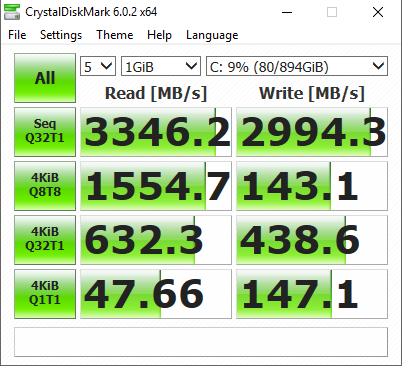
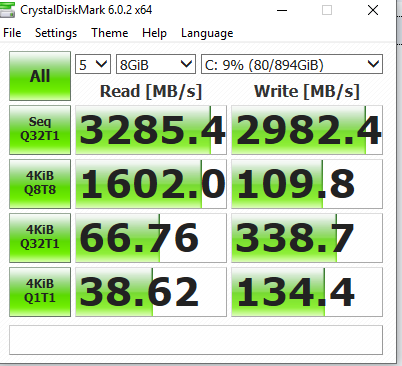
pls post some crystaldisk benchmark for corsair mp510 as well bro, i m looking forward to it rclxms.gif rclxms.gif
btw i went for viewnet this evening too bad out of stock for 960gb unit cry.gif
fat cat
post Feb 11 2019, 11:18 PM

Casual
***
Junior Member
449 posts

Joined: Jan 2010
From: Race : ☐ Malay ☐ Chinese ☐ India ☑ /k/tard


QUOTE(korbin @ Feb 11 2019, 11:12 PM)
pls post some crystaldisk benchmark for corsair mp510 as well bro, i m looking forward to it  rclxms.gif  rclxms.gif
btw i went for viewnet this evening  too bad out of stock for 960gb unit cry.gif
*
should i test 1 gb? or more

sorry you couldnt find stock. maybe i was the last one to buy it haha. but i went last friday. hmm.gif

This post has been edited by fat cat: Feb 11 2019, 11:56 PM
fat cat
post Feb 11 2019, 11:42 PM

Casual
***
Junior Member
449 posts

Joined: Jan 2010
From: Race : ☐ Malay ☐ Chinese ☐ India ☑ /k/tard


» Click to show Spoiler - click again to hide... «


user posted image

got a damn nice laptop for the price. and blazing fast ssd.

user posted image

This post has been edited by fat cat: Feb 11 2019, 11:53 PM
fat cat
post Feb 11 2019, 11:50 PM

Casual
***
Junior Member
449 posts

Joined: Jan 2010
From: Race : ☐ Malay ☐ Chinese ☐ India ☑ /k/tard


» Click to show Spoiler - click again to hide... «


fat cat
post Feb 11 2019, 11:52 PM

Casual
***
Junior Member
449 posts

Joined: Jan 2010
From: Race : ☐ Malay ☐ Chinese ☐ India ☑ /k/tard


» Click to show Spoiler - click again to hide... «


added old powerbrick from the old laptop
DuitNow
post Feb 12 2019, 12:48 AM

On my way
****
Junior Member
597 posts

Joined: Oct 2018
Can disable the number of threads or can disable the number of cores of the cpu?

Wonder would that lower the cpu temperature or not. hmm.gif
fat cat
post Feb 12 2019, 01:13 AM

Casual
***
Junior Member
449 posts

Joined: Jan 2010
From: Race : ☐ Malay ☐ Chinese ☐ India ☑ /k/tard


QUOTE(DuitNow @ Feb 12 2019, 12:48 AM)
Can disable the number of threads or can disable the number of cores of the cpu?

Wonder would that lower the cpu temperature or not. hmm.gif
*
hm..have to do some more testing.
fat cat
post Feb 12 2019, 02:21 AM

Casual
***
Junior Member
449 posts

Joined: Jan 2010
From: Race : ☐ Malay ☐ Chinese ☐ India ☑ /k/tard


further testing suspended, need to go and reapply the thermal paste for the cpu and maybe gpu also.
DuitNow
post Feb 12 2019, 03:16 AM

On my way
****
Junior Member
597 posts

Joined: Oct 2018
QUOTE(fat cat @ Feb 12 2019, 02:21 AM)
further testing suspended, need to go and reapply the thermal paste for the cpu and maybe gpu also.
*
You just got it, why need apply? blink.gif
obs5279
post Feb 12 2019, 09:58 AM

Getting Started
**
Junior Member
278 posts

Joined: Apr 2007


QUOTE(fat cat @ Feb 12 2019, 02:21 AM)
further testing suspended, need to go and reapply the thermal paste for the cpu and maybe gpu also.
*
Once done repasting, please post temperature info for cpu and gpu in idle and full load. brows.gif brows.gif
fat cat
post Feb 12 2019, 12:43 PM

Casual
***
Junior Member
449 posts

Joined: Jan 2010
From: Race : ☐ Malay ☐ Chinese ☐ India ☑ /k/tard


QUOTE(DuitNow @ Feb 12 2019, 03:16 AM)
You just got it, why need apply? blink.gif
*
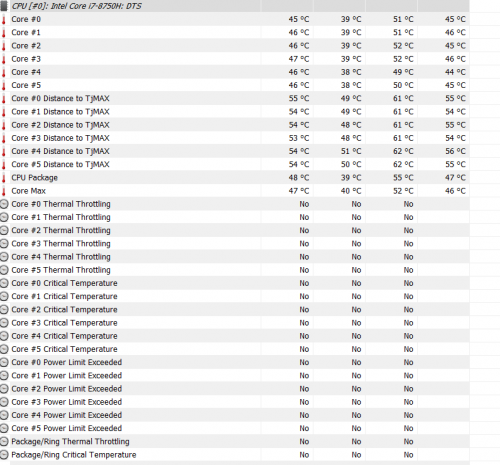
opened far cry 5 and its going to 99 degrees at 20% load. definitely not normal
DuitNow
post Feb 12 2019, 02:14 PM

On my way
****
Junior Member
597 posts

Joined: Oct 2018
QUOTE(fat cat @ Feb 12 2019, 12:43 PM)
opened far cry 5 and its going to 99 degrees at 20% load.  definitely not normal
*
But this below?

user posted image


fat cat
post Feb 12 2019, 02:18 PM

Casual
***
Junior Member
449 posts

Joined: Jan 2010
From: Race : ☐ Malay ☐ Chinese ☐ India ☑ /k/tard


QUOTE(DuitNow @ Feb 12 2019, 02:14 PM)
But this below?

user posted image
*
Not sure, going over to illigear office to see.
DuitNow
post Feb 12 2019, 02:19 PM

On my way
****
Junior Member
597 posts

Joined: Oct 2018
QUOTE(fat cat @ Feb 12 2019, 02:18 PM)
Not sure, going over to illigear office to see.
*
Its best let them check again. You going overseas soon.
fat cat
post Feb 14 2019, 05:30 PM

Casual
***
Junior Member
449 posts

Joined: Jan 2010
From: Race : ☐ Malay ☐ Chinese ☐ India ☑ /k/tard


QUOTE(DuitNow @ Feb 12 2019, 02:19 PM)
Its best let them check again. You going overseas soon.
*
alright, after much testing at their office this kind of temperature is pretty normal especially for i7 8750h and gtx 1070 combo.

will do more testing when i reach denmark. should be better due to lower ambient temperature - around 9 degrees or lower laugh.gif

bought this cooling pad to help:

» Click to show Spoiler - click again to hide... «


This post has been edited by fat cat: Feb 14 2019, 05:37 PM
obs5279
post Feb 14 2019, 06:25 PM

Getting Started
**
Junior Member
278 posts

Joined: Apr 2007


QUOTE(fat cat @ Feb 14 2019, 05:30 PM)
alright, after much testing at their office this kind of temperature is pretty normal especially for i7 8750h and gtx 1070 combo.

will do more testing when i reach denmark. should be better due to lower ambient temperature - around 9 degrees or lower laugh.gif

bought this cooling pad to help:

» Click to show Spoiler - click again to hide... «

*
So your thermal issue is come from cpu or gpu? Gpu more than 80 deg c will be at higher side and might get throttle at 82deg c.
fat cat
post Feb 14 2019, 06:48 PM

Casual
***
Junior Member
449 posts

Joined: Jan 2010
From: Race : ☐ Malay ☐ Chinese ☐ India ☑ /k/tard


QUOTE(obs5279 @ Feb 14 2019, 06:25 PM)
So your thermal issue is come from cpu or gpu? Gpu more than 80 deg c will be at higher side and might get throttle at 82deg c.
*
it was the cpu. but apparently its fine at these high temperatures.
obs5279
post Feb 14 2019, 06:52 PM

Getting Started
**
Junior Member
278 posts

Joined: Apr 2007


QUOTE(fat cat @ Feb 14 2019, 06:48 PM)
it was the cpu. but apparently its fine at these high temperatures.
*
You mean 99 deg c which you mentioned previously?
fat cat
post Feb 14 2019, 07:10 PM

Casual
***
Junior Member
449 posts

Joined: Jan 2010
From: Race : ☐ Malay ☐ Chinese ☐ India ☑ /k/tard


QUOTE(obs5279 @ Feb 14 2019, 06:52 PM)
You mean 99 deg c which you mentioned previously?
*
yeah, i recorded some gameplay just now from black ops 3 which is quite cpu intensive.

i'll upload it now.
DuitNow
post Feb 14 2019, 07:24 PM

On my way
****
Junior Member
597 posts

Joined: Oct 2018
How hot the laptop if playing games continuosly for 8 hours?
fat cat
post Feb 14 2019, 07:49 PM

Casual
***
Junior Member
449 posts

Joined: Jan 2010
From: Race : ☐ Malay ☐ Chinese ☐ India ☑ /k/tard


QUOTE(DuitNow @ Feb 14 2019, 07:24 PM)
How hot the laptop if playing games continuosly for 8 hours?
*
depends on the game, but pretty warm.


this is without the notebook fan.

This post has been edited by fat cat: Feb 14 2019, 07:50 PM
fat cat
post Feb 14 2019, 08:40 PM

Casual
***
Junior Member
449 posts

Joined: Jan 2010
From: Race : ☐ Malay ☐ Chinese ☐ India ☑ /k/tard


with the cooler:


DuitNow
post Feb 14 2019, 09:41 PM

On my way
****
Junior Member
597 posts

Joined: Oct 2018
If you disable some threads or cores? Does the cpu temperature decrease too?
obs5279
post Feb 14 2019, 10:04 PM

Getting Started
**
Junior Member
278 posts

Joined: Apr 2007


QUOTE(fat cat @ Feb 14 2019, 07:49 PM)
depends on the game, but pretty warm.


this is without the notebook fan.
*
Look like your cpu face no thermal throttling at 92deg C. hmm.gif hmm.gif
Can you use HWinfo64 to check whether cpu face thermal throttling?

Something like below:

» Click to show Spoiler - click again to hide... «
fat cat
post Feb 14 2019, 11:04 PM

Casual
***
Junior Member
449 posts

Joined: Jan 2010
From: Race : ☐ Malay ☐ Chinese ☐ India ☑ /k/tard


QUOTE(DuitNow @ Feb 14 2019, 09:41 PM)
If you disable some threads or cores? Does the cpu temperature decrease too?
*
Can, but now im in the airport haha. 13 hour flight...

Gonna post some thermals when i reach denmark.
ZM Fong
post Feb 14 2019, 11:52 PM

Laptop advisor
*******
Senior Member
8,240 posts

Joined: Apr 2017
QUOTE(obs5279 @ Feb 14 2019, 10:04 PM)
HWinfo64
*
Use MSI Afterburner+Rivatuner and HWinfo combo. Can monitor in game
fat cat
post Feb 17 2019, 04:40 AM

Casual
***
Junior Member
449 posts

Joined: Jan 2010
From: Race : ☐ Malay ☐ Chinese ☐ India ☑ /k/tard


first fortnite gameplay in denmark.


pretty good so far. no throttling at all and maintains good framerate throughout. had to adjust settings as i made a new epic account.
fat cat
post Feb 26 2019, 11:25 AM

Casual
***
Junior Member
449 posts

Joined: Jan 2010
From: Race : ☐ Malay ☐ Chinese ☐ India ☑ /k/tard


tested out firestrike ultra on the laguna.

quite impressive. stock speed no overclocked on gpu:

https://www.3dmark.com/fs/18493982

Compared to my desktop setup:


https://www.3dmark.com/fs/11712755


quite happy smile.gif

destroys my old build (RIP) with i5 2500k 780ti:

https://www.3dmark.com/fs/6359958

This post has been edited by fat cat: Feb 26 2019, 11:26 AM
zoixc
post Mar 11 2019, 12:16 PM

haha
******
Senior Member
1,406 posts

Joined: Aug 2018
Hi new to this company and was planning to get one for myself Laguna.
I have a question for those who have been using the laptop for a couple of year. I'm planning to use it for at least 5 year
ZM Fong
post Mar 11 2019, 04:15 PM

Laptop advisor
*******
Senior Member
8,240 posts

Joined: Apr 2017
QUOTE(zoixc @ Mar 11 2019, 12:16 PM)
Laguna
*
Laguna is a Quanta NL5C. Got 1 review in Notebookcheck (older 7700HQ model)

Some things to take note:
Cooling can handle 1060/2060 but not 1070/2070 due to insufficient heatpipes. No Optimus but no GSYNC either. A bit heavy for a 15 inch no thin bezel gaming laptop

This post has been edited by ZM Fong: Mar 11 2019, 04:15 PM
fat cat
post Mar 11 2019, 06:24 PM

Casual
***
Junior Member
449 posts

Joined: Jan 2010
From: Race : ☐ Malay ☐ Chinese ☐ India ☑ /k/tard


QUOTE(ZM Fong @ Mar 11 2019, 04:15 PM)
Laguna is a Quanta NL5C. Got 1 review in Notebookcheck (older 7700HQ model)

Some things to take note:
Cooling can handle 1060/2060 but not 1070/2070 due to insufficient heatpipes. No Optimus but no GSYNC either. A bit heavy for a 15 inch no thin bezel gaming laptop
*
thats false, the laguna has more heatpipe depending on if you take 1060 or 1070. 1070 version comes with 1 extra heatpipe.
ZM Fong
post Mar 11 2019, 07:59 PM

Laptop advisor
*******
Senior Member
8,240 posts

Joined: Apr 2017
QUOTE(fat cat @ Mar 11 2019, 06:24 PM)
thats false, the laguna has more heatpipe depending on if you take 1060 or 1070. 1070 version comes with 1 extra heatpipe.
*
I do know that the 1070 model has 1 extra heatpipe, but it's for CPU and GPU VRM, not for GPU core
zoixc
post Mar 20 2019, 01:14 PM

haha
******
Senior Member
1,406 posts

Joined: Aug 2018
QUOTE(Jeremy Schee @ Jul 20 2017, 10:57 AM)

Audio
Not an audiophile, but overall it is good enough to me. I wish the speaker is louder as it is firing upwards. Bass is good, maybe it is the subwoofer. Weak at mid and very high-pitched at high, some software tweak can easily solve these.

*
What software did you used to tweak it ?
gbsaint
post May 7 2019, 04:13 PM

Getting Started
**
Junior Member
185 posts

Joined: Jul 2005
Issit just me or the illegear laguna looks exactly like the thunderobot dino??thus is the thermal performance the same??

Attached Image
ZM Fong
post May 7 2019, 04:53 PM

Laptop advisor
*******
Senior Member
8,240 posts

Joined: Apr 2017
QUOTE(gbsaint @ May 7 2019, 04:13 PM)
Issit just me or the illegear laguna looks exactly like the thunderobot dino??thus is the thermal performance the same??

Attached Image
*
Same Quanta chassis. Should be the same - 1+2 (CPU+GPU) heatpipes for 1060/2060, 2+2 for 1070/2070
gbsaint
post May 7 2019, 06:40 PM

Getting Started
**
Junior Member
185 posts

Joined: Jul 2005
QUOTE(ZM Fong @ May 7 2019, 04:53 PM)
Same Quanta chassis. Should be the same - 1+2 (CPU+GPU) heatpipes for 1060/2060, 2+2 for 1070/2070
*
Do you think with the extra heatpipes , should i get the gtx 1070 version??

Cause now i'm seeing at lazada thunderobot dino i7 7700HQ with gtx 1070 going for around rm5.7k

ZM Fong
post May 7 2019, 07:05 PM

Laptop advisor
*******
Senior Member
8,240 posts

Joined: Apr 2017
QUOTE(gbsaint @ May 7 2019, 06:40 PM)
Do you think with the extra heatpipes , should i get the gtx 1070 version??

Cause now i'm seeing at lazada thunderobot dino i7 7700HQ with gtx 1070 going for around rm5.7k
*
That model cannot handle the heat of 1070. 8th/9th gen laptops with 1660TI/2060 are better IMO
7cantona
post May 8 2019, 07:21 AM

On my way
****
Junior Member
586 posts

Joined: Apr 2019
after 2 years, still good the condition of the laptop? well made ?
AZIM@ILLEGEAR
post May 8 2019, 10:39 AM

New Member
*
Junior Member
28 posts

Joined: Feb 2017
From: Team ILLEGEAR


QUOTE(Gautham24 @ Feb 5 2019, 09:08 PM)
Have anyone bought Laguna 1050 ti version? How's the performance so far? Actually i am a bit confused with this stuck or dead pixel as stated in illegears website. Does all the laptops have this problem ? Are they fixable? Will they make my screen look bad permanently? Sorry, i am not a tech savy. I am bit dumb in these stuffs.
*
Hi Gautham24, in regards to the dead pixel coverage, we can provide a full display panel replacement with the insurance purchase, even if there is only one dead pixel present on the screen.

However for ILLEGEAR laptops, we shall pursue for a screen replacement under warranty (regardless of the dead pixel coverage) if there are at least three dead/dim/lit pixels present on the screen, as well as other display anomalies (eg: screen lining/blocking/etc), hope this clarifies.
k!nex
post May 9 2019, 03:30 AM

Restless stars
*******
Senior Member
3,389 posts

Joined: Mar 2007
From: KL


QUOTE(gbsaint @ May 7 2019, 06:40 PM)
Do you think with the extra heatpipes , should i get the gtx 1070 version??

Cause now i'm seeing at lazada thunderobot dino i7 7700HQ with gtx 1070 going for around rm5.7k
*
I7 7700HQ is beaten by i5 8300H. Dont buy the i7 7700HQ unless its really really alot cheaper than i5 8300H model
gbsaint
post May 9 2019, 10:41 AM

Getting Started
**
Junior Member
185 posts

Joined: Jul 2005
QUOTE(k!nex @ May 9 2019, 03:30 AM)
I7 7700HQ is beaten by i5 8300H. Dont buy the i7 7700HQ unless its really really alot cheaper than i5 8300H model
*
i mean rm5.5k i would consider cheap for the thunderobot dino

i mean it has 120hz screen,gtx 1070,i7 ,16 gb ram,265 ssd.

i mean all the spec above alone justify the price.

Although is the 8300h as fast as the 7700hq even in application like video render??cause i also do a lot of editing via filmora and da vinci resolve.
k!nex
post May 9 2019, 06:55 PM

Restless stars
*******
Senior Member
3,389 posts

Joined: Mar 2007
From: KL


QUOTE(gbsaint @ May 9 2019, 10:41 AM)
i mean rm5.5k i would consider cheap for the thunderobot dino

i mean it has 120hz screen,gtx 1070,i7 ,16 gb ram,265 ssd.

i mean all the spec above alone justify the price.

Although is the 8300h as fast as the 7700hq even in application like video render??cause i also do a lot of editing  via filmora and da vinci resolve.
*
You look at illegear page now. The current laguna has an i7 8750h. Price ard 5k also. So why bother about that Thunderobot ? 6 core i7 vs an old gen 4 core i7 . There is just no contest.
If you wanna know i5 8300h vs 7700hq, still the i5 8300h is faster .More L3 cache. Higher boost clock. Official support for faster ddr4 2666mhz.

This post has been edited by k!nex: May 9 2019, 06:59 PM
zoixc
post May 9 2019, 10:18 PM

haha
******
Senior Member
1,406 posts

Joined: Aug 2018
QUOTE(gbsaint @ May 9 2019, 10:41 AM)
i mean rm5.5k i would consider cheap for the thunderobot dino

i mean it has 120hz screen,gtx 1070,i7 ,16 gb ram,265 ssd.

i mean all the spec above alone justify the price.

Although is the 8300h as fast as the 7700hq even in application like video render??cause i also do a lot of editing  via filmora and da vinci resolve.
*
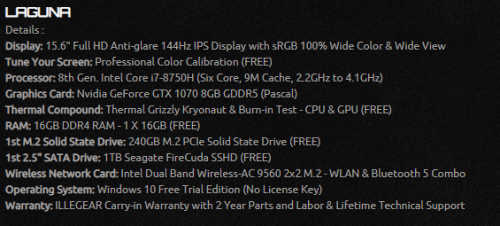
with current Illegear promotion, add another rm 100 get almost same but with 8750h

see photo below

» Click to show Spoiler - click again to hide... «


This post has been edited by zoixc: May 9 2019, 10:19 PM
7cantona
post May 10 2019, 12:19 PM

On my way
****
Junior Member
586 posts

Joined: Apr 2019
QUOTE(zoixc @ May 9 2019, 10:18 PM)
with current Illegear promotion, add another rm 100 get almost same but with 8750h

see photo below

» Click to show Spoiler - click again to hide... «

*
Illegear a lot of promotion now, regret buying other brand recently cry.gif Illegear price very good now with promotion
skyscythe12 P
post Jul 5 2019, 01:25 AM

New Member
*
Probation
4 posts

Joined: Jul 2019
Hi is the high cpu temp really normal with this laptop? it wont hurt the cpu in the long run? kinda regret buying illegear coz of the temp problem..
ZM Fong
post Jul 5 2019, 11:18 AM

Laptop advisor
*******
Senior Member
8,240 posts

Joined: Apr 2017
QUOTE(skyscythe12 @ Jul 5 2019, 01:25 AM)
Hi is the high cpu temp really normal with this laptop? it wont hurt the cpu in the long run? kinda regret buying illegear coz of the temp problem..
*
Laguna 1070 runs hot, 1060 is fine

Thermals depends on model
skyscythe12 P
post Jul 5 2019, 02:00 PM

New Member
*
Probation
4 posts

Joined: Jul 2019
QUOTE(ZM Fong @ Jul 5 2019, 11:18 AM)
Laguna 1070 runs hot, 1060 is fine

Thermals depends on model
*
Mine is a 1060 model. The gpu seems to run fine, but the cpu keeps getting really hot. Is is because of a bad thermal paste job or is it because mine is faulty?
Prince J
post Jul 5 2019, 02:03 PM

Regular
******
Senior Member
1,272 posts

Joined: May 2010
From: Team ILLEGEAR


QUOTE(skyscythe12 @ Jul 5 2019, 02:00 PM)
Mine is a 1060 model. The gpu seems to run fine, but the cpu keeps getting really hot. Is is because of a bad thermal paste job or is it because mine is faulty?
*
What's the CPU temperature you get?
skyscythe12 P
post Jul 5 2019, 02:09 PM

New Member
*
Probation
4 posts

Joined: Jul 2019
QUOTE(Prince J @ Jul 5 2019, 02:03 PM)
What's the CPU temperature you get?
*
90-95ish range when playing games like assassins creed unity and far cry 5. sometimes it can spike up to 97-99 but only for a split second. Lowering the graphics doesn't help in reducing the temp too.
AZIM@ILLEGEAR
post Jul 5 2019, 05:29 PM

New Member
*
Junior Member
28 posts

Joined: Feb 2017
From: Team ILLEGEAR


QUOTE(skyscythe12 @ Jul 5 2019, 02:09 PM)
90-95ish range when playing games like assassins creed unity and far cry 5. sometimes it can spike up to 97-99 but only for a split second. Lowering the graphics doesn't help in reducing the temp too.
*
May I know if your power option is set to 'Balanced'? We would recommend to set the power plan to 'Balanced' regardless if the laptop is powered by charger/battery: https://www.howtogeek.com/240840/should-you...lan-on-windows/

This is because the High Performance mode will activate the TurboBoost at all times and this could be causing excess temperature compounded while the laptop is running on idle and in turn, causing the temperature levels to spike beyond 95°C under certain instances.
ZM Fong
post Jul 5 2019, 05:43 PM

Laptop advisor
*******
Senior Member
8,240 posts

Joined: Apr 2017
QUOTE(skyscythe12 @ Jul 5 2019, 02:09 PM)
90-95ish range when playing games like assassins creed unity and far cry 5. sometimes it can spike up to 97-99 but only for a split second. Lowering the graphics doesn't help in reducing the temp too.
*
clock speed and power draw? fan speed and ambient temp?
skyscythe12 P
post Jul 5 2019, 10:05 PM

New Member
*
Probation
4 posts

Joined: Jul 2019
QUOTE(AZIM@ILLEGEAR @ Jul 5 2019, 05:29 PM)
May I know if your power option is set to 'Balanced'? We would recommend to set the power plan to 'Balanced' regardless if the laptop is powered by charger/battery: https://www.howtogeek.com/240840/should-you...lan-on-windows/

This is because the High Performance mode will activate the TurboBoost at all times and this could be causing excess temperature compounded while the laptop is running on idle and in turn, causing the temperature levels to spike beyond 95°C under certain instances.
*
Its balanced i never changed it. Idle temps are 45 - 47 celsius
Prince J
post Jul 6 2019, 01:32 AM

Regular
******
Senior Member
1,272 posts

Joined: May 2010
From: Team ILLEGEAR


QUOTE(skyscythe12 @ Jul 5 2019, 02:09 PM)
90-95ish range when playing games like assassins creed unity and far cry 5. sometimes it can spike up to 97-99 but only for a split second. Lowering the graphics doesn't help in reducing the temp too.
*
Hi skyscythe12,

May i have your serial number to assist further? You can also send in for servicing and we will check whether dust cleaning / thermal re-application is needed.
AZIM@ILLEGEAR
post Jul 10 2019, 01:07 PM

New Member
*
Junior Member
28 posts

Joined: Feb 2017
From: Team ILLEGEAR


QUOTE(skyscythe12 @ Jul 5 2019, 10:05 PM)
Its balanced i never changed it. Idle temps are 45 - 47 celsius
*
Hi skyscythe12, we have yet to obtain your reply in regards to the serial number. We would like to investigate the issue further and for the serial number of the laptop, you may also text the code/send a snapshot to our Support Line directly via WhatsApp at +6018-2618599, will assist accordingly smile.gif
fat cat
post Sep 1 2019, 11:52 AM

Casual
***
Junior Member
449 posts

Joined: Jan 2010
From: Race : ☐ Malay ☐ Chinese ☐ India ☑ /k/tard


Anyone seen laguna se or have actual picture?

This post has been edited by fat cat: Sep 1 2019, 11:53 AM
ZM Fong
post Sep 1 2019, 10:05 PM

Laptop advisor
*******
Senior Member
8,240 posts

Joined: Apr 2017
QUOTE(fat cat @ Sep 1 2019, 11:52 AM)
Anyone seen laguna se or have actual picture?
*
Seen it just now, didn't take pic though
absolut_zero
post Sep 1 2019, 10:33 PM

New Member
*
Newbie
31 posts

Joined: Mar 2018


QUOTE(ZM Fong @ Sep 1 2019, 10:05 PM)
Seen it just now, didn't take pic though
*
Hi ZM Fong. What are your initial impressions about the notebook? Which ODM is it based on? Thanks.
ZM Fong
post Sep 1 2019, 10:35 PM

Laptop advisor
*******
Senior Member
8,240 posts

Joined: Apr 2017
QUOTE(absolut_zero @ Sep 1 2019, 10:33 PM)
Hi ZM Fong.  What are your initial impressions about the notebook? Which ODM is it based on? Thanks.
*
well since I can't test the laptop (engineering sample), nothing to talk about lol

Quanta
absolut_zero
post Sep 1 2019, 10:47 PM

New Member
*
Newbie
31 posts

Joined: Mar 2018


QUOTE(ZM Fong @ Sep 1 2019, 10:35 PM)
well since I can't test the laptop (engineering sample), nothing to talk about lol

Quanta
*
Oh ok. Thanks a lot.
xyz_cityhunter
post Sep 3 2019, 01:08 AM

Getting Started
**
Junior Member
238 posts

Joined: Dec 2010
From: Kedah


QUOTE(ZM Fong @ Sep 1 2019, 10:35 PM)
well since I can't test the laptop (engineering sample), nothing to talk about lol

Quanta
*
How you identify it as Quanta laptop? confused.gif
Any online info on that?
ZM Fong
post Sep 3 2019, 01:08 PM

Laptop advisor
*******
Senior Member
8,240 posts

Joined: Apr 2017
QUOTE(xyz_cityhunter @ Sep 3 2019, 01:08 AM)
How you identify it as Quanta laptop? confused.gif
Any online info on that?
*
Bottom sticker tells everything
xyz_cityhunter
post Sep 3 2019, 02:28 PM

Getting Started
**
Junior Member
238 posts

Joined: Dec 2010
From: Kedah


QUOTE(ZM Fong @ Sep 3 2019, 01:08 PM)
Bottom sticker tells everything
*
Oh, ok
Is this model is already release in other market?

This post has been edited by xyz_cityhunter: Sep 3 2019, 03:20 PM
ZM Fong
post Sep 3 2019, 04:21 PM

Laptop advisor
*******
Senior Member
8,240 posts

Joined: Apr 2017
QUOTE(xyz_cityhunter @ Sep 3 2019, 02:28 PM)
Oh, ok
Is this model is already release in other market?
*
Not sure, but it looks like a slimmed down version of Aorus 15 (can google for images)
xyz_cityhunter
post Sep 3 2019, 11:25 PM

Getting Started
**
Junior Member
238 posts

Joined: Dec 2010
From: Kedah


QUOTE(ZM Fong @ Sep 3 2019, 04:21 PM)
Not sure, but it looks like a slimmed down version of Aorus 15 (can google for images)
*
Thanks for info, need to check out the I/O on the sides...
LeeroyJenkinss
post Sep 11 2019, 04:03 PM

Getting Started
**
Junior Member
131 posts

Joined: Oct 2017
actually now their showroom have the actual LAGUNA SE for demo.
AZIM@ILLEGEAR
post Sep 12 2019, 02:28 PM

New Member
*
Junior Member
28 posts

Joined: Feb 2017
From: Team ILLEGEAR


QUOTE(fat cat @ Sep 1 2019, 11:52 AM)
Anyone seen laguna se or have actual picture?
*
Hi fat cat

At the moment, limited pictures are available but we will be uploading more soon once the model has been officially launched! https://store.illegear.com/extreme-performa...-laguna-se.html
fat cat
post Sep 12 2019, 04:26 PM

Casual
***
Junior Member
449 posts

Joined: Jan 2010
From: Race : ☐ Malay ☐ Chinese ☐ India ☑ /k/tard


» Click to show Spoiler - click again to hide... «


fat cat
post Sep 12 2019, 04:26 PM

Casual
***
Junior Member
449 posts

Joined: Jan 2010
From: Race : ☐ Malay ☐ Chinese ☐ India ☑ /k/tard


Forgot i took these haha
juiced
post Sep 14 2019, 10:04 AM

New Member
*
Junior Member
44 posts

Joined: Mar 2006


hi guys,

need some assistance, if anybody have the same model, could you guys backup the gpu bios and send to me.

I have the laguna 7700hq gtx 1070, I noticed if the gpu boosted > 1700 the laptop would restart. I usually applied an -150 offset in afterburner but read on the net to flash the bios so it would not boost more than 16++. But after flashing, nvidia wont detect the card and the drivers cant be installed sweat.gif , although I still can use the laptop but using windows generic drivers. Still loving the notebook though.

Thanks in advanced

user posted image

This post has been edited by juiced: Sep 14 2019, 10:05 AM
Eluuna
post Sep 19 2019, 11:10 AM

Getting Started
**
Junior Member
110 posts

Joined: May 2012
QUOTE(fat cat @ Sep 12 2019, 04:26 PM)
Forgot i took these haha
*
Looks good. hows the build quality?
fat cat
post Sep 22 2019, 03:40 AM

Casual
***
Junior Member
449 posts

Joined: Jan 2010
From: Race : ☐ Malay ☐ Chinese ☐ India ☑ /k/tard


QUOTE(Eluuna @ Sep 19 2019, 11:10 AM)
Looks good. hows the build quality?
*
Pretty solid, surprisingly light.
enteraname1
post Sep 22 2019, 02:06 PM

Getting Started
**
Junior Member
176 posts

Joined: Oct 2017


QUOTE(fat cat @ Sep 22 2019, 03:40 AM)
Pretty solid, surprisingly light.
*
battery life wise le?
fat cat
post Sep 22 2019, 03:38 PM

Casual
***
Junior Member
449 posts

Joined: Jan 2010
From: Race : ☐ Malay ☐ Chinese ☐ India ☑ /k/tard


QUOTE(enteraname1 @ Sep 22 2019, 02:06 PM)
battery life wise le?
*
Was only demo unit. Not working.


Change to:
| Lo-Fi Version
0.0902sec    0.81    6 queries    GZIP Disabled
Time is now: 2nd December 2025 - 12:23 AM