

QUOTE(pang0119 @ Jul 20 2017, 12:28 AM)
What is the min require gpu for this 32 inch monitor?
For 2K resolution, minimum R9 390X / GTX 97027 inch in 1080p, Is it good?
|
|
 Jul 20 2017, 09:34 AM Jul 20 2017, 09:34 AM
|
 
All Stars
14,909 posts Joined: Jul 2005  
|
QUOTE(pang0119 @ Jul 20 2017, 12:28 AM) What is the min require gpu for this 32 inch monitor? For 2K resolution, minimum R9 390X / GTX 970 |
|
|
|
|
|
Jul 20 2017, 02:02 PM
|

Senior Member
2,539 posts Joined: Dec 2007
|
QUOTE(StuartLee2015 @ Jul 17 2017, 11:22 PM) Hi, I just bought Dell S2715H, although it's 1080p on 27" , the pixel is great, no pixelated... everything is sharp. can u share your desktop screen bro?Only thing in 1080p vs 1440p, is the icons , text all looks smaller, have more desktop space, and taskbar all look longer too. You can stretch windows as big as you want. Don't worry, bro. 1080p is great on 27"  print screen quality pun enough dy... tq.  |
|
|
Jul 20 2017, 11:31 PM
|

Senior Member
1,221 posts Joined: Sep 2014 From: Malaysia 
|
QUOTE(craxors @ Jul 20 2017, 02:02 PM) can u share your desktop screen bro? This is Print Screen X Ligthshot.print screen quality pun enough dy... tq. Hope this help. Note: It might looks a bit blurry here due to quality being compressed . but in reality, it's very sharp. Like in my 25" HP Pavilion LED Monitor ( 1920 x 1080p ). It's just that the screen is bigger . This post has been edited by StuartLee2015: Jul 20 2017, 11:33 PM Attached thumbnail(s) 
|
|
|
Jul 21 2017, 12:31 AM
|

All Stars
29,773 posts Joined: Jan 2009 From: Johor, Malaysia.
|
QUOTE(craxors @ Jul 20 2017, 02:02 PM) can u share your desktop screen bro? print screen quality pun enough dy... tq. QUOTE(StuartLee2015 @ Jul 20 2017, 11:31 PM) This is Print Screen X Ligthshot. Hmmm... did you both know screenshot tell nothing? Nor matter what size your monitor are, the output is same on screenshot.Hope this help. Note: It might looks a bit blurry here due to quality being compressed . but in reality, it's very sharp. Like in my 25" HP Pavilion LED Monitor ( 1920 x 1080p ). It's just that the screen is bigger . |
|
|
Jul 21 2017, 08:06 AM
|
|
Senior Member
2,539 posts Joined: Dec 2007
|
QUOTE(StuartLee2015 @ Jul 20 2017, 11:31 PM) This is Print Screen X Ligthshot. this is 1080p?Hope this help. Note: It might looks a bit blurry here due to quality being compressed . but in reality, it's very sharp. Like in my 25" HP Pavilion LED Monitor ( 1920 x 1080p ). It's just that the screen is bigger .  QUOTE(Andrewtst @ Jul 21 2017, 12:31 AM) Hmmm... did you both know screenshot tell nothing? Nor matter what size your monitor are, the output is same on screenshot. yes.i just need to see the icon size and titles... |
|
|
Jul 21 2017, 07:57 PM
|
|
All Stars
29,773 posts Joined: Jan 2009 From: Johor, Malaysia.
|
QUOTE(craxors @ Jul 21 2017, 08:06 AM) this is 1080p? Oh. Interesting to see 1440p? Haha! yes. i just need to see the icon size and titles... |
|
|
|
|
|
Jul 21 2017, 08:03 PM
|
|
Senior Member
1,221 posts Joined: Sep 2014 From: Malaysia
|
Although it's 1080p on 27", it's actually nice. Everything is sharp.
the difference in 1440p and 1080p on the same size like the Ultrasharp 27, it will be lots more space , icons looks smaller, everything will be very big. Like 1080p on a 17'' laptop of my friend. it's a Dell XPS. the model i forgotten. The text looks super tiny. |
|
|
Jul 21 2017, 09:44 PM
|
|
Senior Member
2,539 posts Joined: Dec 2007
|
QUOTE(Andrewtst @ Jul 21 2017, 07:57 PM) Oh. Interesting to see 1440p? Haha! Interesting to see what owner claimed those sharpness using 1080p on 27".... |
|
|
Jul 22 2017, 03:34 AM
|
|
All Stars
29,773 posts Joined: Jan 2009 From: Johor, Malaysia.
|
QUOTE(StuartLee2015 @ Jul 21 2017, 08:03 PM) Although it's 1080p on 27", it's actually nice. Everything is sharp. My laptop is 15.6" and running 1080p. it just slightly small but still ok to me and still better resolution than 720p which is obvious pixelate.the difference in 1440p and 1080p on the same size like the Ultrasharp 27, it will be lots more space , icons looks smaller, everything will be very big. Like 1080p on a 17'' laptop of my friend. it's a Dell XPS. the model i forgotten. The text looks super tiny. Also working space for 720p is too narrow already. No choice they is no 1050p (16:10 ratio) resolution for laptop. I don't pick 900p also as that is also narrow working space. Maybe you prefer big icon and big font size, that why you said 1080p just nice in 27". For me, I prefer below resolution 20" - 1050p (16:10 ratio) 22" to 24" - 1080p or 1200p (16:10 ratio) 27" to 32" - 1440p For new ultra wide monitor, I need minimum 34" and 1440p. I seen before 29" which now look small to me and most 29" is only 1080p which no longer my preferable working space resolution. No screen is run nice in Windows 100% scale for 2160p because it still look too tiny even in 50" (I seen my friend using 50" 4K TV before). 2160p must run more than 100% scale and some apps still can't run proper in scaling. That is one of the reason I don't look for 2160p monitor for now unless future Windows and application solve this scale issue and also GPU need to be much much more powerful to render 2160p resolution games. Now the most high end GTX 1080 just spot nice on it. 2160p is not yet for now. QUOTE(craxors @ Jul 21 2017, 09:44 PM) Interesting to see what owner claimed those sharpness using 1080p on 27".... 1080p definitely loose some sharpness on 27". I had check before few include Dell model and it just don't make it for me. As for 32", beside sharpness issue, everything is way too big already in 1080p, actually in 27" already look big. Attached here the 100% scaling by Windows 10 in 1440p vs 1080p. As you can see it is same scale size but 1440p having much better working space and it is well done in 27" and above. Everything just look perfect and not too big.  This post has been edited by Andrewtst: Jul 22 2017, 05:48 AM |
|
|
Jul 22 2017, 10:40 AM
|
|
Senior Member
2,539 posts Joined: Dec 2007
|
QUOTE(Andrewtst @ Jul 22 2017, 03:34 AM) 1080p definitely loose some sharpness on 27". I had check before few include Dell model and it just don't make it for me. Thats the interesting part..As for 32", beside sharpness issue, everything is way too big already in 1080p, actually in 27" already look big. Attached here the 100% scaling by Windows 10 in 1440p vs 1080p. As you can see it is same scale size but 1440p having much better working space and it is well done in 27" and above. Everything just look perfect and not too big. Because from the screen shots its not that big.. Unless owner run dsr... |
|
|
Jul 22 2017, 05:09 PM
|
|
All Stars
29,773 posts Joined: Jan 2009 From: Johor, Malaysia.
|
QUOTE(craxors @ Jul 22 2017, 10:40 AM) Thats the interesting part.. The screenshot by StuartLee2015 is exact 1080p. Because from the screen shots its not that big.. Unless owner run dsr... See the image dimension. It is exactly the 1080p resolution.  What monitor you use? and what is the resolution? Wonder why you doubt StuartLee2015 screenshot or my screenshot? You can download the image and check yourself the image dimension. If you are using 2160p (4k) resolution monitor then 1080p is very small because 1080p is some sort like 1k, 1440p is 2k, they is no 3k monitor and straight jump to 4k. DSR? I though DSR can only apply for gaming. You can't tell from the windows OS screenshot. The Differences of 1080p vs 1440p vs 2160p 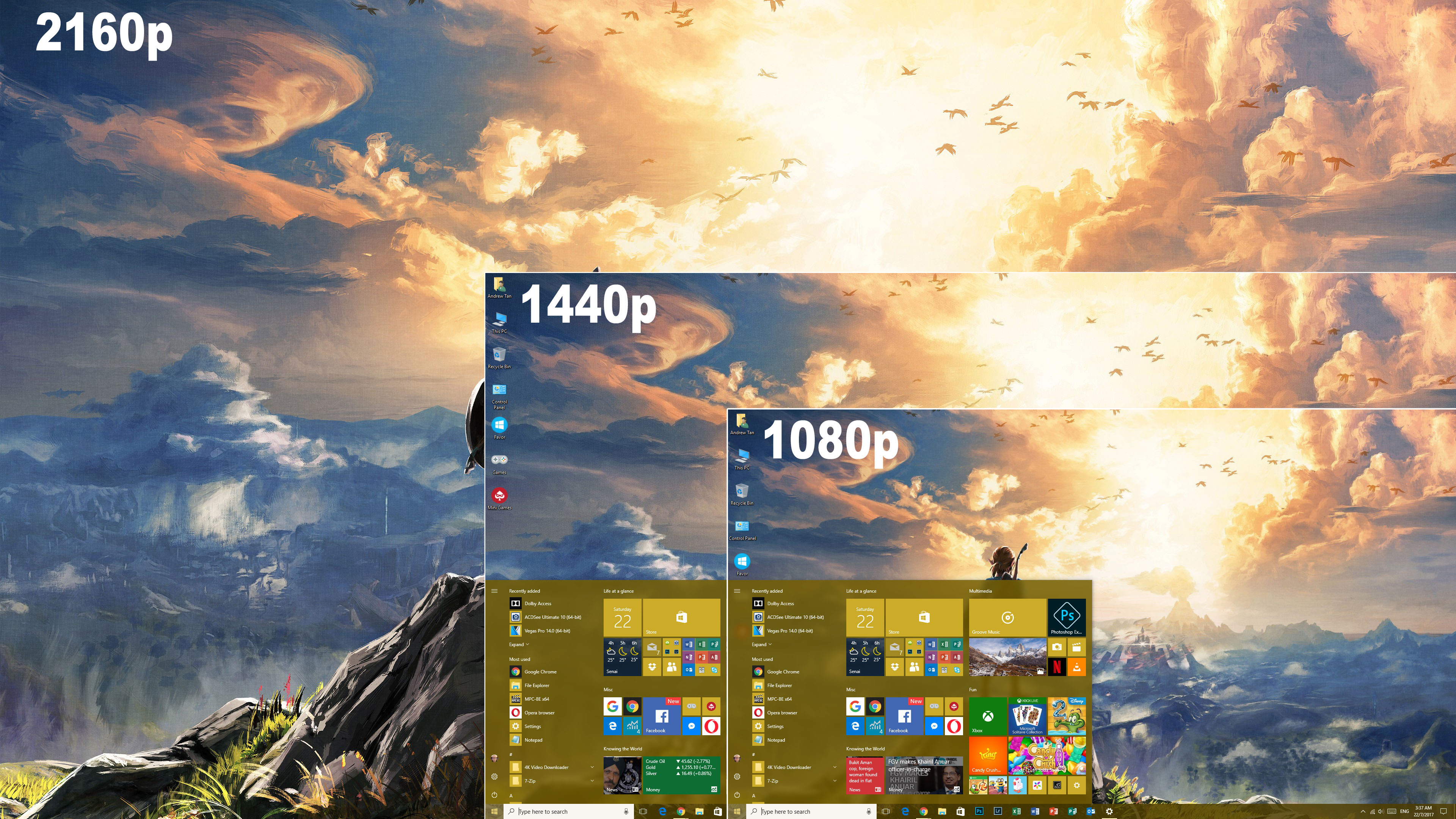 This post has been edited by Andrewtst: Jul 22 2017, 05:28 PM |
|
|
Jul 22 2017, 06:18 PM
|
|
Senior Member
2,539 posts Joined: Dec 2007
|
no no.. its not doubt.
just that i tot 1080p in 27 will much bigger and blurer... but not. thats all. |
|
|
Jul 22 2017, 08:19 PM
|
|
Senior Member
1,221 posts Joined: Sep 2014 From: Malaysia
|
QUOTE(craxors @ Jul 22 2017, 06:18 PM) no no.. its not doubt. lol... but it looks fine to me, no blurry text ...just that i tot 1080p in 27 will much bigger and blurer... but not. thats all. |
|
|
|
|
|
Jul 22 2017, 08:24 PM
Show posts by this member only | IPv6 | Post
#34
|

Senior Member
978 posts Joined: Dec 2008
|
I guess it's up to personal preference. I'm using U2715H at the moment and really like the 1440p resolution. Previously was using S2715H.. I prefer 1440p if u using a 27" monitor.
 |
|
|
Jul 22 2017, 09:26 PM
|
|
All Stars
29,773 posts Joined: Jan 2009 From: Johor, Malaysia.
|
QUOTE(craxors @ Jul 22 2017, 06:18 PM) no no.. its not doubt. As I said before you can't judge based on screenshot.just that i tot 1080p in 27 will much bigger and blurer... but not. thats all. I think you still don't get it. The screenshot is same size forever & same quality and it won't because 27" the screenshot will bigger, and 17" the screenshot will smaller or make any differences to the quality if all is same resolution. It is same size and not follow monitor size because it is follow the size of the resolution output from the operating system. You see exact the same size image & same quality when you screenshot from 17", 20", 27", 32" and even 100" monitor on same resolution. You do seen different image size when you screenshot 1080p resolution gaming and 2160p gaming in DSR mode using same monitor. This is because under DSR mode, you are actually render the games virtually in 2160p resolution but later output it to your monitor native resolution for example 1080p. The image bigger because the screenshot is taken the exact resolution of 2160p not 1080p. For output quality on same resolution but different screen size, you need to see physically to know the output. ** screenshot is taken the image of the exact output from the system itself not the physical device output. This is the same thing some user don't understand and taken phone screenshot and tell user my phone screen is damage, yellowish, tint issue, dead pixel and etc. Even your screen is broken but the screenshot still perfect. Why? Because screenshot is taken the operating system image itself not how the physical look (the thing you seen from screen). Physical look is impossible to get from screenshot. Only manage by see yourself physically or taken by using another camera. This post has been edited by Andrewtst: Jul 22 2017, 09:54 PM |
|
|
Jul 23 2017, 10:53 AM
|
|
All Stars
14,909 posts Joined: Jul 2005
|
Anyone knows where I can find SAMSUNG C32HG70 monitor in Malaysia?
The best 16:9 gaming monitor available  32 Inch QHD (2560x1440) Resolution 1MS Response Time 144Hz Freesync QLED Screen http://www.samsung.com/us/computing/monito...lc32hg70qqnxza/ |
|
|
Jul 23 2017, 01:55 PM
|
|
All Stars
29,773 posts Joined: Jan 2009 From: Johor, Malaysia.
|
QUOTE(sHawTY @ Jul 23 2017, 10:53 AM) Anyone knows where I can find SAMSUNG C32HG70 monitor in Malaysia? The gaming style menu is real awesome. I agree this is the best gaming monitor. Finally it is not TN. It is VA which is still very nice view and color. This proof not only TN can get 1ms respond time. Since VA also can get 1ms. No point getting TN anymore. TN is pure rubbish to me IMO.The best 16:9 gaming monitor available 32 Inch QHD (2560x1440) Resolution 1MS Response Time 144Hz Freesync QLED Screen http://www.samsung.com/us/computing/monito...lc32hg70qqnxza/ It is still very new, wait sometimes probably it will come.  This post has been edited by Andrewtst: Jul 23 2017, 01:57 PM |
|
|
Jul 23 2017, 02:01 PM
|
|
All Stars
14,909 posts Joined: Jul 2005
|
QUOTE(Andrewtst @ Jul 23 2017, 01:55 PM) I agree this is the best gaming monitor. The price is a little scary though at US$699  But with that spec & Samsung name on it, it's not that surprising Here's hoping I can get my CTO to buy this for me as a present for completing the current project I'm running right now A year ago I got him to buy Samsung 950 Pro 512GB for my last project completion  This post has been edited by sHawTY: Jul 23 2017, 02:04 PM |
|
|
Jul 23 2017, 02:05 PM
|
|
All Stars
29,773 posts Joined: Jan 2009 From: Johor, Malaysia.
|
QUOTE(sHawTY @ Jul 23 2017, 02:01 PM) The price is a little scary though at US$699 Ya, the price is ... .... But with that spec & Samsung name on it, it's not that surprising Here's hoping I can get my CTO to buy this for me as a present for completing the current project I'm running right now A year ago I got him to buy Samsung 950 Pro 512GB for my last project completion RM 2.9k, lucky I not that demand yet. That price can buy 2 units of 32" WQHD ViewSonic VX3209-2K IPS panel and still left RM 300 for snack. Haha! A bit too expensive ... but no denied from spec it is very awesome. Review very great also. Lol, lucky you, wish you good luck fulfill your dream. Hehe This post has been edited by Andrewtst: Jul 23 2017, 02:07 PM |
|
|
Jul 29 2017, 11:57 PM
|
|
All Stars
14,909 posts Joined: Jul 2005
|
I officially hate my AG322FCX now
It's flickering badly. No matter what cable I use, old or new, DP or HDMI In fact, it's even worse when on HDMI, not only does it limit the speed to 120Hz, but the flickering is even worse when the screen just go dark Not sure if it's my graphic card or the monitor itself, but reading on the internet, there are hundreds of people having the same issue as me The only thing I haven't tried is using a different graphic card, but the only other graphic card I have is R7 250 which does not support FreeSync  This post has been edited by sHawTY: Jul 29 2017, 11:57 PM |
| Change to: |  0.0273sec 0.0273sec
 0.29 0.29
 6 queries 6 queries
 GZIP Disabled GZIP Disabled
Time is now: 12th December 2025 - 11:18 PM |
 Quote
Quote