Welcome Guest ( Log In | Register )

Outline · [ Standard ] · Linear+

 TP-LINK Malaysia Official Thread, Technical Enquiries and Support

views
     
studentsurvey
post Nov 21 2020, 10:27 PM

Getting Started
**
Junior Member
212 posts

Joined: May 2013
Hey guys, I am currently using unifi and have my username and password. I recently borrowed 2 deco m9plus from my cousin (they subscribed to 800mpbs unifi and got it for free) and wanted to try out before i buy mine.

I followed the set up steps (video) and selected "Dynamic IP" but it did not seemed to connect to the internet.

Did I missed out anything? I read somewhere that I had to ask unifi to reset the password again to use deco m9 plus, is that true?
studentsurvey
post Nov 21 2020, 10:51 PM

Getting Started
**
Junior Member
212 posts

Joined: May 2013
QUOTE(FusionXY @ Nov 21 2020, 10:34 PM)
Hello, you are setting Deco M9 Plus for Unifi main router?
If you are connecting from the TM ONU LAN Port 1 to the M9 Plus WAN Port.

Select router mode and PPPOE Mode.
You only need to reset the password if you can't remember the existing UNIFI PPPOE Password.

Thanks.
*
Yea, it will be my main router. I connected the LAN cable from my TM modem (which i currently used for my modem router) to the ethernet port (I assume is WAN port) of the Deco M9plus. I tried also the PPOE mode, but it just didnt connect.

There was no connectivity issue with the bluetooth or the apps. I basically can set it up, just that my connection doesnt have an internet connection.
studentsurvey
post Nov 21 2020, 10:59 PM

Getting Started
**
Junior Member
212 posts

Joined: May 2013
QUOTE(FusionXY @ Nov 21 2020, 10:54 PM)
Hello, did you select Unifi Mode in the IPTV settings?

Is your M9 Plus connect to same port as the existing router?

Thanks.
*
Ah okay, I didnt set the item in "Unifi Mode". Let me retry again. Sorry newbie here.

Basically my unifi modem is in the back room, and I have a dedicated "port" for internet line (really noob here, not sure what is it called) in the living room. So for my current setup, I just connect a lan cable from the wall's internet port to the modem router and it works.

So right now, I just use the same cable, and connect it to the M9.

Haha, not sure if anyone understands my description, but I'm generally kinda noob in networking, so wanted to try out my cousin's M9 before committing to buying it.
studentsurvey
post Nov 22 2020, 12:53 AM

Getting Started
**
Junior Member
212 posts

Joined: May 2013
Just tried, after i think the 5th try, I managed to get it!
Thanks. Now is purely on placement of the mesh.
studentsurvey
post Nov 22 2020, 01:00 PM

Getting Started
**
Junior Member
212 posts

Joined: May 2013
Staying on landed..
Yea, i missed the 11.11 sales.. with the last minute 999-111 vouchers.
I tried.. currently subscribing to 300mbps, max i could get on 2nd floor averages around 180-200mbps.

Would you recommend m9plus or unit with wifi6 capabilities?

studentsurvey
post Jan 22 2023, 03:47 AM

Getting Started
**
Junior Member
212 posts

Joined: May 2013
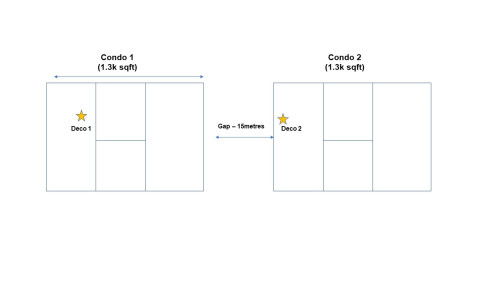
Hi guys, wanted to get some opinion. I stay in a condo unit and am currently sharing the internet with my friend who is staying next door (but we have a small gap in between). The condo unit is about 1.3ksqft

The internet source is coming from his living room and we are currently connecting via 2 deco M9plus. I still can get about 25-30mpbs on average on a 100mbps subscription.

We are looking to increase to 300mbps and I was wondering if I add on 2 deco x90 + 2 M9plus (existing), would i be able to get a higher speed? Or should I just get and additional 2 M9plus to make it 4 M9 plus?

Simple illustration as below:

user posted image


Change to:
| Lo-Fi Version
0.1149sec    0.55    7 queries    GZIP Disabled
Time is now: 16th December 2025 - 01:19 PM