Welcome Guest ( Log In | Register )

Outline · [ Standard ] · Linear+

 TP-LINK Malaysia Official Thread, Technical Enquiries and Support

views
     
sHawTY
post Dec 14 2018, 03:17 PM

Frequent Reporter
********
All Stars
14,909 posts

Joined: Jul 2005

QUOTE(FusionXY @ Dec 14 2018, 03:00 PM)
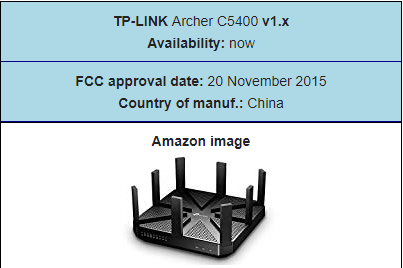
this C5400 is very old and no more firmware updates.
3 years old already considered "very old"? laugh.gif Typical TP-Link with their style of business "sell & abandon"
user posted image

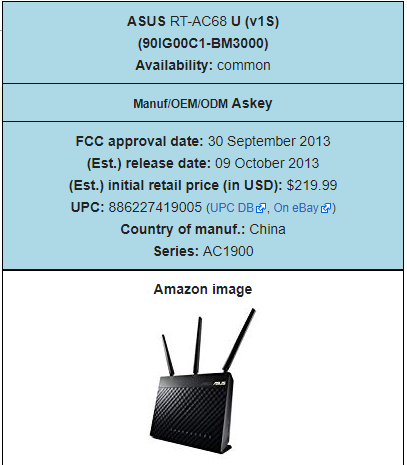
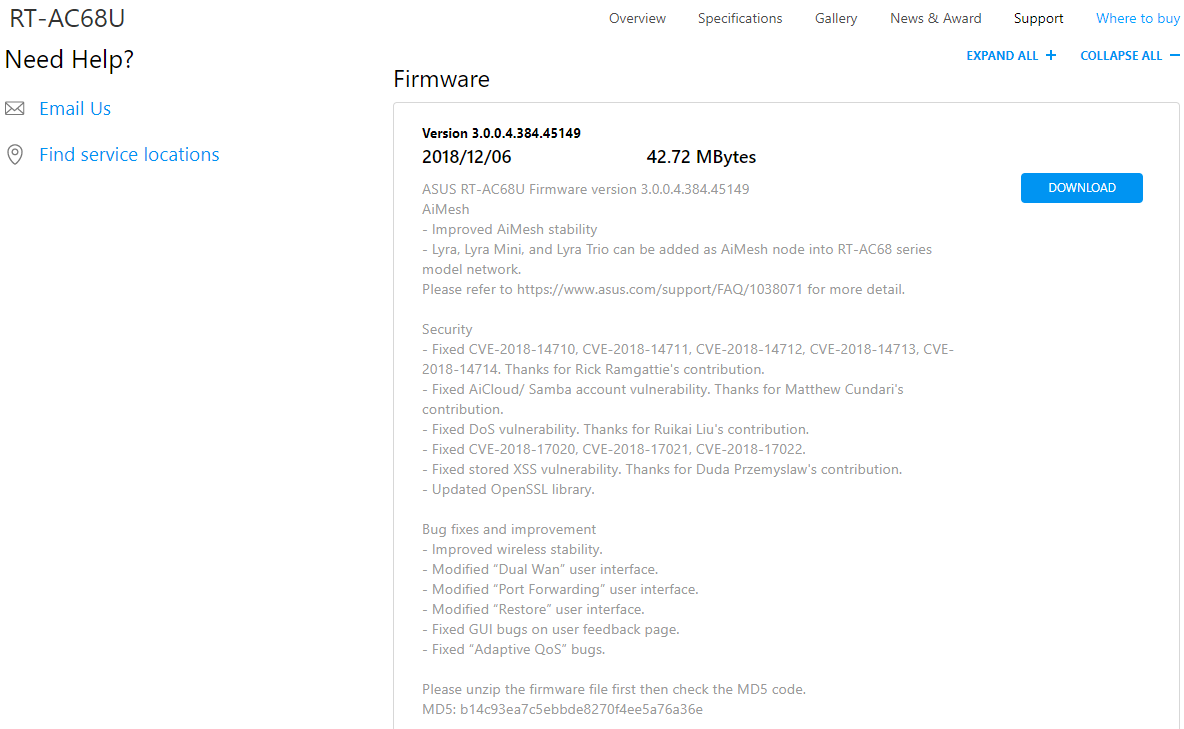
ASUS RT-AC68U is 5 years old and still get firmware updates until now
user posted image
user posted image

This post has been edited by sHawTY: Dec 14 2018, 03:18 PM
sHawTY
post Dec 14 2018, 03:24 PM

Frequent Reporter
********
All Stars
14,909 posts

Joined: Jul 2005

QUOTE(calvin_gsc @ Dec 14 2018, 03:19 PM)
Until now very heavy hearted to try high end asus because of the pricing.  cry.gif
You get what you pay for bro. 3 years warranty and lifetime technical support
My 9 years old RT-N16 still get firmware updates by ASUS whenever I report bugs to their technical support team

TP-Link you buy today, next month you'll be forgotten ady laugh.gif

This post has been edited by sHawTY: Dec 14 2018, 03:29 PM
sHawTY
post Dec 14 2018, 07:55 PM

Frequent Reporter
********
All Stars
14,909 posts

Joined: Jul 2005

QUOTE(FusionXY @ Dec 14 2018, 03:49 PM)
Hi, depends on which brand. ASUS have firmware updates on old models as they are consider as high end routers.
Like TP-Link old Version as V1 don't get any updates.
What I mentioned old is that when don't have firmware updates until now.
I would rather pay more for a brand that provides excellent technical support and frequent firmware updates fixing bugs and closing security hole rather than paying less to a manufacturer that practices "Sell & Abandon" business strategy that leaves their customers using routers that has tons of bugs & living in fear because of security holes that is never patched
sHawTY
post Dec 16 2018, 03:34 PM

Frequent Reporter
********
All Stars
14,909 posts

Joined: Jul 2005

QUOTE(TP-LINK MY @ Dec 15 2018, 12:35 PM)
We will provide firmware updates when there is an issue discovered with the firmware or when we are adding new features to the router.
Really? Show me the latest firmware update for the TP-Link Archer C5400 v1 for Malaysia

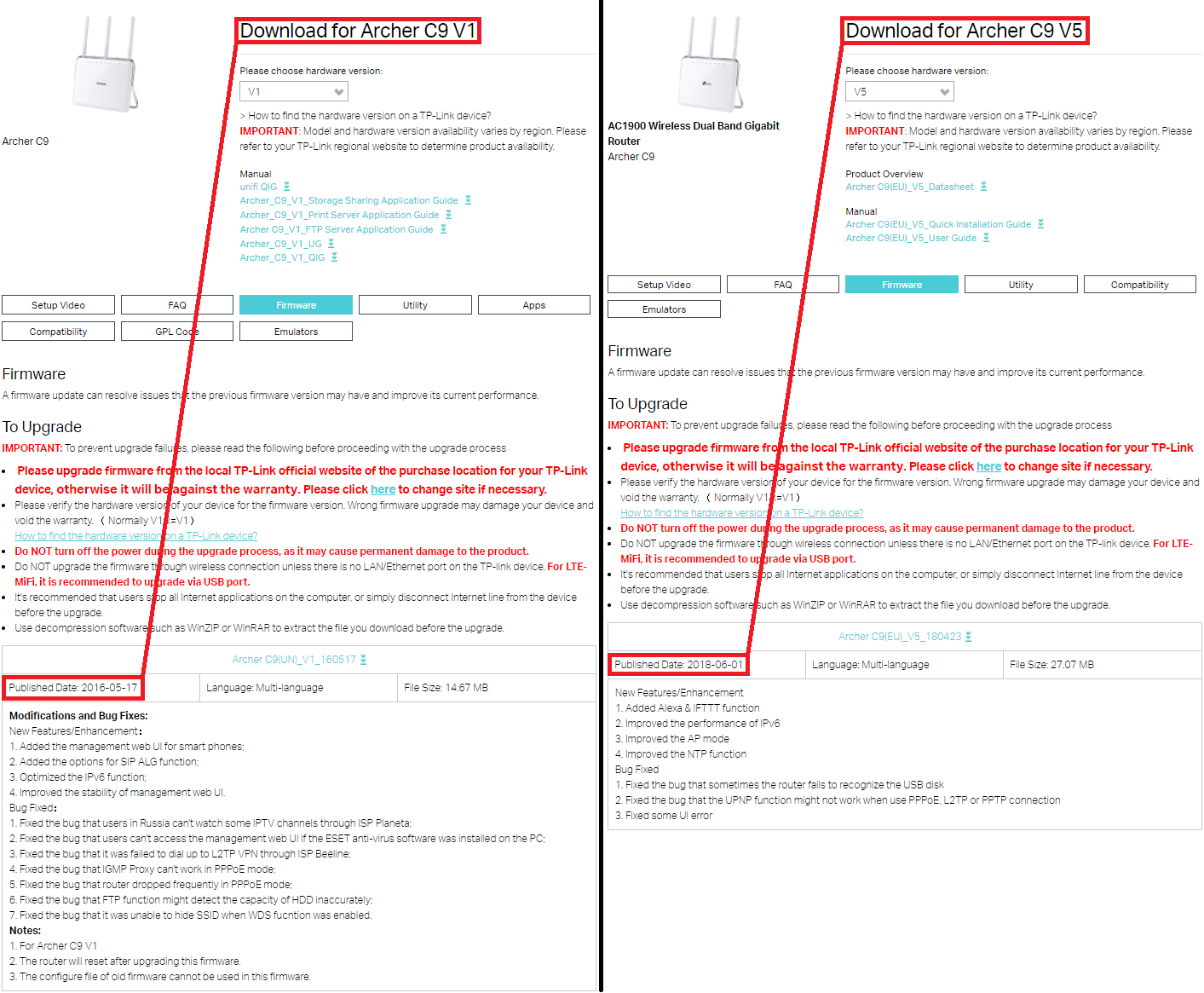
enduser you're too easy to convince. Just compare the firmware updates of RT-AC68U & Archer C9 V1 (for Malaysia)
With ASUS you don't have to worry about region based firmware & hardware revision based firmware whereas TP-Link will immediately stopped producing firmware updates for older revision
What will happen to the Archer C9 V1 Malaysia buyers then? Let them live with the bugs, errors & security hole? Heck, they don't even bother releasing a fix to the WPA2 Security (KRACKs) Vulnerability for Archer C9 V1 Malaysia users

Below is a the proof of what I said:

user posted image

This post has been edited by sHawTY: Dec 17 2018, 11:08 AM
sHawTY
post Dec 18 2018, 08:42 PM

Frequent Reporter
********
All Stars
14,909 posts

Joined: Jul 2005

QUOTE(weileong @ Dec 18 2018, 08:19 PM)
Fully agree with this, i hate when there is V1,2,3 hardware but no firmware to support for old v1 model...at the end , i switched all my KL,hometown routers to Asus..
That's why TP-LINK MY doesn't reply to my post, because they couldn't provide any hard proof that TP-Link doesn't do the "Sell & Abandon" business strategy laugh.gif

Everyone should pressure TP-Link Malaysia to provide better after sales support & stop using those hardware revisions & region based firmware
Just create a global firmware that's compatible with all countries & all hardware revisions

This post has been edited by sHawTY: Dec 27 2018, 03:07 PM
sHawTY
post Jul 2 2019, 03:13 PM

Frequent Reporter
********
All Stars
14,909 posts

Joined: Jul 2005

QUOTE(JuneResources @ Jul 2 2019, 11:58 AM)
It won't be cost around rm50 can buy router already.
However if really have, pm and offer me.. brows.gif
No router is good at RM50
Even RM200 won't get you anywhere
sHawTY
post Apr 27 2020, 08:28 PM

Frequent Reporter
********
All Stars
14,909 posts

Joined: Jul 2005

QUOTE(Gilthoniel @ Apr 27 2020, 07:48 PM)
I do know via Wifi, is quite impossible la... Will wait for the X60 to become more affordable first
Buying an AX router won't do you any good if your device only supports Wireless AC 2x2

There are 2 ways to get 800Mb/s these days, both of which are not widely available
1. On Wireless AC, both your router and device needs to support Wireless AC 80MHz 3x3 or 4x4
2. On Wireless AX, both your router and device needs to support Wireless AX 80MHz / 160MHz 2x2 or 3x3 or 4x4

Most devices available in the market nowadays even the highest end gaming laptop only supports Wireless AC 2x2
Only desktop PCI-e WiFi adapters supports 3x3 or 4x4

So even if you use a Wireless AX router but your device is only limited to AC 2x2, you will still get below 600Mb/s

This post has been edited by sHawTY: Apr 27 2020, 08:29 PM

sHawTY
post Aug 17 2020, 05:57 PM

Frequent Reporter
********
All Stars
14,909 posts

Joined: Jul 2005

QUOTE(zhihao4456 @ Aug 17 2020, 05:47 PM)
Which means inside of using 2 device now, I just 1 will do and will it work with UNIFI?
Why? Both the router and the VDSL modem doesn't consume a lot of currents anyway
sHawTY
post Aug 18 2020, 02:19 PM

Frequent Reporter
********
All Stars
14,909 posts

Joined: Jul 2005

QUOTE(zhihao4456 @ Aug 18 2020, 01:41 PM)
The DLINK router just died, that's why looking for a budget replacement and come across with this TPLINK Archer VR400 and was wondering if can replace both of it by just using this only. Seems budget and space saving also but not sure works with UNIFI or not.
Better not kacau the modem and just replace the router instead
sHawTY
post Oct 28 2021, 07:00 PM

Frequent Reporter
********
All Stars
14,909 posts

Joined: Jul 2005

QUOTE(+Mie1+ @ Oct 26 2021, 10:14 PM)
Has a new stable firmware been issued for Deco M4?
You're not gonna get one
That's TP-Link business strategy. Sell and forget. 1 year or 2 after the product is launched, they wouldn't bother releasing any firmware updates at all

They've been doing that since the beginning. You want firmware updates? Switch to ASUS whistling.gif
sHawTY
post Aug 11 2022, 11:54 AM

Frequent Reporter
********
All Stars
14,909 posts

Joined: Jul 2005

QUOTE(yujin86 @ Aug 11 2022, 11:04 AM)
How to change 5ghz to ax? Can’t find any options on the app.
You can't. The Deco will automatically send AX protocol to any AX devices
That's the limitation of TP-Link mesh system
sHawTY
post Jun 30 2023, 10:28 AM

Frequent Reporter
********
All Stars
14,909 posts

Joined: Jul 2005

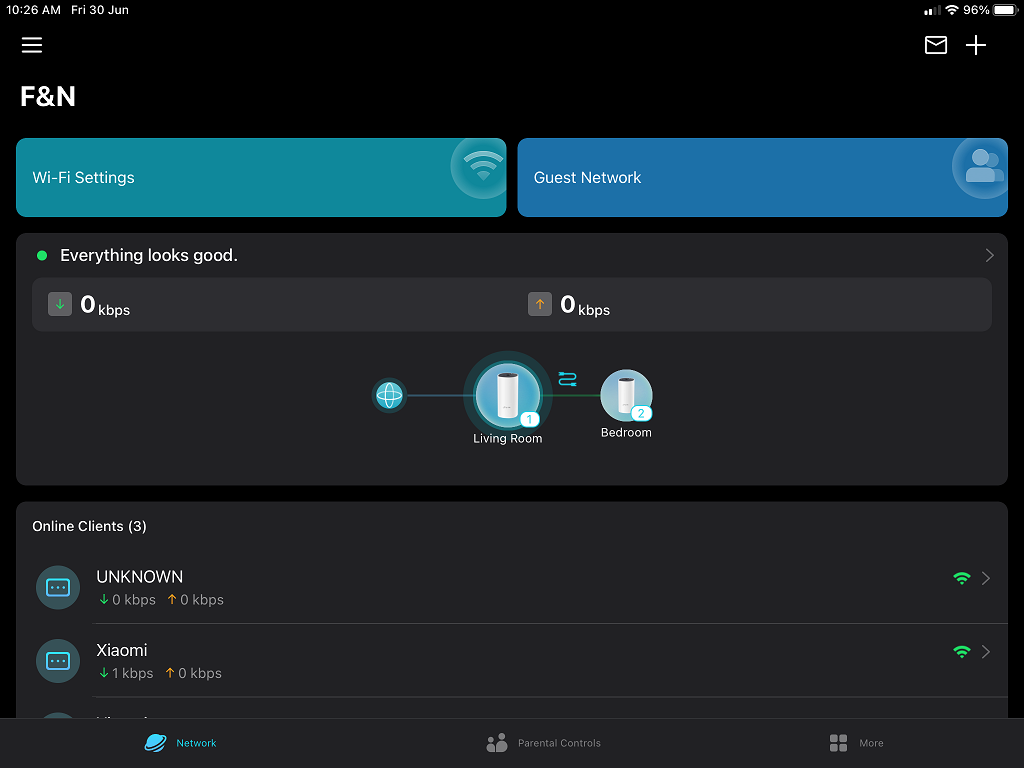
Deco app for iOS / iPadOS received dark mode with the latest update

user posted image


Change to:
| Lo-Fi Version
0.1488sec    0.46    7 queries    GZIP Disabled
Time is now: 20th December 2025 - 03:18 AM