Outline ·
[ Standard ] ·
Linear+
TP-LINK Malaysia Official Thread, Technical Enquiries and Support
|
chiucheng
|
 Jan 23 2018, 08:36 PM Jan 23 2018, 08:36 PM
|

|
hi, ive been facing wifi dropping and cant connect to wif (both 2.4g and 5g) on time broadband provided tp link ac1200 router... anyone face similar issue? time service centre told me its tplink's firmware issue...
need to restart multiple times a day oh gawd.
|
|
|
|
|
|
chiucheng
|
Jan 23 2018, 08:45 PM
|
|
|
QUOTE(Jjuggler @ Jan 23 2018, 08:39 PM) if you're not upgrade to the latest firmware version of c1200 by TIME, then you're lucky where you can actually upgrade to the beta version of the firmware. Give a try. no option for firmware upgrade in interface, does this mean TIME fucked me up? |
|
|
|
|
|
chiucheng
|
Jan 23 2018, 09:32 PM
|
|
|
QUOTE(Jjuggler @ Jan 23 2018, 09:24 PM) to simplify the task, simply go this link attached below. Special thanks to bro Johnlai. http://192.168.0.1/userRpm/firmwareUpgrade.htm
as u can see firmware upgrade really not in my menu lol |
|
|
|
|
|
chiucheng
|
Jan 23 2018, 09:56 PM
|
|
|
QUOTE(Jjuggler @ Jan 23 2018, 09:46 PM) Look in the box I highlighted below. Click on the browse button to upload the beta firmware from your download file, once upload the firmware, then click on the upgrade button. done. Wait for 5 to 6 minutes and do the setup manually. your settings will be erased when you upgrade the firmware. [attachmentid=9537867] The process is done, inserted new ssid and password, but now internet connection gone. Bloody orange light is back again This post has been edited by chiucheng: Jan 23 2018, 10:07 PM Attached thumbnail(s)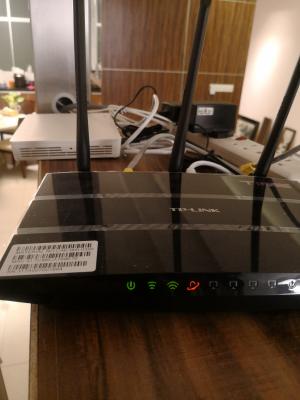
|
|
|
|
|
|
chiucheng
|
Jan 23 2018, 10:04 PM
|
|
|
QUOTE(JohnLai @ Jan 23 2018, 09:37 PM) As I can see, you really need to get your eyes checked.  What I mean is the firmware upgrade can't be found on the left side menu, without the link I can't access this page at all |
|
|
|
|
|
chiucheng
|
Jan 23 2018, 10:06 PM
|
|
|
QUOTE(JohnLai @ Jan 23 2018, 10:05 PM)  .....high definition MAC ID and SN indeed........ So, quick question, have you enter your TIME login and password correctly? Didn't noticed it prompted me to key in those... Only router password, ssid, password... Any way to check? 
What should I choose in this page? This post has been edited by chiucheng: Jan 23 2018, 10:09 PM |
|
|
|
|
|
chiucheng
|
Jan 23 2018, 10:13 PM
|
|
|
QUOTE(JohnLai @ Jan 23 2018, 10:09 PM) ...................-.- seriously? When Jjuggler wrote that upgrading firmware will reset everything, he/she means you must have all those info before upgrading...... You are telling us you don't have your TIME login details?  I have the info but don't know which section to put those info in. Anyhow I figured it out already. Pppoe , and ID password. Thanks for the help. This post has been edited by chiucheng: Jan 23 2018, 10:17 PM |
|
|
|
|
|
chiucheng
|
Jul 11 2023, 03:54 PM
|
|
|
Hi guys,
My house is a single floor condo of 2600 sqft, just changed from free huawei Mesh by Time broadband to a TP-link AX55 router in hopes for getting better speed at my room (far end of the condo).
Im able to get full speed 500 mbps while im in living room (where the router and ONT is located), but in my room i can only get around 15 to 30 mbps download with 1mbps upload.... I thought the stronger router like AX55 was able to reach my room but i guess im wrong...
A few option comes to mind:
1. buying a onemesh range extender, place it near room corridor (midway between my room and AX55 router)
2. moving the router to room corridor (have to connect an extra long lan cable, messy, as moving the ONT might not be viable)
Any input from experts here would be appreciated, thanks
|
|
|
|
|



 Quote
Quote

 0.1260sec
 0.38
0.38
 7 queries
 GZIP Disabled