Welcome Guest ( Log In | Register )

4 Pages  1 2 3 > » Bottom

Outline · [ Standard ] · Linear+

 TP-LINK Malaysia Official Thread, Technical Enquiries and Support

views
     
TSTP-LINK MY
post May 26 2017, 07:04 AM, updated 5y ago

Getting Started
**
Junior Member
78 posts

Joined: May 2017


TP-Link Malaysia Official Lowyat Forum Thread

Welcome to TP-Link Malaysia official thread on Lowyat.NET. Please feel free to discuss about TP-Link products.
Our staffs will be around to handle technical request and enquiries about our products!

user posted image
Unifi and HyppTV is now fully supported on our Deco M9 Plus, Deco M5 and Deco E4

user posted image

This post has been edited by TP-LINK MY: Mar 23 2020, 10:25 AM
TSTP-LINK MY
post May 26 2017, 07:04 AM

Getting Started
**
Junior Member
78 posts

Joined: May 2017


Guides and Articles for TP-Link products
TP-Link Unifi Setup Guide - By Blacktubi
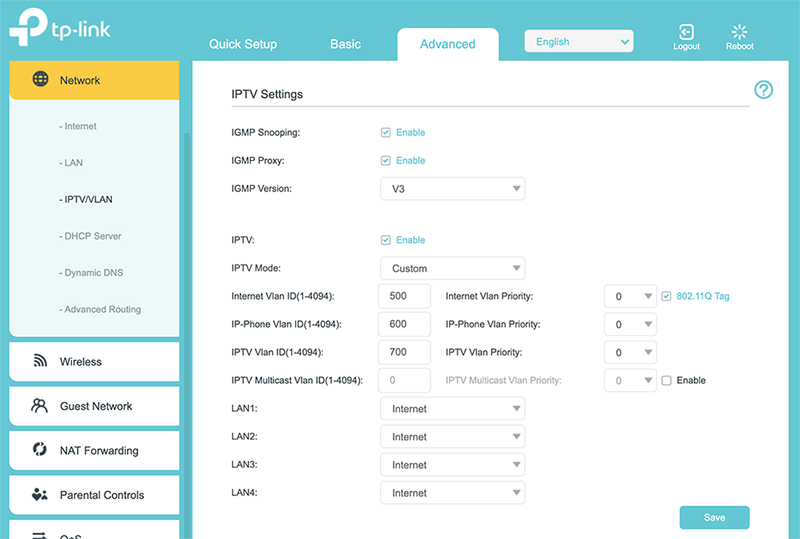
How to setup Unifi for TP-Link Deco Mesh Products

Setup Unifi without IPTV
» Click to show Spoiler - click again to hide... «
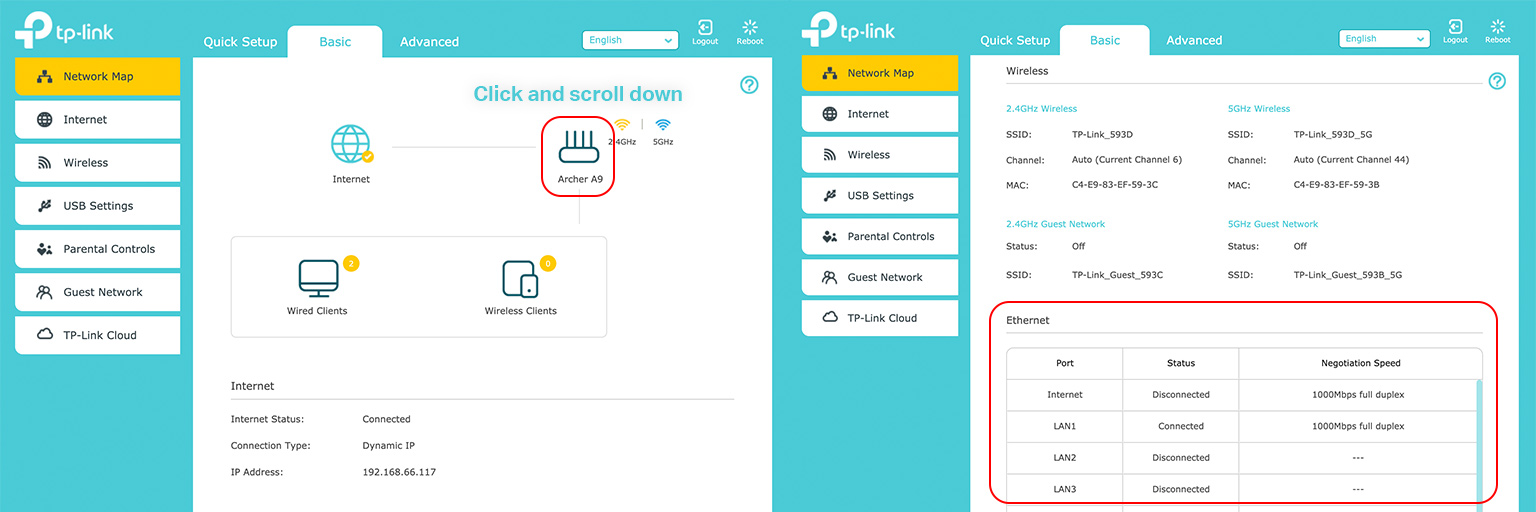
Check Ethernet port speed
» Click to show Spoiler - click again to hide... «

Technical Support Hotline
For immediate response and urgent request, please call us.
Toll Free: 1800 2288 87 (10AM-7PM)
Warranty & Technical support: +603 2141 4358 (10AM-7PM)

TP-Link Service Center
All networking products come with 3 years hardware warranty.
Replacement device will be provided on the spot if stock is available.
Courier RMA is also available on special request. Please contact our customer service.

Lot 3.01 - Lot 3.02, 3rd Floor, Podium Block, Plaza Berjaya, 12, Jalan Imbi, 55100, Kuala Lumpur
Operation Hours: Monday - Sunday 10AM- 7PM
Contact: +603 2141 4358

This post has been edited by TP-LINK MY: Oct 14 2019, 11:59 AM

TSTP-LINK MY
post May 26 2017, 07:04 AM

Getting Started
**
Junior Member
78 posts

Joined: May 2017


user posted image

user posted image

Join Omada Community

Like our Facebook Page

This post has been edited by TP-LINK MY: Apr 17 2019, 02:29 PM
TSTP-LINK MY
post May 26 2017, 11:21 AM

Getting Started
**
Junior Member
78 posts

Joined: May 2017


QUOTE(Xefron @ May 26 2017, 09:54 AM)
When is the Deco M5 going to arrive in Malaysia ?
*
Coming soon! wink.gif
TSTP-LINK MY
post May 29 2017, 08:16 AM

Getting Started
**
Junior Member
78 posts

Joined: May 2017


QUOTE(cucubud @ May 26 2017, 08:41 AM)
This is great. Good of TP-Link to have a dedicate thread for their products.
*
Thanks for the support! wink.gif
TSTP-LINK MY
post May 29 2017, 08:18 AM

Getting Started
**
Junior Member
78 posts

Joined: May 2017


QUOTE(chengsiong @ May 26 2017, 01:10 PM)
Dear TP Link,

Why is Archer C2600 reahes EOL stage just after 1 year? While there is still bugs here and there, especially IPv6 on custom dns setting.
*
Dear Cheng Siong, would you mind to provide us your personal contact by Personal Message, we will assign technical support for case follow up. Apologies for the inconvenience caused. thank you.
TSTP-LINK MY
post May 29 2017, 08:18 AM

Getting Started
**
Junior Member
78 posts

Joined: May 2017


QUOTE(hurricane21 @ May 27 2017, 09:50 PM)
Old school TP-Link TL-MR3020 & TL-MR3420 user here. wave.gif
*
Thank you for your kind support! Have a great day ahead! wink.gif
TSTP-LINK MY
post May 29 2017, 08:35 AM

Getting Started
**
Junior Member
78 posts

Joined: May 2017


QUOTE(raynman @ May 29 2017, 09:21 AM)
I thought it is the other way round, i.e., we should be thanking TP-Link Malaysia for their support.

Or is this not a support thread?

No mention of TP-Link Malaysia providing support to its customers here anywhere.
*
Dear Raynman, yes this is a product & support thread which you can drop us a comment for further help out. We will try our best to solve your issue. wink.gif
TSTP-LINK MY
post May 29 2017, 08:41 AM

Getting Started
**
Junior Member
78 posts

Joined: May 2017


QUOTE(FusionXY @ May 26 2017, 07:06 PM)
Parking.

Congratulations on your new thread.
Now we have support for TP-Link here.

TP-Link Archer C9 user here.

Is TP-Link T2U is capable of supporting up to 100Mbps via 5GHz?

Thanks
*
Dear FusionXY, thank you for your kind support! Yes, Archer T2U provides 433Mbps high speeds WiFi over the 5GHz band. However, the outcomes are subject to changes. wink.gif You may visit our website for info: http://www.tp-link.com.my/products/details...Archer-T2U.html
Have a good day!
TSTP-LINK MY
post May 31 2017, 04:46 PM

Getting Started
**
Junior Member
78 posts

Joined: May 2017


QUOTE(Andrew_Johnny @ May 31 2017, 10:28 AM)
oh real... that is awesome.
currently im using TP Link router and the result of speedtest shocked me.
it is getting a reliable signal and really good performance.
even do pinging only takes me around 7ms to get it.  drool.gif

rclxms.gif  rclxms.gif
always TP Link!!  thumbup.gif
* can see my speedtest result frm the attached screenshot.
*
Hi Andrew_Johnny, thank you for your support as always! biggrin.gif biggrin.gif
TSTP-LINK MY
post Jun 8 2017, 09:28 PM

Getting Started
**
Junior Member
78 posts

Joined: May 2017


QUOTE(rhytion @ May 29 2017, 10:55 AM)
TP-W8970 V3 user reporting in.
*
Hi there, thanks for the support! smile.gif
TSTP-LINK MY
post Jul 10 2017, 08:50 AM

Getting Started
**
Junior Member
78 posts

Joined: May 2017


QUOTE(blacktubi @ Jun 29 2017, 01:50 PM)
user posted image

Got a chance to try TP-Link NC450 wireless network camera recently.

It was great. I never expect the firmware and features to be so good. The image quality is great as well.

Read my review of the camera here.
*
Greet Job! thumbup.gif
TSTP-LINK MY
post Jul 10 2017, 08:57 AM

Getting Started
**
Junior Member
78 posts

Joined: May 2017


QUOTE(kakarocht @ Jun 30 2017, 05:29 PM)
get any access point/extender will do. but depends on your modem location (house/room).
*
Thanks for the reply buddy! thumbup.gif

Hi, either you can go for Powerline http://www.tp-link.com.my/products/list-18.html
Reference: http://www.blacktubi.com/review/tp-link-tl...30kit-reviewed/

This post has been edited by TP-LINK MY: Jul 10 2017, 08:58 AM
TSTP-LINK MY
post Jul 10 2017, 08:59 AM

Getting Started
**
Junior Member
78 posts

Joined: May 2017


QUOTE(blacktubi @ Jul 3 2017, 01:02 PM)
Download the tpPLC app. It is able to show a lot of things including link speed.
*
Thanks for the reply Black Tubi, that is the correct answer! thumbup.gif

This post has been edited by TP-LINK MY: Jul 10 2017, 09:00 AM
TSTP-LINK MY
post Jul 10 2017, 09:07 AM

Getting Started
**
Junior Member
78 posts

Joined: May 2017


QUOTE(theROCKeteer @ Jul 3 2017, 12:52 PM)
I need suggestion here. I used tplink archer c7 as wifi router and tplink wifi extender (WA850RE). My problem is my smart tv got intermittent connection due to low signal. My router is located far from the tv. my wifi extender only using 2.4Ghz and regularly disconnect. Do i need to buy powerline adapters, or any better solution for this?
*
Hi theROCKeteer, to pertaining your question. May i know how is the signal (bar) that you can receive at your Smart TV location? if that is 3 bar and above try to connect your Smart TV with WA850RE and see if the internet connection is improve or not. Let us know! wink.gif
However, with using of powerline adapter with Smart TV (Lan Connection) will give you excellent internet connection.

thank you.
TSTP-LINK MY
post Jul 10 2017, 09:09 AM

Getting Started
**
Junior Member
78 posts

Joined: May 2017


QUOTE(SilentVampire @ Jul 3 2017, 01:47 PM)
I suggest you try using powerline adapters if possible, rather than the wifi extender. Connect the one of the powerline adapter directly to your router, and the other adapter to a power plug near the tv, and connect the tv to the adapter directly, via an Ethernet cable. Just be sure that your house does not have separate or three phase wiring, otherwise the powerline adapter won't work.
*
Thanks for the advice! thumbup.gif
TSTP-LINK MY
post Nov 7 2017, 01:12 PM

Getting Started
**
Junior Member
78 posts

Joined: May 2017


QUOTE(JayChouYEE @ Nov 7 2017, 02:21 AM)
are you find the way to setup the deco m5 to the unifi? bangwall.gif
*
Hi,

You will have to retain your existing router in addition to the Deco system.

Thanks
TSTP-LINK MY
post Nov 7 2017, 01:13 PM

Getting Started
**
Junior Member
78 posts

Joined: May 2017


QUOTE(dkoh703 @ Nov 7 2017, 12:54 PM)
How soon is soon? Any tentative date?
*
Hi!

It is already available in Malaysia now.
TSTP-LINK MY
post Nov 13 2017, 11:48 AM

Getting Started
**
Junior Member
78 posts

Joined: May 2017


QUOTE(nill @ Nov 12 2017, 12:08 AM)
TP-LINK MY, how to setup printer server if want to print using Android device or Ubuntu PC?
HP got provide plugin to detect printer but it cannot detect the printer server.
https://support.hp.com/gb-en/document/c04024231

Device is Archer c9 v1.
Printer is LaserJet M1132 MFP.

Does the Archer c9 printer server have it's own web interface?
If yes, what's the IP? i already change the router's LAN router range from 192.168.x.x to 231.27.x.x What's the printer server IP for my config?
*
Archer C9 print server function currently just support Window and Mac, you can check the compatible list at below link.

http://static.tp-link.com/resources/compat...List_160804.pdf

For the Archer C9 print server, there is no own web interface.


TSTP-LINK MY
post Nov 15 2017, 11:40 AM

Getting Started
**
Junior Member
78 posts

Joined: May 2017


QUOTE(nill @ Nov 14 2017, 08:07 AM)
Thanks for the reply.
Will we get updates for wpa2 encryption?https://www.google.com/amp/s/www.lowyat.net/2017/144873/wi-fi-wpa2-encryption-possibly-cracked/amp/

I will be switching firmware if software support has ended.
*
Archer C9 is not in the Krackwifi affected list. no worry =)

you can check the updates here
http://www.tp-link.com.my/faq-1970.html


4 Pages  1 2 3 > » Top
 

Change to:
| Lo-Fi Version
0.0221sec    0.50    7 queries    GZIP Disabled
Time is now: 4th December 2025 - 04:30 AM