

Anyone with archer C1200 and archer AX10 cannot change dns? If i change both ipv4 and ipv6 dns to cloudflare 1.1.1.1 doesn't take effect, keep using TM Net dns. Why?
TP-LINK Malaysia Official Thread, Technical Enquiries and Support
TP-LINK Malaysia Official Thread, Technical Enquiries and Support
|
|
 May 7 2021, 12:17 AM May 7 2021, 12:17 AM
Return to original view | IPv6 | Post
#1
|
 
Newbie
21 posts Joined: Sep 2017  
|
Anyone with archer C1200 and archer AX10 cannot change dns? If i change both ipv4 and ipv6 dns to cloudflare 1.1.1.1 doesn't take effect, keep using TM Net dns. Why?
|
|
|
|
|
|
May 7 2021, 10:48 AM
Return to original view | IPv6 | Post
#2
|
|
Newbie
21 posts Joined: Sep 2017
|
QUOTE(aniq8676 @ May 7 2021, 12:27 AM) are you sure you put the correct DNS number Yea both are correct and I've restarted many times already and no change. Previously with streamyx can change no issue also.For IPv4: 1.1.1.1 1.0.0.1 For IPv6: 2606:4700:4700::1111 2606:4700:4700::1001 After entering the correct DNS number, make sure you restart your router.  |
|
|
May 7 2021, 12:14 PM
Return to original view | IPv6 | Post
#3
|
|
Newbie
21 posts Joined: Sep 2017
|
QUOTE(aniq8676 @ May 7 2021, 11:19 AM) I have used Archer C1200 from Unifi and have never had problems using third party DNS I just discovered something, with the Archer AX10 I changed DNS to OpenDNS for testing from my phone over wifi, and on my few phones it still shows it's using TM Net DNS. But for some reason on my PC over LAN connection it show it's using OpenDNS, wtf? it only apply to LAN devices and not wifi devices?? |
|
|
May 7 2021, 12:51 PM
Return to original view | IPv6 | Post
#4
|
|
Newbie
21 posts Joined: Sep 2017
|
QUOTE(aniq8676 @ May 7 2021, 12:44 PM) DNS settings for Archer C1200 (Unifi) all looks similar to my current settings, is there some kind of other issue causing this?IPV4 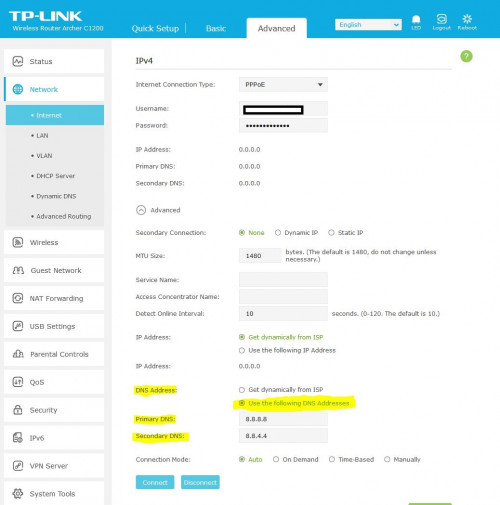 IPV6 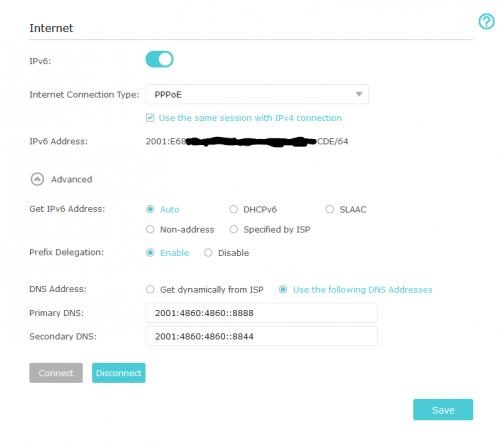 |
|
|
May 7 2021, 01:46 PM
Return to original view | IPv6 | Post
#5
|
|
Newbie
21 posts Joined: Sep 2017
|
QUOTE(aniq8676 @ May 7 2021, 12:57 PM) There may be an issue with the Cloudflare DNS. Since both routers failed to use that DNS With Google DNS, same thing happen, LAN ok but wifi still use TM Net DNS.You can try using Google DNS. |
|
|
May 7 2021, 06:07 PM
Return to original view | IPv6 | Post
#6
|
|
Newbie
21 posts Joined: Sep 2017
|
QUOTE(aniq8676 @ May 7 2021, 04:43 PM) it seems that there may be an mistake in the setting. Could you list the settings that could influence DNS server settings? For now I have found a workaround, set ipv4 and ipv6 to cloudflare 1.1.1.1 and go into DHCP server settings and put 1.1.1.1 in there, although I feel like this added some latency. |
|
|
May 7 2021, 08:44 PM
Return to original view | IPv6 | Post
#7
|
|
Newbie
21 posts Joined: Sep 2017
|
QUOTE(aniq8676 @ May 7 2021, 06:58 PM) I'm not sure what's wrong, can you SS your router settings. Here are the ss for ipv4,6 and vlan if needed.especially on the IPV4 and IPV6 section Attached thumbnail(s) 


|
| Change to: |  0.1110sec 0.1110sec
 0.79 0.79
 7 queries 7 queries
 GZIP Disabled GZIP Disabled
Time is now: 17th December 2025 - 02:14 AM |
 Quote
Quote