

We wish to announce our upcoming 7.7 one day promotion for our Wi-Fi 6 series. Limited units only!
Shop Now: https://bit.ly/3f2niAN
Archer AX10 ➡️ RM259
Archer AX20 ➡️ RM279
Archer AX50 ➡️ RM299

TP-LINK Malaysia Official Thread, Technical Enquiries and Support
 |
 Jul 6 2020, 03:45 PM Jul 6 2020, 03:45 PM
Return to original view | Post
#61
|
 
Junior Member
78 posts Joined: May 2017  
|
Hello Dear TP-Link Fans, We wish to announce our upcoming 7.7 one day promotion for our Wi-Fi 6 series. Limited units only! Shop Now: https://bit.ly/3f2niAN Archer AX10 ➡️ RM259 Archer AX20 ➡️ RM279 Archer AX50 ➡️ RM299 FusionXY liked this post
|
|
|
|
|
|
Aug 17 2020, 03:32 PM
Return to original view | Post
#62
|
|
Junior Member
78 posts Joined: May 2017
|
QUOTE(TongCN @ Aug 17 2020, 09:54 AM) Hmm I'm using Deco X20 right now and every devices working good with it which can connect their best connection which is 5ghz and 2.4ghz for those smart accessories. Dear Customer, please download the latest driver from our official website.However, my desktop which using TP-Link Archer T9UH can only connect to the Deco using 2.4ghz. No matter how near i place it beside the Deco. Under the device properties, i cannot force change it to use the 5ghz band also, that option totally gone under "advanced tab". Note: I havent tried the 2.4ghz disable in deco method though which will be my last resort.  https://www.tp-link.com/my/support/download...er-t9uh/#Driver QUOTE(MeToo @ Aug 17 2020, 03:58 PM) Last weekend got the Deco X20 to get my daughter faster speed for her netflix... Dear customer, if you are using Unifi. Please replicate the VLAN settings on the image below to enable second LAN port for non HyppTV traffic.Current setup Modem ---cable--> Deco X20 (main) ---cable---> my PC ....................................| ....................................| ..................................wifi ....................................| .....................................------> Deco X20 (slave) ----cable---> TV Main Deco unit acting as my Router as well, every working fine. TV connected to the downstairs deco unit (via cable) getting very good speed. Only problem is my PC, it get "unidentified network", AUto DHCP or manual configuration also doesnt work. LAN cable pulsing orange. I tried cabling it to a laptop also same issue "Unidentified network"... Anyone came across similar problem with Deco X20? 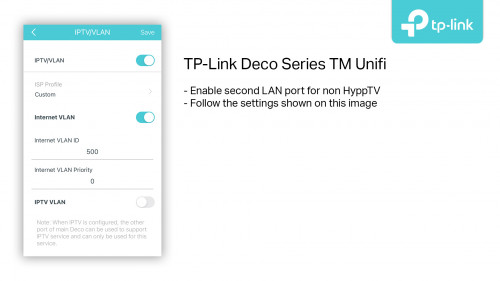 |
|
|
Aug 17 2020, 03:35 PM
Return to original view | Post
#63
|
|
Junior Member
78 posts Joined: May 2017
|
QUOTE(dawnreaver @ Aug 17 2020, 04:03 PM) So I got myself an AX20 during the 7/7 Sales and finally got around to installing it last weekend to replace my C1200 (from TM). Everything works great except the HyppTV box will refuse to connect after coming out of standby and the only way to resolve it is to reboot the router. This didn't occur when I was using the C1200. The TV box is connected via powerline ethernet to LAN1 of the AX20. Any ideas? Dear customer, please change the IGMP version to V3 on the IPTV/VLAN settings page and try again. You may try to reset the powerline adapter as well. |
|
|
Aug 26 2020, 01:20 PM
Return to original view | Post
#64
|
|
Junior Member
78 posts Joined: May 2017
|
QUOTE(Boy96 @ Aug 26 2020, 02:10 PM) I just dig up my old archer c25. Did a hard reset and wanted to key in my unifi details however I dont see the option to choose unifi under advance options after choosing PPPoE.. any ideas? Please follow the image below. The VLAN profile can be selected in the Advanced page.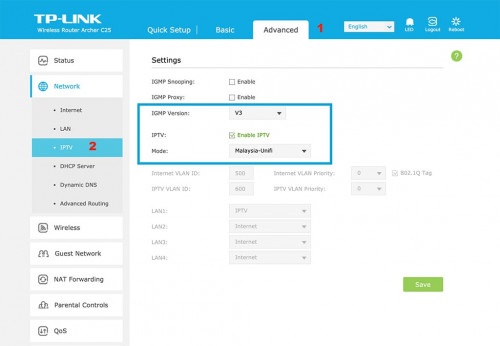 |
|
|
Sep 18 2020, 04:13 PM
Return to original view | Post
#65
|
|
Junior Member
78 posts Joined: May 2017
|
Weak Wi-Fi security warning? For those upgraded to iOS 14 recently, you may notice that it says your network is using weak network security on our Deco mesh Wi-Fi.
Starting from iOS14, Apple will show a warning for Wi-Fi network that still allow WPA2-TKIP encryption method. This is happening as our default Wi-Fi encryption for Deco series is WPA2-PSK (AES+TKIP) to improve compatibility with some older devices. We are aware that some old legacy devices or certain smart home IoT devices cannot support WPA2-PSK (AES). Do not be worried, your Deco mesh network is still secure as we have other measures to enhance the security of the Wi-Fi network. Our RnD team work really hard to address this and we recently released a beta firmware that let users to choose WPA2-PSK only for enhanced security. More info can be found on our TP-Link community. https://community.tp-link.com/en/home/forum/topic/227662 Note: There are some risks involved when performing a manual firmware update. We recommend normal users to wait until our official firmware is released on normal channel. -Christine |
|
|
Oct 1 2020, 04:25 PM
Return to original view | Post
#66
|
|
Junior Member
78 posts Joined: May 2017
|
Hello everyone,
We are having a 8% storewide voucher on our Lazada store today.  https://www.lazada.com.my/shop/tp-link-malaysia This post has been edited by TP-LINK MY: Oct 1 2020, 04:26 PM |
|
|
|
|
|
Oct 3 2020, 01:02 PM
Return to original view | Post
#67
|
|
Junior Member
78 posts Joined: May 2017
|
QUOTE(Kuddo Sachi @ Oct 3 2020, 01:59 PM) Hi, im already install beta firmware on my Deco M4 which is i used as AP. Unfortunately, speed drop on my internet speed still happen. It drop almost half of my speed internet. Only after reboot the Deco my speed back to normal. What of bad experience i have for my first tp link product. Im using Cat 6 cable and speed test on my router i still get my full speed. Such a bad review for me toward TP Link. Dear Customer,Please change your Deco M4 to router mode or replace your current router with Deco M4. On AP mode, the speed is not controlled by our Deco M4 as all network related routing is handled by the router. Thank you. |
|
|
Oct 3 2020, 02:27 PM
Return to original view | Post
#68
|
|
Junior Member
78 posts Joined: May 2017
|
QUOTE(Kuddo Sachi @ Oct 3 2020, 03:09 PM) Is it any effect if i change to router mode? I dont think i should replace my router since it still new one. Dear Kuddo Sachi,Good to hear back from you. We suggest to use our Deco mesh WiFi system as the main router whenever possible. By doing this, our Deco mesh WiFi will have full control over the entire performance of the network. When another router is used, there may be performance impact resulted by QoS profile or performance throttling from the fronthaul router. We cannot guarantee the performance when another fronthaul router is used as the network routing is entirely handled by the fronthaul router. |
|
|
Mar 17 2021, 03:34 PM
Return to original view | Post
#69
|
|
Junior Member
78 posts Joined: May 2017
|
QUOTE(Jase @ Mar 17 2021, 11:38 AM) Hi all, Hi Jase,I just setup a new AX73 using Malaysia-Unifi profile. I just realised somehow HyppTV is on LAN1 instead of the usual LAN4. However, another odd thing is, LAN4 became VoIP????? I connected my laptop directly to LAN4 and could not get any connectivity - does this mean my AX73 is now effectively a 2 port router (minus IPTV)? Anyone else having the same situation? I did check for firmware updates, it stated firmware is the latest. Another funny thing possibly not related to AX73 - happen after switching to the new AX73, my HyppTV can watch VOD but the normal channels somehow only showing blank screen - nothing streaming but the time and progress bar all there just no show. Tried almost all channels the same thing. I am missing something here? Its the very old big grey box. Thanks. Thank you for choosing TP-Link. Kindly replicate your VLAN settings as per screenshot below in order to enable LAN4 for normal connection and improve the compatibility for certain model of HyppTV channels. Best, TP-LINK MY Team Attached thumbnail(s) 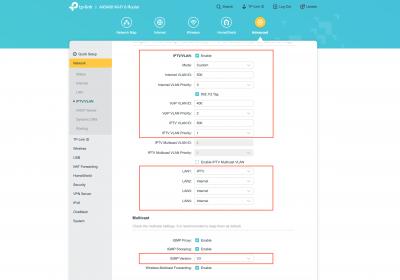
|
|
|
Mar 22 2021, 01:14 PM
Return to original view | Post
#70
|
|
Junior Member
78 posts Joined: May 2017
|
QUOTE(Nando's @ Mar 22 2021, 12:40 PM) Hi, does Deco M9 Plus support DDNS? Hi,Thank you for choosing TP-Link. Deco M9 Plus comes with free TP-Link DDNS. Please be informed your Deco must be used in router mode which is direct connection to modem for DDNS to be working properly. Your ISP will also need to provide you with a public IP. Best, TP-LINK MY Team |
|
|
Jun 11 2021, 10:41 AM
Return to original view | Post
#71
|
|
Junior Member
78 posts Joined: May 2017
|
QUOTE(Klemann C @ Jun 11 2021, 11:12 AM) Hi guys, Dear Klemann C,Can anyone enlighten me how can I solve the speed issue after i hookup AX20 router with RE605X WiFi extender range to utilise Mesh WiFi system? [attachmentid=10908138] Previously I was on Powerline setup very consistent good download speed and low latency. Also this setup very reliable but the downside I need to operate 2 different routers 1 upstairs and 1 downstairs. Thanks... Please change your Archer AX20 to the below settings on the 5Ghz network. 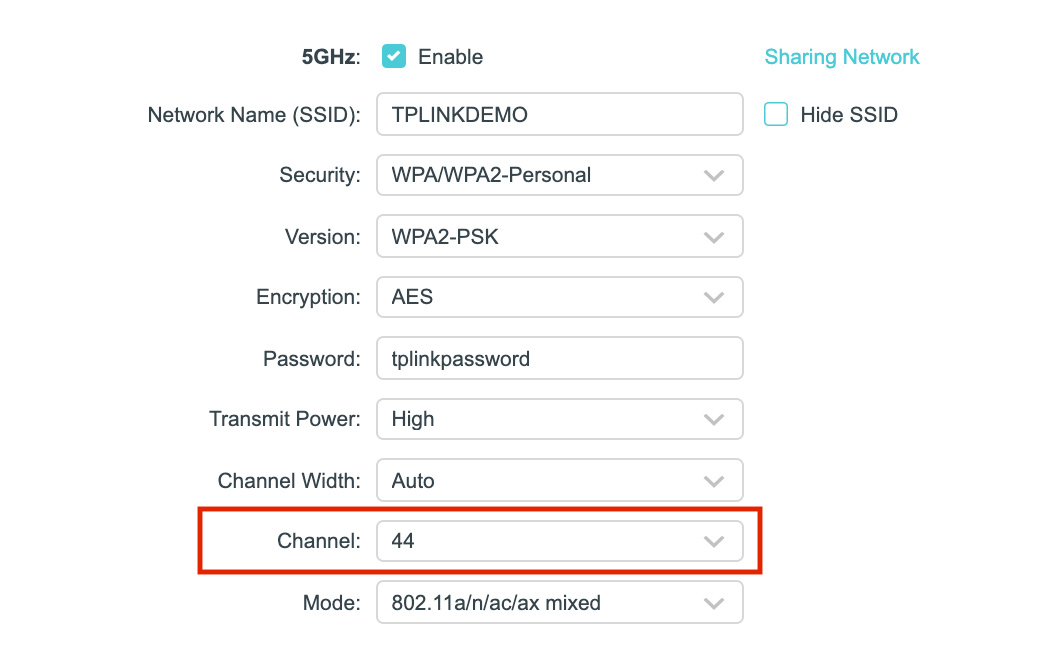 After this, please make sure the RE605X is linked to the 5Ghz network of your Archer AX20. QUOTE(MixBlood @ Jun 10 2021, 03:13 PM) I'm trying to set Parent Control in AC1200 Wireless Dual Band Gigabit VoIP Router, Model No: Archer C5v which was provided by Maxis but it's not working although I already enabled it and save some MACs. Does anyone know why? Dear MixBlood,Please be informed that the parental control feature in this model has been disabled by the service provider. This post has been edited by TP-LINK MY: Jun 11 2021, 10:42 AM |
|
|
Jun 28 2021, 01:47 PM
Return to original view | Post
#72
|
|
Junior Member
78 posts Joined: May 2017
|
+Mie1+ Thank you for sharing this issue with us. Please drop us an email at support.my@tp-link.com for further investigation. sadlyfalways We received an email from you regarding this issue. Be rest assured, our support team will work with you to investigate this issue. Seng89 We suggest leaving the 5Ghz channel and bandwidth in auto mode. Our router will make the best decision based on the signal condition. If you use OneMesh, please set it to channel 44. This post has been edited by TP-LINK MY: Jun 28 2021, 01:49 PM Seng89 liked this post
|
| Change to: |  0.0826sec 0.0826sec
 0.82 0.82
 7 queries 7 queries
 GZIP Disabled GZIP Disabled
Time is now: 4th December 2025 - 12:29 PM |
 Quote
Quote