Welcome Guest ( Log In | Register )

4 Pages < 1 2 3 4 >Bottom

Outline · [ Standard ] · Linear+

 TP-LINK Malaysia Official Thread, Technical Enquiries and Support

views
     
TSTP-LINK MY
post Jun 6 2019, 07:52 PM

Getting Started
**
Junior Member
78 posts

Joined: May 2017


QUOTE(opjust @ May 29 2019, 10:04 PM)
Hi guys - need help on setting up expressVPN on tp link c2300.. what is the easiest way to setup? I’m kinda confuse reading multiple guideline on net.

Once I have setup how easy if I wanted to switch to normal and change as and when required?

Updated : i follow this instruction to set up expressVPN on my router but not successful. I think we can only only one connection at a time, if I do manual l2tp connection my ppoe connection is terminated
https://www.expressvpn.com/support/vpn-setu...uter-with-l2tp/

Any advise?
*
Hi Sir,

Unfortunately, our routers do not support VPN client connection.

QUOTE(Skylinestar @ Jun 1 2019, 09:15 PM)
When will the Archer MR600 modem router reach here?

Anyone use the MR400 before? How's the cell signal quality?
*
Hi there,

The Archer MR600 LTE router is arriving in Q4 this year.

QUOTE(poringkien @ Jun 6 2019, 08:10 PM)
Hi, is Tplink Deco M4 still available?

I have a unifi 500mbps in 2 storey house.

Thinking a 3 pack will do? Economically.

And support HyppTv ?
*
Hi there,

The Deco M4 does not support HyppTV currently. Only Deco M5 and Deco M9 Plus support HyppTV.

The 3 pack is ideal for your property.

This post has been edited by TP-LINK MY: Jun 6 2019, 08:00 PM
TSTP-LINK MY
post Jun 18 2019, 11:29 AM

Getting Started
**
Junior Member
78 posts

Joined: May 2017


QUOTE(squall_12 @ Jun 18 2019, 08:52 AM)
hi guy,

i am thinking of replacement my default TM tplink ac1200 to have a better wifi coverage on my house and so which tplink wireless router is best used for my unifi 100mbp line?

Thanks
*
Hi Sir,

You can consider Archer A9 AC1900 which is on sale right now.

Thanks
TSTP-LINK MY
post Jun 21 2019, 01:48 PM

Getting Started
**
Junior Member
78 posts

Joined: May 2017


QUOTE(| e 3 h y 0 r | @ Jun 20 2019, 01:23 PM)
How to ensure my deco uses 5ghz? It can't be set right?
Does it mean my 5ghz is unstable, I'm standing just next to deco.
*
Hi there,

2.4Ghz signal travel further than 5Ghz.

It depends on the phone you use as some phones do not support 5Ghz Wireless AC.

The Deco system with band steering will steer your phone to use 5Ghz whenever possible.

TSTP-LINK MY
post Jun 21 2019, 04:36 PM

Getting Started
**
Junior Member
78 posts

Joined: May 2017


QUOTE(| e 3 h y 0 r | @ Jun 21 2019, 05:07 PM)
Still back to my question above
*
Please try it with another phone as older phone have slower WiFi capabilities.

Please try and place the second Deco nearer to the main Deco for better overall speed.
TSTP-LINK MY
post Jun 27 2019, 04:21 PM

Getting Started
**
Junior Member
78 posts

Joined: May 2017


QUOTE(takoWALIAO @ Jun 27 2019, 12:55 AM)
I try to find free 2.0 port and test first.

Btw, is there no such problem (or very small) from using pci adapter? I'm subscribed to 500Mbps plan on unifi (200-300 on wifi) since I didn't mention earlier.
*
Hi there,

PCIE WiFi card is more stable than USB WiFi card.

-Agnes

QUOTE(eddmecha @ Jun 27 2019, 04:12 PM)
anyone here familiar with EAP225 and OC200 Omada Cloud controller? I have purchased this product but I can't seems to get it work. I mean to link the AP to controller. Below is what I did.

1. setup the EAP 225 with static IP and DHCP disabled.
2.setup the OC200 but It cant detect any of the AP. ( the static Ip on AP is on a diff subnet as my network but the same with OC200).
3.Tried using the Omada app not working as well.

any expert with experience on this can guide me.

Thanks
*
Thank you for choosing Omada.

Please make sure your AP is running the latest firmware.

https://www.tp-link.com/en/omada_compatibility_list/

-Agnes

This post has been edited by TP-LINK MY: Jun 27 2019, 04:23 PM
TSTP-LINK MY
post Jun 28 2019, 03:01 PM

Getting Started
**
Junior Member
78 posts

Joined: May 2017


QUOTE(FishInTheOcean @ Jun 28 2019, 12:32 PM)
Hi All Sifus,

I have a question bugging me since i bought the AC1200 router. My laptops is connecting to the 5G and older tablet is connecting to the 2.4G Wifi network without any issue.

The concerns is on the newer mobile phones and TvBox which are connecting to 5G but keeps gets added automatically to the blocked users  bangwall.gif  bangwall.gif  (Think is due to DoS setting being turned on).

I've tried adding to the whitelist but is still being going back adding the devices into the blocked list.
Am i being hacked??  icon_question.gif Any advice? confused.gif
*
Please change the Password of your router administrator account.

May I know which model are you using?

-Agnes
TSTP-LINK MY
post Jul 1 2019, 12:41 PM

Getting Started
**
Junior Member
78 posts

Joined: May 2017


QUOTE(FishInTheOcean @ Jul 1 2019, 10:37 AM)
AC6. I have since day 1 changed the router admin password so i dont think that is an issue.
Let me know if you have any suggestion. Thanks!
*
Hi Sir,

This is not a TP-Link wireless router.

Please contact Tenda for this issue.
TSTP-LINK MY
post Jul 10 2019, 11:05 AM

Getting Started
**
Junior Member
78 posts

Joined: May 2017


QUOTE(FishInTheOcean @ Jul 4 2019, 06:25 PM)
Apologies, this is Archer A6.
Still having issue.
*
Hi Sir,

Please ensure your router is running the latest firmware and please use a secure admin password.

https://www.tp-link.com/my/support/download...er-a6/#Firmware

-Agnes

QUOTE(mamakap @ Jul 8 2019, 10:12 PM)
Hello, just want to find out if it possible to set TP-Link Archer A10 AC2600 without IPTV, purely for internet?
*
Hi Sir,

Please refer to the second post in this thread for the setting.

-Agnes

QUOTE(hafiziza @ Jul 9 2019, 02:36 PM)
When will the Archer AX11000 be available in Malaysia?
*
Hi Sir,

This model is coming soon to Malaysia.

-Agnes

This post has been edited by TP-LINK MY: Jul 10 2019, 11:07 AM
TSTP-LINK MY
post Aug 19 2019, 09:40 AM

Getting Started
**
Junior Member
78 posts

Joined: May 2017


QUOTE(wilson1989 @ Aug 19 2019, 01:40 AM)
TP-Link ARCHER MR600 new model, anyone tried this model?
*
Hi Sir,

Thank you for your Interest on this model. Please be informed that we have yet to launch this model in Malaysia.

Please stay tuned on our social media for future product announcements.

https://www.facebook.com/TPLINKMalaysia/

-Sandra
TSTP-LINK MY
post Aug 28 2019, 11:09 AM

Getting Started
**
Junior Member
78 posts

Joined: May 2017


QUOTE(eehs @ Aug 28 2019, 11:46 AM)
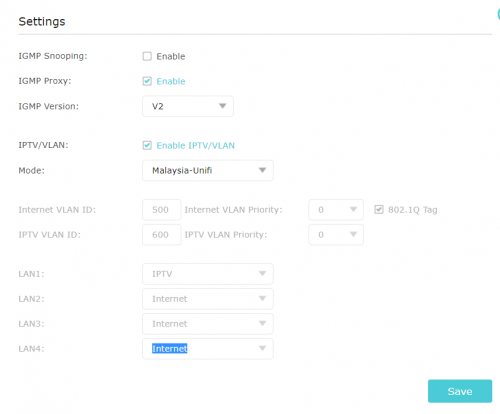
Hi guys, need help here. I have been using Archer A9 for 3 months and it's all the while ok whit hypptv connect to Lan 1.
Yesterday, out of sudden hypptv hang and showed error code 180005. Contacted UNIFI support and they asked me to reconect the HyppTv lan to Lan 4. And now the error message changed to 180001, still I am unable to access hypptv.
Checked my tplink router setting, IPTV is defaultet to Lan 1. Would it be possible to change the Lan 1 to Lan 4?

Thanks!

user posted image
*
Hi There,

Please reset your router and setup again.

The HyppTV port is always LAN 1 as indicated in the firmware.

Thanks.
TSTP-LINK MY
post Oct 1 2019, 02:06 PM

Getting Started
**
Junior Member
78 posts

Joined: May 2017


QUOTE(horray @ Oct 1 2019, 02:00 PM)
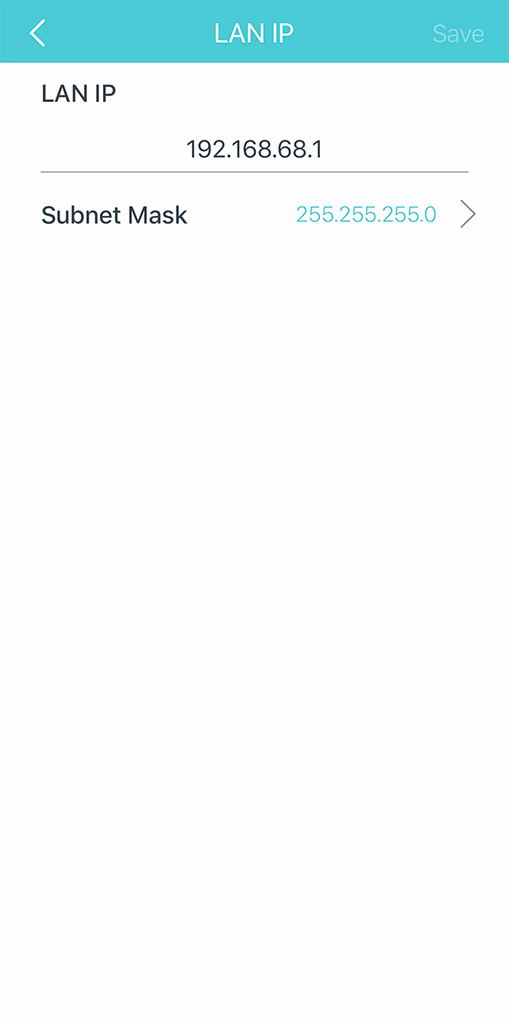
I am interested to purchase the TP-Link Deco M9 to replace my existing setup. I would like to know if user is allowed to change the IP range of the Deco M9? My current home network (wired) has devices like NAS which I would like to be able to access on WiFi through the Deco M9 and hence the Deco M9 IP range should be within my existing home network IP range.

I am not very well versed with networking but this is what I understand. I have tried Google WiFi before and could not access my NAS through WiFi because the Google WiFi IP range was fixed by Google and cannot be changed. Eventually, I had to ditch the whole setup.

Appreciate your advice. Thanks.  thumbup.gif
*
Hi Sir,

TP-Link Deco M9 Plus do come with support in access point mode where it will reuse your existing home router if that is your intended use case.

If you wish to use the Deco M9 Plus in router mode and replacing your existing router, we are glad to say that it also support manual LAN IP and DHCP reservation.

user posted image

-Janet
TSTP-LINK MY
post Oct 14 2019, 11:54 AM

Getting Started
**
Junior Member
78 posts

Joined: May 2017


QUOTE(horray @ Oct 7 2019, 04:18 PM)
For a double-storey house with a floor area of approx. 2,000 s.f., how many units should I get? I was thinking of 2 units (one per floor). Appreciate your guidance. Thanks.
*
Hi horray,

The beauty of the Deco mesh WiFi system is how seamless they work together with each other.

You can purchase the twin pack now and just acquire another single unit Deco M9 Plus if the need arise.

Best Regards,
Janet
TSTP-LINK MY
post Oct 17 2019, 10:13 AM

Getting Started
**
Junior Member
78 posts

Joined: May 2017


QUOTE(blstz @ Oct 16 2019, 11:20 AM)
Sent in my unit for warranty claim. Got back the same unit and service report stated "Reset and tested ok". I think was sent to Advancenet Kuching branch. But still facing same problem.  cry.gif

At wits end already. Any TPLink representative here can help?  sad.gif

At times thinking want to upgrade to Deco M9 also worry whether will face same issue.
*
Hi blstz,

We are sorry for the hiccup that you encounter with the Archer C2300 device. In the meantime, we wish to advice you to make sure your router is running the latest firmware version.

We also wish to know if Ethernet LAN is working when you are unable to authenticate to the WiFi network?

Please contact our service center in KL and we can arrange to have a RMA arranged for you via shipping.

Lot 3.01 - Lot 3.02, 3rd Floor, Podium Block, Plaza Berjaya, 12, Jalan Imbi, 55100, Kuala Lumpur
Operation Hours: Monday - Sunday 10AM- 7PM
Contact: +603 2141 4358

Regards,
Janet
TSTP-LINK MY
post Oct 17 2019, 09:25 PM

Getting Started
**
Junior Member
78 posts

Joined: May 2017


QUOTE(blstz @ Oct 17 2019, 11:23 AM)
Ok will contact your service center to arrange.

Clients connect through ethernet LAN also cannot get access to internet as they get assigned a random IP address thats outside of the usual DHCP pool. Also, all clients (Wifi and LAN) unable to access router's setup page.

Thanks
*
Hi blstz,

May I know if you have another wireless router to try in order to ensure that it is not caused by some devices exhausting the DHCP pool.

Regards,
Janet
TSTP-LINK MY
post Oct 18 2019, 12:34 PM

Getting Started
**
Junior Member
78 posts

Joined: May 2017


QUOTE(blstz @ Oct 18 2019, 08:24 AM)
no problem with TM stock C1200 router with the same amount of clients. quite sure not because of exhausting the DHCP pool.
*
Dear blstz,

Thank you for assisting to verify the issue.

In this case, please contact our KL service center to assist you in courier RMA.

Regards,
Janet

QUOTE(horray @ Oct 18 2019, 11:24 AM)
Just installed 2 x Deco M9 Plus in my home. I would like to ask if this device can set up for static routing? If so, where can I do this in the App? hmm.gif

Another question: Since the Deco M9 Plus has only 2 ethernet ports which I have used to connect one to the Unifi modem and the other to a switch, how do I then connect the Unifi TV since no dedicated ethernet port available on the Deco?  confused.gif
*
Dear horray

Our Deco product series do not support static routing currently.

Unfortunately, if you wish to use HyppTV, you will be left with no other LAN ports from the main Deco.

The LAN ports on the satellite Deco node will still function but their speed will be determined by the mesh wireless network speed.

Regards,
Janet
TSTP-LINK MY
post Nov 4 2019, 12:23 PM

Getting Started
**
Junior Member
78 posts

Joined: May 2017


QUOTE(horray @ Oct 29 2019, 12:10 PM)
After using the Deco 9 Plus for almost 2 weeks now, I noticed that the Unifi IP address changes every now and then which could mean that the connection to Unifi is reset by the router periodically. Does the Deco 9 Plus disconnect and reconnect to Unifi periodically? I do not get this situation when I used my previous Asus router. Please advise. FYI, the Deco is set up as a router.
*
Dear horray,

Thank you for selecting the Deco M9 Plus.

The Deco will not attempt to reset the Internet connection and we do not have any reports in regards of this.

Perhaps you can contact TM to verify if this is an issue at their end.

-Janet
TSTP-LINK MY
post Feb 13 2020, 09:59 AM

Getting Started
**
Junior Member
78 posts

Joined: May 2017


QUOTE(missysleepy @ Feb 12 2020, 09:47 AM)
Question about Unifi TPlink AC1200.
Im having a package by Unifi 100mb. The stock router do have Gigabit Lan support . When i did a status checked in network setting, the speed is at 100mb. If i change my network PC card to a gigabit, will the speed improvised to 1000 or it make not much of a difference.

Im in dilemma now whether i should change my network card . Tq.
*
Dear Customer,

Please try to check if the LAN cable is in good shape as degraded LAN cables are known to cause speed reduction.
TSTP-LINK MY
post Feb 27 2020, 04:11 PM

Getting Started
**
Junior Member
78 posts

Joined: May 2017


We wish to announce that our upcoming WiFi 6 routers will come with WPA3 support.
Note: This require your devices to be compatible with WPA3 as well.

More Info: https://www.tp-link.com/my/wpa3/compatibility/

- Deco X20
- Deco X60
- Archer AX10
- Archer AX50
- Archer AX6000
- Archer AX11000


Attached thumbnail(s)
Attached Image
TSTP-LINK MY
post Mar 23 2020, 10:24 AM

Getting Started
**
Junior Member
78 posts

Joined: May 2017


QUOTE(haturaya @ Mar 8 2020, 12:34 PM)
When?  hmm.gif

Price range?
*
QUOTE(D-Zire @ Feb 29 2020, 01:09 PM)
When are the new deco releasing in malaysian market?
*
Please stay tuned on our Facebook page for upcoming product announcement. brows.gif

https://www.facebook.com/TPLINKMalaysia/

QUOTE(daimGeno @ Mar 9 2020, 11:50 AM)
Hi,

Ive managed to setup AC1200 Deco but my Hypptv not working even after connecting it to the 2nd LAN Port of the main Deco.. kindly assist. Thx
*
Dear Customer, are you using the Deco M4 mesh WiFi system?

This post has been edited by TP-LINK MY: Mar 23 2020, 10:26 AM
TSTP-LINK MY
post May 4 2020, 09:39 AM

Getting Started
**
Junior Member
78 posts

Joined: May 2017


QUOTE(Mr.Docter @ May 4 2020, 02:24 AM)
Hi,

I just recently bought Deco M4. Works wonder but I think I'm needing extra one more Deco for my 3 storey on ground floor.

May I know where can I purchase a single unit only? Been trying to look but haven't found any.

Thanks.
*
Hello customer,

You can get the Deco M5 single pack instead. It can work with Deco M4.

https://www.lazada.com.my/products/tp-link-...s216769384.html

4 Pages < 1 2 3 4 >Top
 

Change to:
| Lo-Fi Version
0.1330sec    0.39    7 queries    GZIP Disabled
Time is now: 4th December 2025 - 04:34 PM