QUOTE(mztang52 @ Apr 20 2019, 12:15 PM)
TP-LINK MY I wonder why do I always face problems with my Deco M5? Currently I am facing random disconnection. Once after I got disconnected I can't connect back to the Deco M5 and I have to switch off and reboot the Deco M5 in order for me to connect back. Wtf is wrong with your firmware or whatever but can you please not to disappoint me with anything like this? At first, last time I bought a WR841HP but then got problem also. Then your C1200 also got problems with firmware. Changed to Archer C7 also got god damn problem with the V1 hardware batch. Then now using Deco M5 also the same. Are you fucking kidding me or what?! I'm so sorry for swearing all the bad words but please forgive me because I'm just so god damn pissed. Feeling so fucked up for trusting your products.
BTW don't tell me it's anything to do with hardware incompatible or whatsoever as my both P20 Pro and Galaxy Note 9 also facing the same problem.
Hi Sir, may I know which firmware version are you using?
Can you try and disable fast roaming just in case some of your devices are not compatible with the 802.11 k/v/r standards.
QUOTE(JohnLai @ Apr 20 2019, 01:02 PM)
TP-LINK MYThere is an online firmware upgrade for Archer A6 1.1.2 Build 20190403 rel.65811 released with the following changelog:
After I upgraded to that version, let the router boots completely, then I pressed the reset button on the router and reconfigure everything again to rule out faulty configuration issue.
With the firmware 1.1.2 Build 20190403 rel.65811(5553), seem like "Online Upgrade" section finally functional when IPv6 is turned on.

The same for the Internet Status LED too where it lights up in green color when IPv6 connectivity is established.
However......IPv6 firewall still doesn't work. 
Port scan still shows same results as in
Page 79 of this thread.

Thus.......what does the changelog "
Improve the security of device" actually do?

Can you forward the IPv6 firewall issue to the software engineering department with the explicit mention of A6 1.1.2 Build 20190403 doesn't fix the IPv6 firewall problem?

Maybe they need more info?
Selecting Malaysia-Unifi preset at Network, IPTV/VLAN?
IPv6 = PPPoE, Use the same session with IPv4 Connection?
EDIT:
The reason I reset the router after upgrading the firmware to 1.1.2 ;
Simple = the "Online Upgrade" section still display "No Internet Connectivity" and Internet Status LED don't wanna change to green after IPv6 connectivity is established.
Once reset, those two will work as expected.
Unfortunately IPv6 firewall still doesn't work. Hi Sir, thank you for the feedback, glad that the latest firmware fixed the LED and web interface bug.
We will check with our team again.
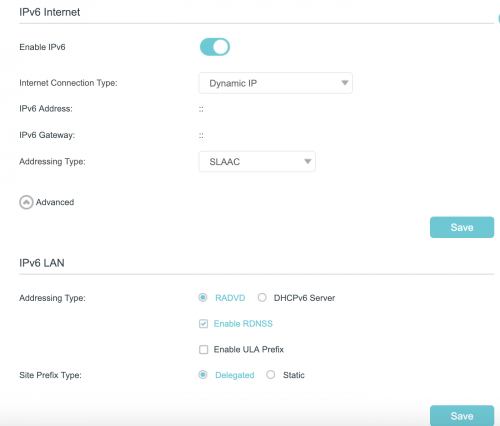
In the meantime, would it be possible if you try different options for IPV6 such as Dynamic IP.
Try experimenting it with SLAAC + Stateless DHCP as well.



 Dec 6 2017, 10:37 AM


 Quote
Quote




 0.0278sec
 0.57
0.57
 7 queries
 GZIP Disabled