Outline ·
[ Standard ] ·
Linear+
Digi Infinite Fan Club [V2], Infinite 150 and Infinite 80
|
alucard89
|
 Jun 17 2017, 08:09 PM Jun 17 2017, 08:09 PM
|

|
QUOTE(fruitie @ Jun 17 2017, 07:51 PM) I keep forgetting to ask this for the past few weeks. For those using E5186, is it normal for the "signal" LED not to light up? However, the signal bar is showing. Voice is also not but I think that's normal because I don't have any phone plugged into my router. 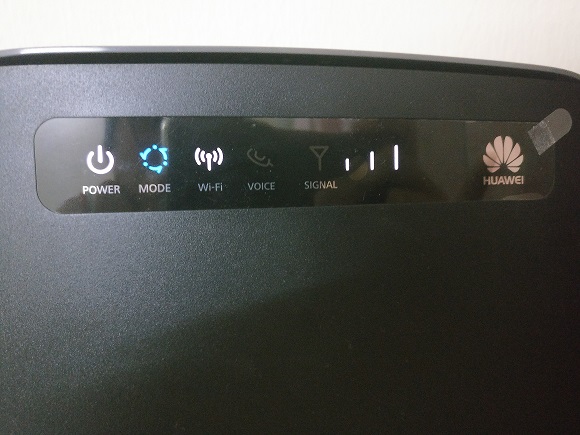 Anyway, after using Mimo antenna, my WiFi speed is consistently at close to 50Mbps.  You used that cheap one right? How do you position it anyway, I tried using b310 with that antenna, seems like internal antenna has better speed Is it like outside your window? |
|
|
|
|
|
alucard89
|
Jun 17 2017, 08:14 PM
|
|
|
QUOTE(fruitie @ Jun 17 2017, 08:12 PM) I don't know which is cheap and which one is expensive.  The RMB 60 one sold in Taobao. Nope, I cannot open my window to put it outside because my room is air-conditioned, so windows are closed 100% all the time. Plus my room has no direct exposure to outside, mine is in the kitchen. So, I put it inside my room by behind my closed windows. That must be it Comparison with vs without mimo antenna? I take it you must've moved it around the house till you got max speed? |
|
|
|
|
|
alucard89
|
Jun 17 2017, 10:10 PM
|
|
|
QUOTE(kernel123 @ Jun 17 2017, 10:06 PM) wow. damn cheap. similar antenna in aliexpress, rm80. twice the price. hmm. how do i buy this when i cant read chinese.. Just need to use chrome with google translate enabled, register an account, input your home address and you're good to go. Payment is via cc or online banking. Or use agent like yeslogistics |
|
|
|
|
|
alucard89
|
Jun 17 2017, 10:11 PM
|
|
|
QUOTE(fruitie @ Jun 17 2017, 08:16 PM) Without is around 30Mbps+ and sometimes can boost up to 40 plus, depending on timing. Now it is like almost all the time close to 50Mbps. Nope, I only rent a room here, so the most is I can only move around my room. But I didn't, just placing around within 2 meters perimeter from the router. 2 meters ar, then again your area digi 4g already powderful enough. Will have to move around the house till I get better speeds/bars. |
|
|
|
|
|
alucard89
|
Jun 17 2017, 10:29 PM
|
|
|
QUOTE(jtcs87 @ Jun 17 2017, 10:19 PM) I saw it the Retail Price in Singapore is SGD 399.  Oh wait, that was just the non 4g router, no wonder cheap Better go for E5186 |
|
|
|
|
|
alucard89
|
Jun 18 2017, 05:51 PM
|
|
|
QUOTE(Masafum1 @ Jun 18 2017, 05:36 PM) anyone know which vpn can use with torrent? also can the vpn use to bypass torrent cap if the data is connected to pc using phone hotspot? Phone needs to be rooted if you wanna share vpn from phone Or just use vpn on pc |
|
|
|
|
|
alucard89
|
Jun 25 2017, 09:17 PM
|
|
|
QUOTE(ajoi57 @ Jun 25 2017, 08:52 PM) Anyone have experience with this signal booster? or something similiar  my friend house got very weak lte signal when i go check coverage using my digi prepaid, so hard to lock lte on my phone then few days later his friend bring that booster and test it there, boom » Click to show Spoiler - click again to hide... « His fren brought the booster to your house? Got before speed? |
|
|
|
|
|
alucard89
|
Jun 25 2017, 09:53 PM
|
|
|
QUOTE(ajoi57 @ Jun 25 2017, 09:44 PM) this is all the result when i go around his house trying to 'catch' 4G  the highest i get is 17mb something on speedtest when i standstill like patung after got 4G for few moment start from 1:31am till 2:04am » Click to show Spoiler - click again to hide... « That's quite an improvement although still with random speed Saw a bunch of these 4g 1800mhz booster selling for rm+130 at taobao |
|
|
|
|
|
alucard89
|
Jun 25 2017, 10:27 PM
|
|
|
QUOTE(ajoi57 @ Jun 25 2017, 10:11 PM) at my place, after digi upgrade to 4g last year 3g connection usually very suck so if want get better connection, die die must connect 4g first  i found one at ebay kinda similiar from the pic he send, but not that cheap  Usually more expensive there since it's in usd Similar items can be cheaper at taobao Maybe you can checkout this one https://detail.tmall.com/item.htm?id=9841593352 |
|
|
|
|
|
alucard89
|
Jun 25 2017, 11:09 PM
|
|
|
QUOTE(ajoi57 @ Jun 25 2017, 11:05 PM) Is this the same model like your friend has? |
|
|
|
|
|
alucard89
|
Jun 26 2017, 06:55 AM
|
|
|
QUOTE(asellus @ Jun 26 2017, 05:25 AM) As of now, 115.164.0.0/16. Bro, you manage to configure ipv6 on your router now? |
|
|
|
|
|
alucard89
|
Jun 26 2017, 06:59 AM
|
|
|
QUOTE(jtcs87 @ Jun 25 2017, 11:38 PM) May I know all the external IP address are NATed in Digi? I plan to use this for my CCTV access.  Which cctv you're using? The ones that connect to own server like xiaomi cameras - This one no problem Standard cameras like hikvision etc with decoders that needs portforwarding - This one needs vpn or ipv6 |
|
|
|
|
|
alucard89
|
Jun 26 2017, 12:22 PM
|
|
|
QUOTE(asellus @ Jun 26 2017, 11:31 AM) No, I haven't. But I believe certain routers like E5186 do has IPv6 capabilites and does support DHCPV6 which would give you the feature you want. Heh, no budget to buy new router after raya But I do have a spare e3372 that according to specs sheet support ipv6 http://m.huawei.com/kemobile/consumer/mobi...il/e3372-ke.htmGonna try connect to huawei ws880 and setup as primary wan See how it goes |
|
|
|
|
|
alucard89
|
Jun 26 2017, 02:15 PM
|
|
|
QUOTE(HolySatan @ Jun 26 2017, 02:11 PM) digi call forwarding.. for those who r using mifi & router  So this can forward to any number? Even non digi number and no charges? |
|
|
|
|
|
alucard89
|
Jun 26 2017, 10:46 PM
|
|
|
blacktubi
Does it just require changing device IMEI to smartphone IMEI for spoofing? Or something else?
|
|
|
|
|
|
alucard89
|
Jun 27 2017, 02:30 AM
|
|
|
QUOTE(jtcs87 @ Jun 27 2017, 01:55 AM) My DDNS is not able to work with those NATed IP. Only able to access under DiGi network. Same, I had to use some specific setup for the vpn portforwarding to access my ipcamera Basically: 1) WS880 (Running xwrt) connect to VPN server 2) DNS - setup to redirect vpn ip address 3) Portfoward as usual to cameras/services 4) There's an also additional setup (script) for portforwarding with vpn. I'm sticking to this setup until I can get ipv6 working This post has been edited by alucard89: Jun 27 2017, 02:32 AM |
|
|
|
|
|
alucard89
|
Jun 27 2017, 08:39 AM
|
|
|
QUOTE(jtcs87 @ Jun 27 2017, 05:21 AM) Mind to share your steps about the VPN thing? I was plan to check with Digi Helpdesk whether I can get the external IP address or not. I'll pm you the instructions once I get back home, still at kampung now Do you have asus router or any custom firmware like ddwrt/gargoyle running on your router? |
|
|
|
|
|
alucard89
|
Jun 27 2017, 11:03 AM
|
|
|
QUOTE(jtcs87 @ Jun 27 2017, 08:44 AM) Thanks first. I'm using Asus 4G-AC55U by now for this Digi Infinite Connection. Nice, have you tried setting ipv6? Maybe you can try to remotely access your ipcamera without portforwarding |
|
|
|
|
|
alucard89
|
Jun 27 2017, 11:31 AM
|
|
|
QUOTE(ahchun @ Jun 27 2017, 09:36 AM) Bought from taobao? Seems like a nice modem Not bad the price (+rm380) Does asus normally have international warranty or regional only? |
|
|
|
|
|
alucard89
|
Jun 29 2017, 03:20 PM
|
|
|
QUOTE(HongKi @ Jun 29 2017, 03:17 PM) Ya im using alldebrid too. Will you get suspend for doing this? Lol Nah, this ain't webe where they suspend your account for vpn |
|
|
|
|



 Quote
Quote


 0.0813sec
 0.33
0.33
 7 queries
 GZIP Disabled