

Beta update- also cant use tplink tether app(wasnt even working with a astable firmware) on my iphone and also cant login using the ip on iphone. only on wired.
UniFi's TP-Link Routers C5, C7 & C1200, Newer is not better.
UniFi's TP-Link Routers C5, C7 & C1200, Newer is not better.
|
|
 Jan 9 2018, 08:11 PM Jan 9 2018, 08:11 PM
Return to original view | Post
#21
|
 
Junior Member
297 posts Joined: Sep 2006  
|
Beta update- also cant use tplink tether app(wasnt even working with a astable firmware) on my iphone and also cant login using the ip on iphone. only on wired.
|
|
|
|
|
|
Jan 9 2018, 11:38 PM
Return to original view | Post
#22
|
|
Junior Member
297 posts Joined: Sep 2006
|
QUOTE(JohnLai @ Jan 9 2018, 08:24 PM) Stable enough for me. EU? 01012018? Yes wasn’t reset at all when I updated. But I just reset it. Still not as good as my ASUS n12hp. For far wireless coverage. Nearby is fine. My router is upstairs at the back. My tv is in front downstairs.None of my family smartphones wifi have issue. Weird thing, the beta update WILL reset everything. But you said your setting isn't reset at all? :confused:  This post has been edited by teen08: Jan 9 2018, 11:41 PM |
|
|
Jan 9 2018, 11:55 PM
Return to original view | Post
#23
|
|
Junior Member
297 posts Joined: Sep 2006
|
QUOTE(JohnLai @ Jan 9 2018, 11:42 PM) Yes, probably something is wrong with your update progress. So what’s the best way I should put my router? I can remove n12hp antennas if that helps. They have 9dbi. Not sure about c1200 Updating to the beta firmware will reset all the settings. Perhaps you should consider doing a full factory reset? Or reflash again?  EDIT: N12HP? -.- I think you should understand how antenna works. 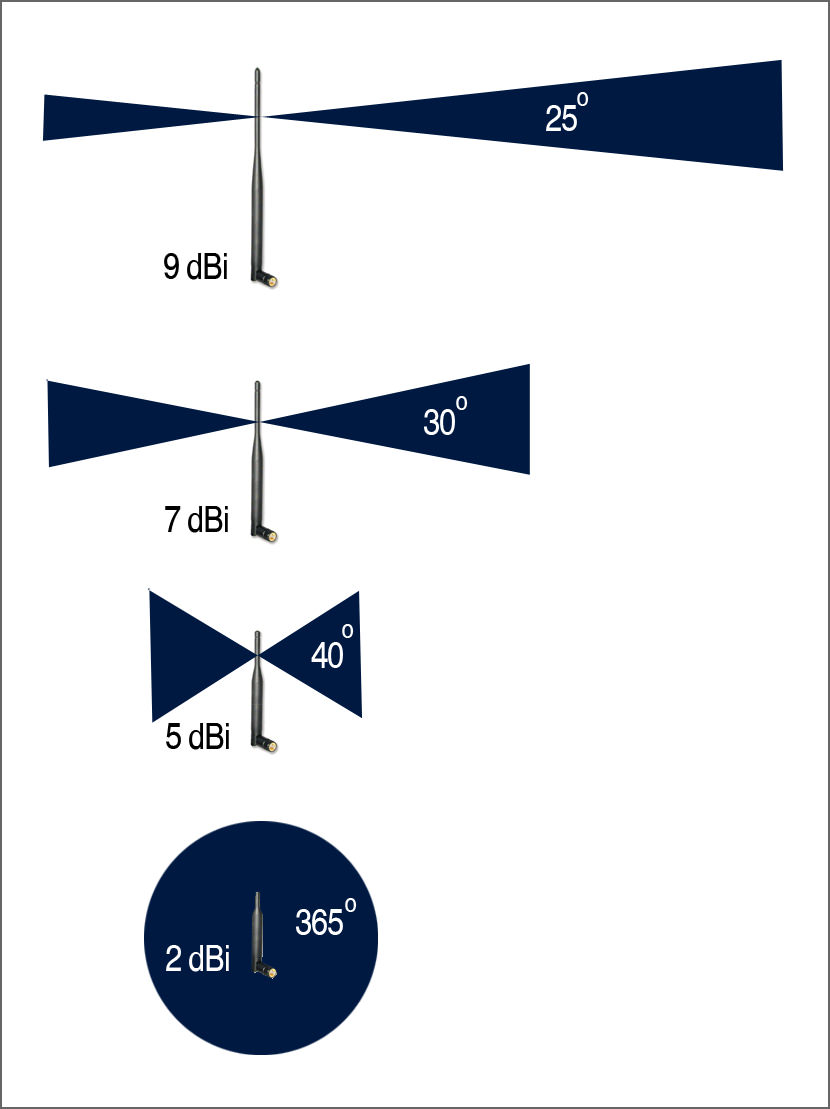 Shitty diagram of my house. lol. 22x75 This post has been edited by teen08: Jan 9 2018, 11:58 PM Attached thumbnail(s) 
|
|
|
Jan 10 2018, 02:10 PM
Return to original view | Post
#24
|
|
Junior Member
297 posts Joined: Sep 2006
|
QUOTE(JohnLai @ Jan 10 2018, 12:09 AM) .....that is the worst possible location to put your router. Plus....no, you can't connect N12HP antenna to C1200. I know. I regret it now. 10 years ago when they did, I just thought of my pc not many wireless gadgets last time if any. So my pc is wired now but others suffer. 😂 but I can’t change the location now. Anyways it was all good with the n12hp. But that’s was 9db antennas. I’m looking at ac1330uhp ASUS for my next buy if this doesn’t works.  Ideally, the router should be put at the middle of your house. As for the C1200 antenna. https://fccid.io/TE7C1200/Internal-Photos/A...6-08-31-3117781 Antenna orientation matter. Recommend you to orient left and right antenna in perpendicular mode.  Don't forge to enable 5ghz beamforming. Thanks for the suggestion on the antennas.  |
|
|
Jan 11 2018, 04:14 PM
Return to original view | Post
#25
|
|
Junior Member
297 posts Joined: Sep 2006
|
QUOTE(JohnLai @ Jan 10 2018, 12:09 AM) .....that is the worst possible location to put your router. Plus....no, you can't connect N12HP antenna to C1200. Sorry what did u mean by don’t forge to enable 5ghz beamforming? U mean do not enable TxBF? Ideally, the router should be put at the middle of your house. As for the C1200 antenna. https://fccid.io/TE7C1200/Internal-Photos/A...6-08-31-3117781 Antenna orientation matter. Recommend you to orient left and right antenna in perpendicular mode. Don't forge to enable 5ghz beamforming. QUOTE(biloxee @ Jan 10 2018, 04:36 PM) Stable for 3 days with no reboot. No Wifi problems with any of my devices, ipads, iphones, notebooks, andriod box. I’m did a normal reset. Will try a hard reset. I think I read about it somewhere. 😅 did you restore your setting or u set up back? Try resetting your router. Mine was automatically factory reset after I installed the new beta firmware. QUOTE(AVFAN @ Jan 10 2018, 05:45 PM) bro, i think u should go ahead. Haha bro. Yea trying this thing out for the last time. If can save some money. 😅spend the money, mine was all smooth, can relax and enjoy the speed!  QUOTE(JohnLai @ Jan 10 2018, 06:15 PM) .....Why don't you plug N12HP to the C1200? What do u mean? Use it as extender? QUOTE(Jjuggler @ Jan 11 2018, 08:20 AM) better. and the most important, stable and able to handle more than 10 devices at a time. Wow that’s good. My transmit power I put it high. Still the same. Did u restore setting for ur router or set up again? I’m gonna try hard resetting it. |
|
|
Jan 11 2018, 04:42 PM
Return to original view | IPv6 | Post
#26
|
|
Junior Member
297 posts Joined: Sep 2006
|
Update: there’s a new firmware out on aus. 180103. But I can’t upgrade.
This post has been edited by teen08: Jan 11 2018, 04:43 PM |
|
|
|
|
|
Jan 11 2018, 06:01 PM
Return to original view | Post
#27
|
|
Junior Member
297 posts Joined: Sep 2006
|
QUOTE(biloxee @ Jan 11 2018, 05:00 PM) US or EU version. I believe we are all using the EU version... Not sure who we are but before the EU beta ver released lots of discussion was on EU firmware from an australian website. the latest is US on the australian tplink site. At least that was the link provided by the sifus here. by the way after flashing the beta firmware did u restore your settings?QUOTE(AVFAN @ Jan 11 2018, 05:27 PM) Your case of router at top back of house is tricky. i never got close to 50mbps but it was sufficient for netflix and ps4 multiplayer. whole area u mean upstairs and downstairs?? thats good. maybe ill get that as my last resort and fix it upside down But if rtn12hp worked well for 50mbps, thats a good sign. My router is at ground front. Rtn12hp worked very well for 10, 30, 50mbps. But cant do enough for 100mbps. Rt ac1300uhp is good for me. Full speed almost all areas with 5ghz. The worst possible spot can still get 25mbps with 2.4ghz. Which is good enough for what i use there. All the best.  thanks |
|
|
Jan 12 2018, 06:45 PM
Return to original view | Post
#28
|
|
Junior Member
297 posts Joined: Sep 2006
|
QUOTE(AVFAN @ Jan 11 2018, 06:11 PM) Yes... 50mbps full in most areas, upstairs n downstairs... with rtn12hp 2.4ghz. wow thats good for you. Maybe mine the use diff brick to build the hosue Now, 100mbps full in most areas upstairs n downstairs... with rt ac1300uhp 5ghz. Good eqpt gives good results!! Sorry for OT, will stop here... this is tplink thread.  QUOTE(biloxee @ Jan 11 2018, 06:12 PM) No I didn't restore the settings from my backup. I configured it manually... thanksQUOTE(Jjuggler @ Jan 11 2018, 06:29 PM) This is my pov. I've updated the beta firmware in my blog. awesome. i actually follwed everything that you did. the only diff is i reset and then i restore setting from my back up. . Reboot time takes around 3 minutes. stable without even need to put cooling fan (no overheat). I dont restore the setting. I just set up again since the beta firmware will wipe out all your settings by default. https://techmemasta.wordpress.com/2018/01/0...ng-walkthrough/ |
|
|
Jan 24 2018, 05:55 PM
Return to original view | Post
#29
|
|
Junior Member
297 posts Joined: Sep 2006
|
QUOTE(SilentVampire @ Jan 18 2018, 08:06 AM) New update guys, EU beta version released. See here for a write up by bro BookerLewitt: i dont see any eu upate for v1. still using the beta ver. theres a new update?“They do have the EU version (which is what we use) on the FAQ. Just updated mine (unifi EU V1) to the beta firmware. It wipes out all your settings, so before upgrading, make sure you keep your unifi username and password handy. Turns out the unifi specific firmware makes the router way shittier than it already is. After upgrading to the beta firmware, I noticed two big thing: 1. I no longer have to deal with the shitty @unifi thing on my SSID. It's no longer there. 2. There's a check for update button on the firmware settings page. Waiting for the Malaysian specific update might take a while (and there's two version locally, the TM and Time version), so if you're comfortable dealing with your router settings, I dont see any issue with upgrading with the firmware they provided. If shit go south, just flash the old firmware back.” Link here for clarification: http://www.tp-link.com/us/faq-2050.html |
|
|
Jan 25 2018, 06:17 PM
Return to original view | Post
#30
|
|
Junior Member
297 posts Joined: Sep 2006
|
QUOTE(SilentVampire @ Jan 24 2018, 06:00 PM) They removed it for some unknown reason, so use at your own risk. See here for link: http://static.tp-link.com/2018/201801/2018...180101_Beta.zip Is this the beta get that was released a few weeks ago. I’m using that now. |
| Change to: |  0.0240sec 0.0240sec
 0.56 0.56
 7 queries 7 queries
 GZIP Disabled GZIP Disabled
Time is now: 11th December 2025 - 02:35 AM |
 Quote
Quote