Welcome Guest ( Log In | Register )

Outline · [ Standard ] · Linear+

 Bandwidth control function unifi modem

views
     
TSVio
post Apr 14 2017, 06:08 PM, updated 9y ago

Enthusiast
*****
Senior Member
829 posts

Joined: Jan 2007
From: KL
hi can anyone suggest me a router/modem that im able to control/allocate bandwidth pls . i have 50mb/s but my average speed is only 500kb/s!! damm tenants, when asked, no one admits

prefer to be something simple to set up.
GOPI56
post Apr 14 2017, 06:23 PM

Regular
******
Senior Member
1,495 posts

Joined: Dec 2012
QUOTE(Vio @ Apr 14 2017, 07:08 PM)
hi can anyone suggest me a router/modem that im able to control/allocate bandwidth pls . i have 50mb/s but my average speed is only 500kb/s!! damm tenants, when asked, no one admits

prefer to be something simple to set up.
*
You could use this router, TP-Link TL-WR841ND

http://www.tp-link.com/lk/products/details...TL-WR841ND.html


This post has been edited by GOPI56: Apr 14 2017, 06:28 PM
SUSraynman
post Apr 14 2017, 06:24 PM

Look at all my stars!!
*******
Senior Member
4,333 posts

Joined: Jan 2003


Get an ASUS RT-AC68U, or a Huawei WS880 (with Xwrt-Vortex firmware) and use the bandwidth limiter function.

I am using it with the Huawei WS880.
TSVio
post Apr 14 2017, 06:30 PM

Enthusiast
*****
Senior Member
829 posts

Joined: Jan 2007
From: KL
QUOTE(GOPI56 @ Apr 14 2017, 06:23 PM)
You could use this router, TP-Link TL-WR841ND

http://www.tp-link.com/lk/products/details...TL-WR841ND.html


*
thank you but mine is a dff one

QUOTE(raynman @ Apr 14 2017, 06:24 PM)
Get an ASUS RT-AC68U, or a Huawei WS880 (with Xwrt-Vortex firmware) and use the bandwidth limiter function.

I am using it with the Huawei WS880.
*
rclxub.gif my jaw almost fell off looking at the price of these 2, any other alternative?
SUSraynman
post Apr 14 2017, 06:44 PM

Look at all my stars!!
*******
Senior Member
4,333 posts

Joined: Jan 2003


QUOTE(Vio @ Apr 14 2017, 06:30 PM)
thank you but mine is a dff one
rclxub.gif my jaw almost fell off looking at the price of these 2, any other alternative?
*
Before I upgraded to the Huawei WS880, I was using the entry-level ASUS RT-N12D1.

It also has the bandwidth limiter function with the latest firmware.

It is only RM149 at Lazada.

http://www.lazada.com.my/asus-rt-n12-d1-hi...r-10869979.html

I am currently using the RT-N12D1 as a backup router in case anything happens to the WS880.

TSVio
post Apr 14 2017, 06:49 PM

Enthusiast
*****
Senior Member
829 posts

Joined: Jan 2007
From: KL
QUOTE(raynman @ Apr 14 2017, 06:44 PM)
Before I upgraded to the Huawei WS880, I was using the entry-level ASUS RT-N12D1.

It also has the bandwidth limiter function with the latest firmware.

It is only RM149 at Lazada.

http://www.lazada.com.my/asus-rt-n12-d1-hi...r-10869979.html

I am currently using the RT-N12D1 as a backup router in case anything happens to the WS880.
*
thank you, is it easy to setup or do i need to flash it to other firmware?
Mali
post Apr 14 2017, 06:58 PM

Getting Started
**
Junior Member
145 posts

Joined: Feb 2007
QUOTE(raynman @ Apr 14 2017, 06:44 PM)
Before I upgraded to the Huawei WS880, I was using the entry-level ASUS RT-N12D1.

It also has the bandwidth limiter function with the latest firmware.

It is only RM149 at Lazada.

http://www.lazada.com.my/asus-rt-n12-d1-hi...r-10869979.html

I am currently using the RT-N12D1 as a backup router in case anything happens to the WS880.
*
the RT-N12D1 can support 50 Mbps?
SUSraynman
post Apr 14 2017, 07:00 PM

Look at all my stars!!
*******
Senior Member
4,333 posts

Joined: Jan 2003


QUOTE(Vio @ Apr 14 2017, 06:49 PM)
thank you, is it easy to setup or do i need to flash it to other firmware?
*
Yes, it is easy to set up.

Just go to QOS, enable bandwidth Limiter, and enter the desired maximum bandwidth for the IP addresses you want to control.

No, you don't need to flash it to other firmware.

Just flash it to the latest firmware version.

jio
post Apr 14 2017, 07:42 PM

Casual
***
Junior Member
383 posts

Joined: May 2005
1. What router you are currently using. Does it has 5GHz wifi? If not, that might explain the poor network performance and might not be the fault of your tenants. You have to understand with more neighbours getting higher internet speed & still remain with their 2.4GHz only wifi, of course the 2.4GHz frequency will more much more congested than before. Add it with more selfish idiots forcing their 2.4GHz wifi channel width to 40MHz, making the situation much worse. Try ping to your router & if the ping is as high as hundreds of ms, it means the interference is really bad.

2. Mikrotik is actually a much better option if you want to control the bandwidth. You can use their user manager as radius server and control the user access individually as well as limit the bandwidth. But it will require some technical knowledge (you can always watch youtube tutorial) to set it up. Hap ac lite is about 250 & hap lite is about 145 and it is much better than RT-N12D1. But if your 2.4GHz wifi has too much interference, try get dual band wifi instead. You can get mikrotik router without wifi & repurpose the existing router as access point only.

3. One of the cheapest dual band router I can recommend is mi router 3 flashed to padavan firmware, under 100 with discount voucher. It might be officially selling here soon https://www.lowyat.net/2017/129193/xiaomi-r...router-3-sirim/
mztang52
post Apr 14 2017, 09:21 PM

Before you quit, TRY
*******
Senior Member
2,807 posts

Joined: Jun 2015


QUOTE(raynman @ Apr 14 2017, 08:00 PM)
Yes, it is easy to set up.

Just go to QOS, enable bandwidth Limiter, and enter the desired maximum bandwidth for the IP addresses you want to control.

No, you don't need to flash it to other firmware.

Just flash it to the latest firmware version.
*
All TM UniFi routers have QOS function.

This post has been edited by mztang52: Apr 14 2017, 09:22 PM
SUSraynman
post Apr 14 2017, 09:43 PM

Look at all my stars!!
*******
Senior Member
4,333 posts

Joined: Jan 2003


QUOTE(mztang52 @ Apr 14 2017, 09:21 PM)
All TM UniFi routers have QOS function.
*
QoS is NOT bandwidth control.

For ASUSwrt, the bandwidth limiter function is placed under the QoS tab.

Not all routers with QoS have bandwidth limiter or bandwidth control.

TSVio
post Apr 14 2017, 11:10 PM

Enthusiast
*****
Senior Member
829 posts

Joined: Jan 2007
From: KL
QUOTE(Mali @ Apr 14 2017, 06:58 PM)
the RT-N12D1 can support 50 Mbps?
*
can it?

QUOTE(raynman @ Apr 14 2017, 07:00 PM)
Yes, it is easy to set up.

Just go to QOS, enable bandwidth Limiter, and enter the desired maximum bandwidth for the IP addresses you want to control.

No, you don't need to flash it to other firmware.

Just flash it to the latest firmware version.
*
ok ill try to look out. also for the unifi setting will it be easy like streamyx?

QUOTE(jio @ Apr 14 2017, 07:42 PM)
1. What router you are currently using. Does it has 5GHz wifi? If not, that might explain the poor network performance and might not be the fault of your tenants. You have to understand with more neighbours getting higher internet speed & still remain with their 2.4GHz only wifi, of course the 2.4GHz frequency will more much more congested than before. Add it with more selfish idiots forcing their 2.4GHz wifi channel width to 40MHz, making the situation much worse. Try ping to your router & if the ping is as high as hundreds of ms, it means the interference is really bad.

2. Mikrotik is actually a much better option if you want to control the bandwidth. You can use their user manager as radius server and control the user access individually as well as limit the bandwidth. But it will require some technical knowledge (you can always watch youtube tutorial) to set it up. Hap ac lite is about 250 &  hap lite is about 145 and it is much better than RT-N12D1. But if your 2.4GHz wifi has too much interference, try get dual band wifi instead. You can get mikrotik router without wifi & repurpose the existing router as access point only.

3. One of the cheapest dual band router I can recommend is mi router 3 flashed to padavan firmware, under 100 with discount voucher. It might be officially selling here soon https://www.lowyat.net/2017/129193/xiaomi-r...router-3-sirim/
*
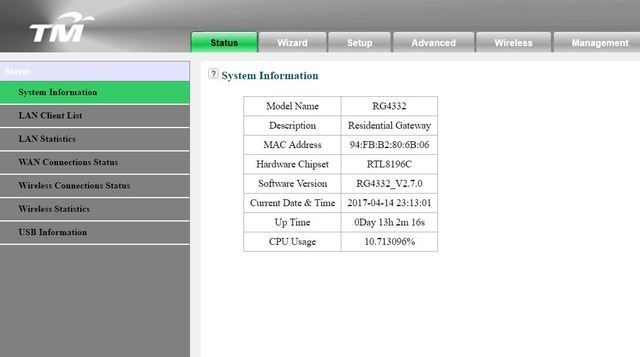
im on RG4332 very old model i guess, coz i never sign up for new account, keep online upgrade thus they didnt provide any new router, also not sure about the 5Ghz.
when i ping im getting like 15ms only

i've tried getting my hands on mikrotik once but was too complicated for a noob like me and i sold it off cry.gif

mztang52
post Apr 14 2017, 11:10 PM

Before you quit, TRY
*******
Senior Member
2,807 posts

Joined: Jun 2015


QUOTE(raynman @ Apr 14 2017, 10:43 PM)
QoS is NOT bandwidth control.

For ASUSwrt, the bandwidth limiter function is placed under the QoS tab.

Not all routers with QoS have bandwidth limiter or bandwidth control.
*
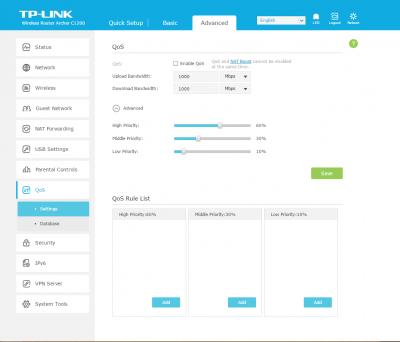
Aren't you referring to this? This is TP-Link archer C1200 from TM.


Attached thumbnail(s)
Attached Image
TSVio
post Apr 14 2017, 11:16 PM

Enthusiast
*****
Senior Member
829 posts

Joined: Jan 2007
From: KL
QUOTE(mztang52 @ Apr 14 2017, 11:10 PM)
Aren't you referring to this? This is TP-Link archer C1200 from TM.
*
mine is like this

user posted image
SUSraynman
post Apr 14 2017, 11:17 PM

Look at all my stars!!
*******
Senior Member
4,333 posts

Joined: Jan 2003


QUOTE(mztang52 @ Apr 14 2017, 11:10 PM)
Aren't you referring to this? This is TP-Link archer C1200 from TM.
*
No, I am referring to ASUSwrt bandwidth limiter under the QoS tab

user posted image

As I said earlier, not all routers with QoS have bandwidth control.

The RG4332 given to me by TM does not have it.

SUSraynman
post Apr 14 2017, 11:23 PM

Look at all my stars!!
*******
Senior Member
4,333 posts

Joined: Jan 2003


QUOTE(Vio @ Apr 14 2017, 11:16 PM)
mine is like this

user posted image
*
Your TM router is the RG4332, same as what I was given.

It is confirmed that it does not have bandwidth control.

mztang52
post Apr 14 2017, 11:27 PM

Before you quit, TRY
*******
Senior Member
2,807 posts

Joined: Jun 2015


QUOTE(raynman @ Apr 15 2017, 12:17 AM)
No, I am referring to ASUSwrt bandwidth limiter under the QoS tab

user posted image

As I said earlier, not all routers with QoS have bandwidth control.

The RG4332 given to me by TM does not have it.
*
So is the QOS control in my TP-Link C1200 same as yours?
SUSraynman
post Apr 14 2017, 11:37 PM

Look at all my stars!!
*******
Senior Member
4,333 posts

Joined: Jan 2003


QUOTE(mztang52 @ Apr 14 2017, 11:27 PM)
So is the QOS control in my TP-Link C1200 same as yours?
*
The QoS portion should be the same, but your TP-Link does not seem to have bandwidth control.

Strange, because I used to own a TP-Link TL-WR1043ND version 3, and it has QoS and bandwidth control.

soonwai
post Apr 15 2017, 02:15 AM


********
All Stars
11,459 posts

Joined: Oct 2007
From: KL


QUOTE(raynman @ Apr 14 2017, 11:37 PM)
The QoS portion should be the same, but your TP-Link does not seem to have bandwidth control.

Strange, because I used to own a TP-Link TL-WR1043ND version 3, and it has QoS and bandwidth control.
*
Yeah, C5v2 and C1200 have different features.

user posted image
C5v2 has bandwidth control but no QOS.

user posted image
C1200 has QoS but no bw control.
TSVio
post Apr 16 2017, 10:42 AM

Enthusiast
*****
Senior Member
829 posts

Joined: Jan 2007
From: KL
guys what about the TP-LINK AC1750? is it good compared to the ones mentioned here like ASUS RT-AC68U, or a Huawei WS880

2 Pages  1 2 >Top
 

Change to:
| Lo-Fi Version
0.0172sec    0.52    6 queries    GZIP Disabled
Time is now: 16th December 2025 - 12:31 PM