

i have browsed the 1st page and didnt see how to view the IEMI etc. how to view it in P1i?
Sony-Ericsson Sony Ericsson P1i
Sony-Ericsson Sony Ericsson P1i
|
|
 Oct 29 2007, 10:09 PM Oct 29 2007, 10:09 PM
Return to original view | Post
#1
|
 
Senior Member
719 posts Joined: Jun 2005 From: Safe From Harm  
|
i have browsed the 1st page and didnt see how to view the IEMI etc. how to view it in P1i?
|
|
|
|
|
|
Oct 30 2007, 12:23 AM
Return to original view | Post
#2
|
|
Senior Member
719 posts Joined: Jun 2005 From: Safe From Harm
|
thanks fx_53_xt, yes that IMEI, no wonder nothings coming up in my google search >_> LOL
|
|
|
Oct 30 2007, 11:08 PM
Return to original view | Post
#3
|
|
Senior Member
719 posts Joined: Jun 2005 From: Safe From Harm
|
chikanot, you got voucher too? you can buy software at www.p1-choice.com with that voucher. it has 10 points, and i just bought Oxford dictionary for 2 points, still got 8 points.
 Added on October 30, 2007, 11:13 pmanother question, can i change that "today" panel? its my first symbian, is it like today panel of ppc? where you can put other panels? This post has been edited by BratPAQ: Oct 30 2007, 11:13 PM |
|
|
Nov 6 2007, 04:36 AM
Return to original view | Post
#4
|
|
Senior Member
719 posts Joined: Jun 2005 From: Safe From Harm
|
im currently using Classic Case ICE-25 on my P1i, ICE-25 was originally for K750i/w800i phones, i was surprised it fits my P1i, although it looks like a fat lady on a tight dress
 oh, and it still fits even if theres a headset attached to the phone oh, and it still fits even if theres a headset attached to the phone those who are not using theyre vouchers, if you can give it to me just scratch that gray cover and send me the voucher number (its a shame that it will go to waste )Added on November 6, 2007, 4:41 am QUOTE(d@odao @ Nov 6 2007, 12:23 AM) woot!...after some tweaking on the router, i managed to stream youtube!... please post the "tweak" you did   This post has been edited by BratPAQ: Nov 6 2007, 04:41 AM |
|
|
Nov 6 2007, 08:33 PM
Return to original view | Post
#5
|
|
Senior Member
719 posts Joined: Jun 2005 From: Safe From Harm
|
QUOTE(spoonkin @ Nov 6 2007, 01:38 PM) I repeat DO NOT USE THE BUNDLED POUCH ! scan the manual that comes with the phone, theres a page there where it specifies everything that comes with the phone, i believe the pouch is also specified there. then send that to supportthe stiches area has glue that can melt easily and eventually causes your phone has glue stain. This happen to me after 1 hr using it. I email sonyericsson support and they CLAIM P1i does not comes with pouch and then eventually i show the the picture, they dont reply me anymore. How sad Added on November 6, 2007, 1:39 pmDear Sir or Madam, Thank you for contacting Sony Ericsson on the World Wide Web. Answer: Thank you for highlighting the issue to us.Regard to your enquiry,we would like to inform you,the Authorized Sony Ericsson P1i doesn't come with the pouch. Please contact Sony Ericsson Call Center again if we can assist you further. Thank you. Best regards, Alex Wong Sony Ericsson Call Center Sony Ericsson Mobile Communication International AB Branch Office Malaysia Email: questions.my@support.sonyericsson.com Web: http://www.sonyericsson.com http://wap.sonyericsson.com Added on November 6, 2007, 1:41 pmI am refering to this pouch. It does come with the phone. » Click to show Spoiler - click again to hide... « Added on November 6, 2007, 8:43 pm QUOTE(karlcheong @ Nov 6 2007, 04:20 PM) Found this pouch at Lelong sell by Mobile Care Stop. Anyone bought it kind to comment. A review will be good i havent bought this but looking at the picture, it doesnt have a belt clip, and doesnt support the headset (you cant close the case if you have headset connected. and how about at the back? do you have to remove it from the case to use the camera?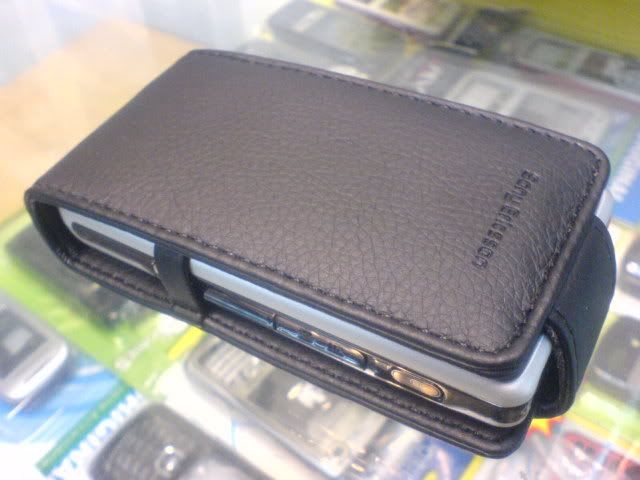 This is the links to Lelong right now im looking for this case  This post has been edited by BratPAQ: Nov 6 2007, 08:43 PM |
|
|
Nov 6 2007, 09:28 PM
Return to original view | Post
#6
|
|
Senior Member
719 posts Joined: Jun 2005 From: Safe From Harm
|
QUOTE(chikanot @ Nov 6 2007, 09:14 PM) fx_53 2 ways, fx_53 was right but not complete, you have to press and HOLD the back button on the left side, or you can press more->minimizeI tried your suggestion to press back button on the phone side a few second during mp3 playback with music viewer but the music automatically stop and displaying desktop. Any other suggestion? Thanks |
|
|
|
|
|
Nov 6 2007, 10:56 PM
Return to original view | Post
#7
|
|
Senior Member
719 posts Joined: Jun 2005 From: Safe From Harm
|
chikanot, you are using just a music viewer, not music player, if you want to play in background use the music player, it can be found in Main Menu->Entertainment->Music Player.
|
|
|
Nov 6 2007, 10:59 PM
Return to original view | Post
#8
|
|
Senior Member
719 posts Joined: Jun 2005 From: Safe From Harm
|
QUOTE(karlcheong @ Nov 6 2007, 10:54 PM) How come you done have 'minimize' ?? he was using "music viewer" not "music player",  Mine one have : Manage, Minimize, Send as, Settings, Help, Task Manager. Try this : Press the Task Manager > Standby It will go back to Standby menu. i didnt realize that there was "music viewer" aside from the music player |
|
|
Nov 7 2007, 08:58 PM
Return to original view | Post
#9
|
|
Senior Member
719 posts Joined: Jun 2005 From: Safe From Harm
|
QUOTE(chikanot @ Nov 7 2007, 06:06 PM) All I have in Main Menu --> Entertainment are Camera, Web, More Applications, RSS Feeds, Play Now and Picture Gallery....No Music Player dude...Will call SE later on Friday....Or any Freeware out there to play music?? you are looking at the wrong menu, thats multimedia, not entertainment.Anyway just bought Martin Field Screen Protector and PDair leather case from doml. So far I am satisfy wif the acc... btw, hows the PDair? does it have hole for camera? does it support headset? |
|
|
Nov 7 2007, 10:49 PM
Return to original view | Post
#10
|
|
Senior Member
719 posts Joined: Jun 2005 From: Safe From Harm
|
QUOTE(kenji82 @ Nov 7 2007, 10:44 PM) do you guys download the free software form p1-choice? i downloaded 3 softwares.pls suggest which software is useful. thanks... MSDict Pocket Oxford English Dictionary (2 points) - an english dictionary Swiss Manager Pro UIQ3 (2 points) - auto memory clean-up/reclaim + file browser + system information Magic Message Manager Pro for UIQ3 (2 points) - much like the Rules Wizard of MS outlook, it sort or move your messages to specified folders when they arrive/created. This post has been edited by BratPAQ: Nov 7 2007, 10:52 PM |
|
|
Nov 8 2007, 12:54 AM
Return to original view | Post
#11
|
|
Senior Member
719 posts Joined: Jun 2005 From: Safe From Harm
|
QUOTE(kenji82 @ Nov 7 2007, 11:53 PM) hi brat, but i have to warn you about Swiss Manager Pro, its a memory management software, though it helps a lot, theres also a risk of having some problems cause its a memory management, like when you programmed it to kill software if the phone is idle for 1 minute, it will kill media player or radio, even if you are using it, you have to configure it so it wouldnt kill the software you are using. things like that...but if you get the hang of it and configured it right, it wont be a problem anymorethanks for the suggestion, i'm thinking to download the same software... just got the phone today, havent really play around yet... |
|
|
Nov 8 2007, 09:27 PM
Return to original view | Post
#12
|
|
Senior Member
719 posts Joined: Jun 2005 From: Safe From Harm
|
QUOTE(bluegreen @ Nov 8 2007, 02:55 PM) & writing message/sms, is it possible to change the background to black & alphabets to white? it is possible, but using themes, you can create your own themes |
|
|
Nov 8 2007, 09:57 PM
Return to original view | Post
#13
|
|
Senior Member
719 posts Joined: Jun 2005 From: Safe From Harm
|
QUOTE(bluegreen @ Nov 8 2007, 09:41 PM) megabass got. cool la. then the sound must be good. anyone got the pic of the headphones? i forgot where i download these so ill just post them here, i think you can use M600 themes.where to download themes for P1? Attached File(s)  P1i_Themes.zip ( 2.37mb )
Number of downloads: 303
P1i_Themes.zip ( 2.37mb )
Number of downloads: 303 |
|
|
|
|
|
Nov 9 2007, 12:16 AM
Return to original view | Post
#14
|
|
Senior Member
719 posts Joined: Jun 2005 From: Safe From Harm
|
QUOTE(spoonkin @ Nov 9 2007, 12:05 AM) yea, as mentioned, it was charging fine i wouldnt rely on USB charge, ive tried that, 4 hours USB charge and only like 3% to 10% charged, your phone is sometimes using more power than the usb can provide, so it will still drain even thought its connected to USBthen suddenly just not charging but DIS-CHARGING i also stoned  |
|
|
Nov 10 2007, 04:12 AM
Return to original view | Post
#15
|
|
Senior Member
719 posts Joined: Jun 2005 From: Safe From Harm
|
HURRY!
LCG Jukebox for free today at Handango! http://www.handango.com/FreeAppFriday.jsp?siteId=1 JUST TODAY HURRY! Just remember to login first on the orders page, when it shows the price. After you login, the total price becomes zero. and oh, use IE, FF hangs on last step for me This post has been edited by BratPAQ: Nov 10 2007, 04:12 AM |
|
|
Nov 10 2007, 04:33 AM
Return to original view | Post
#16
|
|
Senior Member
719 posts Joined: Jun 2005 From: Safe From Harm
|
QUOTE(LivingLife @ Nov 10 2007, 04:16 AM) Thank!!! i dont know too, but ill watch out for it every friday ....Just wan to ask whether Handango free apps every friday or? Lol  |
|
|
Nov 12 2007, 09:15 PM
Return to original view | Post
#17
|
|
Senior Member
719 posts Joined: Jun 2005 From: Safe From Harm
|
QUOTE(dscythe @ Nov 12 2007, 12:48 PM) Guys, either you use other file browser, like swiss manager pro, or connect the phone to PC as file transfer mode. this 2 way i said can view any folder, while the built-in file browser in the phone and file manager ic PC Suite only browse the "SE" foldersneed help here. I tranferred 3GP files to my P1i via bluetooth. I save it in folder named "private" in memory card but from file manager, i could not find the folder. who knows how to locate this folder?  Thanks |
|
|
Nov 13 2007, 08:45 PM
Return to original view | Post
#18
|
|
Senior Member
719 posts Joined: Jun 2005 From: Safe From Harm
|
QUOTE(kenji82 @ Nov 13 2007, 09:24 AM) how do i locate the defaults sounds folder? in c:\music\sounds ? unlike k750i/w800i etc. P1i doesnt need default folders, although, you have D:\music for M2 stick, and C:\Music for phone memory, you dont actually need to put MP3 there to be read by the music player, cause the music player have a search function that will search all playable music on your memory. |
|
|
Nov 14 2007, 08:46 PM
Return to original view | Post
#19
|
|
Senior Member
719 posts Joined: Jun 2005 From: Safe From Harm
|
QUOTE(StratOS @ Nov 14 2007, 10:22 AM) i want to know more bout this phone now.. hows the firmware and camera all those up till now..? seems all camera pictures has a green tint on right side, goggle "p1i green tint"Added on November 14, 2007, 8:48 pm QUOTE(kenji82 @ Nov 14 2007, 11:31 AM) what is the latest firmware? new firmware is R9J005 - R6F41, you can update it if you are GW1, to be GW1, you need XS++ to change region.who has successfully updated? what are the changes? mind to share? This post has been edited by BratPAQ: Nov 14 2007, 08:48 PM |
|
|
Nov 14 2007, 09:20 PM
Return to original view | Post
#20
|
|
Senior Member
719 posts Joined: Jun 2005 From: Safe From Harm
|
QUOTE(kenji82 @ Nov 14 2007, 09:00 PM) thanks....how to check the region is GW1? during update service, just right before the copying of firmware to cellphone starts, it will say either hongkong something, or france something, or generic world 1.or you can use XS++ that can be downloaded here http://www.esato.com/go.php?url=http://for...?showtopic=6805 >dwnload XS++ 2.2 >tick smartphone connect and press connect, then do the usual to connect your fone (remove batt, sim, mem card, reinsert battery, hold 'C' and connect) >once connected go to the GDFS menu on the bottom, and press backup GDFS, once completed dissconnect, remove and reinsert battery, and restart XS++ >connect again and once connected it should show a drop down menu with CDA versions, select P1 WG-1 and press run script, the process should only take a couple of mintues >lastly, connect into SEUS, it should say that you have a new update available for your fone, start the update, once finished unplug fone and enjoy! and oh, i dont know if chinese character are available in GW1 This post has been edited by BratPAQ: Nov 14 2007, 09:26 PM |
|
Topic ClosedOptions
|
| Change to: |  0.0205sec 0.0205sec
 0.71 0.71
 7 queries 7 queries
 GZIP Disabled GZIP Disabled
Time is now: 11th December 2025 - 06:07 PM |
 Quote
Quote
