Welcome Guest ( Log In | Register )

Bump Topic Topic Closed RSS Feed

Outline · [ Standard ] · Linear+

Sony-Ericsson Sony Ericsson P1i

views
     
karlcheong
post Dec 21 2007, 09:31 PM

Getting Started
**
Junior Member
130 posts

Joined: Aug 2006
QUOTE(arjenayai @ Dec 21 2007, 07:28 PM)
im quite new here, cn someone tell me how to check my firmware? n what's d latest ver?
*
Select More from Standby Mode then select Status. Scoll down u will c these :

Phone: CXC162037 R9J005
Bluetooth: CXC 162143 R1D
Organiser: CXC162156 R6F41
CDA: CDA162024/95 R7A

This is the latest firmware
or refer here for details

This post has been edited by karlcheong: Dec 21 2007, 09:32 PM
karlcheong
post Dec 27 2007, 01:43 PM

Getting Started
**
Junior Member
130 posts

Joined: Aug 2006
QUOTE(aH wAi @ Dec 26 2007, 11:28 PM)
argh, crap... seems like my dock not working perfectly anymore, try direct connect the usb cable to phone it's work, but connect the usb cable to dock and from dock to phone but not recognize doh.gif
*
Oot o, 1st case!? Did u connect to the right place, there is power and usb 'hole' and also headset 'hole'. wrong hole? wink.gif


Added on December 27, 2007, 1:49 pm
QUOTE(ooikl @ Dec 27 2007, 01:19 PM)
Just bought a P1i from Hong Kong.

Few questions, which maybe some expert or senior user can help to answer...  smile.gif

1. Is the auto keylock interval able to configure? Found that its too the auto keylock is too fast to lock..  sad.gif
2. About the shortcut, we able to choose/configure, once configured, unable to set it back/revert to "New" like come from default?

Thanks...
*
Welcome abroad thumbup.gif

1. The auto lock interval cannot be configure. You can only switch on and off.
2. Shortcut once configure cant be undo/revert, only can replace. you can copy any png/gif/jpg icons to replace the default application icon


Added on December 27, 2007, 1:57 pm
QUOTE(Elvinyew @ Dec 27 2007, 01:43 PM)
Hi Jason83, can tell the exact location of atlantis at ss2? seems like a very good deal you got there drool.gif
so far so good the phone?
how is the service from the shop?
thank you so much !! notworthy.gif
*
One shop away from Ampang Yong Tau Foo. Next to Wo Lai Ye.

There is promotions for original set. free bluetooth stereo headset HS 970 drool.gif and gift pack (desk calender, diary...) as advertise in today newspaper

This post has been edited by karlcheong: Dec 27 2007, 01:58 PM
karlcheong
post Dec 29 2007, 02:16 AM

Getting Started
**
Junior Member
130 posts

Joined: Aug 2006
As you all know that there is no software to view and edit sms for P1i on PC. Myphoneexplorer does not work for P1i. PC Suite only backup and no way to view it on PC.

Then I found this Software call SMS Diary, it in SIS format, install on P1i and it will capture all sms and save it in html format, it even sort it according to name and date with a Table of content! Nice ha. Copy the html file to PC and you'll be able to view it.

You can download a trial version from here
karlcheong
post Dec 30 2007, 12:31 AM

Getting Started
**
Junior Member
130 posts

Joined: Aug 2006
QUOTE(mickeynic @ Dec 29 2007, 06:49 PM)
» Click to show Spoiler - click again to hide... «
Well I didnt use W950 and M600 before, the P1 speed is fine with me, and I should said its pretty fast indeed.


Added on December 30, 2007, 12:47 am
QUOTE(jackolantern @ Dec 29 2007, 10:12 PM)
how much this pouch?

http://www.pdair.com/images/product/3BSEP1B41_7.jpg

coz i seen somebody using this type pouch and made by SE
*
I think this cost RM119.95 I saw it once in www.doml.com.my

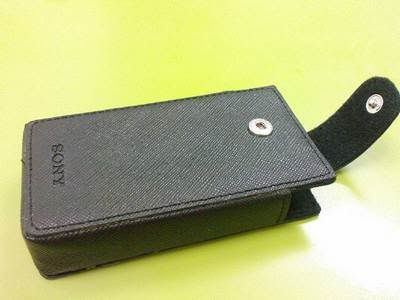
I just brought the follow pouch at lowyat yesterday RM50, but workmanship not that good. Overall not bad

user posted image


This post has been edited by karlcheong: Dec 30 2007, 12:47 AM
karlcheong
post Dec 31 2007, 01:09 AM

Getting Started
**
Junior Member
130 posts

Joined: Aug 2006
QUOTE(numerical @ Dec 31 2007, 12:17 AM)
Mine has English (UK) and Simplified Chinese language. I already have the chinese version even the ringtones n pics default are writen in chinese. The main thing is i wan to remove the chinese language option from my hp (the chinese virtual keybod n changing to chinese language in handwritin recognition). Can i do it? i thought if i add american english language and other language i can remove them.
*
Do you mean that you want to set you p1 display language to English ? If yes then do this

Main Menu > Control Panel > Other > Select language > English (UK)

To set the virtual keyboard to English just tap the word 中 and it will switch to 英 from the hanging menu appeal while typing.

This post has been edited by karlcheong: Dec 31 2007, 10:11 AM
karlcheong
post Dec 31 2007, 04:43 PM

Getting Started
**
Junior Member
130 posts

Joined: Aug 2006
QUOTE(numerical @ Dec 31 2007, 02:33 PM)
Thanx to all of u willing to help me out wit ur ideas. my cda version is 162024/74 and it is hongkong. Thats y my phne is chinese language based isn it? Now, at 1st time i bought i already upgrade the firmware wit SEUS. They said mine is already updated n i just reinstal it again.

How can i change the CDA to other genric language?
Another question is, for those who doesnt have the chinese language in P1i they just have english virtual keyboard n cannot change to chinese in handwriting recognition? if that is the case,i just want to make my P1i like that.
*
Yes for those doesn't have chinese support, there is no virtual keyboard and handwritted recognition and not even chinese font.

Im believe hongkong CDA have both english and chinese support just like Singapore APAC CDA. You just need to switch over to English without changing the CDA.
karlcheong
post Jan 2 2008, 11:56 AM

Getting Started
**
Junior Member
130 posts

Joined: Aug 2006
QUOTE(joshua_chin @ Jan 1 2008, 11:42 PM)
btw.....any IM that is free?
*
There is a lot of free IM :

Fring, ebuddy, and the latest one eqo and a lot more


karlcheong
post Jan 5 2008, 02:45 PM

Getting Started
**
Junior Member
130 posts

Joined: Aug 2006
QUOTE(j0ann3 @ Jan 5 2008, 02:05 PM)
>.<
well.. maybe my fren doesnt really know wat 'cradle' means.. cuz he's not really good in english.. it seems his supplier confirmed that everything is same as the original set things.. so it should be there =)

i shall see how it goes.. gonna get it tonite~ wHeeeeee...
*
One more thing to check is that whether the AP set come with P1-choice voucher..
karlcheong
post Jan 6 2008, 10:13 PM

Getting Started
**
Junior Member
130 posts

Joined: Aug 2006
QUOTE(j0ann3 @ Jan 6 2008, 08:31 PM)
only 2 hours and i already got prob >.<
i tried to copy the simcard numbers to my fon book.. but there is only 15numbers available in my fon book~!!!! there should be at least 150 contacts... anyone can tell me how to get it ??
secondly... i think the AP set is from hK.. (cuz the guide books has chinese and english... plus the service centre location is hK).. so.. everytime i go to the fon book or somethng.. there seems to be this arrow on the right side near the scroll.. nothing happens if i tap on the arrow.. but on top.. there is this 3 small boxes... one with chinese char.. one for symbol.. and one more is to close the box... even if i tap on the 'X' to close it.. that arrow thingy is stil thr.. issit normal???
*
1) Try this : Contact>more>view folder>All phone contacts
2) The black triangle u mean, located in the middle of phone book listing, it will be there, nothing u can do about that, its normal
3) The three boxes the one with chinese char is to switch between English input (英) and chinese input (中)


4 Pages « < 2 3 4Top
Topic ClosedOptions
 

Change to:
| Lo-Fi Version
0.0371sec    0.68    7 queries    GZIP Disabled
Time is now: 8th December 2025 - 08:40 AM