Welcome Guest ( Log In | Register )

8 Pages « < 2 3 4 5 6 > » Bottom

Outline · [ Standard ] · Linear+

 [OFFICIAL]Rig Suggestion Q&A Thread V13!

views
     
AthrunIJ
post Jul 22 2023, 06:47 PM

Look at all my stars!!
*******
Senior Member
2,992 posts

Joined: Feb 2015

QUOTE(phoenixxx @ Jul 22 2023, 06:27 PM)
In BIOS showing 6600 with XMP, but in L-Connect showing 4800, a bit blur.
Didn't really have much time recently to play long sessions, but whatever I throw at it max graphics, RT etc all run smooth. Albeit still using old monitor (60Hz) while finding a better one to upgrade to.

user posted image
*
Download hwinfo to check

More than likely that is just showing the jedec timing spec.

This post has been edited by AthrunIJ: Jul 22 2023, 06:48 PM
AthrunIJ
post Jul 22 2023, 07:52 PM

Look at all my stars!!
*******
Senior Member
2,992 posts

Joined: Feb 2015

QUOTE(PJng @ Jul 22 2023, 07:40 PM)
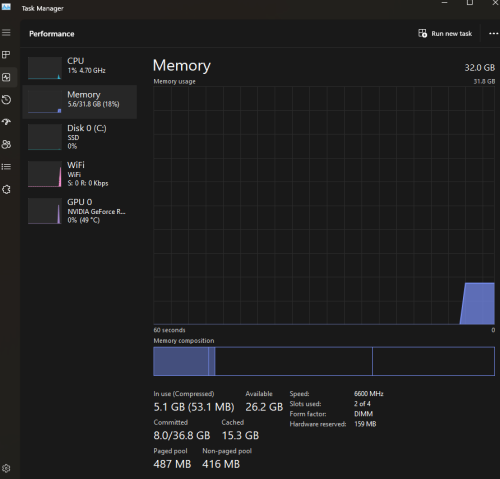
Look like he AMD grahpic reseverd  900MB, he want all 32GB  usable, not 31.1GB
Mine is about 260MB hardware reserved, also no  idea how to make it usable, 
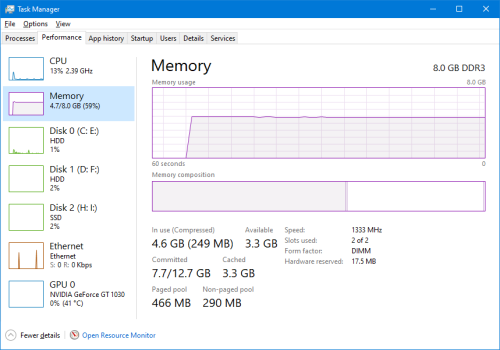
My old pc after add graphic card, near all RAM usable, as only 17.5MB hardware reserved
user posted image
*
I see.

First time heard of this question.

Don't think is possible no? There will be some reserved.
AthrunIJ
post Jul 22 2023, 07:53 PM

Look at all my stars!!
*******
Senior Member
2,992 posts

Joined: Feb 2015

QUOTE(XeactorZ @ Jul 22 2023, 07:24 PM)
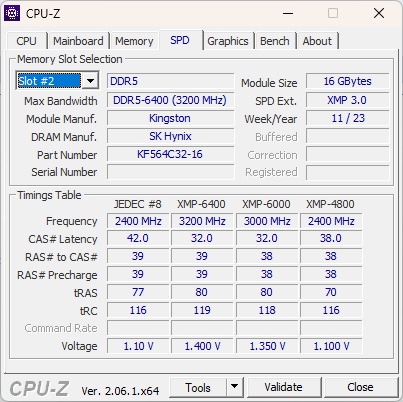
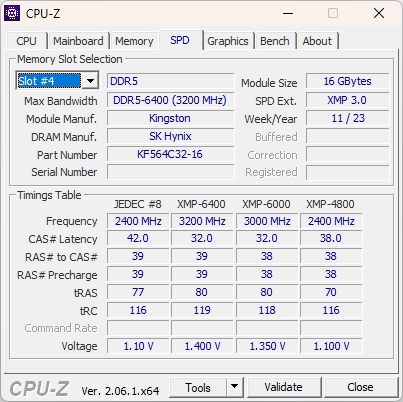
gotten my rig few days ago, thanks all the sifu for the recommendation

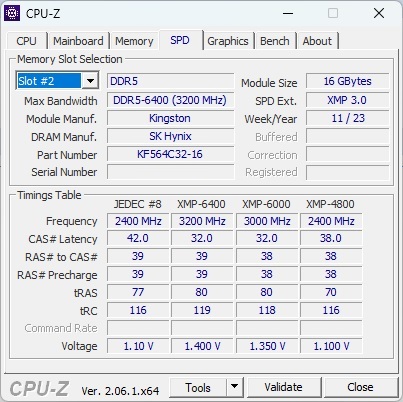
however, seller told me my RAM is cl32, but how do I know whether it is cl32?

below are the photos took from cpu-z

user posted image

is it based from part number KF564C32-16?
*
When you turn on xmp for that 6400 or 6000 then it will be cl32 if not mistaken from the screenshot.

This post has been edited by AthrunIJ: Jul 22 2023, 07:53 PM
AthrunIJ
post Jul 22 2023, 08:07 PM

Look at all my stars!!
*******
Senior Member
2,992 posts

Joined: Feb 2015

QUOTE(PJng @ Jul 22 2023, 08:00 PM)
I think is depend on hardware, no much can done unless bios can set IGPU memory, before i install GPU is 7.8GB, 200MB+ hardware reserved
I also want to make my new pc use near all RAM, already got GPU still reserved about 260MB, bios only saw this option, disable intergrade GPU will save 1MB of memory, what i want to use with 1MB
*
Any reason to use all ram?

Am I missing something? Haha

Reserved is set by the os if not mistaken.

This post has been edited by AthrunIJ: Jul 22 2023, 08:10 PM
AthrunIJ
post Jul 22 2023, 08:12 PM

Look at all my stars!!
*******
Senior Member
2,992 posts

Joined: Feb 2015

QUOTE(PJng @ Jul 22 2023, 08:10 PM)
As me is my old pc usable RAM near all, why not new pc also
Or can say OCD, what i pay, must use all of it

i5 2300 with GT1030
i5 12400F with GTX1650
*
I see...

Then HDD and SSD will be giving you a hard time then haha

This post has been edited by AthrunIJ: Jul 22 2023, 08:18 PM
AthrunIJ
post Jul 22 2023, 11:03 PM

Look at all my stars!!
*******
Senior Member
2,992 posts

Joined: Feb 2015

QUOTE(phoenixxx @ Jul 22 2023, 10:35 PM)
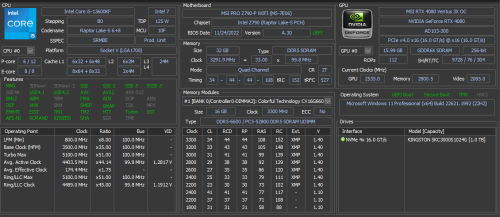
6600 showing in task manager
3300 showing in HWinfo (maybe coz running in Gear2?)

biggrin.gif  thanks for the tip

user posted image

user posted image
*
3300 is correct in hwinfo

Because of ddr or double rate you multiply the 3300 by 2 then get your ram speed

This post has been edited by AthrunIJ: Jul 22 2023, 11:27 PM
AthrunIJ
post Jul 22 2023, 11:32 PM

Look at all my stars!!
*******
Senior Member
2,992 posts

Joined: Feb 2015

QUOTE(XeactorZ @ Jul 22 2023, 11:30 PM)
Then should I update bios?

Saw my bios date is 30/3, got latest version around mid July laugh.gif

Saw few articles mentioned if no issue better don't update it hmm.gif
*
AMD ryzen 7800x3d?

If so wait until agessa1.0.0.9 ba I also waiting for it

So far stable on v162 for me.
AthrunIJ
post Jul 22 2023, 11:38 PM

Look at all my stars!!
*******
Senior Member
2,992 posts

Joined: Feb 2015

QUOTE(XeactorZ @ Jul 22 2023, 11:37 PM)
I using 13700, not amd biggrin.gif
*
If no issue then can upgrade geh. Can check forums regarding stability.

AMD need abit of checking haha

This post has been edited by AthrunIJ: Jul 22 2023, 11:39 PM
AthrunIJ
post Jul 22 2023, 11:46 PM

Look at all my stars!!
*******
Senior Member
2,992 posts

Joined: Feb 2015

QUOTE(XeactorZ @ Jul 22 2023, 11:45 PM)
After update bios need to set XMP in BIOS again?

As I bought my rig I let the shop help me set it

Hence I had no idea how to set it rclxub.gif
*
Simple bios button press

Then save and exit
AthrunIJ
post Jul 22 2023, 11:56 PM

Look at all my stars!!
*******
Senior Member
2,992 posts

Joined: Feb 2015

QUOTE(XeactorZ @ Jul 22 2023, 11:55 PM)
How? Don't understand

I though need to download bios from motherboard website, put in flash drive

Then boot into bios to update the bios

So how to set XMP rclxub.gif
*
For the bios update, just follow the steps by the manufacturer.

As for XMP, need to follow the mobo steps also.

Diff mobo diff step. It should be in yourube or their website.

Just make sure to follow the steps to the t. Any wrong move might brick your mobo

This post has been edited by AthrunIJ: Jul 22 2023, 11:59 PM
AthrunIJ
post Jul 23 2023, 12:29 AM

Look at all my stars!!
*******
Senior Member
2,992 posts

Joined: Feb 2015

QUOTE(XeactorZ @ Jul 23 2023, 12:25 AM)
Had saw few youtube video regarding how to update bios and set xmp on msi motherboard

Seems like XMP profile had save on my RAM, just need to switch to the profile hmm.gif

However I cannot download latest bios from MSI website, try different browser and my laptop also cannot download it sweat.gif
*
That is odd.

Should be simple as download and update.
AthrunIJ
post Jul 23 2023, 10:14 AM

Look at all my stars!!
*******
Senior Member
2,992 posts

Joined: Feb 2015

QUOTE(seanwms @ Jul 23 2023, 01:22 AM)
32gb ram has been installed but in task manager only showing 31.1 instead of 32gb? any fix?

user posted image
*
No lol.

Os will reserved some for other usage.
AthrunIJ
post Jul 24 2023, 07:57 AM

Look at all my stars!!
*******
Senior Member
2,992 posts

Joined: Feb 2015

QUOTE(seanwms @ Jul 24 2023, 03:02 AM)
ya but I didn't expect to reserve so much ram.. i thought at least  31.7 instead of 31.1..sorry noob here
*
Expected. As capacity increase and more ram needed for hardwares then it will take more.

Just like SSD and HDD. It will use a fraction of it for something else. Because it can

This post has been edited by AthrunIJ: Jul 24 2023, 07:57 AM
AthrunIJ
post Jul 24 2023, 08:02 AM

Look at all my stars!!
*******
Senior Member
2,992 posts

Joined: Feb 2015

QUOTE(XeactorZ @ Jul 23 2023, 03:51 PM)
URL got typo, TrixtanX provided the link for me to download

Done update as well biggrin.gif
Done update already laugh.gif

No idea why CPU-Z show RAM slot#2 and #4 which I had put my RAM on 1st and 3rd slot hmm.gif

user posted image

user posted image
Nice, didn't realize the URL got typo

Done update the bios, as expected after update bios, xmp is off, show 4800mhz
Then boot into bios select profile 1 then back to 6400mhz
*
Most likely is the orientation of the mobo.

Can check the mobo booklet for more info. What you see as 1 or 2 might be 3 and 4.

Nothing wrong. As long as the slot is channel a and channel b for dual channel then all good.

This post has been edited by AthrunIJ: Jul 24 2023, 08:05 AM
AthrunIJ
post Jul 25 2023, 11:07 PM

Look at all my stars!!
*******
Senior Member
2,992 posts

Joined: Feb 2015

QUOTE(darksider @ Jul 25 2023, 09:16 PM)
Hi sifu i plan to upgrade my gpu from gtx1080ti
To either
Rtx 4090 or rtx 4090ti
Do you think I should wait 4090 ti?

I will pair it with the new Samsung g9 neo 240hz

Psu how much needed, my current one corsair 750w
*
Well 1k watt and above depending on the sku

Enjoy
AthrunIJ
post Aug 10 2023, 07:57 AM

Look at all my stars!!
*******
Senior Member
2,992 posts

Joined: Feb 2015

QUOTE(ballistix89 @ Aug 9 2023, 09:48 PM)
current PC specs

Core i5-9400F
Gigabyte H310M
Kingston HyperX 16GB DDR4
Sapphire RX 580
500W PSU

hi guys looking to upgrade my GPU. eyeing on 6600 xt currently, is it a good buy?

mainly gaming on 1080p
*
Latest game?

Look for 12gb vram and above gpu.


AthrunIJ
post Aug 10 2023, 07:06 PM

Look at all my stars!!
*******
Senior Member
2,992 posts

Joined: Feb 2015

QUOTE(tky0414 @ Aug 10 2023, 01:36 PM)
Guys can help to screen through before i order ?

CPU AMD RYZEN 7 7800X3D 4.2GHZ 96MB CHACHE PROCESSOR AM5 rm2180

GPU GIGABYTE WINDFORCE GEFORCE RTX4070 OC 12GB GDDR6X (GV-N4070WF3OC-12GD) 3YR rm2880

CORSAIR CP-9020262-UK RM750E 750W 80PLUS GOLD FULL MODULAR POWER SUPPLY ATX3.0 rm510

DEEPCOOL AK620 DIGITAL BLACK AIR COOLER CPU rm285

GIGABYTE B650M AORUS ELITE AX WIFI DDR5 AM5 GAMING MAINBOARD rm820

SSD INT KINGSTON KC3000 1TB PCIE 4.0 NVME M.2 (SKC3000S/1024G) 5Y rm320

FRACTAL DESIGN NORTH BLACK PC CASE rm620

G SKILL TRIDENT Z5 NEO RGB 6000mhz CL30 (2X16Gb) rm600

Total RM8215

It this setup okay?

I might change the air cooler to thermalright phantom spirit 120 to save about 100bucks.. still thinking bcz ak620 digital seems a bit more aesthetically pleasing.
*
I would swap the gpu to non oc for some savings.

Note that Gigabyte GPU has PCB issues. Can Google and YouTube for the issue.

Other than that seems fine.

Ak620 digital just add a simple LCD to display stuff. Non digital don't have that

I am using ak620 so far so good and yes more aesthetically pleasing that's why I got it.

After got your rig. Limit the Vsoc to 1.22 ish just in case for AMD x3D CPU.

As for RAM check is it EXPO ready or intel equivalent

This post has been edited by AthrunIJ: Aug 10 2023, 07:08 PM
AthrunIJ
post Aug 10 2023, 08:30 PM

Look at all my stars!!
*******
Senior Member
2,992 posts

Joined: Feb 2015

QUOTE(tky0414 @ Aug 10 2023, 08:08 PM)
any good alternative rtx 4070 under 3k? do u think i should just ditch gigabyte to other brand instead?

ya ak620 look nicer, not sure it justifies the extra 100 bucks over thermalright PA 120 or PS 120. I am in dilemma.

i will likely buy most of the part from a shop, add in some part that i bought online, ask the shop person to assemble for me. TBH i get confused with all the BIOS stuff, i am afraid that i will explode the cpu in the process, better let the pro do the job.

yeah the g skill ram i bought is specially for amd expo.
*
Check MSI or Zotac variant. Don't need the OC. Standard should be within your budget.

As for bios and stuffs. Can ask the assembler for help.

RAM ada expo then all good. Have fun bruh

I got almost the same spec as you just rtx4080 zotac.

So far so good.

Well, for me I don't mind spending abit more got abit atheistic pleasing cpu cooler and the ak620 is a beast air cooler. I am using the non digital version.

In the end is your budget and your choice.

For me I would change the mobo to MSI tomahawk wifi. Well that is just me. Using it so far so good.

This post has been edited by AthrunIJ: Aug 10 2023, 08:34 PM
AthrunIJ
post Aug 10 2023, 09:21 PM

Look at all my stars!!
*******
Senior Member
2,992 posts

Joined: Feb 2015

QUOTE(tky0414 @ Aug 10 2023, 09:03 PM)
i have some concerned about gigabyte mobo, the cpu melting issue and also the coil whine issue. however, the board gives the most features and cheapest as well.
someone told me just get the cheapest mobo that can support the cpu will do, dont waste money. haiya the more i read the more i confused.

whats the difference between msi mortar b650m wifi vs msi tomahawk b650 wifi? i am asking this because msi mortar is cheaper.
also some people said msi mobo boot slower compared to gigabyte mobo, does it matter?? how bad is it?
*
Not too bad for me. Quite fast boot up for MSI tomahawk wifi. As for difference, I did a quick glance. Tomahawk has extra usb3 port and m2 socket for ssd storage, 6 layer pcb, additional fan header and beefier vrm.

Coil whine is subjective as it is audio related. That is up to you to decide.

As for CPU X3D melting. Not to worry as long as you flash latest bios before stressing the cpu it will all be good. If want more safety. Then set the CPU vSoC to 1.22 ish v aftrr flashing latest bios then all good. Monitor the cpu vsoc for a week or so and if stay within that then all good.

Take your time lol. Can always read online reviews and ask sifu here. Haah

I did that and satisfied with it.

Have fun bruh

This post has been edited by AthrunIJ: Aug 10 2023, 09:35 PM
AthrunIJ
post Aug 10 2023, 09:22 PM

Look at all my stars!!
*******
Senior Member
2,992 posts

Joined: Feb 2015

QUOTE(myway1985 @ Aug 10 2023, 08:48 PM)
hehe.. this ok boh

Ryzen 7 7800X3D RM2,180.00
MSI B650 TOMAHAWK WIFI RM1,029.00
32gb 6000mhz kingston fury black RM600.00
1TB kc3000 RM329.00
colorful rtx 4070NB RM2,799.00
thermalright frost commander black RM279.00
Lancool III Black RM599.00
Corsair RM850e RM599.00
RM8,414.00
*
I would swap that colourful brand to msi or zotac tongue.gif and RAM to fury beast for EXPO eventhough cl36 😭, psu to corsair shift and casing corsair 4000d or 5000d tongue.gif

Other than that solid built

This post has been edited by AthrunIJ: Aug 10 2023, 09:23 PM

8 Pages « < 2 3 4 5 6 > » Top
 

Change to:
| Lo-Fi Version
0.0471sec    1.18    7 queries    GZIP Disabled
Time is now: 14th December 2025 - 04:52 AM